The 3 Claude Files to Replace 500+ Prompts
About This Cheat Sheet
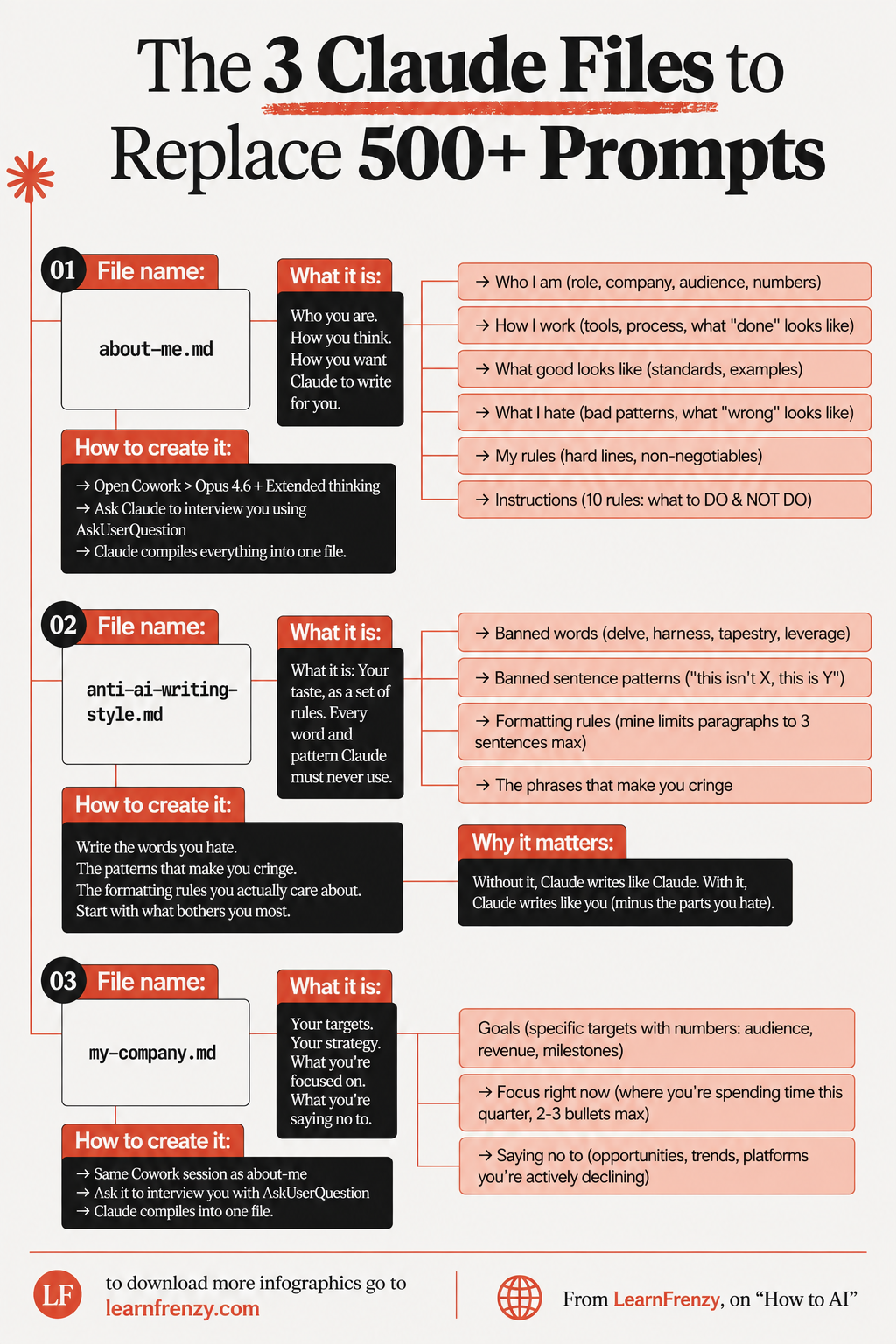
Hey! I'm Saurabh Samir, and this is my cheat sheet for the 3 Claude files that replace 500+ prompts. If you're tired of re-explaining yourself, repeating preferences, and wasting tokens on context every single chat, you're in the right place. I've been using these 3 files for months, and they've completely transformed my workflow. File 1: about-me.md (Who you are, how you think, how you want Claude to write). File 2: anti-ai-writing-style.md (Your taste as a set of rules — words and patterns Claude must never use). File 3: my-company.md (Your targets, strategy, focus, and what you're saying no to). I've also included step-by-step instructions on how to create them using Cowork > Opus 4.6 + Extended thinking + AskUserQuestion, sample templates, and why these 3 files replace 500+ prompts in your AI workflow. Whether you're a freelancer, consultant, or team lead, these files will save you hours every week.
📄 File 1: about-me.md
- Who you are - Role, company, audience, numbers
- How you work - Tools, process, what "done" looks like
- How you want Claude to write - Voice and style
- What good looks like - Standards, examples
- What you hate - Bad patterns, what "wrong" looks like
- Your rules - Hard lines, non-negotiable
- 10 instructions - What to DO & NOT DO
- Why: Claude knows who you are instantly
🚫 File 2: anti-ai-writing-style.md
- Your taste - As a set of rules
- Words you hate - Every word Claude must never use
- Patterns that make you cringe - Phrases you dislike
- Formatting rules - Your style preferences
- Priority items - What bothers you most
- Why it matters: Without it, Claude writes like Claude 🤖
- With it: Claude writes like you, minus the parts you hate ✍️
- Result: Text that doesn't sound AI-generated
🏢 File 3: my-company.md
- Your goals - Specific targets with numbers
- Your strategy - How you're achieving them
- What you're focused on - Where you're spending time this quarter
- What you're saying no to - Opportunities you're declining
- Audience targets - Who you're serving
- Revenue goals - Financial targets
- Milestones - Key achievements
- Why: Claude understands your business context
🔧 How to Create
- Step 1: Open Cowork
- Step 2: Select Opus 4.6 + Extended thinking
- Step 3: Start interview with AskUserQuestion
- Step 4: Answer questions honestly
- Step 5: Let Claude compile
- Step 6: Create about-me.md
- Step 7: Create anti-ai-writing-style.md
- Step 8: Create my-company.md
💡 Why It Works
- One-time setup - Create once, use forever
- Consistent voice - Claude always writes like you
- No repetition - Never re-explain yourself
- Better outputs - Claude has full context
- Save tokens - No wasted prompts
- Team alignment - Shared files = shared context
- Fast iteration - Update files, not every prompt
- 500+ prompts replaced - Massive time saver
📋 Before vs After
- Before: 500+ prompts
- After: 3 files
- Before: Explain who you are every time
- After: about-me.md handles it
- Before: List preferences each chat
- After: Files store preferences
- Before: Inconsistent responses
- After: Consistent Claude responses
📄 3 Files
Replace 500+ Prompts
about-me, anti-ai, my-company🚫 Anti-AI
Kill the AI Voice
Write like you🔧 Cowork
Opus 4.6 + Extended
AskUserQuestion💡 One-Time
Setup Once, Use Forever
500+ prompts saved📄 The 3 Files Overview
| File | Purpose | What It Contains |
|---|---|---|
| about-me.md | Your identity and voice | Who you are, how you work, your rules, what good/bad looks like |
| anti-ai-writing-style.md | Your taste as rules | Words you hate, patterns that make you cringe, formatting rules |
| my-company.md | Your business context | Targets, strategy, focus, what you're saying no to |
📄 File 1: about-me.md — Complete Breakdown
| Section | What to Include | Example |
|---|---|---|
| Who I am | Role, company, audience, numbers | "I'm a Product Manager at TechCorp, serving 50K+ enterprise users" |
| How I work | Tools, process, what "done" looks like | "I use Notion, Slack, Figma. Done means shipped to production" |
| What good looks like | Standards, examples | "Clean, minimal design. Examples: Apple, Stripe" |
| What I hate | Bad patterns, what "wrong" looks like | "Jargon, buzzwords, overly complex sentences" |
| My rules | Hard lines, non-negotiable | "No AI-generated images. No generic advice" |
| Instructions | 10 rules: what to DO & NOT DO | "DO be concise. DON'T use emojis in professional content" |
🚫 File 2: anti-ai-writing-style.md — Complete Breakdown
| Section | What to Include | Why It Matters |
|---|---|---|
| Words you hate | Every word that bothers you | Claude will never use them |
| Patterns that make you cringe | Phrases, structures you dislike | Removes AI tells |
| Formatting rules you care about | Your style preferences | Keeps writing consistent |
| Start with what bothers you most | Priority items first | Quickest impact |
🚫 Why the Anti-AI File Matters
Claude writes like Claude 🤖
With anti-ai-writing-style.md:
Claude writes like you (minus the parts you hate) ✍️
🏢 File 3: my-company.md — Complete Breakdown
| Section | What to Include | Details |
|---|---|---|
| Goals | Specific targets with numbers | Audience targets, revenue goals, milestones |
| Focus right now | Where you're spending time this quarter | 2-3 bullets MAX |
| Saying no to | Opportunities you're actively declining | Trends, platforms, distractions |
🔧 How to Create All 3 Files — Step by Step
| Step | Action | Details |
|---|---|---|
| 1 | Open Cowork | Launch Claude Cowork session |
| 2 | Select model | Choose Opus 4.6 + Extended thinking |
| 3 | Start interview | Ask Claude to interview you using AskUserQuestion |
| 4 | Answer questions | Provide honest, detailed answers |
| 5 | Let Claude compile | Claude organizes everything into one file |
| 6 | Create about-me.md | Extract your personal information |
| 7 | Create anti-ai-writing-style.md | Extract your taste rules |
| 8 | Create my-company.md | Extract your business context |
📄 Sample about-me.md Template
🚫 Sample anti-ai-writing-style.md Template
🏢 Sample my-company.md Template
📊 Comparison: Before vs After Files
| Before (500+ Prompts) | After (3 Files) |
|---|---|
| Explain who you are every time | about-me.md handles it |
| List your preferences each chat | about-me.md stores preferences |
| Tell Claude what to avoid | anti-ai-writing-style.md lists bans |
| Explain your company context | my-company.md provides context |
| Re-state your goals repeatedly | my-company.md has goals |
| Write lengthy instructions | Files contain all instructions |
| Inconsistent responses | Consistent Claude responses |
| Wasted tokens on context | Files provide context once |
💡 Why It Works — The Logic
| Benefit | How It Works |
|---|---|
| One-time setup | Create files once, use forever |
| Consistent voice | Claude always writes like you |
| No repetition | Never re-explain yourself |
| Better outputs | Claude has full context |
| Save tokens | No wasted prompts |
| Team alignment | Shared files = shared context |
| Fast iteration | Update files, not every prompt |
🚫 Common Mistakes to Avoid
| Mistake | Problem | Solution |
|---|---|---|
| Too vague | Files lack specifics | Include numbers, examples |
| Too long | Files overwhelming | Keep concise, focused |
| Not updating | Outdated context | Review quarterly |
| Missing sections | Incomplete files | Follow the template |
| Not using AskUserQuestion | Poor interview | Let Claude interview you |
| Skipping anti-AI file | AI voice remains | Always create it |
✅ Quick Setup Checklist
| Step | Task | Status |
|---|---|---|
| 1 | Open Cowork with Opus 4.6 + Extended thinking | ⬜ |
| 2 | Ask Claude to interview you with AskUserQuestion | ⬜ |
| 3 | Answer all questions honestly | ⬜ |
| 4 | Let Claude compile the file | ⬜ |
| 5 | Create about-me.md | ⬜ |
| 6 | Extract anti-ai-writing-style.md | ⬜ |
| 7 | Extract my-company.md | ⬜ |
| 8 | Review and refine all 3 files | ⬜ |
| 9 | Upload files to Claude | ⬜ |
| 10 | Start using — 500+ prompts replaced! | ⬜ |
📍 Where to Use These Files
| Platform/Feature | How to Use |
|---|---|
| Cowork | Files are read before every session |
| Projects | Upload files to Project context |
| Custom Instructions | Copy key sections |
| Skills | Reference files in skills |
| Every Chat | Files provide persistent context |
🎯 The 3 Claude Files — Quick Revision
The Golden Rule: Set up these 3 files once, and you'll never write 500+ prompts again. Your identity, your taste, and your business context — all stored in files that Claude reads every session.
Quick Memory Tricks:
- 📌 File 1: about-me.md = "Who you are, how you work, what good/bad looks like"
- 📌 File 2: anti-ai-writing-style.md = "Words you hate, patterns you cringe at"
- 📌 File 3: my-company.md = "Goals, focus, what you're saying no to"
- 📌 Creation: Cowork → Opus 4.6 + Extended → AskUserQuestion → Compile
- 📌 Result: 500+ prompts → 3 files, massive time savings
Daily Checklist:
- ✅ Open Cowork with Opus 4.6 + Extended thinking
- ✅ Files are read automatically before every session
- ✅ Claude knows who you are, your voice, your business
- ✅ No more re-explaining yourself
- ✅ Consistent, high-quality outputs every time
💡 Pro Tips for the 3 Claude Files
✅ Use AskUserQuestion
Don't write these files from scratch. Let Claude interview you with AskUserQuestion — it's faster and more thorough.
✅ Include Examples
Your files need concrete examples. "Good looks like Apple's website" is better than "good looks clean and minimal."
✅ Review Quarterly
Your voice and context evolve. Review and update these files every quarter to keep them fresh and relevant.
✅ Share with Your Team
These files aren't just for individuals. Share them with your team for consistent AI outputs across the whole organization.
✅ Don't Skip Anti-AI File
Without anti-ai-writing-style.md, Claude will still write like Claude. This file is essential for killing the AI voice.
✅ Keep It Concise
Your files should be dense with signal, not bloated with fluff. Every word should serve a purpose.
from Saurabh Samir, on "How to AI"
Download Cheat Sheet
Click the button below to download this high-resolution PNG cheat sheet.
Download PNG (1.0 MB)Preview
Still have questions?
We're here to help! Reach out to our support team for any queries.