Claude Prompt Shortcuts
About This Cheat Sheet
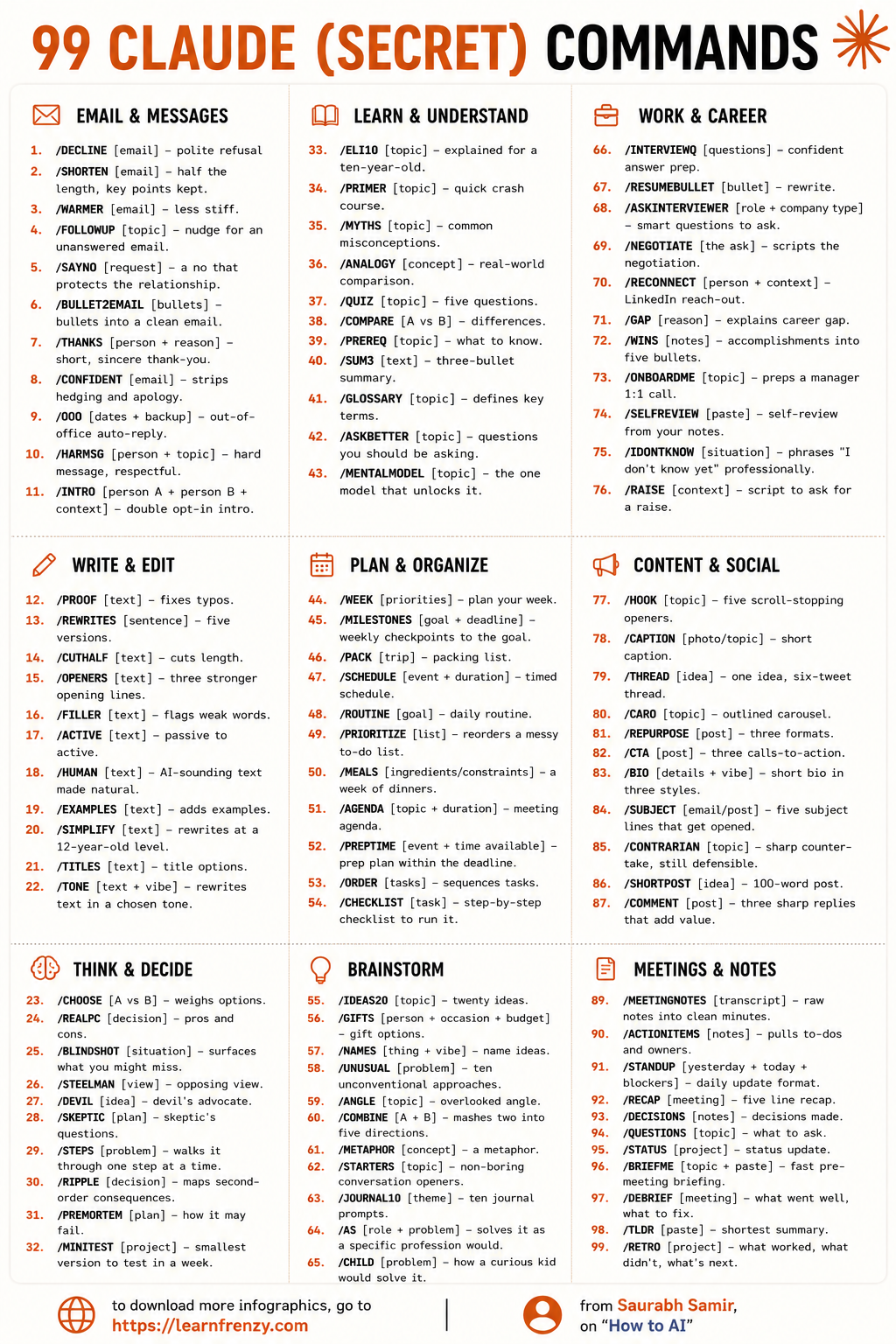
Hi! I'm Saurabh Samir, and this cheat sheet is all about Claude prompt shortcuts that will save you time and get you better results. I've been using Claude for months and have discovered that the right shortcut can turn a mediocre response into something truly useful. This guide covers my favorite prompt shortcuts for coding (write, debug, refactor, explain, optimize), writing (draft, rewrite, summarize, expand, edit), analysis (analyze, compare, evaluate, synthesize), brainstorming (ideate, mind map, plan, outline), research (research, find, extract, compile), creative work (create, design, illustrate, compose), quick actions (fix, simplify, translate, improve), and productivity hacks that I use every day. I've also included example prompts for each shortcut and real-world scenarios where they work best. Whether you're a beginner or a power user, these Claude prompt shortcuts will help you work faster and smarter.
📝 Writing Shortcuts
- /write - Write from scratch
- /draft - Create first draft
- /rewrite - Rewrite or rephrase
- /edit - Edit and improve
- /summarize - Summarize long text
- /expand - Expand on a topic
💻 Coding Shortcuts
- /explain - Explain code/concept
- /debug - Find and fix bugs
- /refactor - Improve code structure
- /optimize - Optimize code
- /review - Review code
- /tutorial - Create tutorial
📊 Analysis Shortcuts
- /analyze - Analyze data/text
- /compare - Compare options
- /evaluate - Evaluate pros/cons
- /synthesize - Synthesize information
- /extract - Extract key info
- /compile - Compile information
💡 Brainstorming Shortcuts
- /brainstorm - Generate ideas
- /ideate - Creative ideation
- /plan - Create a plan
- /outline - Create an outline
- /mindmap - Create a mind map
- /suggest - Suggest improvements
🔍 Research Shortcuts
- /research - Research a topic
- /find - Find specific info
- /example - Provide examples
- /answer - Answer questions
- /check - Check for errors
- /format - Format text/code
🎨 Creative Shortcuts
- /create - Create something new
- /design - Design a system
- /compose - Compose music/text
- /translate - Translate text
- /simplify - Simplify complex text
- /improve - Improve text
/write
Write from scratch
Blog posts, emails/debug
Find & fix bugs
Code errors/brainstorm
Generate ideas
Creative thinking/summarize
Summarize text
Long documents📝 Writing Shortcuts
/write
- What It Does: Write something from scratch
- Example: "/write a blog post about AI"
- Best For: Creating new content from zero
- 💡 My Tip: Add details for better results: "/write a 500-word blog post about AI for beginners"
/draft
- What It Does: Create a first draft
- Example: "/draft an email to my boss"
- Best For: Getting started on writing tasks
- 💡 My Tip: Use /draft when you're stuck with writer's block
/rewrite
- What It Does: Rewrite or rephrase text
- Example: "/rewrite this paragraph to be more concise"
- Best For: Improving existing text
- 💡 My Tip: Specify the tone: "/rewrite this in a professional tone"
📝 More Writing Shortcuts
/edit
- What It Does: Edit and improve text
- Example: "/edit this document for clarity and flow"
- Best For: Polishing final drafts
- 💡 My Tip: Be specific about what to improve
/summarize
- What It Does: Summarize long text
- Example: "/summarize this article in 3 bullet points"
- Best For: Quick understanding of long documents
- 💡 My Tip: Specify the length: "/summarize in 100 words"
/expand
- What It Does: Expand on a topic
- Example: "/expand this point with more details"
- Best For: Adding depth to content
- 💡 My Tip: Add specific areas to expand
💻 Coding Shortcuts
📊 Analysis Shortcuts
💡 Brainstorming & Planning Shortcuts
/brainstorm
- What It Does: Generate ideas
- Example: "/brainstorm 10 marketing ideas for a coffee shop"
- Best For: Creative ideation sessions
- 💡 My Tip: Add context: "/brainstorm ideas for a productivity app for students"
/ideate
- What It Does: Creative ideation
- Example: "/ideate product features for a fitness tracking app"
- Best For: Product development and innovation
- 💡 My Tip: Ask for different angles: "/ideate from the user's perspective"
/plan
- What It Does: Create a plan
- Example: "/plan a 7-day trip to Japan"
- Best For: Project planning and organization
- 💡 My Tip: Specify constraints: "/plan a budget-friendly trip under $1000"
💡 More Brainstorming Shortcuts
/outline
- What It Does: Create an outline
- Example: "/outline a 10-page business plan"
- Best For: Structuring long-form content
- 💡 My Tip: Ask for specific sections: "/outline with introduction, body, and conclusion"
/mindmap
- What It Does: Create a mind map
- Example: "/mindmap the key concepts of machine learning"
- Best For: Visualizing connections and relationships
- 💡 My Tip: Use for complex topics to see the big picture
/suggest
- What It Does: Suggest improvements
- Example: "/suggest improvements to this design"
- Best For: Getting feedback and ideas
- 💡 My Tip: Be specific about what you need: "/suggest improvements for user experience"
🔍 Research Shortcuts
/research
- What It Does: Research a topic
- Example: "/research the benefits of meditation"
- Best For: Getting comprehensive information
- 💡 My Tip: Add depth: "/research with recent studies and statistics"
/find
- What It Does: Find specific information
- Example: "/find statistics about remote work in 2024"
- Best For: Quick fact-finding
- 💡 My Tip: Be specific about what you're looking for
/example
- What It Does: Provide examples
- Example: "/example of a cover letter for a marketing role"
- Best For: Learning through examples
- 💡 My Tip: Ask for multiple examples: "/example of 3 different approaches"
🎨 Creative Shortcuts
/create
- What It Does: Create something new
- Example: "/create a logo description for a coffee shop"
- Best For: Creative content generation
- 💡 My Tip: Provide style preferences: "/create a modern, minimalist logo"
/design
- What It Does: Design a system or process
- Example: "/design a workflow for content creation"
- Best For: Process and system design
- 💡 My Tip: Ask for step-by-step designs: "/design step-by-step workflow"
/compose
- What It Does: Compose music or text
- Example: "/compose a short poem about autumn"
- Best For: Creative writing and composition
- 💡 My Tip: Specify style or mood: "/compose a cheerful poem for children"
⚡ Quick Action Shortcuts
/fix
- What It Does: Quick fix for a problem
- Example: "/fix this error in my code"
- Best For: Quick problem-solving
- 💡 My Tip: Paste the error message for faster fixes
/format
- What It Does: Format text or code
- Example: "/format this JSON for better readability"
- Best For: Cleaning up messy text/code
- 💡 My Tip: Specify the format: "/format as a table" or "/format as bullet points"
/check
- What It Does: Check for errors
- Example: "/check this document for spelling mistakes"
- Best For: Proofreading and quality assurance
- 💡 My Tip: Ask for specific checks: "/check for grammar, spelling, and punctuation"
⚡ More Quick Action Shortcuts
/translate
- What It Does: Translate text
- Example: "/translate this article into French"
- Best For: Translation and localization
- 💡 My Tip: Specify tone: "/translate in a professional tone"
/simplify
- What It Does: Simplify complex text
- Example: "/simplify this legal document"
- Best For: Making complex content accessible
- 💡 My Tip: Specify audience: "/simplify for beginners"
/improve
- What It Does: Improve text
- Example: "/improve the sentence structure of this paragraph"
- Best For: Polishing and refining content
- 💡 My Tip: Be specific: "/improve the clarity and flow"
📋 Complete Claude Prompt Shortcuts Table
📝 Writing Shortcuts
- /write - Write something from scratch
- /draft - Create a first draft
- /rewrite - Rewrite or rephrase text
- /edit - Edit and improve text
- /summarize - Summarize long text
- /expand - Expand on a topic
💻 Coding Shortcuts
- /explain - Explain a concept or code
- /debug - Find and fix bugs
- /refactor - Improve code structure
- /optimize - Optimize code
- /review - Review and give feedback
- /tutorial - Create a tutorial
📊 Analysis Shortcuts
- /analyze - Analyze data or text
- /compare - Compare options
- /evaluate - Evaluate pros and cons
- /synthesize - Synthesize information
- /extract - Extract key information
- /compile - Compile information
💡 Brainstorming Shortcuts
- /brainstorm - Generate ideas
- /ideate - Creative ideation
- /plan - Create a plan
- /outline - Create an outline
- /mindmap - Create a mind map
- /suggest - Suggest improvements
🔍 Research Shortcuts
- /research - Research a topic
- /find - Find specific information
- /example - Provide examples
- /answer - Answer a question
- /check - Check for errors
- /format - Format text or code
🎨 Creative Shortcuts
- /create - Create something new
- /design - Design a system
- /compose - Compose music or text
- /translate - Translate text
- /simplify - Simplify complex text
- /improve - Improve text
🎯 Claude Prompt Shortcuts: Summary
The Golden Rule: Start your prompt with a shortcut to instantly tell Claude what you need. These shortcuts save time and get you better, more focused responses.
My Top 10 Most Used Shortcuts:
- 1. /write - Write content from scratch (blogs, emails, articles)
- 2. /debug - Fix code errors fast
- 3. /summarize - Get the key points from long text
- 4. /brainstorm - Generate creative ideas
- 5. /explain - Understand complex concepts
- 6. /edit - Polish and improve existing text
- 7. /analyze - Get insights from data or text
- 8. /plan - Create detailed plans
- 9. /translate - Translate text quickly
- 10. /simplify - Make complex text easy to understand
Quick Reference: Shortcuts by Category:
- 📝 Writing: /write, /draft, /rewrite, /edit, /summarize, /expand
- 💻 Coding: /explain, /debug, /refactor, /optimize, /review, /tutorial
- 📊 Analysis: /analyze, /compare, /evaluate, /synthesize, /extract, /compile
- 💡 Brainstorming: /brainstorm, /ideate, /plan, /outline, /mindmap, /suggest
- 🔍 Research: /research, /find, /example, /answer, /check, /format
- 🎨 Creative: /create, /design, /compose, /translate, /simplify, /improve
💡 My Pro Tips for Using Prompt Shortcuts
✅ Always Start with the Shortcut
Put the shortcut at the beginning of your prompt. This tells Claude exactly what type of response you need.
✅ Add Specific Details
"/write a blog post" is good, but "/write a 500-word blog post about AI for beginners with examples" is much better.
✅ Combine Shortcuts
You can combine shortcuts: "/write then /edit" or "/draft then /improve" for better results.
✅ Use /explain for Learning
When you're learning something new, use /explain to get clear, simple explanations.
✅ /summarize for Long Documents
Instead of reading long documents, use /summarize to get the key points quickly.
✅ Build Your Own Shortcuts
Create your own shortcut system. For example, "/myblog" for your specific blog writing style.
📊 Shortcuts at a Glance
📝 Writing
- /write, /draft
- /rewrite, /edit
- /summarize, /expand
💻 Coding
- /explain, /debug
- /refactor, /optimize
- /review, /tutorial
📊 Analysis
- /analyze, /compare
- /evaluate, /synthesize
- /extract, /compile
💡 Brainstorming
- /brainstorm, /ideate
- /plan, /outline
- /mindmap, /suggest
🔍 Research
- /research, /find
- /example, /answer
- /check, /format
🎨 Creative
- /create, /design
- /compose, /translate
- /simplify, /improve
Download Cheat Sheet
This cheat sheet has 4 pages. Choose download option:
Preview
Still have questions?
We're here to help! Reach out to our support team for any queries.