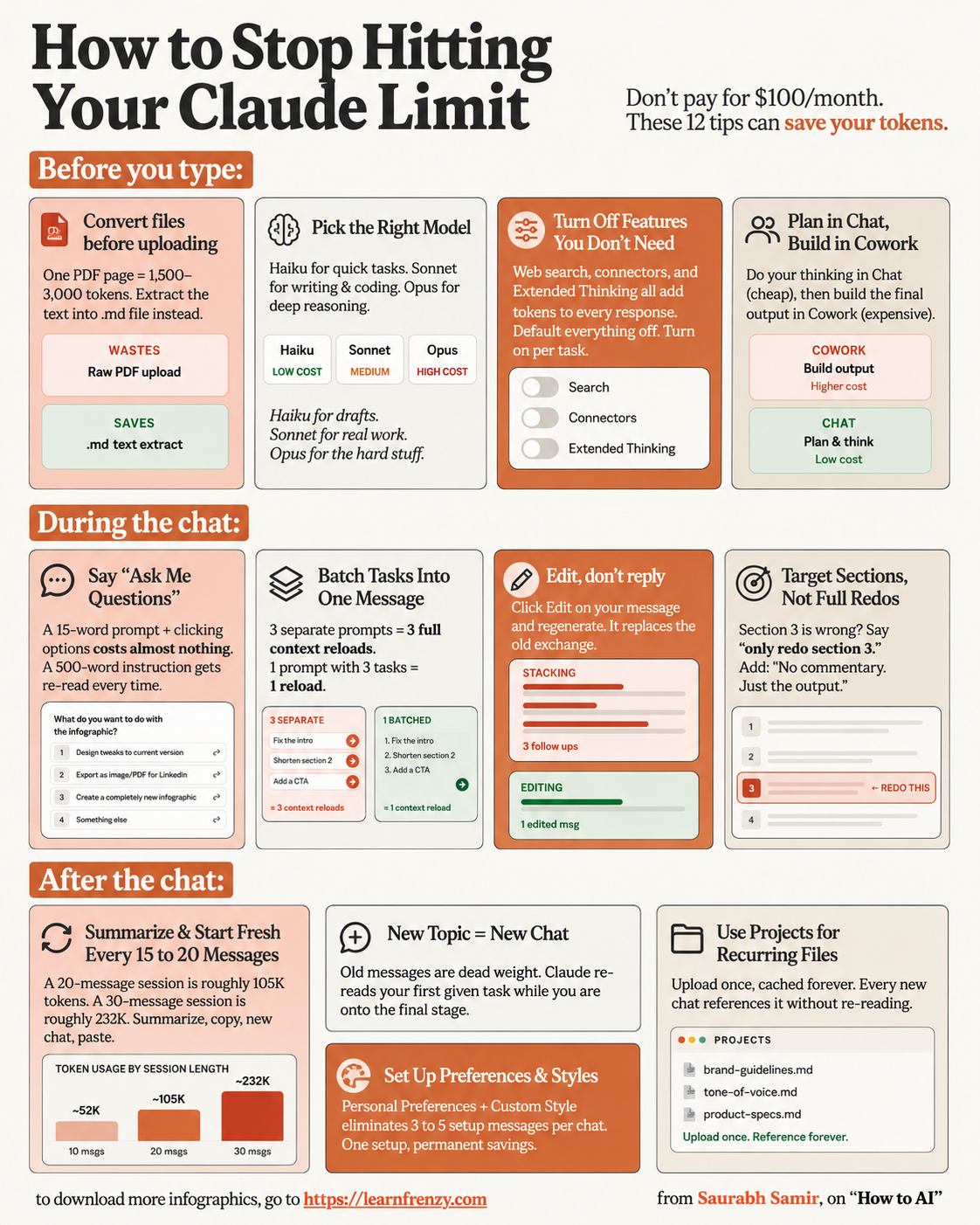
How to Stop Hitting Your Claude Limit
About This Cheat Sheet
Hi! I'm Saurabh Samir, and this cheat sheet is for everyone who keeps hitting Claude's limits. We've all been there — you're in the middle of a great conversation, and suddenly you get the "limit reached" message. So annoying! I've been using Claude extensively and have figured out practical ways to get more done without constantly hitting those limits. This guide covers understanding Claude's limits (free vs Pro), how to structure your conversations to use fewer tokens, techniques to stay within limits, alternative approaches when you're close to the limit, and how to get the most value from every conversation. I've also included my favorite productivity hacks, real-world examples, and tips to make the most of your Claude usage, whether you're using the free version or Claude Pro.
📊 Understanding Limits
- Free vs Pro comparison
- Message limits per day
- Token limits per conversation
- File upload limits
- Priority access differences
- When limits reset
📝 Conversation Structure
- Start fresh for new topics
- Keep conversations focused
- Use Artifacts for long content
- Consolidate multiple questions
- Remove unnecessary context
- End conversations purposefully
💡 Token Management
- Be concise in prompts
- Use bullet points & lists
- Avoid long back-and-forth
- Summarize previous context
- Use shorter responses when possible
- Plan your conversation flow
🔄 Alternative Approaches
- Use Projects for organization
- Save important responses
- Use multiple accounts (free tier)
- Consider Claude API
- Plan conversations ahead
- Focus on one task per chat
⚡ Productivity Hacks
- Start new chats frequently
- Use Artifacts for long outputs
- Copy important content
- Use Projects for ongoing work
- Batch similar questions
- Know when to start fresh
🎯 Real-World Strategies
- Daily planning with Claude
- Research without hitting limits
- Coding efficiently with Claude
- Content creation strategies
- Business use optimization
- Student use tips
📊 Free Limit
Limited messages/day
Shorter context⭐ Pro Limit
5x more messages
Priority access💡 Save Tokens
Be concise
Use Artifacts🔄 Reset
Limits reset daily
Plan accordingly📊 Claude Limits Comparison: Free vs Pro
🆓 Free Version
- Messages per day: Limited (around 20-30 messages)
- Token limit per conversation: Shorter context (may lose earlier messages)
- File uploads: Limited file size and types
- Priority access: Standard (may experience wait times)
- New features access: Limited access to latest features
- When limits reset: Every 24 hours
- My Tip: Great for light usage and trying Claude
⭐ Claude Pro ($20/month)
- Messages per day: 5x more (around 100-150 messages)
- Token limit per conversation: 200K tokens (longer context)
- File uploads: Extended limits, larger files
- Priority access: Priority during peak times
- New features access: Early access to new features
- When limits reset: Every 24 hours
- My Tip: Worth it for regular/heavy users
💡 Token-Saving Tips
⚡ Productivity Hacks
📝 How to Structure Conversations to Save Tokens
🎯 Before You Start
- Plan: Write down what you need
- Group: Batch similar questions together
- Prioritize: Start with most important questions
- Prepare: Have your files ready to upload
- My Tip: 5 minutes of planning saves hours of frustration
💬 During the Conversation
- One topic per chat: Don't mix unrelated topics
- Consolidate questions: Ask multiple questions in one prompt
- Use brief responses: Keep your responses short and focused
- Use Artifacts: For long outputs like code or documents
- My Tip: "Can you answer these 3 questions..." is better than 3 separate messages
🔄 When to Start Fresh
- New topic: Start a new conversation
- Long conversation: Start fresh if it's getting long
- Error messages: Restart if Claude seems confused
- Reaching limits: Start fresh to reset context
- My Tip: Start fresh every 30-40 messages for optimal performance
🔄 Alternative Approaches When You're Close to the Limit
🔄 What to Do
- Start fresh: Close the conversation and start a new one
- Use Projects: Organize work in Projects
- Save output: Copy important responses before closing
- Use Artifacts: Keep long content in Artifacts
- Plan ahead: Know what you need before the next chat
📝 What to Ask
- Summarize: "Summarize our conversation so far"
- Save context: "Create a summary of what we've discussed"
- Prioritize: "What are the most important points from our chat?"
- Prepare: "What should I ask next in a new conversation?"
⚡ Pro Tips
- Limit reached? Wait for the reset (24 hours for free, 24 hours for Pro)
- Use API: If you're a developer, consider Claude API for more flexibility
- Multiple accounts: Rotate free accounts (if you really need to)
- Consider Pro: If you hit limits often, Pro is worth the investment
🎯 Real-World Strategies That Work
💻 For Developers
- Strategy: Use Artifacts for all code generation
- Tip: Start new conversations for each coding task
- Save: Copy code immediately after generation
- Plan: Write pseudocode before asking Claude
- Outcome: Get more done with fewer tokens
- My Example: "Write this function in Python" → generate → copy → new chat for next function
✍️ For Content Creators
- Strategy: Use one conversation per content piece
- Tip: Upload reference documents for context
- Save: Copy content to Google Docs/Microsoft Word
- Plan: Outline content before starting the chat
- Outcome: High-quality content without hitting limits
- My Example: "Write a blog post outline" → refine → copy → write full post in another chat
⚡ My Favorite Productivity Hacks
🚀 Hack 1: Batch Your Questions
- Instead of asking one question at a time, batch 3-5 questions in one prompt
- Saves tokens by reducing the back-and-forth
- Example: "Can you: 1) Write a function 2) Explain it 3) Give an example"
📂 Hack 2: Use Projects
- Create a Project for each major task
- Upload all relevant files at the start
- Maintain context across conversations
- Saves tokens by not re-uploading files
📋 Hack 3: Start Fresh Often
- Start a new conversation for each new task
- Copy what you need from previous chats
- Resets the context and saves tokens
- Better for Claude's performance too
🎯 How to Stop Hitting Your Claude Limit: My Proven Framework
The Golden Rule: Plan before you chat. Most people hit limits because they waste tokens on long, unstructured conversations. A little planning goes a long way.
My Step-by-Step Framework:
- Step 1: Know your limit - free or Pro? Understand what you're working with
- Step 2: Plan your conversation - write down what you need before starting
- Step 3: Batch your questions - ask multiple questions in one prompt
- Step 4: Use Artifacts - keep long code and content in Artifacts
- Step 5: Start fresh - new conversations reset context and save tokens
- Step 6: Save output - copy important responses before closing
- Step 7: Use Projects - organize related work to avoid re-uploading
Common Mistakes to Avoid:
- ❌ Long, rambling prompts → ✅ Be concise and specific
- ❌ Multiple separate messages → ✅ Batch questions together
- ❌ Keeping long conversations → ✅ Start fresh often
- ❌ Not using Artifacts → ✅ Use Artifacts for long outputs
- ❌ Not planning ahead → ✅ Plan before you start
My Proven Strategy: The "Plan-Batch-Artifact-Fresh" technique – plan what you need, batch your questions, use Artifacts for long outputs, and start fresh conversations regularly.
My Memory Trick: Remember the 5 Rules of Limit-Free Claude:
- 📝 Plan: Know what you need before you start
- 📊 Batch: Ask multiple questions at once
- 🎨 Artifact: Use Artifacts for long content
- 🔄 Fresh: Start new conversations often
- 💾 Save: Copy important responses immediately
💡 My Pro Tips for Avoiding Claude Limits
✅ Plan Your Conversations
Spend 5 minutes planning what you need before you start. This saves hours of frustration and wasted tokens.
✅ Use Artifacts for Everything Long
Any time Claude generates more than 100 words, ask for it in an Artifact. This keeps the main conversation clean.
✅ Start Fresh Every 30 Minutes
For heavy usage, start a new conversation every 30-40 messages. This resets context and saves tokens.
✅ Batch Your Questions
Instead of "Can you...?" then "Also...?" then "What about...?" - ask all questions in one prompt.
✅ Save Everything Important
Copy outputs to your own notes. Don't rely on Claude's chat history to save your work.
✅ Upgrade to Pro If Needed
If you hit limits daily, Claude Pro is worth every penny. 5x more usage = 5x more productivity.
📋 Quick Reference: Token-Saving Techniques
✂️ Be Concise
- Short prompts
- Direct language
- No fluff
- Focus on key points
📊 Use Structure
- Bullet points
- Numbered lists
- Clear headings
- Organized content
🎨 Artifacts
- Code in Artifacts
- Documents in Artifacts
- Long content in Artifacts
- Separate from chat
🔄 Fresh Start
- New topics = new chat
- Long chats = start fresh
- Reset context
- Save tokens
📊 Limits at a Glance
🆓 Free Version Limits
- Messages: ~20-30 per day
- Context: Shorter window
- Files: Limited size
- Priority: Standard access
- Features: Basic access
- Reset: Every 24 hours
⭐ Pro Version Limits
- Messages: ~100-150 per day
- Context: 200K tokens
- Files: Extended limits
- Priority: Priority access
- Features: Early access
- Reset: Every 24 hours
Download Cheat Sheet
This cheat sheet has 3 pages. Choose download option:
Preview
Still have questions?
We're here to help! Reach out to our support team for any queries.