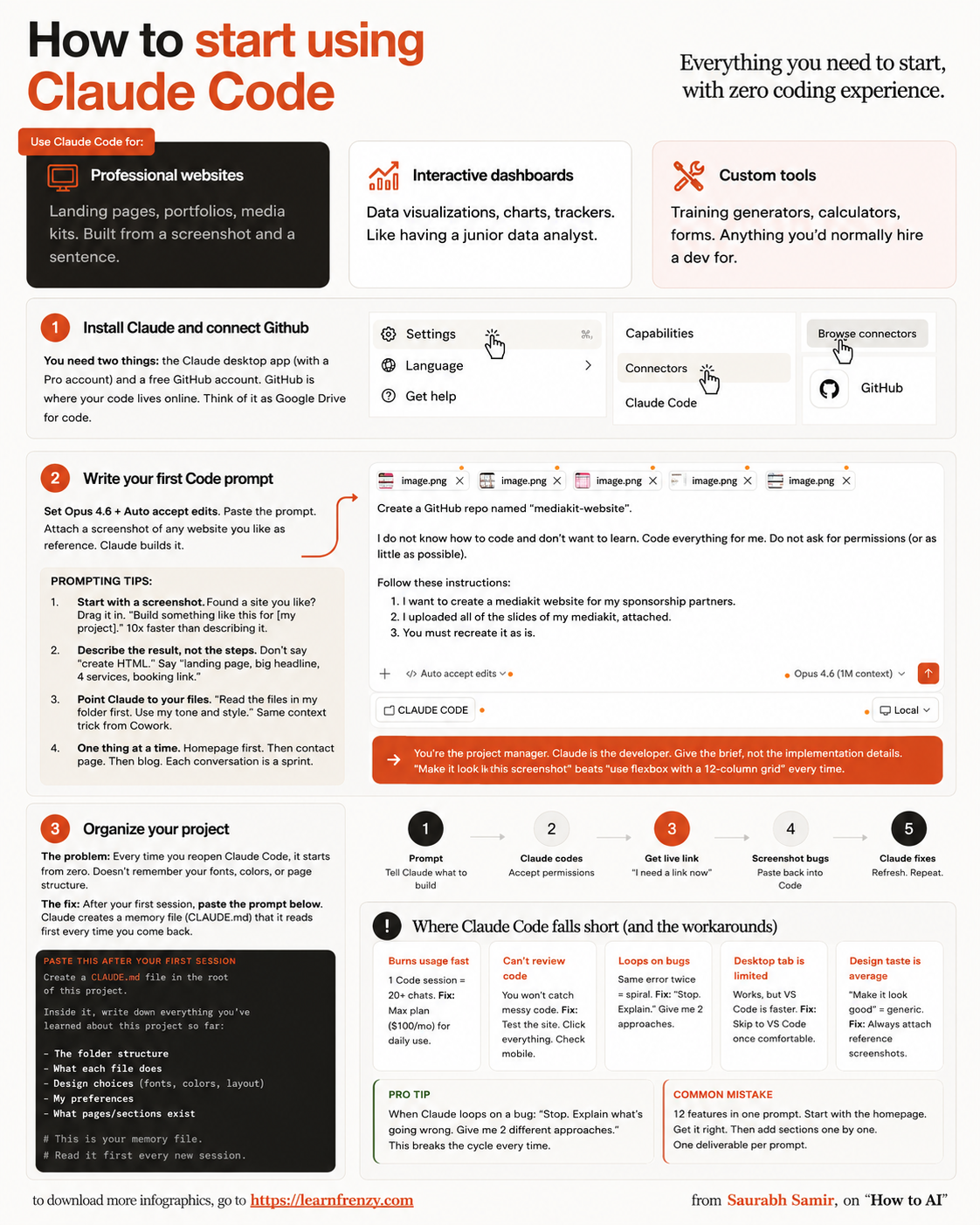
How to start using Claude Code
About This Cheat Sheet
Hey! I'm Saurabh Samir, and this is my cheat sheet for getting started with Claude Code. If you're a developer wondering how to use Claude for coding, you're in the right place. I've been using Claude Code for writing, debugging, and refactoring code, and I've put together everything you need to know to hit the ground running. This guide covers how to set up Claude Code, basic commands, writing your first prompt, generating code, debugging with Claude, refactoring existing code, and best practices for getting clean, working code every time. I've also included my favorite coding prompts that actually work, real-world examples, and tips for using Claude alongside your existing tools. Whether you're building a full-stack app, writing scripts, or just automating tasks, this cheat sheet will help you code faster and smarter with Claude AI.
🚀 Getting Started
- Access at claude.ai (web app)
- Claude Pro subscription ($20/mo)
- Claude API for developers
- Choose Claude 3.5 Sonnet (best for code)
- Upload code files (PY, JS, HTML, etc.)
- Mobile app support (iOS/Android)
💻 Basic Commands
- "Write a function for..."
- "Debug this code:" [paste code]
- "Refactor this code:" [paste code]
- "Explain this code:" [paste code]
- "Optimize this code"
- "Add comments to this code"
📝 Writing First Prompt
- Start with a clear goal
- Specify language & framework
- Provide input/output examples
- Mention coding experience level
- Ask for comments/explanation
- Request multiple solutions
🐛 Debugging with Claude
- Paste error messages
- Describe expected behavior
- Show input/output examples
- Ask for fix explanation
- Request simpler alternative
- Check edge cases
🔄 Refactoring Code
- Identify code to improve
- Specify optimization goal
- Request cleaner version
- Ask for modular structure
- Check performance issues
- Review security concerns
💡 Best Practices
- Be specific in prompts
- Break large tasks into steps
- Test code before using
- Ask for explanations
- Use file uploads for context
- Iterate & refine
💻 Code Generator
Write code from scratch
Full functions🐛 Bug Fixer
Debug & fix errors
Fast debugging🔄 Refactor
Clean & optimize code
Better structure📚 Explainer
Learn while coding
Understand code🚀 Claude Code Setup Guide
💻 Step 1: Access Claude
- Open claude.ai in your browser
- Sign up for a free account
- Upgrade to Pro for more code prompts
- Or use Claude API for integration
- My Tip: Pro is worth it for heavy coding
📁 Step 2: Prepare Your Code
- Copy your code or error messages
- Have input/output examples ready
- Know your language/framework
- Upload files for context
- My Tip: Upload entire files for best results
🤖 Step 3: Choose Model
- Use Claude 3.5 Sonnet for coding
- Best balance of speed & intelligence
- 200K context for large codebases
- Vision for analyzing diagrams
- My Tip: Sonnet is the sweet spot
💻 Essential Claude Code Commands
📝 Prompt Writing Best Practices
🎯 My Favorite Coding Prompts That Actually Work
💻 Generate from Scratch
- Prompt: "Write a Python function that fetches data from a REST API, handles errors, and returns JSON. Include comments."
- Result: Production-ready function with error handling
🐛 Debug & Fix
- Prompt: "This code gives a KeyError. Fix it and explain why it happened. [paste code]"
- Result: Fixed code with detailed explanation
🔄 Refactor & Improve
- Prompt: "Refactor this messy code into clean, modular functions. Add type hints and docstrings."
- Result: Clean, well-documented code
🚀 Real-World Code Examples
🌐 Web Development
- "Build a RESTful API with Flask"
- "Create a React component with state"
- "Write HTML/CSS for a landing page"
- "Set up Express.js with MongoDB"
🐍 Python Scripts
- "Web scraper with BeautifulSoup"
- "Data analysis with Pandas"
- "Automate file operations"
- "Create CLI tool with argparse"
📱 App Development
- "Flutter widget for login screen"
- "SwiftUI view for profile page"
- "React Native component for list"
- "Android Kotlin activity"
🐛 Debugging Mastery with Claude
🔍 Step 1: Identify
- Copy the complete error message
- Describe what should happen
- Show sample input/output
- Mention your environment
🛠️ Step 2: Fix
- Paste your broken code
- Ask: "Fix this code with explanation"
- Request: "Show me what went wrong"
- Get multiple solution options
✅ Step 3: Prevent
- Ask: "How can I prevent this error?"
- Request: "Add error handling"
- Check: "What are the edge cases?"
- Learn: "Explain the best practice"
🔄 My Code Refactoring Checklist
📝 1. Assess
- Review current code
- Identify pain points
- Set improvement goals
- Define success metrics
🔧 2. Request
- Specify language/framework
- Describe desired structure
- Mention performance needs
- Request clean code
✅ 3. Review
- Check for readability
- Test functionality
- Validate performance
- Verify security
📚 4. Learn
- Study refactored code
- Understand improvements
- Apply best practices
- Document insights
🎯 How to Master Claude Code: My Proven Workflow
The Golden Rule: Treat Claude as your pair programming partner, not just a code generator. Be specific, provide context, and always understand the code before using it.
My Step-by-Step Coding Workflow:
- Step 1: Define exactly what you need to build or fix
- Step 2: Write a clear, specific prompt with language/framework details
- Step 3: Upload code files for better context and accuracy
- Step 4: Generate code and review it carefully
- Step 5: Test the code in your development environment
- Step 6: Iterate: "Now handle edge cases" or "Make it more efficient"
- Step 7: Ask for explanations to learn and improve
My Top 5 Mistakes to Avoid:
- ❌ "Write code for a website" → ✅ "Write HTML/CSS for a responsive landing page with a hero section"
- ❌ Not specifying language → ✅ "Write a Python function using Flask"
- ❌ Accepting code without understanding → ✅ "Explain this code line by line"
- ❌ Not testing before deploying → ✅ Test in dev environment first
- ❌ Not using file uploads → ✅ Upload your codebase for best context
My Proven Strategy: The "Define-Generate-Review-Refine" technique – define what you need, generate code with Claude, review it carefully, and refine through iteration.
My Memory Trick: Remember the 4 Pillars of Claude Code Mastery:
- 🎯 Define: Know exactly what you need
- 🤖 Generate: Write clear prompts with context
- ✅ Review: Check code before using
- 🔄 Refine: Iterate and improve continuously
💡 My Pro Tips for Claude Code
✅ Start with Pseudocode
Ask Claude to write pseudocode first, then convert to actual code. This helps validate your logic.
✅ Use File Uploads
Upload entire files or projects for better context. Claude can analyze multiple files at once.
✅ Ask for Explanations
Always ask Claude to explain the code. This helps you learn and avoid blindly copying code.
✅ Test Incrementally
Test code in small pieces before combining. Claude can help you write unit tests too.
✅ Iterate & Refine
Don't settle for the first version. Ask Claude to improve, optimize, or simplify.
✅ Keep a Prompt Library
Save your best prompts for future use. Build a collection of proven coding prompts.
💻 Quick Reference: Languages Claude Supports
🐍 Python
- Flask, Django
- Pandas, NumPy
- FastAPI, Requests
- Scikit-learn
🌐 JavaScript
- React, Vue, Angular
- Node.js, Express
- TypeScript
- Next.js, Gatsby
💻 Others
- Java, Spring Boot
- C#, .NET
- Go, Rust
- PHP, Laravel
📱 Mobile
- Swift, iOS
- Kotlin, Android
- React Native
- Flutter, Dart
📝 My Go-To Coding Command Templates
🎯 Template 1: Generate Code
- "Write a [language] function that [task]"
- "Include: [specific features]"
- "Handle: [edge cases]"
- "Add comments for clarity"
- Example: "Write a Python function that reads a CSV file, filters rows where age > 18, and returns a list of names. Include error handling."
🐛 Template 2: Debug Code
- "This code is throwing [error]:"
- "[paste code]"
- "Expected output: [example]"
- "Fix it and explain the issue"
- Example: "This code is throwing a TypeError on line 12: [paste code]. Expected output is [1,2,3]. Fix it and explain why it happened."
Download Cheat Sheet
This cheat sheet has 3 pages. Choose download option:
Preview
Still have questions?
We're here to help! Reach out to our support team for any queries.