How to use Claude
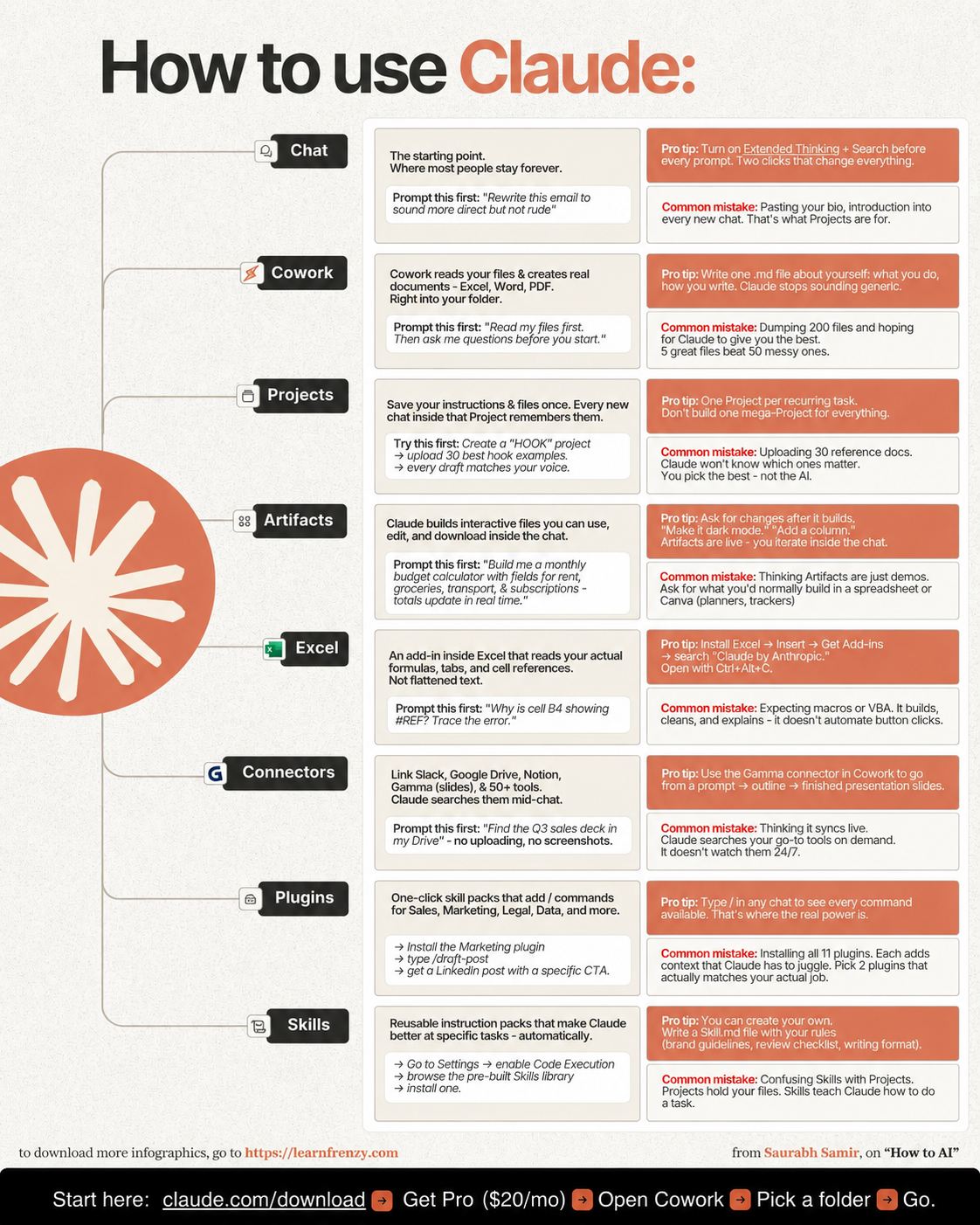
About This Cheat Sheet
Hi! I'm Saurabh Samir, and this is my practical guide to using Claude AI in your daily work. I've been using Claude for everything from writing emails and creating content to analyzing data and brainstorming ideas, and I've compiled my best tips into this cheat sheet. This guide covers how to access Claude (web, mobile, API), crafting effective prompts that get results, using Claude Artifacts for code and documents, working with Projects to organize your conversations, uploading and analyzing files (PDFs, images, spreadsheets), Claude's vision capabilities, and tips for getting the most out of the free and Pro versions. I've also included real-world examples of how I use Claude for content creation, research, analysis, and creative work. Whether you're a beginner or an experienced user, this cheat sheet will help you use Claude more effectively and get better results, faster.
🌐 Access Methods
- Web App (claude.ai)
- Mobile Apps (iOS & Android)
- Claude Pro ($20/month)
- Claude API for developers
- Team/Enterprise plans
- Free tier with limits
📝 Prompt Crafting
- Be clear & specific
- Provide context & background
- Use examples for clarity
- Specify desired format
- Set tone & style
- Ask follow-up questions
✨ Claude Artifacts
- Generate code (Python, JS, etc.)
- Create documents (Markdown, HTML)
- Interactive content output
- Side panel for longer content
- Edit & refine in real-time
- Export & download
📁 Projects & Files
- Organize conversations
- Upload multiple files
- Maintain context across chats
- PDF, DOCX, XLSX support
- Image upload & analysis
- Long document processing
👁️ Vision Capabilities
- Analyze images & photos
- Read charts & graphs
- Extract text from images
- Describe visual content
- Understand diagrams
- Handwritten text recognition
💡 Pro Tips
- Use Artifacts for long content
- Upload files for better context
- Iterate to refine answers
- Save best prompts
- Use Projects for ongoing work
- Combine with other tools
🌐 Web & Mobile
Access anywhere
claude.ai📝 Smart Prompts
Clear + Context
Better results📎 File Upload
PDFs, Images, Docs
20+ formats🎨 Artifacts
Code & Documents
Interactive output🌐 How to Access Claude
💻 Web App
- Go to claude.ai in your browser
- Sign up with email/Google
- Start chatting immediately
- Access all features
- My Tip: Use Chrome for best experience
📱 Mobile Apps
- Download from App Store/Google Play
- Same features as web
- Voice input supported
- Chat history syncs
- My Tip: Great for quick answers on the go
🔌 API Access
- For developers & integrations
- Build custom applications
- Pay-as-you-go pricing
- High usage limits
- My Tip: Start with web app, then API if needed
📝 My Prompt Crafting Framework
🎯 Prompt Templates That Work
🎨 Mastering Claude Artifacts
💻 For Code
- Ask: "Create an artifact with code for..."
- Claude generates in separate panel
- Edit and refine in real-time
- Copy code with one click
- My Tip: Great for long scripts
📄 For Documents
- Ask: "Create an artifact with this content..."
- Perfect for long-form writing
- Format with headings & styling
- Export as Markdown or HTML
- My Tip: Use for reports and articles
🔄 For Iteration
- Generate initial version
- Refine with follow-up prompts
- Claude updates the artifact
- Download final version
- My Tip: Keep refining until perfect
📁 Projects & File Uploads
📁 Projects
- Create project for each task
- Upload relevant files
- Maintain context across chats
- Organize by topic/client
- My Tip: Use for long-term work
📎 File Uploads
- Upload PDF, DOCX, XLSX, PPTX
- Images: JPG, PNG, WebP
- CSV, TXT files
- Code files (PY, JS, etc.)
- My Tip: Upload for best context
📊 File Analysis
- Summarize long documents
- Extract key information
- Analyze data in spreadsheets
- Review and edit documents
- My Tip: Perfect for research
👁️ Vision Capabilities Guide
🖼️ Image Analysis
- Upload photos for description
- Analyze charts and graphs
- Extract text from images
- Identify objects and scenes
- My Tip: Great for presentations
📊 Chart Reading
- Upload charts and graphs
- Ask for insights and trends
- Get data interpretations
- Create written analysis
- My Tip: Perfect for reports
📝 Document Scanning
- Upload scanned documents
- Extract and transcribe text
- Analyze handwritten notes
- Convert images to text
- My Tip: Great for PDFs
💰 Free vs Pro: Which One Do You Need?
🆓 Free Version
- Access to Claude 3.5 Sonnet
- Limited messages per day
- File uploads supported
- Artifacts available
- Community support
- My Tip: Great for trying out Claude
⭐ Pro Version ($20/month)
- 5x more usage (more messages)
- Access to all models
- Priority access during peak times
- Larger file uploads
- Earlier access to new features
- My Tip: Worth it for regular users
🚀 How I Use Claude in My Daily Work
✍️ Content Creation
- Write blog posts & articles
- Create social media content
- Edit and proofread
- Generate newsletter content
- Repurpose long-form content
📊 Research & Analysis
- Summarize research papers
- Analyze market trends
- Extract insights from reports
- Compare and contrast sources
- Create research briefs
💼 Business & Professional
- Write professional emails
- Create presentation content
- Prepare meeting agendas
- Draft business proposals
- Analyze business data
🎯 How to Use Claude Effectively: My Proven Framework
The Golden Rule: Think of Claude as a smart assistant that needs clear instructions. The better your prompt, the better your results. Always provide context and be specific about what you want.
My Step-by-Step Framework:
- Step 1: Define your goal - what do you want Claude to help you with?
- Step 2: Access Claude (web app, mobile, or API)
- Step 3: Write a clear prompt with context, examples, and desired format
- Step 4: Upload relevant files for better context
- Step 5: Review the response and ask for refinements
- Step 6: Use Artifacts for longer code or document outputs
- Step 7: Save useful prompts for future use
Common Mistakes to Avoid:
- ❌ Vague prompts like "Help me with writing" → ✅ "Write a professional email about [topic] for [audience]"
- ❌ Not providing context → ✅ "I'm a small business owner..."
- ❌ Not using file uploads → ✅ Upload relevant documents for analysis
- ❌ Accepting first response → ✅ Iterate: "Now make it more concise"
- ❌ Not using Artifacts → ✅ Use for long content or code
My Proven Strategy: The "Context-Prompt-Refine" technique – provide rich context, write a detailed prompt, then refine through iteration and Artifacts.
My Memory Trick: Remember the 5 Steps of Claude Mastery:
- 🎯 Set Clear Goals: Know exactly what you need
- 📝 Write Detailed Prompts: Provide context and examples
- 📎 Upload Relevant Files: Give Claude more information
- 🎨 Use Artifacts: Get better outputs for long content
- 🔄 Refine Through Iteration: Keep improving results
💡 My Pro Tips for Using Claude Effectively
✅ Start with the End in Mind
Know exactly what you want Claude to produce before you start typing your prompt.
✅ Use the Role-Playing Technique
Tell Claude to act as an expert: "You are a professional copywriter..." for better results.
✅ Upload Files for Context
Claude works better with examples. Upload a sample of what you want or reference documents.
✅ Use Artifacts for Long Content
For code, reports, or long-form writing, ask Claude to use artifacts for better formatting.
✅ Save Your Best Prompts
Keep a library of prompts that work well. This saves time and improves consistency.
✅ Experiment and Learn
Try different approaches and styles. Learn what works best for your specific needs.
📝 Quick Reference: My Favorite Prompts
✍️ For Writing
- "Write a [blog post/article/email] about [topic] for [audience]. Make it [engaging/professional/friendly] and include [specific elements]."
- "Edit this content to be more [concise/engaging/professional]. Improve clarity and flow."
- "Generate 10 headlines/titles for [topic]. Make them attention-grabbing and include keywords."
📊 For Analysis
- "Summarize this [document/PDF] into 5 key points. Include actionable insights and recommendations."
- "Analyze this data and identify trends, patterns, and outliers. Provide a clear, easy-to-understand summary."
- "Compare and contrast [topic A] and [topic B]. Highlight key differences and similarities."
📋 Features at a Glance
🌐 Access
- Web: claude.ai
- Mobile: iOS/Android
- API: For developers
- Free & Pro plans
📝 Outputs
- Text responses
- Code (multiple languages)
- Artifacts (HTML, Markdown)
- Document analysis
📎 Inputs
- Text prompts
- PDF, DOCX, XLSX
- Images (JPG, PNG)
- CSV, TXT files
🛠️ Features
- Artifacts
- Projects
- Vision
- 200K context
Download Cheat Sheet
Click the button below to download this high-resolution PNG cheat sheet.
Download PNG (1.0 MB)Preview
Still have questions?
We're here to help! Reach out to our support team for any queries.