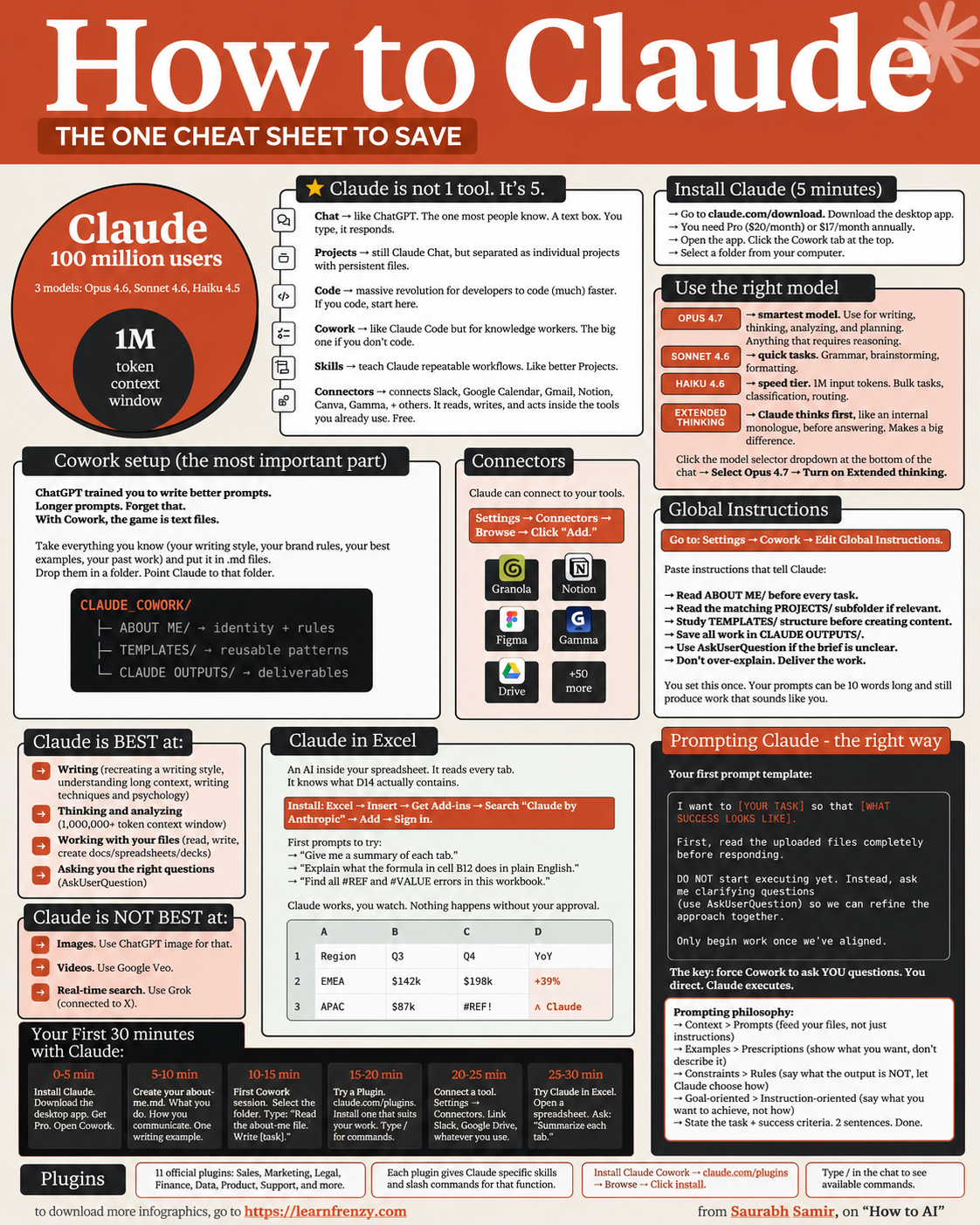
How to Claude
About This Cheat Sheet
Hi! I'm Saurabh Samir, and this is my quick guide to getting the most out of Claude AI. I've been using Claude for coding, writing, research, and brainstorming, and I've put together everything I've learned. This cheat sheet covers how to get started, the different Claude models (Sonnet, Opus, Haiku), cool features like Artifacts and Projects, file uploads, vision capabilities, prompt writing tips, and how Claude compares to ChatGPT. Whether you're a developer wanting AI to help with code, a content creator looking for writing assistance, or just curious about AI tools, this guide will help you use Claude like a pro. I've also included my favorite prompts and real-world use cases that actually work.
🚀 Getting Started
- Sign up at claude.ai
- Free tier vs Pro plan ($20/month)
- Web app & mobile apps (iOS/Android)
- API access for developers
- Claude 3.5 Sonnet (default)
- 20+ file upload formats
🤖 Claude Models
- Claude 3.5 Sonnet (Best overall)
- Claude 3 Opus (Most powerful)
- Claude 3 Haiku (Fastest)
- 200K context window
- Multilingual support
- Vision capabilities
✨ Key Features
- Artifacts (Code/Content)
- Projects (Organize chats)
- File Uploads (PDF, DOCX, etc.)
- Image Analysis (Vision)
- Long Document Processing
- Web Search (Some regions)
📝 Prompt Writing Tips
- Be Specific & Clear
- Provide Context & Examples
- Use Chain-of-Thought
- Ask for Multiple Options
- Specify Format & Length
- Iterate & Refine
🎯 Use Cases
- Code Generation & Debugging
- Content Writing & Editing
- Research & Analysis
- Brainstorming & Planning
- Document Summarization
- Data Analysis
⚖️ Claude vs ChatGPT
- More Natural Writing Style
- Better Code Generation
- Larger Context Window
- Higher Truthfulness
- Less Hallucination
- Ethical & Safe Design
🤖 Claude 3.5
Most Advanced Model
Default & Best📄 200K Context
Processes 200,000 tokens
Entire books📎 File Upload
PDF, DOCX, XLSX, Images
20+ formats🎨 Artifacts
Code & Content Generation
Interactive output🤖 Claude Models Comparison
⚡ Claude 3.5 Sonnet
- Best For: Everyday tasks, coding, content
- Speed: ⚡⚡⚡⚡
- Intelligence: 🧠🧠🧠🧠
- Context: 200K tokens
- Price: Free (with limits) / Pro
🏆 Claude 3 Opus
- Best For: Complex reasoning, research
- Speed: ⚡⚡
- Intelligence: 🧠🧠🧠🧠🧠
- Context: 200K tokens
- Price: Pro only
💨 Claude 3 Haiku
- Best For: Quick tasks, high volume
- Speed: ⚡⚡⚡⚡⚡
- Intelligence: 🧠🧠🧠
- Context: 200K tokens
- Price: Free (with limits) / Pro
✨ Key Features Explained
📝 Prompt Engineering Tips
🎯 My Favorite Prompts That Actually Work
💻 Coding
- Prompt: "Write a React component for a todo list with local storage. Include comments explaining each part."
- Result: Clean, production-ready code with explanations
📝 Writing
- Prompt: "Write a professional email to propose a partnership. Make it persuasive but not pushy."
- Result: Polished, tone-perfect email
🧠 Research
- Prompt: "Summarize this PDF [upload file] into 5 key points. Include practical takeaways."
- Result: Concise, actionable summary
🎯 Real-World Use Cases
💻 For Developers
- Code generation & debugging
- API documentation writing
- Code review & optimization
- Learning new languages/frameworks
- Writing unit tests
✍️ For Content Creators
- Blog posts & articles
- Social media captions
- Email newsletters
- Script writing
- Editing & proofreading
📊 For Business
- Data analysis & insights
- Report generation
- Market research
- Business plan writing
- Presentation creation
⚖️ Claude vs ChatGPT: Quick Comparison
📝 Writing Style
- Claude: More natural, conversational, warm
- ChatGPT: More formal, structured
- Winner: Claude for natural writing
💻 Coding
- Claude: Better code generation, fewer bugs
- ChatGPT: Good but sometimes inconsistent
- Winner: Claude for complex coding
🧠 Context
- Claude: 200K tokens (entire books)
- ChatGPT: 8K-128K tokens
- Winner: Claude for long documents
🎯 How to Master Claude AI: My Proven Approach
The Golden Rule: Treat Claude like a smart colleague, not just a tool. Be specific about what you need, provide context, and iterate to refine the output.
My Step-by-Step Approach:
- Step 1: Start with a clear goal - what do you want to achieve?
- Step 2: Write a specific prompt with context and examples
- Step 3: Use chain-of-thought: "Think step by step"
- Step 4: Upload relevant files for better context
- Step 5: Review and refine the output
- Step 6: Iterate: "Now make it better" or "Add more detail"
Common Mistakes I've Made (and How to Avoid Them):
- ❌ Vague prompts like "Help me with code" → ✅ "Write a Python function for sorting an array"
- ❌ No context or background → ✅ "I'm a beginner, explain step by step"
- ❌ Not using file uploads → ✅ Upload PDFs, code files, or images
- ❌ Accepting first output → ✅ Iterate: "Now make it more concise"
- ❌ Ignoring Artifacts → ✅ Use Artifacts for longer code/document outputs
My Proven Strategy: The "Context-Prompt-Refine" technique – provide rich context, write a detailed prompt, then refine through iteration.
My Memory Trick: Remember the 4 Pillars of Claude Mastery:
- 🎯 Clarity: Know exactly what you want
- 📝 Context: Provide background and examples
- 🔄 Iterate: Refine and improve outputs
- 📎 Upload: Use file uploads for better results
💡 My Pro Tips for Claude Mastery
✅ Use Chain-of-Thought
Ask Claude to "think step by step" for better reasoning and more accurate answers
✅ Upload Files
Upload PDFs, DOCX, or code files for better context and more accurate responses
✅ Use Artifacts
For longer code or document generation, use Artifacts to see the full output in a separate panel
✅ Be Specific
Vague prompts = vague answers. Be specific about what you want and how you want it
✅ Iterate & Refine
Don't settle for the first output. Ask Claude to improve, shorten, expand, or rephrase
✅ Learn from Others
Join the Claude community, read prompt examples, and learn from other users
📎 Quick Reference: Supported File Formats
📄 Documents
- DOCX
- TXT
- HTML
📊 Data
- CSV
- XLSX
- JSON
🖼️ Images
- JPG/JPEG
- PNG
- WebP
- GIF (static)
💻 Code
- PY
- JS/TS
- HTML/CSS
- JAVA, C++, etc.
📝 My Go-To Prompt Templates
🔄 The Refinement Template
- 1. "Write a [type of content] about [topic]"
- 2. "Now make it more [concise/detailed/professional]"
- 3. "Add examples for [specific point]"
- 4. "Now create a summary version"
🧠 The Chain-of-Thought Template
- "Think step by step about how to [solve problem]"
- "First, identify the key issues"
- "Then, propose solutions"
- "Finally, recommend the best approach"
Download Cheat Sheet
This cheat sheet has 2 pages. Choose download option:
Preview
Still have questions?
We're here to help! Reach out to our support team for any queries.