Everything You Must Know in Claude
About This Cheat Sheet
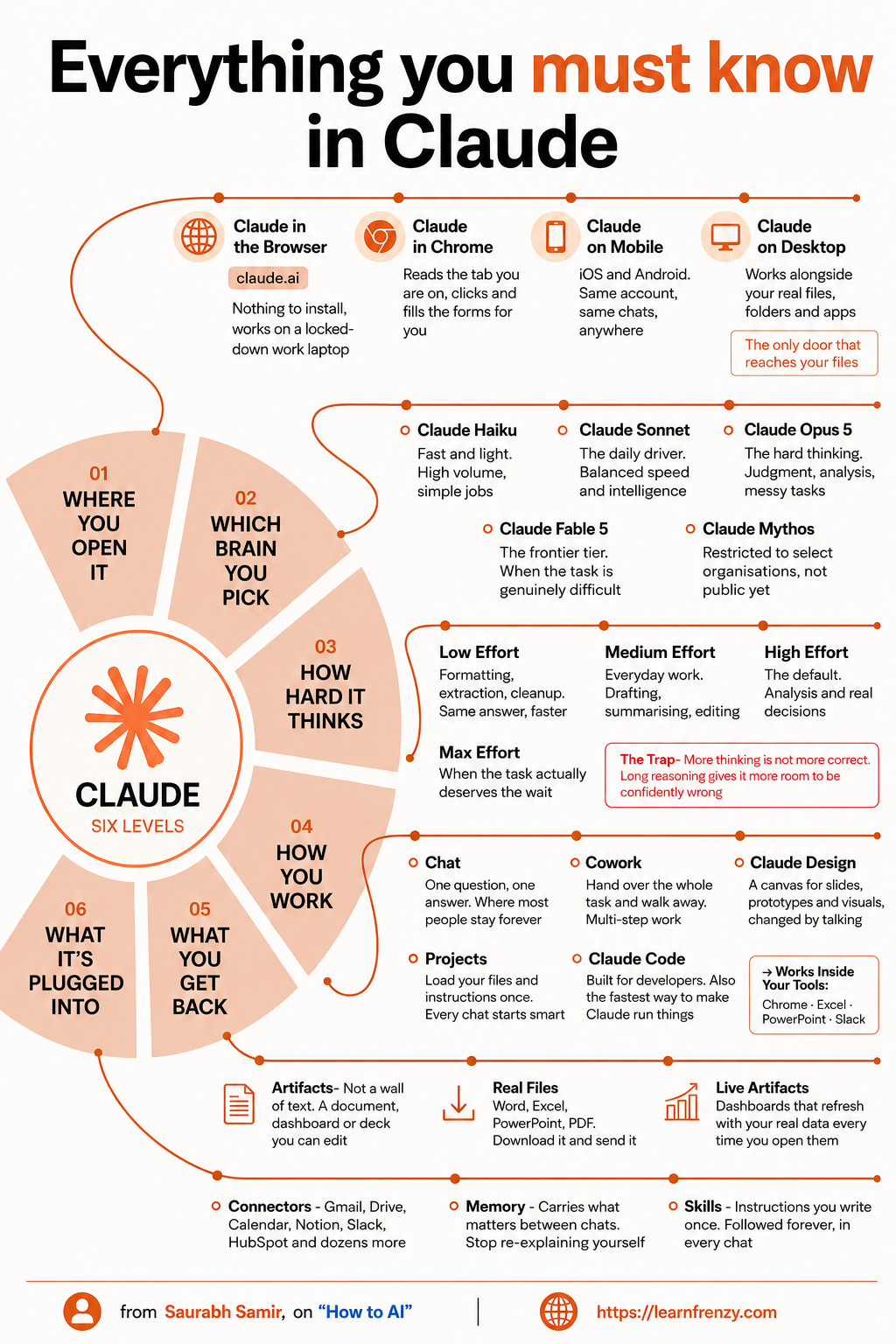
Hey! I'm Saurabh Samir, and this is the cheat sheet that covers everything you must know about Claude in 2026. I've spent years figuring out the ins and outs of Claude, and I've condensed it all into one comprehensive guide. This covers WHERE YOU OPEN IT (Browser, Chrome extension, Mobile, Desktop — the ONLY door that reaches your files), WHICH BRAIN YOU PICK (Opus, Sonnet, Haiku), HOW HARD IT THINKS (Reasoning effort levels and THE TRAP — more thinking is NOT more correct), HOW YOU WORK (your workflow preferences), WHAT YOU GET BACK (Artifacts, dashboards, decks), and WHAT IT'S PLUGGED INTO (Connectors, Memories, Skills, Real Files — Word, Excel, PPT, PDF). I've also included Live Artifacts (dashboards that refresh with real data), Cloud Guides, and everything else you need to master Claude across all platforms. Whether you're a beginner or a power user, this cheat sheet has everything you need.
🌐 Where You Open It
- Browser - claude.ai, nothing to install
- Chrome - Extension reads tabs/clicks/fills forms
- Mobile - iOS/Android, same account/same chats
- Desktop - Works alongside real files/folders/apps
- Key: Desktop is the ONLY door that reaches your files
- Best: Full integration with your computer
🧠 Which Brain You Pick
- Claude Opus - Complex reasoning (★★★★★)
- Claude Sonnet - Balanced all-rounder (★★★★)
- Claude Haiku - Fastest for quick tasks (★★★)
- Speed: Haiku > Sonnet > Opus
- Smartness: Opus > Sonnet > Haiku
- Tip: Match model to your task
💭 How Hard It Thinks
- Low - Quick, surface-level reasoning
- Medium - Balanced reasoning
- High - Deep, thorough reasoning
- ⚠️ THE TRAP: More thinking ≠ More correct
- Why: Long reasoning gives room to be confidently wrong
- Fix: Match effort to task, keep it simple
⚡ How You Work
- Workflow Preferences - Your way of working
- Interaction Style - How you communicate
- Task Approach - How you tackle problems
- Customization - Tailor Claude to you
- Efficiency - Work smarter, not harder
- Adaptability - Claude learns from you
📤 What You Get Back
- Artifacts - Documents, dashboards, decks
- Live Artifacts - Refresh with real data
- Cloud Guides - Canvas for slides/prototypes
- Cloud Design - Visual canvas changed by talking
- Cloud Essentials - The Trap explained
- Quality - Multiple output types
🔌 What It's Plugged Into
- Connectors - Gmail, Drive, Calendar, Notion, Slack
- Artifacts - Editable documents/dashboards/decks
- Memories - Carries what matters between chats
- Memory Lists - Permanent storage
- Skills - /command reusable actions
- Real Files - Word, Excel, PPT, PDF
🌐 4 Places
Browser, Chrome, Mobile, Desktop
Choose your platform🧠 3 Brains
Opus, Sonnet, Haiku
Pick your model⚠️ The Trap
More thinking ≠ More correct
Keep it simple🔌 20+
Connectors Available
Gmail, Drive, Slack🌐 Where You Open Claude — Platform Comparison
| Platform | Access | Key Feature | Best For |
|---|---|---|---|
| Browser | claude.ai | Nothing to install | Locked-down work laptops |
| Chrome | Chrome extension | Reads tabs, clicks, fills forms | Automation, form filling |
| Mobile | iOS/Android app | Same account, same chats | Anywhere, on-the-go |
| Desktop | Desktop app | Works alongside real files/folders/apps | Full integration with files |
📋 Platform Details
| Platform | Installation | File Access | Features |
|---|---|---|---|
| Browser | None — just visit claude.ai | Limited | Basic chat, Artifacts |
| Chrome | Install extension | Limited | Tab reading, form automation |
| Mobile | Download from app store | Limited | Same chats, portable |
| Desktop | Download installer | Full access | Real files/folders/apps |
🧠 Which Brain You Pick — Model Selection
| Brain (Model) | Smartness | Speed | Best For |
|---|---|---|---|
| Claude Opus | ★★★★★ | Medium | Complex reasoning, deep analysis |
| Claude Sonnet | ★★★★ | Fast | Balanced tasks, everyday use |
| Claude Haiku | ★★★ | Very Fast | Quick tasks, simple questions |
🎯 Quick Model Selection Guide
Need everyday help? → Use Sonnet
Need quick answer? → Use Haiku
💭 How Hard It Thinks — Reasoning Effort
| Level | Description | When to Use |
|---|---|---|
| Low | Quick, surface-level reasoning | Simple questions |
| Medium | Balanced reasoning | Everyday tasks |
| High | Deep, thorough reasoning | Complex problems |
⚠️ THE TRAP
Long reasoning gives it more room to be confidently wrong.
💡 Important: Don't overdo the reasoning effort. Sometimes the simple answer is the right answer.
🔌 Connectors — What Claude Is Plugged Into
| Connector | Type | What It Accesses |
|---|---|---|
| Gmail | Communication | Emails, threads |
| Google Drive | Storage | Files, documents |
| Calendar | Scheduling | Events, meetings |
| Notion | Knowledge | Notes, databases |
| Slack | Team Communication | Channels, messages |
| HubSpot | CRM | Contacts, deals, pipeline |
| And Dozens More | Various | Multiple integrations |
📤 Artifacts — What You Get Back
| Artifact Type | Format | How to Use |
|---|---|---|
| Document | Editable text | Write, edit, refine |
| Dashboard | Data visualization | View metrics, insights |
| Deck | Presentation slides | Present ideas |
| Canvas | Visual/prototype | Design, iterate |
| Live Artifacts | Real-time data | Refresh with current data |
📤 Artifact Benefits
✅ A document, dashboard, or deck you can edit
🧠 Memories — Carry What Matters Between Chats
| Memory Type | What It Does | Benefit |
|---|---|---|
| Memories | Carries important info between chats | Stop re-explaining yourself |
| Memory Lists | Saved preferences | Quick reference |
| Skills | Reusable commands | /command access |
| Instructions | Written once | Followed forever in every chat |
📁 Real Files — Supported Formats
| File Type | Extensions | Action |
|---|---|---|
| Word | .docx | Download and send |
| Excel | .xlsx | Download and send |
| PowerPoint | .pptx | Download and send |
| Download and send |
📊 Live Artifacts — Real-Time Dashboards
| Feature | Description | Benefit |
|---|---|---|
| Live Data | Refreshes with real data | Always up-to-date |
| Automatic | Refreshes every time you open | No manual updates |
| Interactive | Click to explore | Dynamic insights |
📊 The Complete Claude Experience — Visual Overview
📋 Quick Reference — Claude Ecosystem
| Category | Items | Purpose |
|---|---|---|
| Where | Browser, Chrome, Mobile, Desktop | Access points |
| Which | Opus, Sonnet, Haiku | Brain options |
| How Hard | Low, Medium, High | Thinking effort |
| How Work | Your style | Interaction method |
| What Back | Artifacts, Dashboards, Decks | Output types |
| Plugged Into | 20+ Connectors | Integrations |
| Memories | Lists, Skills, Instructions | Persistence |
| Files | Word, Excel, PPT, PDF | Real documents |
| Live | Live Artifacts | Real-time data |
🧠 Memory Features Comparison
| Memory Type | Scope | How to Use |
|---|---|---|
| Memories | Between chats | Automatic context |
| Memory Lists | Permanent storage | Create and save |
| Skills | Reusable commands | /command |
| Instructions | Followed forever | Write once |
| Projects | Per project context | Upload once |
⚙️ Setting Up Each Platform
| Platform | Setup Steps | Time |
|---|---|---|
| Browser | Go to claude.ai | Instant |
| Chrome | Install extension, allow permissions | 2 min |
| Mobile | Download app, sign in | 2 min |
| Desktop | Download installer, install app | 3 min |
🎯 Everything You Must Know in Claude — Quick Revision
The Golden Rule: Choose the right platform, pick the right brain, and don't overthink it. Desktop is the ONLY door that reaches your files. Opus for complex, Sonnet for daily, Haiku for quick. And remember — more thinking is NOT more correct.
Quick Memory Tricks:
- 📌 Where: "Browser, Chrome, Mobile, Desktop — Desktop = files"
- 📌 Which: "Opus = Smartest, Sonnet = Balanced, Haiku = Fastest"
- 📌 How Hard: "Low = Quick, Medium = Balanced, High = Deep"
- 📌 The Trap: "More thinking ≠ More correct — keep it simple"
- 📌 Plugged Into: "Gmail, Drive, Calendar, Notion, Slack, HubSpot"
Daily Checklist:
- ✅ Open Claude on the right platform (Desktop for files)
- ✅ Pick the right model (Opus/Sonnet/Haiku)
- ✅ Set reasoning effort (match to task)
- ✅ Use connectors for real-time context
- ✅ Save Memories and Skills for reuse
- ✅ Export real files (Word, Excel, PPT, PDF)
💡 Pro Tips for Claude
✅ Use Desktop for Files
Desktop is the ONLY door that reaches your real files. Always use Desktop when working with documents.
✅ Don't Overthink
More thinking is NOT more correct. Long reasoning gives Claude more room to be confidently wrong. Keep it simple.
✅ Use Memories
Stop re-explaining yourself. Memories carry what matters between chats. Save skills and instructions once.
✅ Connect Everything
Claude is plugged into 20+ connectors. Connect Gmail, Drive, Slack, and Notion for real-time context.
✅ Use Live Artifacts
Dashboards that refresh with real data. Always up-to-date, no manual updates needed.
✅ Match Model to Task
Opus for complex, Sonnet for daily, Haiku for quick. Don't use Opus for simple questions.
from Saurabh Samir, on "How to AI"
Download Cheat Sheet
Click the button below to download this high-resolution PNG cheat sheet.
Download PNG (1.2 MB)Preview
Still have questions?
We're here to help! Reach out to our support team for any queries.