21 Hacks to NEVER Hit Claude's Limit
About This Cheat Sheet
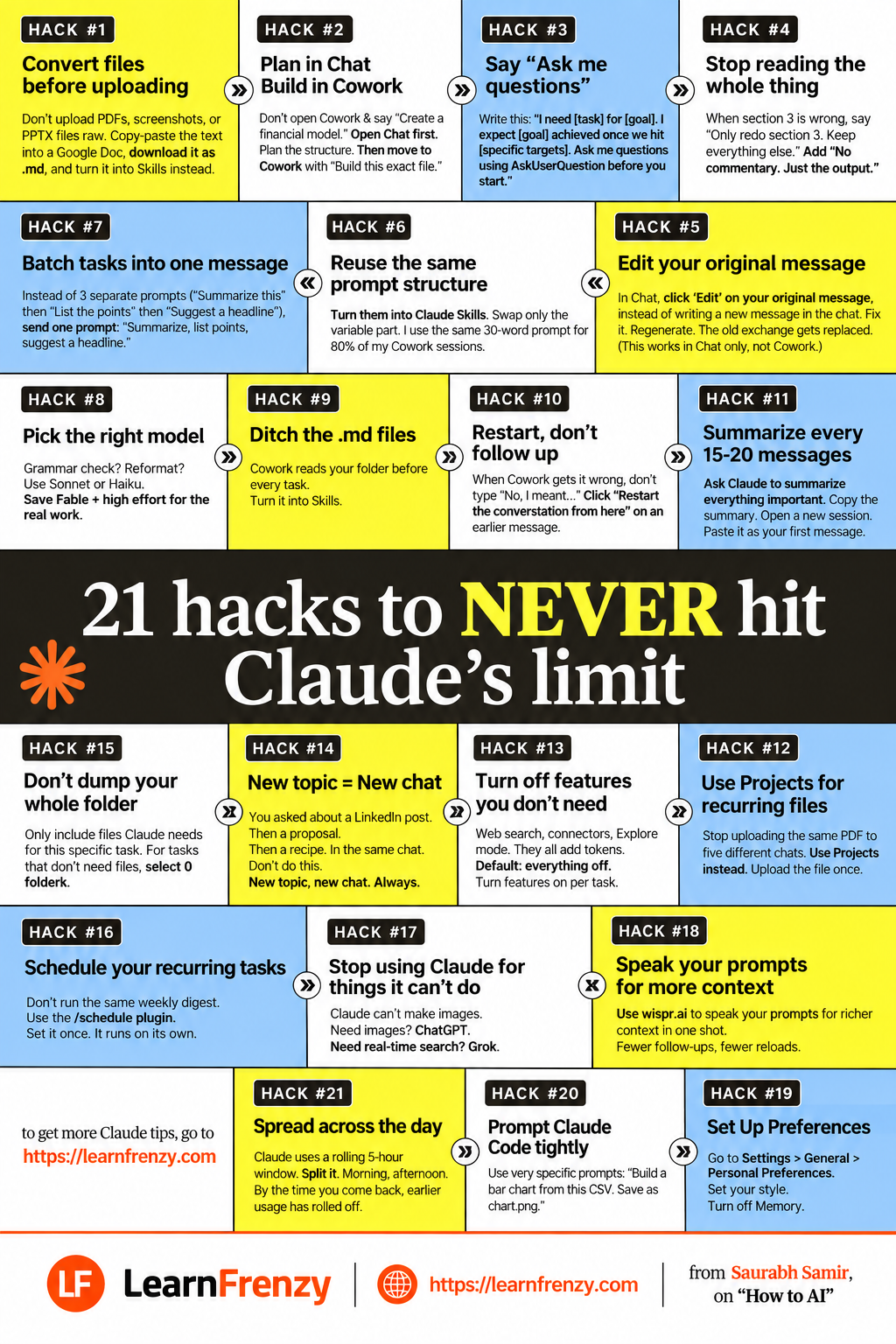
Hey! I'm Saurabh Samir, and this is my cheat sheet for 21 hacks to NEVER hit Claude's limit. If you're tired of getting cut off in the middle of important work, these hacks will save you. I've been using Claude for years and have figured out exactly how to stay within limits while getting more done. This covers everything from file optimization (#1: Convert files before uploading) to workflow (#2: Plan in Chat, Build in Cowork), prompting (#3: Say "Ask me questions"), editing (#4: Only redo specific sections), efficiency (#5: Batch tasks into one message), reusability (#6: Reuse same prompt structure as Skills), editing (#7: Edit original message), model selection (#8: Pick right model for task), skills (#9: Ditch .md files, turn into Skills), recovery (#10: Restart, don't follow up), session management (#11: Summarize every 15-20 messages), projects (#12: Use Projects for recurring files), optimization (#13: Turn off features you don't need), organization (#14: New topic = New chat), file management (#15: Don't dump your whole folder), automation (#16: Schedule recurring tasks), tool selection (#17: Use right tool for right job), input efficiency (#18: Speak your prompts), and preferences (#19: Set up Personal Preferences). Whether you're a power user or just starting out, these 19 hacks will transform how you use Claude.
#1 File Conversion
- Convert before upload - PDFs/PPTX use more tokens
- Copy-paste to Google Doc
- Download as .md - Most efficient format
- Turn into Skills - Reusable
#2 Plan in Chat, Build in Cowork
- Plan structure first - In Chat
- Then move to Cowork
- "Build this exact file"
- Complex tasks only
#3 Say "Ask me questions"
- Use AskUserQuestion
- Before you start
- Set specific targets
- Get better outputs
#4 Only Redo Sections
- Stop reading the whole thing
- Only redo wrong sections
- "No commentary. Just the output."
- Saves massive tokens
#5 Batch Tasks
- Combine prompts into one
- 3 prompts → 1 message
- Saves 40-60% tokens
- More efficient
#6 Reuse Prompt Structure
- Turn into Skills
- Swap variable part only
- 80% of Cowork sessions
- Massive time saver
#7 Edit Original Message
- Click 'Edit' on original
- Fix it, regenerate
- Old exchange gets replaced
- Works in Chat only
#8 Pick Right Model
- Grammar/reformat → Sonnet/Haiku
- Complex work → Opus
- Saves 50-70% tokens
- Save Opus for what matters
#9 Ditch .md Files
- Turn files into Skills
- Skills are reusable
- Files are per-session
- Huge efficiency gain
#10 Restart, Don't Follow Up
- "Restart conversation from here"
- Cleaner context
- When Cowork gets it wrong
- Better results
#11 Summarize Sessions
- Every 15-20 messages
- Ask Claude to summarize
- Copy → New session → Paste
- Saves 60-80% tokens
#12 Use Projects
- Upload once, use everywhere
- For recurring files
- No re-uploading
- Context always ready
#13 Turn Off Features
- Web search - Adds tokens
- Connectors - Adds tokens
- Explore mode - Adds tokens
- Only enable when needed
#14 New Topic = New Chat
- Always start new chat
- For different topics
- Clean context
- Better responses
#15 Don't Dump Whole Folder
- Only include needed files
- Don't dump everything
- Saves 40-60% tokens
- Focus on what matters
#16 Schedule Tasks
- Use /schedule plugin
- For recurring tasks
- Run automatically
- Weekly/monthly
#17 Right Tool for Right Job
- Images → ChatGPT
- Real-time search → Grok
- Reasoning/writing → Claude
- Don't force Claude
#18 Speak Your Prompts
- Use wisp.ai
- Speak prompts for richer context
- One shot, not typing
- Faster input
🔥 21 Hacks
Never Hit Limit
Full toolkit💾 90%
Token Savings
Combined impact⚡ 19
Hacks Included
All categories✅ Checklist
Implementation
Track progress📋 Key Topics Covered — 21 Hacks Overview
| Hack # | Category | Key Action |
|---|---|---|
| Hack 1 | File Optimization | Convert files to .md before uploading |
| Hack 2 | Workflow | Plan in Chat, Build in Cowork |
| Hack 3 | Prompting | Say "Ask me questions" |
| Hack 4 | Editing | Only redo specific sections |
| Hack 5 | Efficiency | Batch tasks into one message |
| Hack 6 | Reusability | Reuse same prompt structure as Skills |
| Hack 7 | Editing | Edit original message, not new |
| Hack 8 | Model Selection | Pick right model for task |
| Hack 9 | Skills | Ditch .md files, turn into Skills |
| Hack 10 | Recovery | Restart, don't follow up |
| Hack 11 | Session Management | Summarize every 15-20 messages |
| Hack 12 | Projects | Use Projects for recurring files |
| Hack 13 | Optimization | Turn off features you don't need |
| Hack 14 | Organization | New topic = New chat |
| Hack 15 | File Management | Don't dump your whole folder |
| Hack 16 | Automation | Schedule recurring tasks |
| Hack 17 | Tool Selection | Use right tool for right job |
| Hack 18 | Input Efficiency | Speak your prompts |
| Hack 19 | Preferences | Set up Personal Preferences |
📁 File & Upload Optimization Hacks
| Hack # | Technique | Why It Works |
|---|---|---|
| #1 | Convert files before uploading | PDFs/PPTX use more tokens; .md is efficient |
| #9 | Ditch .md files, turn into Skills | Skills are reusable, files are per-session |
| #12 | Use Projects for recurring files | Upload once, use everywhere |
| #15 | Don't dump your whole folder | Only include what's needed |
📝 Hack #1 — File Conversion Process
2. Copy-paste text into a Google Doc
3. Download it as .md
4. Turn it into Skills instead
📋 Workflow & Planning Hacks
| Hack # | Technique | When to Use |
|---|---|---|
| #2 | Plan in Chat, Build in Cowork | Complex tasks needing structure first |
| #6 | Reuse same prompt structure | 80% of Cowork sessions |
| #10 | Restart, don't follow up | When Cowork gets it wrong |
| #14 | New topic = New chat | Always for different topics |
| #16 | Schedule recurring tasks | Weekly/monthly recurring work |
📝 Hack #2 — Plan in Chat, Build in Cowork
✅ Do: Open Chat first, plan structure, then move to Cowork with "Build this exact file"
💬 Prompting & Communication Hacks
| Hack # | Technique | How to Implement |
|---|---|---|
| #3 | Say "Ask me questions" | "I need [task] for [goal]. I expect [goal] achieved once we hit [specific targets]. Ask me questions using AskUserQuestion before you start." |
| #5 | Batch tasks into one message | Instead of 3 separate prompts, combine: "Summarize, list points, suggest a headline" |
| #18 | Speak your prompts | Use wisp.ai to speak prompts for richer context |
📝 Hack #3 — Ask Questions Template
I expect [goal] achieved once we hit [specific targets].
Ask me questions using AskUserQuestion before you start."
📝 Hack #5 — Batch Tasks Example
- "Summarize this"
- "List the points"
- "Suggest a headline"
✅ Do one prompt:
"Summarize this, list the points, and suggest a headline."
✏️ Editing & Output Hacks
| Hack # | Technique | How It Saves Tokens |
|---|---|---|
| #4 | Stop reading the whole thing | Only redo wrong sections |
| #7 | Edit your original message | Replaces old exchange instead of adding new |
| #11 | Summarize every 15-20 messages | Reset session with clean context |
📝 Hack #4 — Redo Specific Sections
✅ Good: "Only redo section 3. Keep everything else. No commentary. Just the output."
📝 Hack #7 — Edit Original Message
✅ Fix it, regenerate
✅ Old exchange gets replaced
⚠️ This works in Chat only, not Cowork
📝 Hack #11 — Summarize Process
2. Copy the summary
3. Open a new session
4. Paste it as your first message
🤖 Model Selection Hacks
| Hack # | Task Type | Model to Use |
|---|---|---|
| #8 | Grammar check, reformat | Sonnet or Haiku |
| #8 | Real work, complex tasks | Opus (save Fable + high effort) |
📝 Hack #8 — Pick the Right Model
→ Use Sonnet or Haiku
Complex reasoning? Real work?
→ Use Opus (save for what matters)
⚙️ Feature & Preference Hacks
| Hack # | Technique | Impact |
|---|---|---|
| #13 | Turn off features you don't need | Reduces token usage |
| #19 | Set Up Preferences | Customizes output style |
📝 Hack #13 — Features That Add Tokens
• Web search
• Connectors
• Explore mode
Turn ON only when needed for specific tasks.
📝 Hack #19 — Preferences Setup
• Set your style
• Turn off Memory
🔧 Tool Selection Hacks
| Hack # | Task | Best Tool |
|---|---|---|
| #17 | Create images | ChatGPT |
| #17 | Real-time search | Grok |
| #17 | Complex reasoning, writing | Claude |
📝 Hack #17 — Use Right Tool
Need real-time search? → Grok
Need reasoning, writing, analysis? → Claude
💾 Token Saving Impact
| Hack # | Token Saved Per Task | Cumulative Impact |
|---|---|---|
| #1 - Convert files | 30-50% | High |
| #5 - Batch tasks | 40-60% | Very High |
| #8 - Right model | 50-70% | Very High |
| #11 - Summarize | 60-80% | Very High |
| #13 - Turn off features | 10-30% | Medium |
| #15 - Don't dump folder | 40-60% | High |
| Combined Impact | Up to 90% | Maximum |
🎯 Common Scenarios — Which Hacks to Use
| Scenario | Hacks to Use |
|---|---|
| Hit limit frequently | #8, #11, #13, #14, #15 |
| Long responses | #4, #5, #11 |
| Repetitive tasks | #6, #9, #12, #16 |
| File-heavy work | #1, #12, #15 |
| Complex projects | #2, #3, #10 |
| Quick tasks | #5, #7, #8 |
| Multi-topic days | #14, #18 |
💡 Pro Tips Summary
| Tip | Benefit |
|---|---|
| Use Sonnet/Haiku for quick tasks | Saves Opus tokens for complex work |
| Edit original message (Chat only) | No duplicate conversations |
| Restart instead of follow-up | Cleaner context |
| Batch everything | Fewer messages, fewer tokens |
| Turn off unused features | Every feature adds tokens |
| Use Projects for recurring files | Upload once, use forever |
| Schedule recurring tasks | Run automatically |
| Speak your prompts | Richer context in one shot |
✅ Quick Implementation Checklist
| # | Hack | Implemented? |
|---|---|---|
| 1 | Convert files to .md before upload | ⬜ |
| 2 | Plan in Chat before moving to Cowork | ⬜ |
| 3 | Always say "Ask me questions" | ⬜ |
| 4 | Only redo specific sections | ⬜ |
| 5 | Batch tasks into one message | ⬜ |
| 6 | Create Skills for repeated prompts | ⬜ |
| 7 | Edit original in Chat, not new message | ⬜ |
| 8 | Use right model for right task | ⬜ |
| 9 | Turn files into Skills | ⬜ |
| 10 | Restart conversation on errors | ⬜ |
| 11 | Summarize every 15-20 messages | ⬜ |
| 12 | Use Projects for recurring files | ⬜ |
| 13 | Turn off unnecessary features | ⬜ |
| 14 | New chat for new topics | ⬜ |
| 15 | Only include needed files | ⬜ |
| 16 | Schedule recurring tasks | ⬜ |
| 17 | Use right tool for right job | ⬜ |
| 18 | Speak prompts with wisp.ai | ⬜ |
| 19 | Set up Personal Preferences | ⬜ |
🎯 21 Hacks to NEVER Hit Claude's Limit — Quick Revision
The Golden Rule: Every action you take should save tokens. Convert files, batch tasks, use the right model, and restart when needed. Combined, these hacks can save you up to 90% of your token usage.
Top 5 Most Powerful Hacks:
- 📌 #8 - Pick Right Model: Sonnet/Haiku for simple, Opus for complex — saves 50-70% tokens
- 📌 #11 - Summarize Sessions: Every 15-20 messages — saves 60-80% tokens
- 📌 #5 - Batch Tasks: Combine prompts into one — saves 40-60% tokens
- 📌 #1 - Convert Files: PDF/PPTX → .md — saves 30-50% tokens
- 📌 #15 - Don't Dump Folder: Only include needed files — saves 40-60% tokens
Quick Checklist — Daily Token-Saving Habits:
- ✅ Use Sonnet/Haiku for quick tasks, save Opus for complex work
- ✅ Batch all tasks into one message
- ✅ Only redo specific sections, not the whole thing
- ✅ Edit original message in Chat (not new message)
- ✅ Summarize every 15-20 messages and start fresh
- ✅ Turn off features you don't need (Web search, Connectors)
- ✅ Use Projects for recurring files
- ✅ Speak your prompts with wisp.ai
💡 Pro Tips for Never Hitting Limits
✅ Always Batch Tasks
Instead of 3 separate prompts, combine them into one. "Summarize this, list the points, and suggest a headline" saves 40-60% tokens.
✅ Use Sonnet/Haiku for Quick Tasks
Grammar check? Reformat? Simple Q&A? Use Sonnet or Haiku. Save Opus tokens for what actually matters.
✅ Restart Instead of Follow-Up
When Cowork gets it wrong, use "Restart conversation from here." Cleaner context = better results.
✅ Summarize Every 20 Messages
Ask Claude to summarize, copy it, start a new session, paste the summary. Saves 60-80% tokens.
✅ Turn Off Unused Features
Web search, Connectors, and Explore mode all add tokens. Turn them OFF by default.
✅ Use Projects for Recurring Files
Upload once, use everywhere. No re-uploading, no duplicate context. Massive time and token saver.
from Saurabh Samir, on "How to AI"
Download Cheat Sheet
Click the button below to download this high-resolution PNG cheat sheet.
Download PNG (1.8 MB)Preview
Still have questions?
We're here to help! Reach out to our support team for any queries.