Claude Roadmap
About This Cheat Sheet
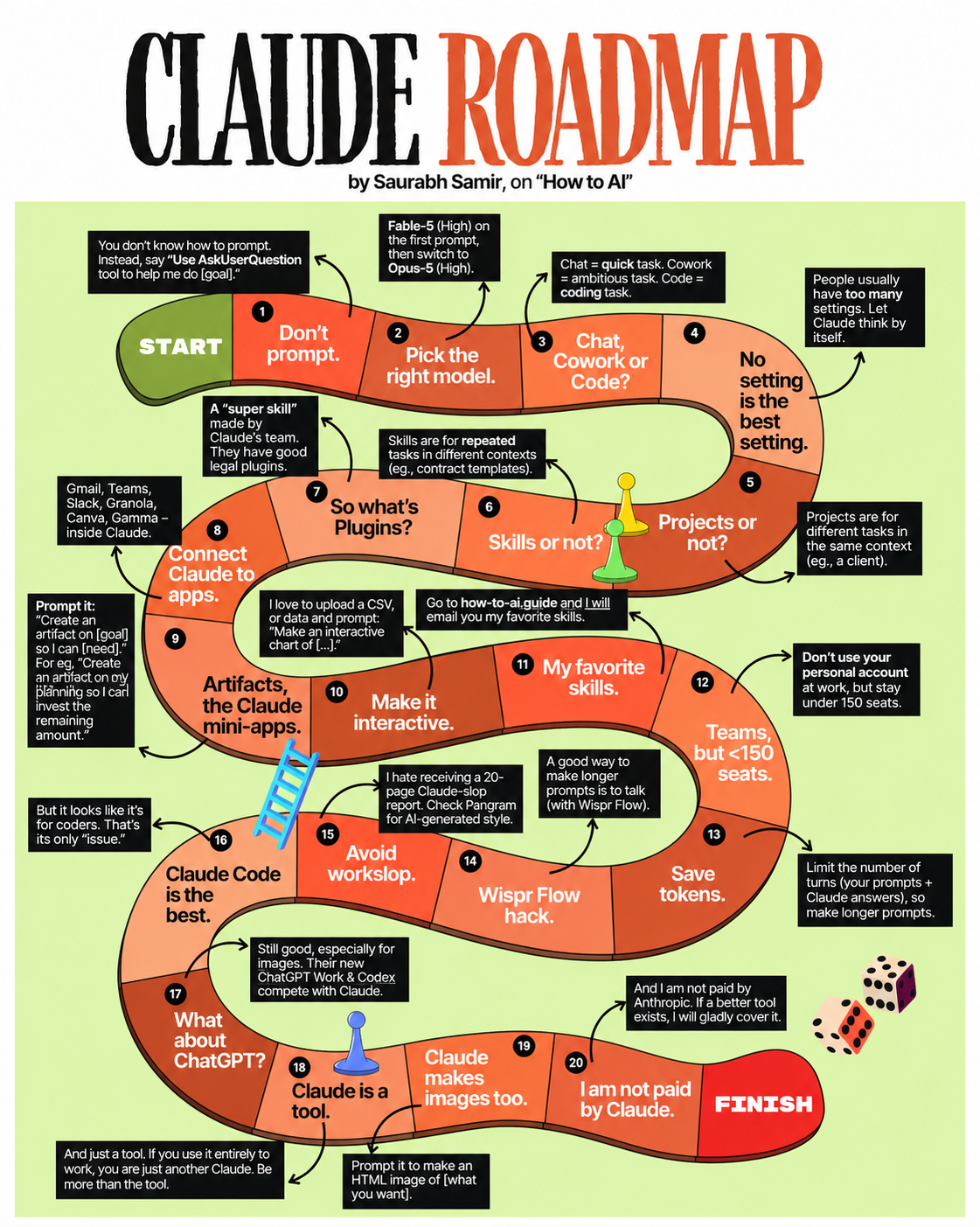
Hey! I'm Saurabh Samir, and this is my 20-step roadmap to mastering Claude AI. I've been using Claude for years, and I've distilled everything I've learned into this roadmap — from Step 1 (Don't prompt — use AskUserQuestion instead) to Step 20 (I'm not paid by Claude — I'll cover whatever tool is best). This guide covers everything: picking the right model (Fable-5 then Opus-5), choosing between Chat, Cowork, and Code, setting up Projects and Skills, connecting Claude to your apps (Gmail, Slack, Granola), building interactive Artifacts, saving tokens with Wispr Flow, avoiding workslop, and even Claude Code and ChatGPT. Whether you're just starting out or you've been using Claude for years, this roadmap will help you master Claude AI.
🚀 Getting Started (1-4)
- Step 1: Don't prompt — use AskUserQuestion
- Step 2: Pick right model — Fable-5 then Opus-5
- Step 3: Chat, Cowork, or Code
- Step 4: No setting is the best setting
📁 Organization (5-7)
- Step 5: Projects for same context
- Step 6: Skills for repeated tasks
- Step 7: Plugins — super skills
🔌 Integration (8-9)
- Step 8: Connect to Gmail, Teams, Slack
- Step 9: Artifacts — Claude mini-apps
⚡ Advanced (10-11)
- Step 10: Make it interactive
- Step 11: My favorite skills
👥 Team & Efficiency (12-14)
- Step 12: Teams, but <150 seats
- Step 13: Save tokens
- Step 14: Wispr Flow hack
🏆 Best Practices (15-17)
- Step 15: Avoid workslop
- Step 16: Claude Code is the best
- Step 17: What about ChatGPT?
🚀 20 Steps
Master Claude
Full roadmap🧠 Step 1
Don't Prompt
Use AskUserQuestion⚡ Step 10
Make It Interactive
CSV + Charts💡 Step 20
Not Paid by Claude
Honest coverage📋 The 20-Step Claude Roadmap
| Step | Title | Key Takeaway |
|---|---|---|
| 1 | Don't prompt | Use AskUserQuestion tool to help me do [goal] |
| 2 | Pick the right model | Fable-5 (High) first, then Opus-5 (High) |
| 3 | Chat, Cowork or Code? | Chat = quick, Cowork = ambitious, Code = coding |
| 4 | No setting is the best setting | Let Claude think by itself |
| 5 | Projects or not? | Projects for different tasks in same context (client) |
| 6 | Skills or not? | Skills for repeated tasks in different contexts |
| 7 | So what's Plugins? | "Super skill" made by Claude's team |
| 8 | Connect Claude to apps | Gmail, Teams, Slack, Granola, Canva, Gamma |
| 9 | Artifacts, the Claude mini-apps | "Create an artifact on [goal] so I can [need]" |
| 10 | Make it interactive | Upload CSV/data and ask for interactive chart |
| 11 | My favorite skills | Go to how-to-ai.guide for email updates |
| 12 | Teams, but <150 seats | Don't use personal account at work |
| 13 | Save tokens | Limit turns, make longer prompts |
| 14 | Wispr Flow hack | Talk to make longer prompts |
| 15 | Avoid workslop | Check Pangram for AI-generated style |
| 16 | Claude Code is the best | But it looks like it's for coders |
| 17 | What about ChatGPT? | Still good, especially for images |
| 18 | Claude is a tool | Be more than the tool |
| 19 | Claude makes images too | Prompt it to make HTML image |
| 20 | I am not paid by Claude | Not paid by Anthropic, will cover better tools |
📂 Roadmap Categories
| Phase | Steps | Focus |
|---|---|---|
| Getting Started | 1-4 | Prompting, models, modes, settings |
| Organization | 5-7 | Projects, Skills, Plugins |
| Integration | 8-9 | Apps, Artifacts |
| Advanced Usage | 10-11 | Interactive, Favorite skills |
| Team & Efficiency | 12-14 | Teams, Tokens, Wispr Flow |
| Best Practices | 15-17 | Workslop, Claude Code, ChatGPT |
| Mindset | 18-20 | Tool mindset, Images, Honesty |
📊 20-Step Claude Roadmap — Visual Summary
• Step 2: Pick right model — Fable-5 then Opus-5
• Step 3: Chat, Cowork, or Code
• Step 4: No setting is the best setting
• Step 6: Skills for repeated tasks
• Step 7: Plugins — super skills
• Step 9: Artifacts — Claude mini-apps
• Step 11: My favorite skills
• Step 13: Save tokens
• Step 14: Wispr Flow hack
• Step 16: Claude Code is the best
• Step 17: What about ChatGPT?
• Step 19: Claude makes images too
• Step 20: I am not paid by Claude
🔍 Step Details — Key Insights
| Step | What It Means | Why It Matters |
|---|---|---|
| 1 | Instead of writing long prompts, say "Use AskUserQuestion to help me do [goal]" | Let Claude ask YOU questions — saves tokens |
| 2 | Fable-5 (High) on first prompt, then switch to Opus-5 (High) | Right model for the right stage of work |
| 3 | Chat = quick task, Cowork = ambitious task, Code = coding task | Use the right mode for the job |
| 4 | Too many settings make Claude go in circles | Less context = better results |
| 5 | Projects for different tasks in the same context (e.g., a client) | Keep client work separate and organized |
| 6 | Skills for repeated tasks in different contexts (e.g., contract templates) | Reusable commands for recurring work |
| 7 | Plugins are "super skills" made by Claude's team | Pre-built solutions for common tasks |
| 8 | Connect Gmail, Teams, Slack, Granola, Canva, Gamma | Claude pulls real context from your tools |
| 9 | Artifacts are mini-apps: "Create an artifact on [goal] so I can [need]" | Claude builds interactive outputs |
| 10 | Upload CSV/data and ask for interactive chart | Turn data into visual insights |
| 11 | Go to how-to-ai.guide for favorite skills | Get curated, ready-to-use skills |
| 12 | Teams, but stay under 150 seats | Don't use personal account at work |
| 13 | Limit turns, make longer prompts | Fewer back-and-forth = fewer tokens |
| 14 | Use Wispr Flow to talk longer prompts | Speech is faster than typing |
| 15 | Avoid workslop — check Pangram for AI-generated style | Quality over quantity |
| 16 | Claude Code is the best, but looks like it's for coders | Powerful tool with an image problem |
| 17 | ChatGPT is still good, especially for images | Use the right tool for the right job |
| 18 | Claude is a tool — be more than the tool | Don't become just another Claude |
| 19 | Claude makes images too — prompt it to make HTML image | No need for other tools for simple images |
| 20 | Not paid by Anthropic — will cover better tools | Honest, unbiased recommendations |
🎯 Claude Roadmap — Quick Revision
The Golden Rule: Don't prompt — use AskUserQuestion. Pick the right model (Fable-5 then Opus-5). Use the right mode (Chat, Cowork, Code). Keep settings minimal. Organize with Projects and Skills. Connect your apps. Build Artifacts. Stay efficient. And remember — Claude is a tool, not a replacement for you.
Quick Memory Tricks:
- 📌 Steps 1-4: "Don't prompt, pick model, choose mode, minimal settings"
- 📌 Steps 5-7: "Projects for context, Skills for repeats, Plugins for super skills"
- 📌 Steps 8-9: "Connect apps, build Artifacts"
- 📌 Steps 10-11: "Make it interactive, get favorite skills"
- 📌 Steps 12-14: "Teams under 150, save tokens, use Wispr Flow"
- 📌 Steps 15-17: "Avoid workslop, use Claude Code, ChatGPT for images"
- 📌 Steps 18-20: "Be more than the tool, make HTML images, stay honest"
Daily Checklist:
- ✅ Use AskUserQuestion instead of long prompts
- ✅ Pick the right model for each task
- ✅ Choose Chat, Cowork, or Code based on need
- ✅ Keep settings minimal (Connectors only)
- ✅ Organize with Projects and Skills
- ✅ Connect your apps (Gmail, Slack, Granola)
- ✅ Build interactive Artifacts from data
- ✅ Save tokens with longer prompts + fewer turns
- ✅ Avoid workslop — check Pangram
- ✅ Be more than the tool
💡 Pro Tips for the Claude Roadmap
✅ Don't Prompt — Ask Questions
Instead of writing long prompts, say "Use AskUserQuestion to help me do [goal]." Claude will interview you and get exactly what you need.
✅ Pick the Right Model
Fable-5 (High) on the first prompt for hard problems. Then switch to Opus-5 (High) for everything else. Right model = right results.
✅ Use the Right Mode
Chat = quick tasks, Cowork = ambitious tasks, Code = coding tasks. Don't use Cowork for what Chat can do.
✅ No Setting Is the Best Setting
Too many settings make Claude go in circles. Keep it simple. Only turn on what you actually need.
✅ Projects vs. Skills
Projects for different tasks in the same context (a client). Skills for repeated tasks in different contexts (contract templates).
✅ Be More Than the Tool
Claude is a tool — just a tool. If you use it entirely to work, you're just another Claude. Be more than the tool.
from Saurabh Samir, on "How to AI"
Download Cheat Sheet
Click the button below to download this high-resolution PNG cheat sheet.
Download PNG (1.5 MB)Preview
Still have questions?
We're here to help! Reach out to our support team for any queries.