Claude Formulas
About This Cheat Sheet
Hey! I'm Saurabh Samir, and this is my cheat sheet for Claude Formulas — the 6 formulas that run 80% of my Claude work. Less guessing, more results. I've been using Claude for years, and these formulas have completely changed how I work. Formula 1 — Delete your about-me file (turn it into a skill). Formula 2 — Skills + Projects, nothing else. Formula 3 — No settings is the best setting. Formula 4 — Make Claude ask YOU. Formula 5 — Fable on Low, Opus on High. Formula 6 — Edit, don't follow up. Each formula comes with the math, the "you right now" scenario, and where to apply it. Whether you're wasting tokens, overcomplicating your setup, or just want to get more done with less effort, these 6 formulas will transform your Claude workflow.
📄 Formula 1: Delete about-me file
- The Rule: Turn it into a skill
- You (Right Now): 22,000-word file re-read every task
- Copy This: Invoke /about-me only when needed
- The Math: Files load every session, skills load on demand
- Where: Cowork → Customize → Skills
⚙️ Formula 2: Skills + Projects Only
- The Rule: Skills + Projects, nothing else
- You (Right Now): 100 skills that should be 2 projects
- Copy This: Teach → Skill, Client → Project
- The Math: Skills travel anywhere, Projects don't poison chats
- Where: Left menu, share with your team
⚙️ Formula 3: No Settings is Best Setting
- The Rule: Less settings = Better results
- You (Right Now): Instructions in every box, same answer
- Copy This: Turn everything off except Connectors
- The Math: Too much context = Claude goes in circles
- Where: Settings, 2 minutes
❓ Formula 4: Make Claude Ask YOU
- The Rule: Let Claude interview you
- You (Right Now): Writing 500-word prompts badly
- Copy This: "I want [task] to [goal]. Ask me questions with AskUserQuestion first."
- The Math: 500 words = 500 tokens per re-read, clicks cost nothing
- Where: Everywhere, follow up forever
💰 Formula 5: Fable on Low, Opus on High
- The Rule: Right model for right task
- You (Right Now): Paying smartest AI to rewrite an email
- Copy This: Fable-5 on Low for hard problems, Opus 4.8 on High for rest
- The Math: Fable $0.15/question, $14/session. Opus: included
- Where: Model picker + effort toggle
✏️ Formula 6: Edit, Don't Follow Up
- The Rule: Edit, don't follow up
- You (Right Now): "No, I meant..." on 29 old messages
- Copy This: Click Edit on your prompt, everything after dies
- The Math: Message 30 costs 31× message 1
- Where: Everywhere, yes Cowork too
📄 6 Formulas
Run 80% of Claude Work
Less guessing, more results⚙️ Formula 2
Skills + Projects
Nothing else❓ Formula 4
Make Claude Ask YOU
Clicks cost nothing✏️ Formula 6
Edit, Don't Follow Up
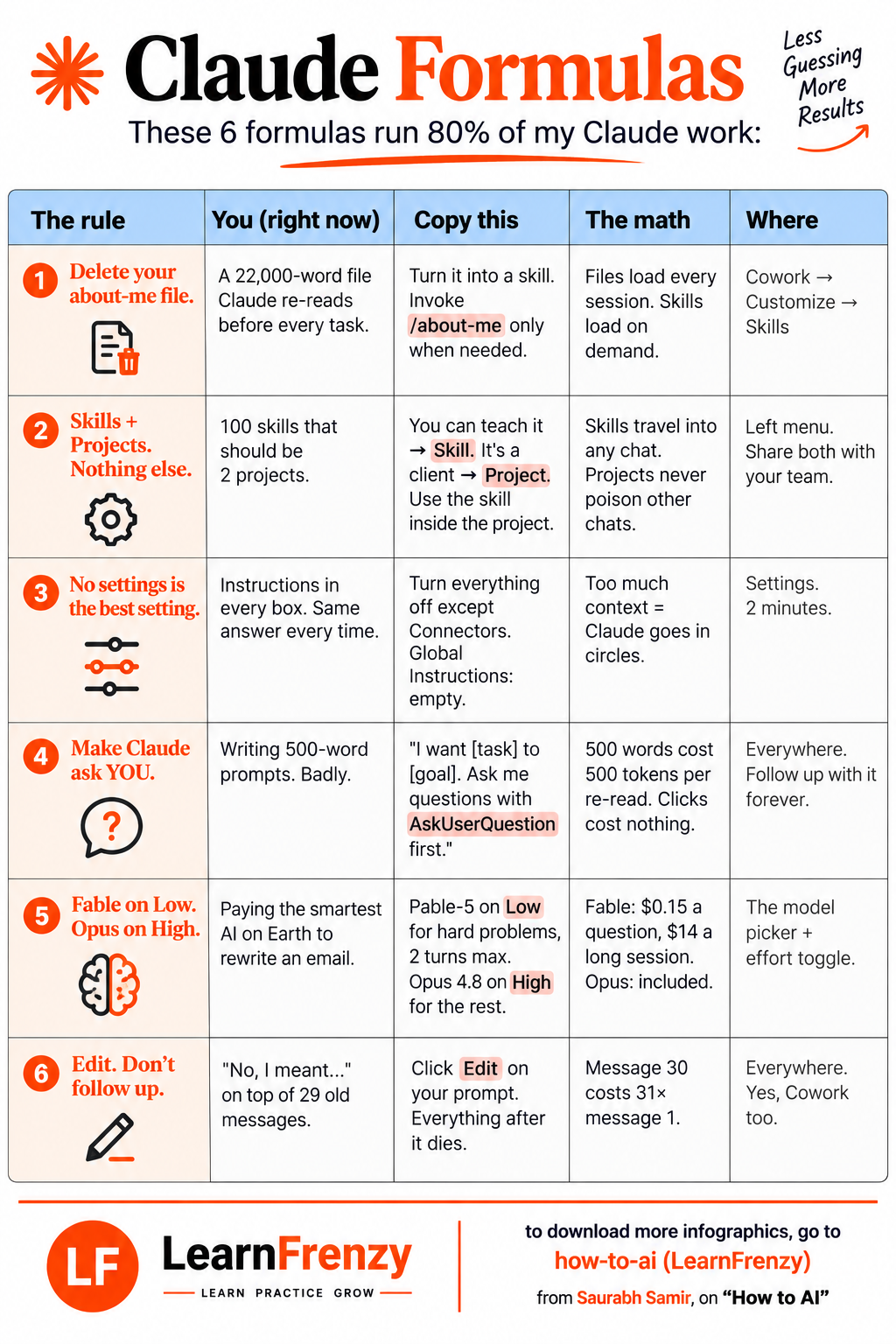
Message 30 costs 31×📋 The 6 Claude Formulas
| # | The Rule | You (Right Now) | Copy This | The Math | Where |
|---|---|---|---|---|---|
| 1 | Delete your about-me file | A 22,000-word file Claude re-reads before every task | Turn it into a skill. Invoke /about-me only when needed | Files load every session. Skills load on demand | Cowork → Customize → Skills |
| 2 | Skills + Projects. Nothing else | 100 skills that should be 2 projects | You can teach it → Skill. It's a client → Project. Use the skill inside the project | Skills travel into any chat. Projects never poison other chats | Left menu. Share both with your team |
| 3 | No settings is the best setting | Instructions in every box. Same answer every time | Turn everything off except Connectors. Global Instructions: empty | Too much context = Claude goes in circles | Settings. 2 minutes |
| 4 | Make Claude ask YOU | Writing 500-word prompts. Badly | "I want [task] to [goal]. Ask me questions with AskUserQuestion first." | 500 words cost 500 tokens per re-read. Clicks cost nothing | Everywhere. Follow up with it forever |
| 5 | Fable on Low. Opus on High | Paying the smartest AI on Earth to rewrite an email | Fable-5 on Low for hard problems, 2 turns max. Opus 4.8 on High for the rest | Fable: $0.15 a question, $14 a long session. Opus: included | The model picker + effort toggle |
| 6 | Edit. Don't follow up | "No, I meant..." on top of 29 old messages | Click Edit on your prompt. Everything after it dies | Message 30 costs 31× message 1 | Everywhere. Yes, Cowork too |
⚡ Quick Summary
| Formula | Key Takeaway |
|---|---|
| 1 | Skills > Files (load on demand, not every session) |
| 2 | Skills for teaching, Projects for clients |
| 3 | Less settings = Better results |
| 4 | Let Claude ask questions instead of writing long prompts |
| 5 | Use cheaper models for simple tasks |
| 6 | Edit prompts instead of following up |
📄 Formula 1: Delete Your about-me File
The Fix: Turn it into a skill. Invoke
/about-me only when neededThe Math: Files load every session. Skills load on demand
Where: Cowork → Customize → Skills
⚙️ Formula 2: Skills + Projects, Nothing Else
The Fix: You can teach it → Skill. It's a client → Project. Use the skill inside the project
The Math: Skills travel into any chat. Projects never poison other chats
Where: Left menu. Share both with your team
⚙️ Formula 3: No Settings Is the Best Setting
The Fix: Turn everything off except Connectors. Global Instructions: empty
The Math: Too much context = Claude goes in circles
Where: Settings. 2 minutes
❓ Formula 4: Make Claude Ask YOU
The Fix: "I want [task] to [goal]. Ask me questions with AskUserQuestion first."
The Math: 500 words cost 500 tokens per re-read. Clicks cost nothing
Where: Everywhere. Follow up with it forever
💰 Formula 5: Fable on Low, Opus on High
The Fix: Fable-5 on Low for hard problems, 2 turns max. Opus 4.8 on High for the rest
The Math: Fable: $0.15 a question, $14 a long session. Opus: included
Where: The model picker + effort toggle
📊 Claude Formulas — Visual Summary
• Where: Cowork → Customize → Skills
• Where: Left menu. Share with team
• Where: Settings. 2 minutes
• Where: Everywhere. Follow up forever
• Where: Model picker + effort toggle
• Where: Everywhere. Yes, Cowork too
🎯 Claude Formulas — Quick Revision
The Golden Rule: Less guessing, more results. These 6 formulas run 80% of my Claude work. Use them, and you'll save tokens, get better outputs, and stop wasting time.
Quick Memory Tricks:
- 📌 Formula 1: "Delete about-me file → Turn into skill"
- 📌 Formula 2: "Skills + Projects, nothing else"
- 📌 Formula 3: "No settings is the best setting"
- 📌 Formula 4: "Make Claude ask YOU"
- 📌 Formula 5: "Fable on Low, Opus on High"
- 📌 Formula 6: "Edit, don't follow up"
Daily Checklist:
- ✅ Use /about-me skill instead of loading the file
- ✅ Separate Skills (teaching) from Projects (clients)
- ✅ Turn off unnecessary settings
- ✅ Let Claude ask questions with AskUserQuestion
- ✅ Use Fable on Low for simple tasks, Opus on High for complex
- ✅ Edit prompts instead of following up
💡 Pro Tips for Claude Formulas
✅ Skills > Files
Files load every session and cost tokens. Skills load on demand, only when you invoke them. Turn your about-me file into a skill.
✅ Skills for Teaching, Projects for Clients
If you can teach it, make it a Skill. If it's a client, make it a Project. Skills travel anywhere, Projects stay contained.
✅ Less Settings = Better Results
Turn everything off except Connectors. Keep Global Instructions empty. Too much context makes Claude go in circles.
✅ Let Claude Ask Questions
Don't write 500-word prompts. Use "I want [task] to [goal]. Ask me questions with AskUserQuestion first." Clicks cost nothing.
✅ Right Model for Right Task
Use Fable-5 on Low for hard problems (2 turns max). Use Opus 4.8 on High for everything else. Fable costs $0.15/question.
✅ Edit, Don't Follow Up
Click Edit on your prompt instead of adding a new message. Message 30 costs 31× message 1. This saves massive tokens.
from Saurabh Samir, on "How to AI"
Download Cheat Sheet
Click the button below to download this high-resolution PNG cheat sheet.
Download PNG (1.8 MB)Preview
Still have questions?
We're here to help! Reach out to our support team for any queries.