@wire vs Imperative Apex (Salesforce LWC)
About This Cheat Sheet
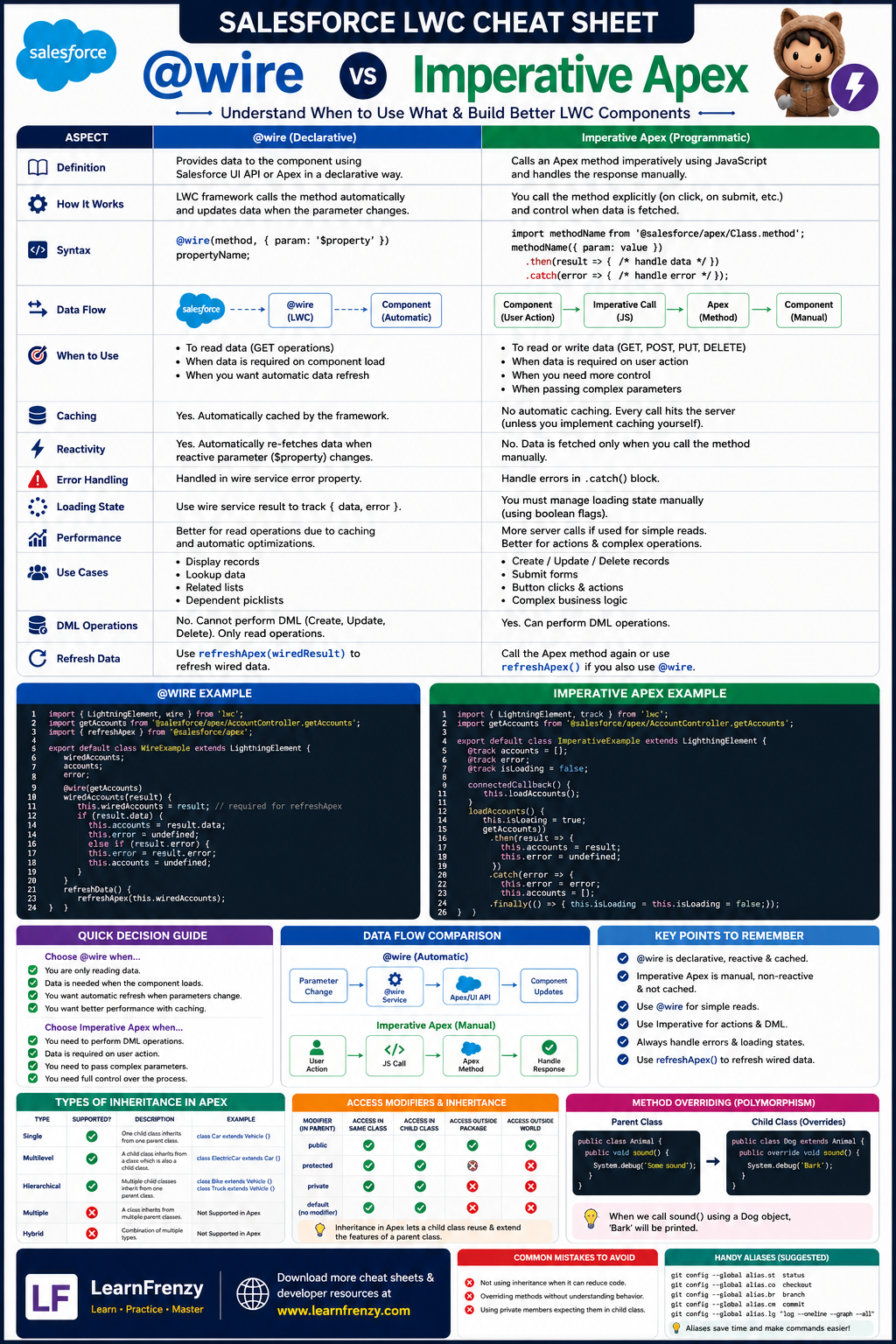
Hey there! Welcome to your complete guide to understanding @wire and Imperative Apex calls in Salesforce Lightning Web Components (LWC). I've put together everything you need to know — from @wire syntax and reactive variables to Imperative Apex with async/await, error handling, and when to use each approach. Whether you're preparing for platform developer certifications or building production-grade LWC applications, this cheat sheet covers key differences, best practices, common scenarios, and shortcut techniques to help you master data retrieval in LWC.
🔌 @wire Apex Methods
- Syntax: @wire(apexMethod, params)
- Reactive: Auto-updates on dependency change
- Caching: Built-in automatic caching
- Load Time: Component initialization
- Wired Functions: Handle data/error responses
- refreshApex: Refresh wired data
- Best For: Initial data load
- Example: getRecord, getFieldValue
⚡ Imperative Apex Methods
- Syntax: apexMethod(params)
- Non-Reactive: Manual re-call required
- Caching: Manual implementation
- Load Time: User interaction
- Error Handling: try-catch, .catch()
- Async/Await: Modern promise handling
- Best For: User actions, search, forms
- Example: CRUD operations, DML
📊 Key Differences
- @wire: Reactive, cached, component load
- Imperative: Manual, non-reactive, user actions
- Performance: @wire faster for initial load
- Error Handling: Both support, different syntax
- Testing: Imperative easier to test
- Refresh: @wire = refreshApex, Imperative = re-call
- Cacheable: @wire requires cacheable=true
- DML: Imperative only for non-cacheable
🔄 Response Handling
- data: Success response
- error: Error response
- Loading States: Show spinner
- UI Updates: Reactive rendering
- Error Messages: Toast notifications
- Fallback Data: Cache on error
- User Feedback: Progress indicators
- Refresh: Re-fetch data
💡 Best Practices
- @wire: Use for initial data load
- Imperative: Use for user interactions
- Error Handling: Always handle errors
- Loading States: Show user feedback
- Caching: Use cacheable for read-only
- Refresh: Implement refresh mechanism
- Memory: Clean up subscriptions
- Testing: Test both approaches
🚀 Advanced Patterns
- Combining: Both approaches together
- Conditional Calls: Call based on condition
- Dependent Wires: Wire depends on another
- Dynamic Parameters: Reactive parameters
- refreshApex: Refresh wired data
- Lazy Loading: Load on demand
- Debouncing: Prevent excessive calls
- Throttling: Control call frequency
🔌 @wire
Reactive Data
Auto-updates⚡ Imperative
Manual Calls
User Actions📊 Cacheable
@AuraEnabled
Read-Only🔄 refreshApex
Refresh Data
Wired Only📊 @wire vs Imperative Apex Comparison
Feature
- When to Use
- Reactivity
- Caching
- Error Handling
- Performance
- Syntax
- Loading State
- Refresh
- Testing
🔌 @wire
- Data needed on component load
- ✅ Reactive - auto-updates
- ✅ Automatic caching available
- Via wired function or error property
- Better for initial load
- @wire(apexMethod, params)
- Built-in via wired function
- Using refreshApex()
- More challenging
⚡ Imperative
- Data needed after user interaction
- ❌ Non-reactive - manual re-call
- ❌ Manual caching required
- Via try-catch or .catch()
- Better for actions/button clicks
- this.apexMethod(params)
- Must manually manage
- Must re-call the method
- Easier to unit test
🔌 @wire Syntax Examples
// Basic @wire
@wire(getAccount, { accountId: '$recordId' })
wiredAccount;

// With wired function
@wire(getAccount, { accountId: '$recordId' })
wiredAccount({ data, error }) {
    if (data) {
        this.account = data;
    } else if (error) {
        this.error = error;
    }
}

// Reactive parameters
@wire(getRelatedContacts, { accountId: '$selectedAccountId' })
contacts;
⚡ Imperative Apex Syntax Examples
// Basic imperative call
import getAccount from '@salesforce/apex/AccountController.getAccount';

handleClick() {
    getAccount({ accountId: this.recordId })
        .then(data => {
            this.account = data;
        })
        .catch(error => {
            this.error = error;
        });
}

// With async/await
async handleClick() {
    try {
        const data = await getAccount({ accountId: this.recordId });
        this.account = data;
    } catch (error) {
        this.error = error;
    }
}

// With loading state
async handleClick() {
    this.isLoading = true;
    try {
        const data = await getAccount({ accountId: this.recordId });
        this.account = data;
    } catch (error) {
        this.error = error;
    } finally {
        this.isLoading = false;
    }
}
| 🔌 Wire Adapter | 📂 Import Path | 🎯 Primary Use Case | ⚡ Source API |
|---|---|---|---|
getRecord |
@salesforce/apex/... |
Retrieves Salesforce record data from an Apex method using the @wire service. |
Custom Apex |
getFieldValue |
lightning/uiRecordApi |
Extracts the value of a specific field from a record returned by getRecord. |
UI Record API |
getObjectInfo |
lightning/uiObjectInfoApi |
Retrieves object metadata, including fields, labels, record types, and default record type information. | UI Object Info API |
getPicklistValues |
lightning/uiObjectInfoApi |
Retrieves picklist values for a specific field based on the selected record type. | UI Object Info API |
getPicklistValuesByRecordType |
lightning/uiObjectInfoApi |
Retrieves all picklist field values available for an object based on a specific record type. | UI Object Info API |
getListUi |
lightning/uiListApi |
Retrieves Salesforce List View records together with list view metadata. | UI List API |
getRecordUi |
lightning/uiRecordApi |
Retrieves record data along with layout and related UI metadata. | UI Record API |
🎯 Common Scenarios
📄 Scenario
- Initial Data Load
- Search/Filter
- Form Submission
- Dependent Picklists
- Data Refresh
- Count Only
- Modal/Popup
- Dashboard
🔌 Approach
- @wire
- Imperative
- Imperative
- Imperative
- @wire + refreshApex
- @wire
- Imperative
- @wire
💡 Example Use Case
- Detail page loading account info
- User searches for accounts
- Create or update record
- Load values based on selection
- Refresh after record update
- Display record count
- Load data when modal opens
- Multiple independent data sources
🛡️ Error Handling Patterns
🔧 Pattern
- try-catch
- .catch()
- Wired Function
- Error Tracking
- User Feedback
- Fallback Data
⏰ When to Use
- Imperative calls
- Imperative with promises
- @wire calls
- Both
- Both
- Both
📝 Example
- try { await apexMethod(); } catch (error) { ... }
- apexMethod().catch(error => { ... })
- wiredMethod({ data, error }) { ... }
- Track errors for monitoring
- Show toast messages
- Show cached data on error
💡 Best Practices
📌 Practice
- Initialize
- Cache
- Refresh
- Load Screen
- Error Display
- Memory Cleanup
🔌 @wire
- Component load
- Use @AuraEnabled(cacheable=true)
- Use refreshApex()
- Use wired function
- Use wired function
- Automatic
⚡ Imperative
- User interaction
- Implement manual cache
- Re-call method
- Use isLoading variable
- Use try-catch with error var
- Manual cleanup in disconnectedCallback
⚠️ Common Pitfalls to Avoid
❌ Pitfall
- Missing @AuraEnabled
- Cacheable false with @wire
- Not handling undefined
- Missing error handling
- Inefficient DML
- Not unsubscribing
- Callback hell
⚠️ Problem
- Apex not accessible
- @wire throws error
- Component breaks
- User sees blank screen
- Performance issues
- Memory leaks
- Code hard to read
✅ Solution
- Add @AuraEnabled(cacheable=true)
- Only use imperative for non-cacheable
- Check data exists before using
- Always handle errors
- Use multiple calls vs single
- Clean up subscriptions
- Use async/await
⏰ Lifecycle Methods
⏰ Method
- connectedCallback
- renderedCallback
- User Action
- Parameter Change
- Form Submit
- Search/Filter
🔌 @wire
- ✅ Yes
- ✅ Yes (only once)
- ❌ No
- ✅ Yes (reactive)
- ❌ No
- ❌ No
⚡ Imperative
- ❌ No (use @wire instead)
- ❌ No (use @wire instead)
- ✅ Yes
- ✅ Yes (manual call)
- ✅ Yes
- ✅ Yes
📝 Sample Apex Methods
// Cacheable - Can be used with @wire @AuraEnabled(cacheable=true) public static Account getAccount(Id accountId) { return [SELECT Id, Name, Industry, Phone FROM Account WHERE Id = :accountId]; } // Non-cacheable - Must use imperative @AuraEnabled(cacheable=false) public static Account createAccount(Account newAccount) { insert newAccount; return newAccount; } // With parameter handling @AuraEnabled(cacheable=true) public static ListgetContactsByAccount(Id accountId, Integer limitCount) { return [SELECT Id, Name, Email FROM Contact WHERE AccountId = :accountId LIMIT :limitCount]; }
⚡ Performance Comparison
📊 Aspect
- Initial Load Time
- Network Calls
- Caching
- Component Renders
- User Experience
- Server Round Trips
- Data Binding
🔌 @wire
- Faster (parallel)
- One automatic call
- Built-in
- Minimal
- Immediate data
- Optimized
- Automatic
⚡ Imperative
- Slower (sequential)
- Multiple manual calls
- Must implement
- More renders
- Loading state required
- More round trips possible
- Manual
🎯 @wire vs Imperative Apex Quick Revision
The Golden Rule: Use @wire for data needed on component load and when you want automatic reactivity. Use Imperative Apex for user-triggered actions like search, form submission, and DML operations.
Quick Memory Tricks:
- 📌 @wire: "Load and React" — data loads on component load, reacts to changes
- 📌 Imperative: "Call and Handle" — called on user action, handle manually
- 📌 Cacheable: @AuraEnabled(cacheable=true) for @wire, false for DML
- 📌 refreshApex: Only for @wire — re-fetches wired data
- 📌 Async/Await: Cleaner imperative syntax with try-catch-finally
When to Use Each:
- ✅ Use @wire for: Record detail pages, dashboard widgets, display-only data, reactive dependencies
- ✅ Use Imperative for: Search functionality, form submissions, dependent picklists, modal popups, CRUD operations
- ✅ Use Both: Hybrid approach — @wire for initial load, imperative for refreshes and updates
💡 Pro Tips for @wire vs Imperative Apex
✅ Use @wire for Initial Load
Always use @wire for data that needs to display on component load. It's faster and automatically caches the result.
✅ Use Imperative for User Actions
Buttons, search, and form submissions should use imperative calls. They provide better control over loading states and error handling.
✅ Always Handle Errors
Use try-catch for imperative and error property for @wire. Show user-friendly toast messages for better UX.
✅ Use refreshApex for Updates
After DML operations, use refreshApex() on wired data to automatically refresh the UI without re-calling manually.
✅ Show Loading States
Always show loading spinners for imperative calls. For @wire, use the loading property in wired functions.
✅ Cacheable for Read-Only
Mark Apex methods with cacheable=true for @wire. Use cacheable=false (default) for DML operations.
📋 Quick Reference: Syntax Summary
🔌 @wire Syntax
- Basic: @wire(apexMethod, params) variable;
- With Function: @wire(apexMethod, params) wiredMethod({ data, error }) { ... }
- Reactive: @wire(apexMethod, { param: '$reactiveVar' })
- Import: import apexMethod from '@salesforce/apex/MyController.method';
- Refresh: refreshApex(this.wiredVariable);
- Note: Requires cacheable=true on Apex method
⚡ Imperative Syntax
- Basic: apexMethod(params).then(data => { }).catch(error => { });
- Async/Await: async handleClick() { try { const data = await apexMethod(params); } catch (error) { } }
- Loading: this.isLoading = true; try { ... } finally { this.isLoading = false; }
- Import: import apexMethod from '@salesforce/apex/MyController.method';
- Note: Works with cacheable=true and false
🛡️ Quick Reference: Error Handling
🔌 @wire Error Handling
- Wired Function: wiredMethod({ data, error }) { if (error) { this.error = error; } }
- Error Property: this.wiredMethod.error
- User Feedback: Show toast message with error.body.message
- Fallback: Display cached data or empty state
⚡ Imperative Error Handling
- try-catch: try { await apexMethod(); } catch (error) { this.error = error; }
- .catch(): apexMethod().catch(error => { this.error = error; });
- finally: Always reset loading state in finally block
- Network Errors: Check error.body and error.message
✅ Best Practices
- Always: Handle errors in every call
- Toast: Show user-friendly error messages
- Console: Log errors for debugging
- State: Set error state for UI display
- Retry: Provide retry option for users
Download Cheat Sheet
Click the button below to download this high-resolution PNG cheat sheet.
Download PNG (1.3 MB)Preview
Still have questions?
We're here to help! Reach out to our support team for any queries.