Salesforce Apex Basics Series: Week 2
About This Cheat Sheet
Hey there! Continuing my Salesforce Apex learning journey with Week 2. This cheat sheet covers Day 6: Types of Variables — Local Variables, Instance Variables, Global Variables, memory management (Stack vs Heap). Day 7: Conditional Statements — if, if-else, if-else-if ladder, switch statement with real examples. Day 8: OOPS Concepts — Encapsulation, Inheritance, Polymorphism, Abstraction explained with real-life examples and Apex code. Day 9: Encapsulation in detail — Data hiding, private variables, getter/setter methods, access control. Day 10: Inheritance in detail — Parent-Child relationship, extends keyword, code reusability, real examples. Perfect for beginners learning Apex programming and Salesforce development.
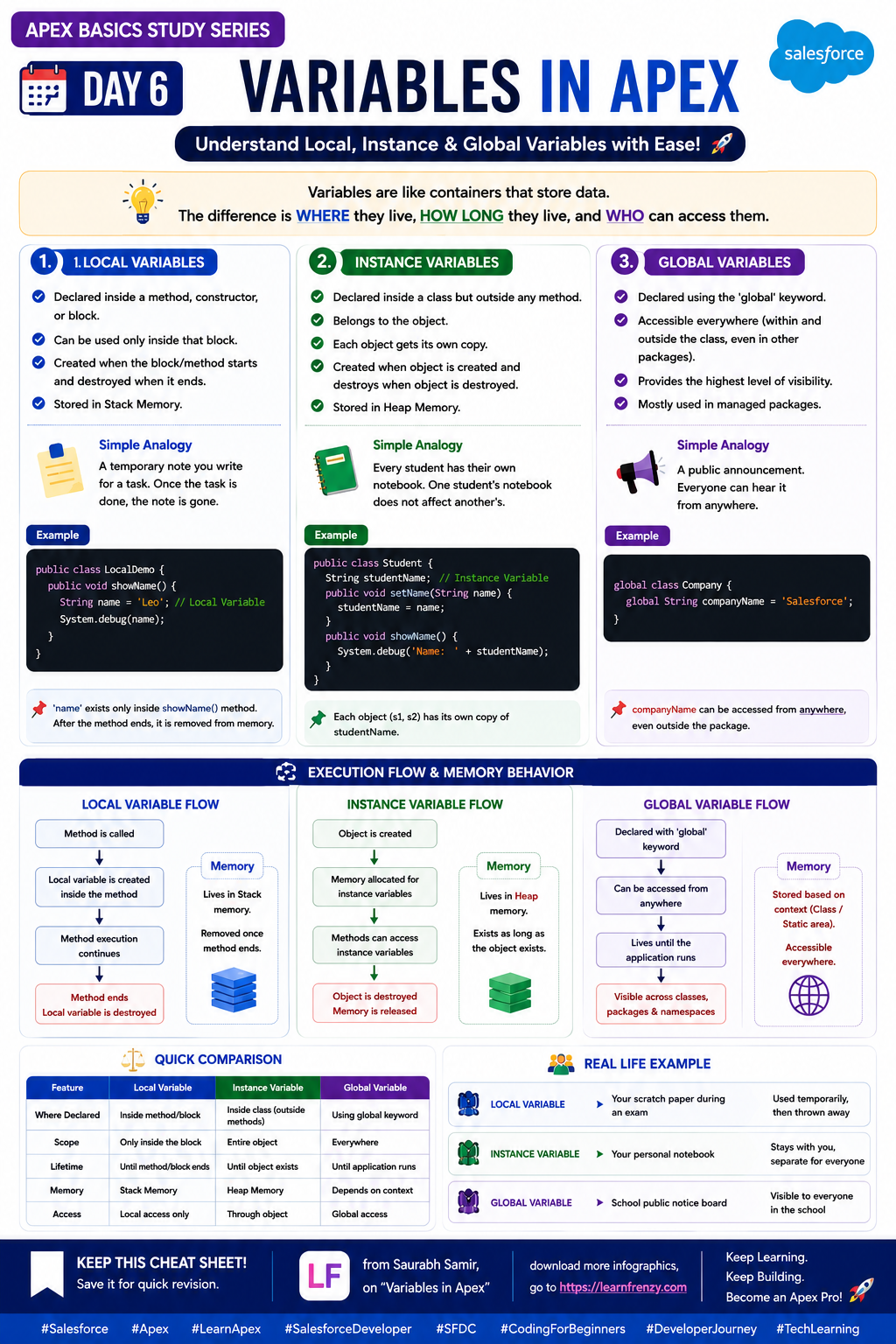
📦 Day 6: Types of Variables
- Local Variables - Inside methods (Stack)
- Instance Variables - Inside class (Heap)
- Static Variables - Shared across instances
- Global Variables - Across namespaces
- Stack Memory - Fast, temporary
- Heap Memory - Slow, persistent
- Scope & Lifetime - Variable visibility
- Best Practices - Memory management
🔀 Day 7: Conditional Statements
- if - Simple condition
- if-else - Two-way branching
- if-else-if - Multiple conditions
- switch - Multi-way branching
- when - Switch cases
- else - Default case
- Nested if - If inside if
- Real examples - Practical usage
🧬 Day 8: OOPS Concepts
- Encapsulation - Data hiding
- Inheritance - Code reusability
- Polymorphism - Multiple forms
- Abstraction - Hide complexity
- Real-life Examples - Practical understanding
- Apex Code - Implementation
- Best Practices - Clean code
- Interview Questions - Key concepts
🔒 Day 9: Encapsulation
- Data Hiding - Hide internal state
- private Variables - Restricted access
- Getter Methods - Read data
- Setter Methods - Write data
- Access Control - public, private
- Validation - In setter methods
- Read-only - Getter only
- Write-only - Setter only
🔗 Day 10: Inheritance
- Parent-Child - Superclass/Subclass
- extends Keyword - Inherit from parent
- Code Reusability - Reuse parent code
- super Keyword - Call parent methods
- Overriding - Override parent methods
- Single Inheritance - One parent
- Real Examples - Practical usage
- Best Practices - When to use
🏁 Week 2 Takeaways
- Variables - Know where they live
- Conditionals - Control flow
- OOPS - Core concepts
- Encapsulation - Data protection
- Inheritance - Code reuse
- Memory - Stack vs Heap
- Access - Control modifiers
- Practice - Write more code
📦 Day 6
Types of Variables
Stack vs Heap🔀 Day 7
Conditional Statements
if, switch🧬 Day 8
OOPS Concepts
4 Pillars🔒 Day 9
Encapsulation
Data Hiding📦 Day 6: Types of Variables
📍 Local Variables
- Scope: Inside method/block
- Memory: Stack
- Lifetime: Method execution
- Access: Only within method
- Example: Integer count = 0;
📦 Instance Variables
- Scope: Inside class
- Memory: Heap
- Lifetime: Object lifetime
- Access: Across methods
- Example: public Integer count;
🌐 Static Variables
- Scope: Class level
- Memory: Shared (Heap)
- Lifetime: Class lifetime
- Access: Across instances
- Example: public static Integer count;
📦 Day 6: Code Example — Types of Variables
public class VariableDemo {
    // Instance Variable — Stored in Heap
    public Integer instanceCount = 5;

    // Static Variable — Shared, Stored in Heap
    public static Integer staticCount = 10;

    public void display() {
        // Local Variable — Stored in Stack
        Integer localCount = 3;

        System.debug('Local: ' + localCount);     // Stack
        System.debug('Instance: ' + instanceCount); // Heap
        System.debug('Static: ' + staticCount);     // Heap
    }
}
🔀 Day 7: Conditional Statements
📝 if Statement
- Syntax: if (condition) { // code }
- Use: Single condition
- Example: if (age >= 18) { System.debug('Adult'); }
📝 if-else Statement
- Syntax: if (cond) { } else { }
- Use: Two-way branching
- Example: if (score >= 40) { 'Pass' } else { 'Fail' }
📝 if-else-if Ladder
- Syntax: if (c1) { } else if (c2) { } else { }
- Use: Multiple conditions
- Example: Grade based on marks
🔀 Day 7: Switch Statement
🎯 Switch Syntax
- Syntax: switch (expression) { when value1 { } when value2 { } }
- Use: Multi-way branching
- when else: Default case
- Key: Cleaner than multiple if-else
💡 When to Use Switch
- Multiple equality checks
- Enum values
- String matching
- Integer values
- 💡 My Tip: Use switch for 3+ conditions
🔀 Day 7: Code Example — Conditional Statements
public class ConditionalDemo {
    public static void checkGrade(Integer marks) {
        // if-else-if Ladder
        if (marks >= 90) {
            System.debug('Grade: A');
        } else if (marks >= 75) {
            System.debug('Grade: B');
        } else if (marks >= 60) {
            System.debug('Grade: C');
        } else {
            System.debug('Grade: F (Fail)');
        }
    }

    public static void checkDay(String day) {
        // Switch Statement
        switch (day) {
            when 'Monday' {
                System.debug('Start of week');
            }
            when 'Friday' {
                System.debug('End of week');
            }
            when 'Saturday', 'Sunday' {
                System.debug('Weekend!');
            }
            when else {
                System.debug('Midweek');
            }
        }
    }
}
🧬 Day 8: OOPS Concepts
🔒 Encapsulation
- What: Data hiding
- How: private variables + getters/setters
- Example: Bank account balance
- Benefit: Data protection
🔗 Inheritance
- What: Parent-Child relationship
- How: extends keyword
- Example: Vehicle → Car, Bike
- Benefit: Code reusability
🔄 Polymorphism
- What: Multiple forms
- How: Overriding, Overloading
- Example: Shape → Circle, Square
- Benefit: Flexibility
🎯 Abstraction
- What: Hide complexity
- How: abstract classes, interfaces
- Example: Car steering wheel
- Benefit: Simplify usage
🧬 Day 8: Code Example — OOPS Concepts
// Abstract class (Abstraction)
public abstract class Shape {
    public abstract Double area();
}

// Inheritance: Circle extends Shape
public class Circle extends Shape {
    // Encapsulation: private variable
    private Double radius;

    // Encapsulation: getter & setter
    public Double getRadius() { return radius; }
    public void setRadius(Double r) { radius = r; }

    // Polymorphism: Overriding area method
    public override Double area() {
        return 3.14 * radius * radius;
    }
}
🔒 Day 9: Encapsulation in Detail
📦 Data Hiding
- What: Hide internal state
- How: private variables
- Why: Prevent unauthorized access
- Rule: Variables = private
- Benefits: Security, Integrity
📥 Getter Methods
- Purpose: Read data
- Syntax: public DataType getVariable() { return variable; }
- Read-only: Only getter, no setter
- Validation: Can add logic
📤 Setter Methods
- Purpose: Write data
- Syntax: public void setVariable(DataType value) { variable = value; }
- Write-only: Only setter, no getter
- Validation: Check values before assignment
🔒 Day 9: Code Example — Encapsulation
public class BankAccount {
    // Private variable — Data Hiding
    private Double balance;

    // Constructor
    public BankAccount(Double initialBalance) {
        if (initialBalance >= 0) {
            this.balance = initialBalance;
        }
    }

    // Getter — Read data
    public Double getBalance() {
        return balance;
    }

    // Setter — Write data with validation
    public void setBalance(Double newBalance) {
        if (newBalance >= 0) {
            this.balance = newBalance;
        } else {
            System.debug('Balance cannot be negative');
        }
    }

    // Deposit with validation
    public void deposit(Double amount) {
        if (amount > 0) {
            balance += amount;
        }
    }
}
🔗 Day 10: Inheritance in Detail
👪 Parent-Child
- Parent: Superclass
- Child: Subclass
- Keyword: extends
- Single Inheritance: One parent
- Access: protected, public
🔄 Code Reusability
- Benefit: Reuse parent code
- Override: Change parent behavior
- super: Call parent methods
- Benefits: Less code, Less errors
- Use: When objects share common behavior
💡 Real Examples
- Vehicle → Car, Bike, Truck
- Animal → Dog, Cat, Bird
- Shape → Circle, Square, Triangle
- Employee → Developer, Manager
- 💡 My Tip: Use inheritance for IS-A relationship
🔗 Day 10: Code Example — Inheritance
// Parent Class
public class Vehicle {
    protected String brand;
    protected Integer speed;

    public Vehicle(String brand) {
        this.brand = brand;
    }

    public void start() {
        System.debug('Vehicle starting...');
    }

    public void showBrand() {
        System.debug('Brand: ' + brand);
    }
}

// Child Class — Car inherits Vehicle
public class Car extends Vehicle {
    private Integer doors;

    public Car(String brand, Integer doors) {
        super(brand); // Call parent constructor
        this.doors = doors;
    }

    // Override parent method
    public override void start() {
        super.start(); // Call parent method
        System.debug('Car engine started!');
    }

    public void showDoors() {
        System.debug('Doors: ' + doors);
    }
}
🎯 Week 2 Quick Revision
The Golden Rule: Understanding variables, conditional statements, and OOPS concepts is essential for writing clean, maintainable, and efficient Apex code.
Quick Memory Tricks:
- 📌 Day 6: Local = Stack (fast), Instance/Static = Heap (slower)
- 📌 Day 7: if-else for 2-way, if-else-if for multiple, switch for 3+ equality checks
- 📌 Day 8: Encapsulation (hiding), Inheritance (reusing), Polymorphism (flexibility), Abstraction (simplifying)
- 📌 Day 9: private variables + public getters/setters = Encapsulation
- 📌 Day 10: extends = Inheritance, super = call parent, override = change behavior
Key Takeaways:
- Local Variables live in Stack — method scope only
- Instance Variables live in Heap — object scope
- Encapsulation protects data using private variables and getters/setters
- Inheritance promotes code reusability using extends keyword
- Polymorphism allows methods to take multiple forms
- Abstraction hides implementation details from the user
💡 Pro Tips for Week 2
✅ Use Switch for Multiple Conditions
Switch statements are cleaner than multiple if-else blocks for 3+ conditions. Use when checking equality.
✅ Always Use Private Variables
Keep variables private by default. Provide public getters/setters only when needed for encapsulation.
✅ Validate in Setters
Add validation logic in setter methods to ensure data integrity and prevent invalid values.
✅ Use Inheritance Wisely
Only use inheritance when there's a true IS-A relationship. Don't overuse it.
✅ Override for Customization
Use override keyword to customize parent class behavior in child classes while keeping the same method signature.
✅ Understand Memory
Knowing where variables live (Stack vs Heap) helps you write more efficient code and avoid memory issues.
📦 Quick Reference: Variable Types
📍 Local Variables
- Scope: Method/Block
- Memory: Stack
- Access: Only within method
- Lifetime: Method execution
📦 Instance Variables
- Scope: Class
- Memory: Heap
- Access: Across methods
- Lifetime: Object lifetime
🌐 Static Variables
- Scope: Class
- Memory: Shared Heap
- Access: Across instances
- Lifetime: Class lifetime
Download Cheat Sheet
This cheat sheet has 5 pages. Choose download option:
Preview
Still have questions?
We're here to help! Reach out to our support team for any queries.