How to prompt Claude Code
About This Cheat Sheet
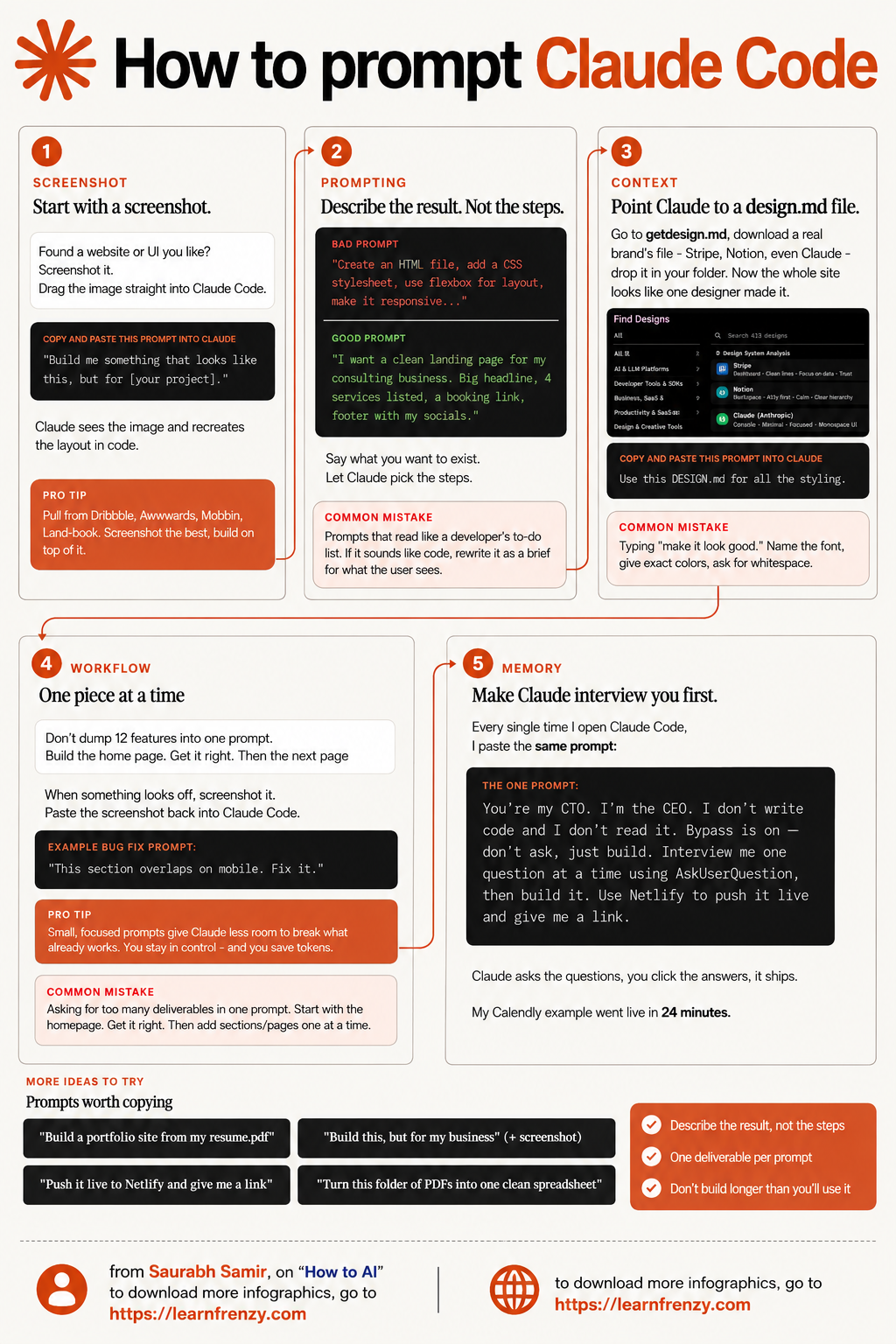
Hi! I'm Saurabh Samir, and this cheat sheet is all about how to prompt Claude Code effectively. I've been using Claude Code for months and have discovered that the way you prompt makes all the difference between getting generic code and getting exactly what you need. This guide covers the anatomy of a great Claude Code prompt, how to provide context that actually helps, examples of good vs bad prompts, and my favorite techniques for getting Claude Code to write clean, working code every time. I've also included real-world examples for Python, JavaScript, Java, and C++, common mistakes to avoid, and a checklist to make sure your prompts are on point. Whether you're building a full-stack app, writing scripts, or just experimenting, these prompting techniques will transform how you code with Claude.
📸 Screenshot First
- Found a website or UI you like?
- Screenshot it
- Drag image into Claude Code
- Claude recreates the layout
- Pull from Dribbble, Awwwards
- Build on top of existing designs
📝 Describe Results, Not Steps
- BAD: "Create HTML file, add CSS, use flexbox..."
- GOOD: "Clean landing page for my business"
- Say what you want to exist
- Let Claude pick the steps
- Focus on what user sees
- Write as a brief, not a to-do list
📁 Use design.md Context
- Download design.md files
- Use Stripe, Notion, Claude designs
- Drop in your folder
- Site looks like one designer made it
- Name fonts, give exact colors
- Ask for whitespace
🔄 One Piece at a Time
- Don't dump 12 features in one prompt
- Build home page first
- Get it right, then next page
- Screenshot what looks off
- Paste back into Claude Code
- Fix it with specific feedback
🧠 Make Claude Interview You
- Use the "CTO/CEO" prompt
- "You're my CTO, I'm the CEO"
- Claude asks clarifying questions
- You click answers
- It ships the product
- Builds in under 30 minutes
💡 Pro Tips
- Small, focused prompts
- Less room for errors
- Stay in control
- Save tokens
- Start with homepage
- Add sections one at a time
📸 Screenshot
Drag & drop UI
Rebuild any design📝 Results First
Describe what you want
Not how to build it📁 design.md
Brand templates
Professional designs🧠 Interview Mode
Claude asks questions
You click answers📸 Technique 1: Start with a Screenshot
How It Works
- Found a website or UI you like?
- Screenshot it
- Drag the image straight into Claude Code
- Claude sees the image and recreates the layout in code
- 💡 My Tip: Pull from Dribbble, Awwwards, Mobbin, Land-book
The Prompt
- Copy and paste this prompt:
- "Build me something that looks like this, but for [your project]."
- Claude sees the image and recreates the layout in code
- 💡 My Tip: Screenshot the best designs, build on top of them
📝 Technique 2: Describe Results, Not Steps
🚫 Common Mistake
📁 Technique 3: Use design.md for Context
How It Works
- Point Claude to a design.md file
- Go to getdesign.md
- Download a real brand's file
- Stripe, Notion, or Claude designs
- Drop it in your folder
- 💡 My Tip: Now the whole site looks like one designer made it
The Prompt
- Copy and paste this prompt:
- "Use this DESIGN.md for all the styling."
- Name the font
- Give exact colors
- Ask for whitespace
- 💡 My Tip: Don't just say "make it look good"
Find Designs
- AI & LLM Platforms
- Developer Tools & SDKs
- Business, SaaS & SaaS
- Productivity & SaaS
- Design & Creative Tools
- 💡 My Tip: Search 413+ designs available
🔄 Technique 4: One Piece at a Time
🎯 Don't Dump Everything
- Don't dump 12 features into one prompt
- Build the home page first
- Get it right, then the next page
- Small, focused prompts = better results
- 💡 My Tip: Less room for Claude to break things
📸 Screenshot & Fix
- When something looks off
- Screenshot it
- Paste it back into Claude Code
- Be specific about the issue
- 💡 My Tip: "This section overlaps on mobile. Fix it."
✅ The Right Approach
- Build homepage → Get it right
- Build about page → Get it right
- Build contact page → Get it right
- Add features one by one
- 💡 My Tip: Each piece builds on the last
🧠 Technique 5: Make Claude Interview You First
The One Prompt
- Every single time I open Claude Code, I paste this:
- "You're my CTO. I'm the CEO. I don't write code and I don't read it. Bypass is on - don't ask, just build. Interview me one question at a time using AskUserQuestion, then build it. Use Netlify to push it live and give me a link."
- 💡 My Tip: Claude asks the questions, you click answers, it ships
Why It Works
- Claude asks clarifying questions
- You click multiple-choice answers
- Approve the plan
- Let it build
- 💡 My Tip: My Calendly example went live in 24 minutes
📊 Good vs Bad Prompt Examples
❌ Bad Prompts
- "Create an HTML file with CSS and JavaScript"
- "Build a React component with state management"
- "Make it responsive using CSS Grid"
- "Write a Python function with error handling"
- Why they fail: Too technical, tells Claude HOW not WHAT
✅ Good Prompts
- "Clean landing page for my coffee shop with menu and contact form"
- "Interactive todo list where I can add and delete tasks"
- "Beautiful portfolio showing my design work"
- "Function that processes customer orders and sends confirmations"
- Why they work: Describes the result, not the steps
🚀 Real-World Prompt Examples
🌐 Web Development
- Prompt: "Build a portfolio site from my resume.pdf"
- Prompt: "Push it live to Netlify and give me a link"
- Prompt: "Build this, but for my business" (+ screenshot)
- Result: Professional portfolio in minutes
📊 Data & Automation
- Prompt: "Turn this folder of PDFs into one clean spreadsheet"
- Prompt: "Analyze this sales data and find trends"
- Prompt: "Create a dashboard from these CSV files"
- Result: Clean, usable data in minutes
📝 Prompts Worth Copying
💡 My Favorite Prompts
- "Build a portfolio site from my resume.pdf"
- "Push it live to Netlify and give me a link"
- "Build this, but for my business" (+ screenshot)
- "Turn this folder of PDFs into one clean spreadsheet"
📝 The Rules
- Describe the result, not the steps
- One deliverable per prompt
- Don't build longer than you'll use it
- Use screenshots for UI design
✅ Claude Code Prompt Checklist
📝 Before You Prompt
- ☐ Do you have a screenshot of what you want?
- ☐ Have you added a design.md file for styling?
- ☐ Are you describing the result, not the steps?
- ☐ Is your prompt focused on one deliverable?
💬 During the Prompt
- ☐ Did you start with context (design.md, folder)?
- ☐ Did you describe what the user should see?
- ☐ Did you let Claude pick the implementation?
- ☐ Did you keep it under 3-4 requirements?
🔄 After the Prompt
- ☐ Did you check the live preview?
- ☐ Did you screenshot and fix issues?
- ☐ Did you build one piece at a time?
- ☐ Did you push to production?
🎯 How to Prompt Claude Code: Summary
The Golden Rule: Describe what you want the user to see, not the code you want Claude to write. Let Claude figure out the implementation.
My 5-Step Prompting Framework:
- Step 1: Screenshot First - Drag a UI screenshot into Claude Code and say "Build this for [your project]"
- Step 2: Describe Results - Say what you want to exist: "Clean landing page with big headline and booking link"
- Step 3: Provide Context - Use design.md files for professional styling, name fonts and colors
- Step 4: One Piece at a Time - Build homepage, get it right, then next page. Don't dump 12 features
- Step 5: Use the Interview Prompt - "You're my CTO, I'm the CEO. Interview me and build it."
Common Mistakes to Avoid:
- ❌ Describing steps: "Create HTML, add CSS, use flexbox" → ✅ Describe result: "Landing page with 4 services"
- ❌ Asking for too much: 12 features in one prompt → ✅ One deliverable per prompt
- ❌ "Make it look good" → ✅ Name font, give exact colors, ask for whitespace
- ❌ Not using screenshots → ✅ Screenshot what you like and drag it in
- ❌ Not using design.md → ✅ Use Stripe, Notion, or Claude designs
My Proven Strategy: The "Screenshot-Result-Context-Interview" technique – start with a screenshot, describe the result, provide design.md context, and use the interview prompt.
My Memory Trick: Remember the 5 Rules of Prompting:
- 📸 Screenshot: Show Claude what you want
- 📝 Result: Describe the outcome, not the steps
- 📁 Context: Use design.md for styling
- 🔄 Build: One piece at a time
- 🧠 Interview: Let Claude ask you questions
💡 My Pro Tips for Prompting Claude Code
✅ Always Start with a Screenshot
Found a website or UI you like? Screenshot it and drag it in. Claude recreates the layout perfectly.
✅ Describe Results, Not Steps
Say what you want to exist. Let Claude pick the steps. "I want a landing page" not "Create HTML with flexbox."
✅ Use design.md Files
Download design.md from getdesign.md. Drop it in your folder. Now the whole site looks like one designer made it.
✅ Build One Piece at a Time
Don't dump 12 features into one prompt. Build the home page. Get it right. Then the next page.
✅ Use the Interview Prompt
"You're my CTO, I'm the CEO. Interview me and build it." Claude asks questions, you click answers, it ships.
✅ Screenshot and Fix
When something looks off, screenshot it and paste it back in. "This section overlaps on mobile. Fix it."
📋 Quick Reference: The Perfect Prompt Anatomy
The Perfect Prompt Formula
- 1. Context: "Use this design.md for styling"
- 2. Screenshot: [Drag image into Claude Code]
- 3. Result: "Build me a clean landing page for my consulting business"
- 4. Specifics: "Big headline, 4 services listed, a booking link, footer with my socials"
- 5. Constraints: "Make it responsive and professional"
- Example: "Use this design.md. Build me a clean landing page for my consulting business. Big headline, 4 services listed, a booking link, footer with my socials. Make it responsive and professional."
Download Cheat Sheet
Click the button below to download this high-resolution PNG cheat sheet.
Download PNG (2.0 MB)Preview
Still have questions?
We're here to help! Reach out to our support team for any queries.