Claude, Oversimplified
About This Cheat Sheet
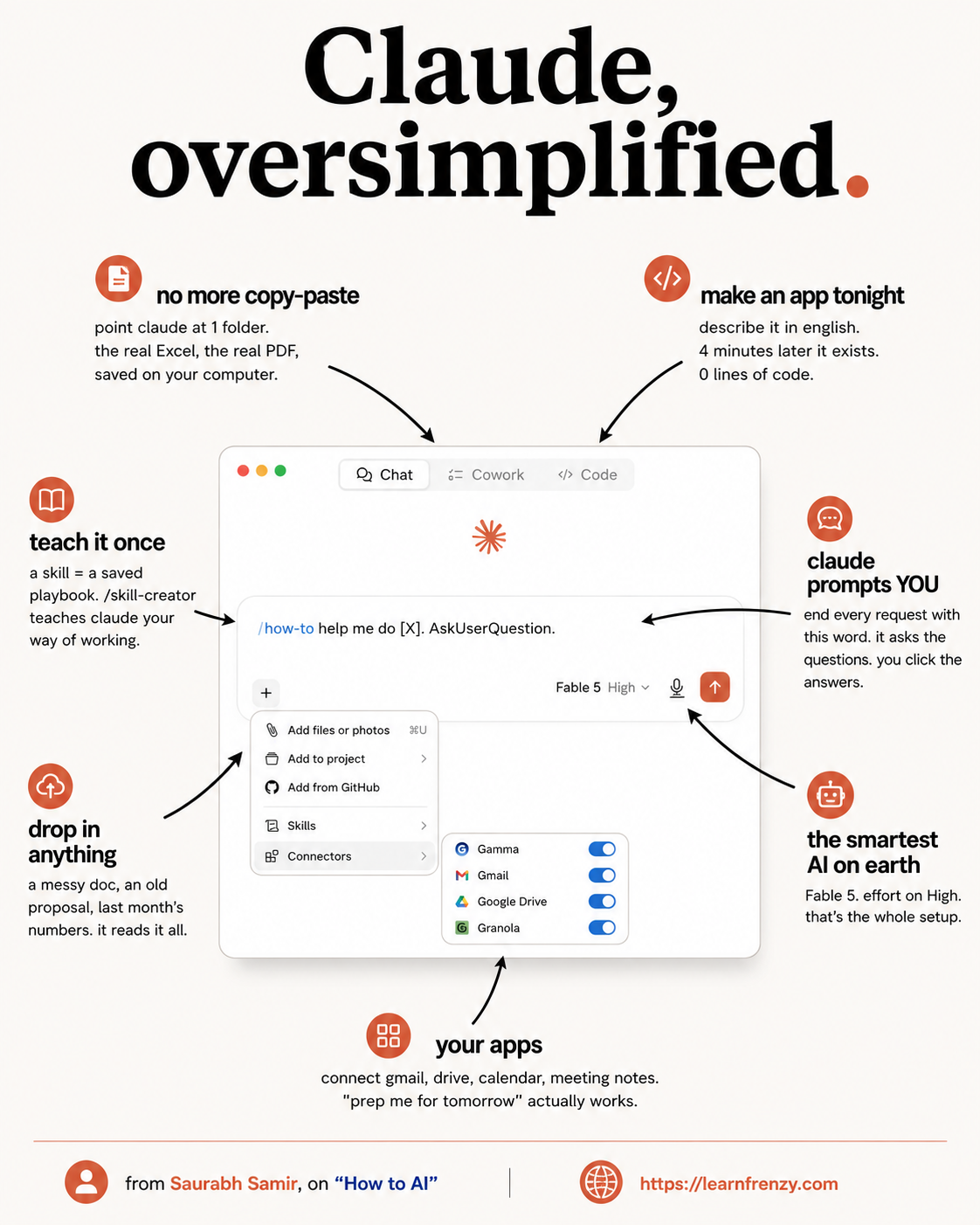
Hey! I'm Saurabh Samir, and this is my cheat sheet for Claude, Oversimplified — the beginner-friendly guide to understanding Claude AI without any technical jargon. If you've ever felt overwhelmed by AI terms like "LLM," "context window," or "token," you're in the right place. I've broken down everything into simple, easy-to-understand concepts that anyone can follow. This guide covers What is Claude, How Claude Works, Getting Started, Core Capabilities, Models Explained (Opus, Sonnet, Haiku), The Interface, Basic Features, Simple Use Cases, Tips for Beginners, Common Mistakes, and a Quick Glossary. Whether you're completely new to AI or just want a simpler explanation, this cheat sheet is for you.
🤖 What is Claude
- AI Assistant - Super-smart computer program
- Created by - Anthropic
- Conversational AI - Talks like a person
- Reasoning - Thinks through problems
- Claude 4.0 - Latest version (2026)
- Multimodal - Understands text & images
- 1M+ Context - Remembers lots of information
- Always Learning - Gets better over time
🧠 How Claude Works
- Training Data - Learned from books, websites
- Pattern Recognition - Understands word connections
- Response Generation - Writes answers
- Simple Analogy: Like a super-smart friend
- Process: You ask → Claude thinks → Answers
- No Magic: Just pattern matching
- Context Matters: Remembers what you said
- Predictive: Predicts the next word
🚀 Getting Started
- Step 1: Go to claude.ai
- Step 2: Sign up with email
- Step 3: Choose plan (Free/Pro)
- Step 4: Open chat window
- Step 5: Type your first prompt
- Step 6: Claude responds
- Step 7: Chat like a friend
- Step 8: Explore features
⚡ Core Capabilities
- Text Generation - Write emails, articles
- Code Writing - Python, JavaScript, etc.
- Data Analysis - Understand numbers
- Document Processing - PDFs, Word docs
- Image Understanding - Describe, analyze
- Web Search - Get real-time information
- Translation - 50+ languages
- Summarization - Condense long texts
🤖 Models Explained
- Opus 4.0 - "The Professor" (Smartest)
- Sonnet 4.0 - "The All-Rounder" (Balanced)
- Haiku 4.0 - "The Speedy One" (Fastest)
- Opus: Complex problems, deep thinking
- Sonnet: Daily tasks, balanced needs
- Haiku: Quick tasks, simple answers
- Speed: Haiku > Sonnet > Opus
- Smartness: Opus > Sonnet > Haiku
💡 Beginner Tips
- Start Simple - Ask one question at a time
- Be Specific - Clear instructions = better answers
- Use Examples - Show what you want
- Ask Follow-ups - "Can you expand on that?"
- Say "Shorter" - Get concise responses
- Use AskMeQuestions - "Interview me first"
- Save Good Responses - Reuse later
- Experiment - Try different models
🤖 Claude
AI Assistant
By Anthropic🧠 1M+
Context Window
Huge memory⚡ 3 Models
Opus, Sonnet, Haiku
Choose your fit💡 Simple
No Jargon
Easy to understand📚 Claude Explained in Plain English
| Complex Term | Simple Meaning |
|---|---|
| AI Assistant | A super-smart computer program that helps you do things |
| Large Language Model | A giant brain trained on lots of text |
| Training Data | Everything Claude learned from (books, websites, etc.) |
| Pattern Recognition | Claude's ability to understand how words connect |
| Token | A tiny piece of text (like a word or part of a word) |
| Context Window | How much Claude can remember in one chat |
| Prompt | What you type to ask Claude for help |
| Response | Claude's answer to your question |
| Artifact | A separate window for Claude's long responses |
| Skill | A saved command you can reuse with / |
🤖 Claude Models — Simplified
| Model | Nickname | Best For | Speed | Smartness |
|---|---|---|---|---|
| Claude 4.0 Opus | "The Professor" | Complex problems, deep thinking | Medium | ★★★★★ |
| Claude 4.0 Sonnet | "The All-Rounder" | Daily tasks, balanced needs | Fast | ★★★★ |
| Claude 4.0 Haiku | "The Speedy One" | Quick tasks, simple answers | Very Fast | ★★★ |
🎯 Simple Model Selection Guide
Need everyday help? → Use Sonnet
Need quick answer? → Use Haiku
🚀 Getting Started — Step by Step
| Step | Action | What You'll See |
|---|---|---|
| 1 | Go to claude.ai | Welcome screen |
| 2 | Sign up with email | Account created |
| 3 | Choose plan (Free/Pro) | Access granted |
| 4 | Open chat window | Empty text box |
| 5 | Type your first prompt | Claude responds |
| 6 | Chat like a friend | Conversation flows |
✨ Basic Features — Simple Explanation
| Feature | What It Does | When to Use |
|---|---|---|
| Chat | Talk to Claude | Always your main tool |
| Artifacts | Separate window for long responses | For code, documents, long writing |
| Projects | Save context for specific work | When working on same topic repeatedly |
| Skills | Saved commands you can reuse | For tasks you do often |
| Cowork Mode | Work alongside Claude | For pair programming |
| AskMeQuestions | Claude interviews you | When you don't know what to ask |
💡 Simple Use Cases — Examples
| What You Want | What to Type | What Claude Does |
|---|---|---|
| Write an email | "Write a professional email to..." | Drafts a complete email |
| Brainstorm ideas | "Give me 10 ideas for..." | Lists creative options |
| Summarize a long text | "Summarize this in 3 sentences" | Creates a short summary |
| Explain a concept | "Explain photosynthesis like I'm 10" | Simple explanation |
| Translate something | "Translate to Spanish: ..." | Provides translation |
| Create an outline | "Make an outline for..." | Creates structured plan |
| Get coding help | "Write a function that..." | Provides code with explanation |
📝 Simple Prompt Examples
| Situation | Simple Prompt | Why It Works |
|---|---|---|
| Don't know what to say | "Use AskUserQuestion to interview me before answering" | Claude asks you questions |
| Need to stay focused | "Cap paragraphs at 3 sentences" | Keeps responses short |
| Need specific format | "Write it as bullet points" | Gets organized list |
| Need examples | "Give me 3 examples of..." | Provides concrete cases |
| Need step-by-step | "Explain step by step how to..." | Gets clear instructions |
| Need plain language | "Explain like I'm a beginner" | Simple language |
💡 Beginner Tips — Quick Reference
| Tip | What to Do | Why It Helps |
|---|---|---|
| Start Simple | Ask one question at a time | Claude understands better |
| Be Specific | Give clear instructions | Gets you the right answer |
| Use Examples | Show what you want | Claude learns from examples |
| Ask Follow-ups | Ask "Can you expand on that?" | Gets more detail |
| Say "Shorter" | "Make it 3 bullet points" | Avoids long responses |
| Use AskMeQuestions | "Interview me first" | Gets to the right answer |
| Save Good Responses | Copy-paste to save | Reuse later |
| Experiment | Try different models | Find what works best |
🚫 Common Beginner Mistakes
| Mistake | Problem | Better Way |
|---|---|---|
| Vague Prompt | "Help me" | "Help me write an email to my boss" |
| Too Long | One giant question | Break it into smaller questions |
| No Context | "Write a proposal" | "Write a proposal for XYZ project..." |
| Expecting Magic | Claude can't read your mind | Be specific and clear |
| Ignoring Features | Not using Artifacts | Use separate window for long outputs |
| One Message | Not asking follow-ups | Have a conversation |
| Wrong Model | Using Opus for quick tasks | Use Haiku or Sonnet |
| Not Saving | Good response lost | Copy-paste or export |
📚 Quick Glossary — AI Terms Simplified
| Term | Simple Definition |
|---|---|
| AI (Artificial Intelligence) | Computer that can think and learn |
| LLM (Large Language Model) | AI trained on lots of text |
| Prompt | What you ask the AI |
| Token | Tiny piece of text, like a word |
| Context Window | How much the AI can remember |
| Training Data | Everything the AI learned from |
| API | Way for apps to talk to Claude |
| Fine-tuning | Making Claude better at specific tasks |
| Multimodal | Can understand images and text |
| Reasoning | Claude's ability to think through problems |
🧠 How Claude Thinks — Simple Explanation
Claude's Brain:
1. Recognizes the word "photosynthesis"
2. Recalls what it learned about plants
3. Identifies key concepts: sunlight, water, energy
4. Organizes into simple explanation
5. Writes response in clear language
6. Checks if it makes sense
7. Sends answer back to you
Result: A clear explanation you can understand!
🎯 Getting the Most Out of Claude
| Situation | Simple Strategy | Example |
|---|---|---|
| You're stuck | "Ask me questions" | "Use AskUserQuestion to help me" |
| You need ideas | "Give me options" | "Give me 5 options for..." |
| You need detail | "Tell me more" | "Can you expand on that?" |
| You need simplicity | "Explain simply" | "Explain like I'm 10 years old" |
| You need structure | "Make an outline" | "Create a structure for..." |
| You need examples | "Show me examples" | "Give me examples of..." |
| You need steps | "Step by step" | "Give me step-by-step instructions" |
📅 Simple Day 1 Workflow
| Time | Action | What to Do |
|---|---|---|
| Start | Open Claude | Go to claude.ai |
| Hello | First prompt | "Hi, I'm new. What can you do?" |
| Explore | Try a simple task | "Write a to-do list for today" |
| Practice | Another task | "Summarize this text" (paste any text) |
| Learn | Ask about features | "What are Artifacts?" |
| Refine | Improve a response | "Make that shorter" |
| Save | Copy-paste | Save useful responses |
| End | One more question | "What should I try next?" |
🚀 Claude 2026 — Why It's Better
| Old Claude (2024) | New Claude (2026) |
|---|---|
| Text only | Understands images too |
| Short memory (200K tokens) | Huge memory (1M+ tokens) |
| Basic chat only | Chat + Artifacts + Projects |
| No voice | Voice input with Wispr Flow |
| No skills | Skills with /commands |
| No Cowork mode | Full Cowork collaboration |
| Manual setup | One-time setup, no maintenance |
🚀 Quick Start — First 5 Prompts
| # | Prompt | Why |
|---|---|---|
| 1 | "Hi, I'm new to Claude. What should I know?" | Introduction |
| 2 | "Help me write a professional bio" | Basic writing |
| 3 | "Explain AI in simple words" | Learning |
| 4 | "Give me a daily routine" | Practical help |
| 5 | "What's one thing I should try next?" | Next step |
🎯 Claude, Oversimplified — Quick Revision
The Golden Rule: Think of Claude as a super-smart friend who's read everything. The better you explain what you want, the better the answer you'll get. Start simple, be specific, and ask follow-ups.
Quick Memory Tricks:
- 📌 3 Models: "Opus = Smartest, Sonnet = Balanced, Haiku = Fastest"
- 📌 Core Features: "Chat, Artifacts, Projects, Skills, Cowork, AskMeQuestions"
- 📌 Beginner Tips: "Simple → Specific → Examples → Follow-ups → Save"
- 📌 When Stuck: "Use AskUserQuestion to interview me"
Daily Checklist for Beginners:
- ✅ Start with one simple question
- ✅ Be specific about what you want
- ✅ Use examples if you have them
- ✅ Ask follow-up questions
- ✅ Try different models (Opus, Sonnet, Haiku)
- ✅ Save responses you like
- ✅ Use AskMeQuestions when stuck
💡 Pro Tips for Beginners
✅ Start with "Help me"
If you don't know what to ask, just say "Help me" and Claude will ask you questions to figure out what you need.
✅ Use AskMeQuestions
End every prompt with "Use AskUserQuestion to interview me before answering." This makes sure you get exactly what you need.
✅ Be Specific
Instead of "Write a blog post," try "Write a 300-word blog post about AI for beginners." The more specific you are, the better the result.
✅ Use Examples
If you have an example of what you want, share it. Claude learns from examples and can match the style and format.
✅ Save Good Responses
When Claude gives you something useful, copy-paste it to a document. You can reuse it later or use it as a template.
✅ Experiment with Models
Try Opus for complex tasks, Sonnet for daily use, and Haiku for quick answers. Find what works best for each task.
from Saurabh Samir, on "How to AI"
Download Cheat Sheet
Click the button below to download this high-resolution PNG cheat sheet.
Download PNG (1.0 MB)Preview
Still have questions?
We're here to help! Reach out to our support team for any queries.