4 Things to Set up in Claude in 2026
About This Cheat Sheet
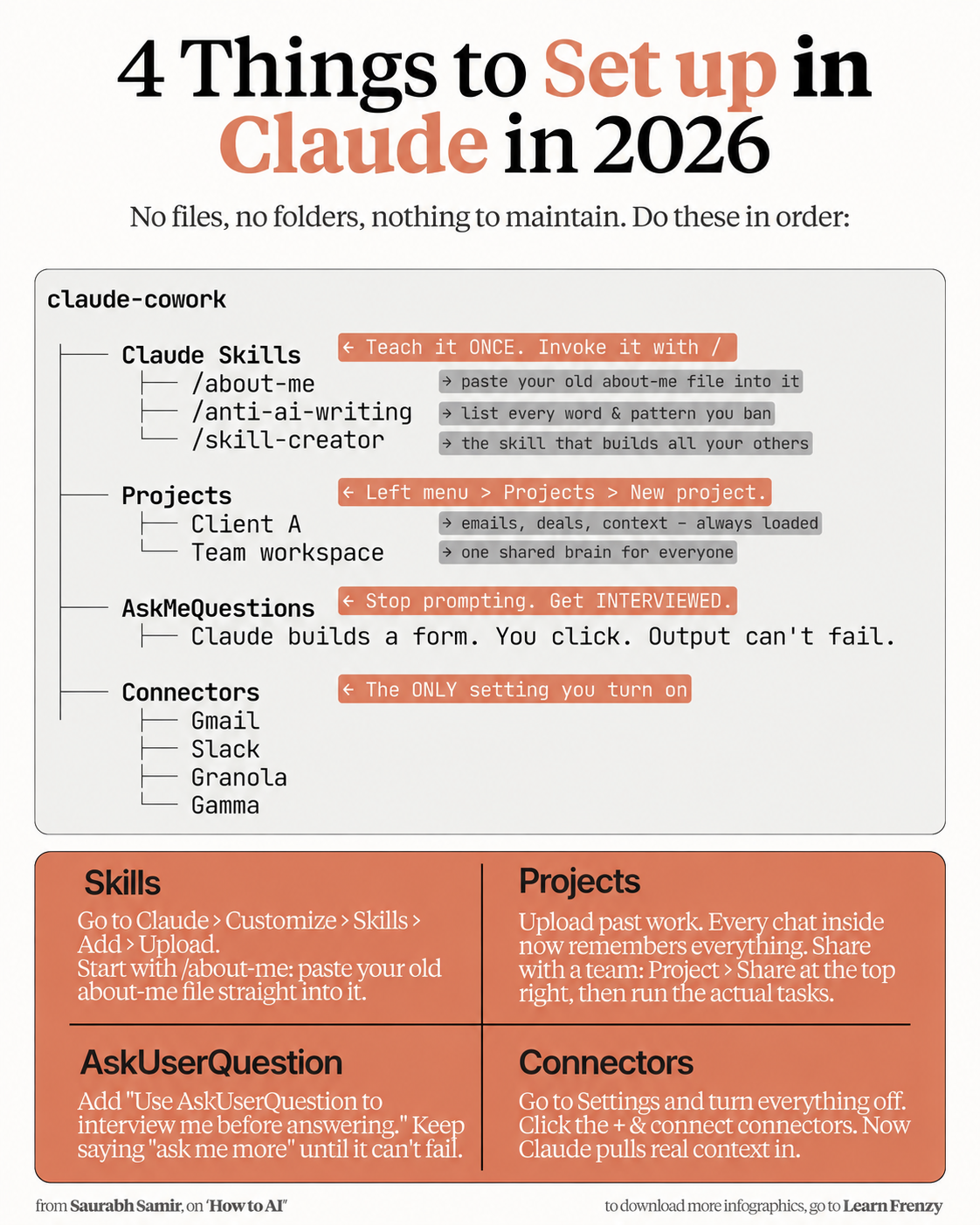
Hey! I'm Saurabh Samir, and this is my cheat sheet for the 4 things you absolutely must set up in Claude in 2026. No files, no folders, nothing to maintain. Just do these in order. I've been using Claude for years, and these four things are the foundation of everything I do. This guide covers Claude Skills (teach it ONCE, invoke it with /), Projects (left menu > Projects > New project), AskMeQuestions (stop prompting, get interviewed), and Connectors (the ONLY setting you turn on). Each one comes with step-by-step setup instructions and the exact prompts to use. Whether you're a total beginner or a power user, these 4 things will transform how you work with Claude.
🧠 Claude Skills
- Teach it ONCE - Invoke it with /
- /about-me - Paste your old about-me file
- /anti-ai-writing - List every word & pattern you ban
- /skill-creator - The skill that builds all others
- Where: Claude > Customize > Skills > Add > Upload
- Result: Reusable commands, instant access
📁 Projects
- Left menu > Projects > New project
- Client A - Emails, deals, context (always loaded)
- Team workspace - One shared brain for everyone
- Upload past work - Every chat remembers everything
- Share with team - Project > Share at the top right
- Result: Shared context, no repetition
❓ AskMeQuestions
- Stop prompting - Get INTERVIEWED
- Claude builds a form - You click
- Output can't fail - Because Claude knows exactly what you need
- Prompt: "Use AskUserQuestion to interview me before answering."
- Keep saying - "ask me more" until it can't fail
- Result: Perfect answers every time
🔌 Connectors
- The ONLY setting you turn on
- Gmail - Emails, threads
- Slack - Team channels
- Granola - Meeting notes
- Gamma - AI decks
- Settings > turn everything OFF > + connect
- Result: Claude pulls real context in
🧠 4 Things
Set Up in Claude
No files, no folders📁 Projects
Shared Brain
Always loaded❓ AskMeQuestions
Cannot Fail
Claude interviews you🔌 Connectors
Gmail, Slack
Real-time context📋 The 4 Things to Set Up
| # | Feature | What It Does | Quick Action |
|---|---|---|---|
| 1 | Claude Skills | Teach it ONCE. Invoke it with / | /about-me, /anti-ai-writing, /skill-creator |
| 2 | Projects | Left menu > Projects > New project | Client A, Team workspace |
| 3 | AskMeQuestions | Stop prompting. Get INTERVIEWED | Claude builds a form, you click |
| 4 | Connectors | The ONLY setting you turn on | Gmail, Slack, Granola, Gamma |
🔧 Detailed Setup Guide
| Feature | Step-by-Step |
|---|---|
| Skills | Go to Claude > Customize > Skills > Add > Upload. Start with /about-me: paste your old about-me file straight into it |
| Projects | Upload past work. Every chat inside now remembers everything. Share with a team: Project > Share at the top right, then run the actual tasks |
| AskUserQuestion | Add "Use AskUserQuestion to interview me before answering." Keep saying "ask me more" until it can't fail |
| Connectors | Go to Settings and turn everything off. Click the + & connect connectors. Now Claude pulls real context in |
🧠 Claude Skills Structure
| Skill | Purpose |
|---|---|
| /about-me | Paste your old about-me file into it |
| /anti-ai-writing | List every word & pattern you ban |
| /skill-creator | The skill that builds all your others |
📊 4 Things to Set Up — Visual Summary
• /about-me, /anti-ai-writing, /skill-creator
• Where: Claude > Customize > Skills > Add > Upload
• Client A, Team workspace
• Upload past work, share with team
• "Use AskUserQuestion to interview me"
• Keep saying "ask me more"
• Gmail, Slack, Granola, Gamma
• Settings > turn everything OFF > + connect
💡 Why These 4 Things Work
| Feature | Benefit |
|---|---|
| Claude Skills | Teach once, use forever. No more re-explaining yourself. Instant /commands. |
| Projects | One shared brain for everyone. Every chat remembers everything. No repetition. |
| AskMeQuestions | Output cannot fail. Claude interviews you. You click answers. Perfect results. |
| Connectors | Real-time context. Claude pulls from Gmail, Slack, Granola, Gamma automatically. |
🎯 4 Things to Set Up in Claude in 2026 — Quick Revision
The Golden Rule: No files, no folders, nothing to maintain. Do these 4 things in order and watch your productivity skyrocket.
Quick Memory Tricks:
- 📌 Claude Skills: "Teach once → Invoke with / → /about-me, /anti-ai-writing, /skill-creator"
- 📌 Projects: "Left menu > Projects > New project → Client A, Team workspace"
- 📌 AskMeQuestions: "Stop prompting → Get interviewed → Output can't fail"
- 📌 Connectors: "The ONLY setting you turn on → Gmail, Slack, Granola, Gamma"
Daily Checklist:
- ✅ Start each chat with /about-me
- ✅ Use /anti-ai-writing before any content
- ✅ Work inside Projects for shared context
- ✅ End prompts with "Use AskUserQuestion to interview me"
- ✅ Keep saying "ask me more" until it can't fail
- ✅ Connectors pull real-time data automatically
💡 Pro Tips for the 4 Essential Setups
✅ Start with /about-me
Every chat should begin with /about-me. This gives Claude instant context about who you are and what you do.
✅ Build /anti-ai-writing First
Before any content generation, use /anti-ai-writing. This bans all the words and patterns that make AI writing obvious.
✅ Create Projects for Everything
Every client, every team, every major project gets its own Project. This keeps context organized and always available.
✅ Use AskMeQuestions Relentlessly
End every prompt with "Use AskUserQuestion to interview me before answering." Keep saying "ask me more" until Claude covers everything.
✅ Only Turn on Connectors
In Settings, turn everything OFF. Only enable the connectors you need. This keeps Claude focused and clean.
✅ Share Projects with Your Team
Projects are a shared brain. Upload context once, share it with everyone, and all conversations use the same context.
from Saurabh Samir, on "How to AI"
Download Cheat Sheet
Click the button below to download this high-resolution PNG cheat sheet.
Download PNG (1.5 MB)Preview
Still have questions?
We're here to help! Reach out to our support team for any queries.