
Understanding Decorators and Lifecycle Hooks in Salesforce LWC
Understand LWC decorators (@api, @track, @wire) and lifecycle hooks with clear examples — what each does and when to use it in your components.
Ways to work with Salesforce data in LWC — Lightning Data Service, record forms, wire adapters and Apex — and how to choose the right one.

In this blog post, we will explore different ways to work with Salesforce data in Lightning Web Components (LWC). Salesforce provides various tools and mechanisms to interact with data, ranging from base Lightning components built on Lightning Data Service (LDS) to the more flexible use of Apex. We will cover the following methods:
The easiest way to interact with Salesforce data in LWC is by using base Lightning components built on Lightning Data Service. These components, including lightning-record-form, lightning-record-edit-form, and lightning-record-view-form, offer simplicity and take care of field-level security and sharing automatically.
Mode: edit, view, readonly
layout-type: full, compact
Mind it!
Let's explore a real-time scenario using base Lightning components built on Lightning Data Service (LDS). In this scenario, we'll create a Lightning Web Component (LWC) to display the details of a specific Account using the lightning-record-view-form component.
Scenario: Displaying Account Details
Objective: Retrieve and display details of a specific Account using the lightning-record-view-form base Lightning component.
Implementation
// Apex class (AccountController)
public with sharing class AccountController {
    @AuraEnabled(cacheable=true)
    public static Account getAccountDetails(String accountId) {
        return [SELECT Id, Name, Industry, AnnualRevenue, Phone, Website FROM Account WHERE Id = :accountId LIMIT 1];
    }
}// LWC component (AccountDetails)
import { LightningElement, api, wire } from 'lwc';
import { getRecord } from 'lightning/uiRecordApi';
export default class AccountDetails extends LightningElement {
@api recordId; // Account Id passed from the parent component or record page
// Fetch data using wire adapter
@wire(getRecord, { recordId: '$recordId', fields: ['Account.Name', 'Account.Industry', 'Account.AnnualRevenue', 'Account.Phone', 'Account.Website'] })
account;
// Getter to extract data from wire result
get accountDetails() {
return this.account.data ? this.account.data.fields : {};
}
}<template>
<lightning-card title="Account Details" icon-name="standard:account">
<div class="slds-m-around_medium">
<div if:true={accountDetails.Name}>
<h2>{accountDetails.Name.value}</h2>
<lightning-record-view-form record-id={recordId}
object-api-name="Account"
fields={fields}>
</lightning-record-view-form>
</div>
<template if:false={accountDetails.Name}>
<p>No Account details found.</p>
</template>
</lightning-card>
</template>Explanation
AccountController Apex class provides a method (getAccountDetails) to retrieve details of a specific Account based on the provided Account Id.AccountDetails), the @wire decorator is used to call the getRecord wire adapter, which dynamically fetches data for the specified Account fields.lightning-record-view-form component to display the details of the Account.
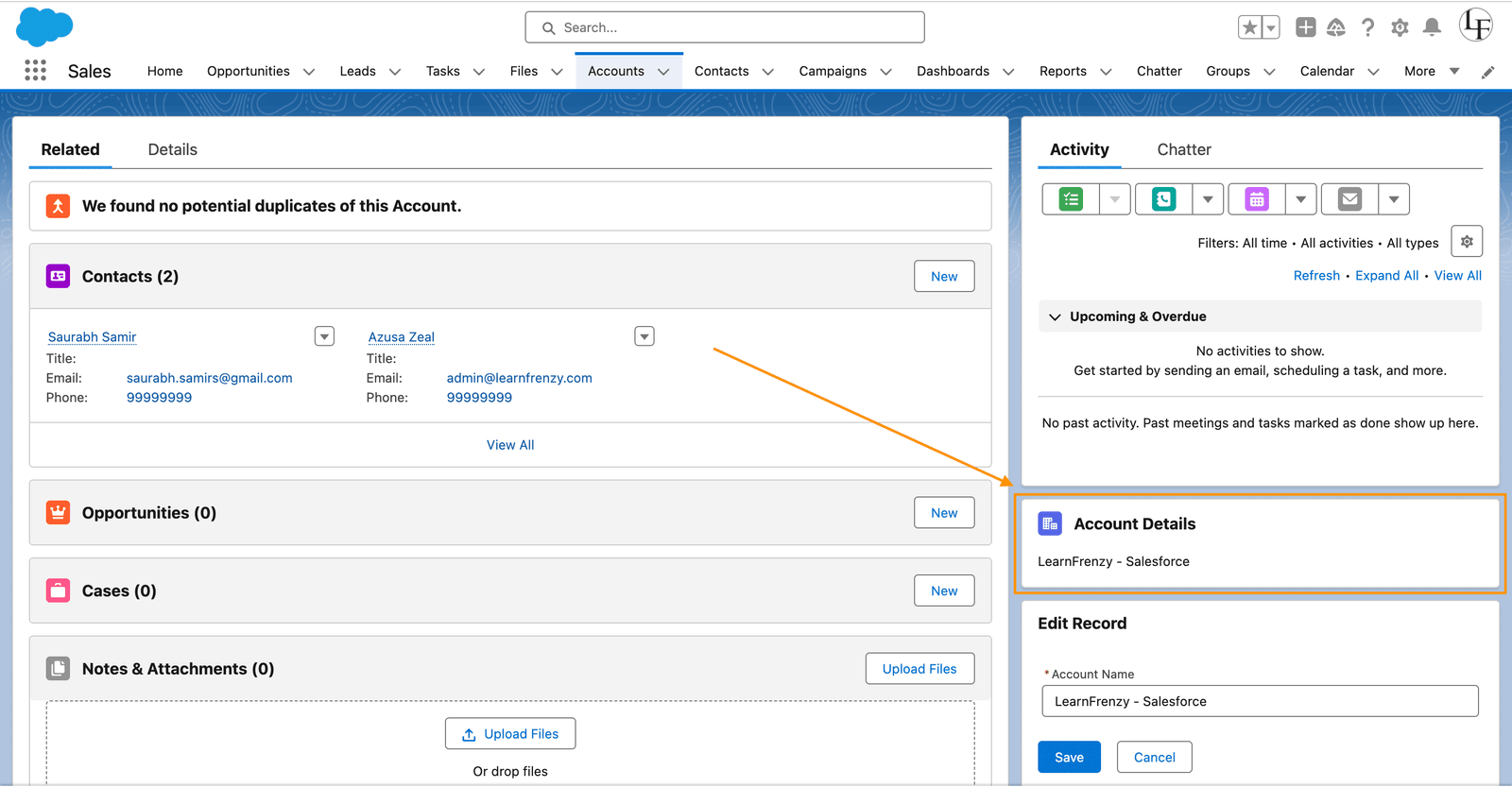
If no Account details are found
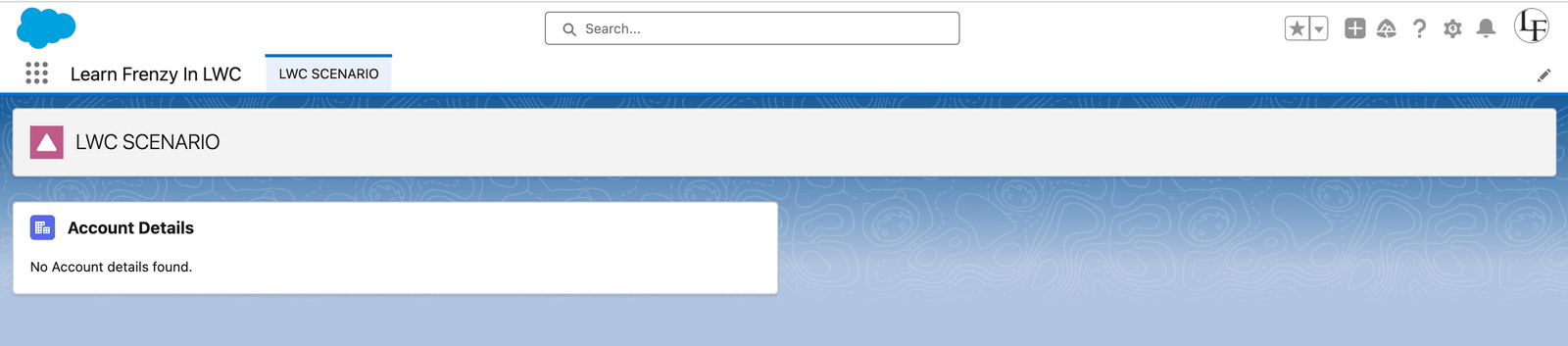
AccountDetails component is rendered with a valid recordId (Account Id), it dynamically fetches and displays the details of the specified Account, including fields like Name, Industry, Annual Revenue, Phone, and Website.This scenario demonstrates how base Lightning components like lightning-record-view-form can simplify the process of fetching and displaying Salesforce data in a Lightning Web Component.
LDS Wire Adapters provide a more flexible approach to work with Lightning Data Service. Using @wire, you can specify the getRecord function to apply business logic on data and create more customizable forms.
@wire to specify getRecord.@wire is reactive, means once data is available it immidiately update it.lightning/ui*Api modules.$propertyName.Mind it!
Let's explore a real-time scenario of working with Salesforce Data in Lightning Web Components (LWC). In this scenario, we want to create an LWC that displays information about the five most recently modified Opportunities. We will leverage Lightning Data Service (LDS) wire adapters to achieve this, ensuring efficient and secure data retrieval.
Scenario: Displaying Recently Modified Opportunities
Objective: Retrieve and display information about the five most recently modified Opportunities using LDS Wire Adapters.
Implementation
// Apex class (OpportunityController)
public with sharing class OpportunityController {
    @AuraEnabled(cacheable=true)
    public static List<Opportunity> getRecentlyModifiedOpportunities() {
        Date thirtyDaysAgo = Date.today().addDays(-30);

        return [SELECT Id, Name, StageName, CloseDate
                FROM Opportunity
                WHERE LastModifiedDate >= :thirtyDaysAgo
                ORDER BY LastModifiedDate DESC LIMIT 5];
    }
}// LWC component (RecentlyModifiedOpportunitiesLDS)
import { LightningElement, wire } from 'lwc';
import { getRecord } from 'lightning/uiRecordApi';
import getRecentlyModifiedOpportunities from '@salesforce/apex/OpportunityController.getRecentlyModifiedOpportunities';
const FIELDS = ['Opportunity.Name', 'Opportunity.StageName', 'Opportunity.CloseDate'];
export default class RecentlyModifiedOpportunitiesLDS extends LightningElement {
@wire(getRecentlyModifiedOpportunities)
opportunities;
// Alternatively, you can use the following wire adapter for individual record fields:
// @wire(getRecord, { recordId: '$opportunityId', fields: FIELDS })
// opportunity;
// Optional: If you want to display individual fields using getRecord wire adapter
// get opportunityId() {
// return this.opportunities.data ? this.opportunities.data[0].Id : null;
// }
// Optional: If you want to display individual fields using getRecord wire adapter
// get opportunityName() {
// return this.opportunity.data ? this.opportunity.data.fields.Name.value : 'N/A';
// }
}<template>
<lightning-card title="Recently Modified Opportunities (LDS Wire Adapters)" icon-name="standard:account">
<div class="slds-m-around_medium">
<div if:true={opportunities.data}>
<ul>
<template for:each={opportunities.data} for:item="opp">
<li key={opp.Id}>
<p>Name: {opp.Name}</p>
<p>Stage: {opp.StageName}</p>
<p>Close Date: {opp.CloseDate}</p>
</li>
</template>
</ul>
</div>
</div>
<template if:false={opportunities.data}>
<p>No recently modified opportunities found.</p>
</template>
</lightning-card>
</template>Explanation
OpportunityController Apex class provides a method (getRecentlyModifiedOpportunities) to retrieve details of the five most recently modified Opportunities in the last 30 days.RecentlyModifiedOpportunitiesLDS) uses the @wire decorator to call the getRecentlyModifiedOpportunities wire adapter, which dynamically fetches the Opportunities.

RecentlyModifiedOpportunitiesLDS component is rendered, it dynamically fetches and displays the details of the five most recently modified Opportunities, including their Name, Stage, and Close Date.This real-time scenario demonstrates the seamless integration of Salesforce data into a Lightning Web Component using Lightning Data Service wire adapters, providing a user-friendly and performance-optimized solution.
When LDS Wire Adapters lack the required flexibility, Apex can be employed. It's ideal for performing operations on Task and Event objects, implementing record filtration, and executing transactional operations.
Mind it!
@wire for simplicity.Async and await (more cleaner to write code)async function always return promises.await pause until the async function is done.For More details about the Work with Apex Method in LWC
Working with Salesforce data in Lightning Web Components offers a range of options to suit different needs. Whether you prefer the simplicity of base Lightning components, the flexibility of LDS Wire Adapters, or the power of Apex, Salesforce provides a comprehensive set of tools for developers. Understanding the strengths and trade-offs of each approach helps in making informed decisions when building robust and efficient LWC applications.
Mind it!
let's explore practical scenarios for working with various wire adapters in the lightning/ui*Api module within Lightning Web Components (LWC). We'll cover a range of use cases to help you gain hands-on experience and proficiency with these powerful tools.
1. lightning/uiRecordApi
Scenario: Displaying Contact Details
Objective: Retrieve and display details of a specific Contact usinguiRecordApi.
Implementation
// Apex class (ContactController)
public with sharing class ContactController {
    @AuraEnabled(cacheable=true)
    public static Contact getContactDetails(String contactId) {
        return [SELECT Id, Name, Email, Phone FROM Contact WHERE Id = :contactId LIMIT 1];
    }
}
2. Create Lightning Web Component (LWC) Using uiRecordApi
// LWC component (ContactDetails)
import { LightningElement, api, wire } from 'lwc';
import { getRecord } from 'lightning/uiRecordApi';

export default class ContactDetails extends LightningElement {
    @api recordId; // Contact Id passed from the parent component or record page

    // Fetch data using uiRecordApi wire adapter
    @wire(getRecord, { recordId: '$recordId', fields: ['Contact.Name', 'Contact.Email', 'Contact.Phone'] })
    contact;

    // Getter to extract data from wire result
    get contactDetails() {
        return this.contact.data ? this.contact.data.fields : {};
    }
}<template>
<lightning-card title="Contact Details" icon-name="standard:contact">
<div class="slds-m-around_medium">
<div if:true="{contactDetails.Name}">
<h2>{contactDetails.Name.value}</h2>
<p>Email: {contactDetails.Email.value}</p>
<p>Phone: {contactDetails.Phone.value}</p>
</div>
<template if:false={contactDetails.Name}>
<p>No Contact details found.</p>
</template>
</div>
</lightning-card>
</template>Explanation
ContactController Apex class provides a method (getContactDetails) to retrieve details of a specific Contact based on the provided Contact Id.ContactDetails), the @wire decorator is used to call the getRecord wire adapter, which dynamically fetches data for the specified Contact fields.
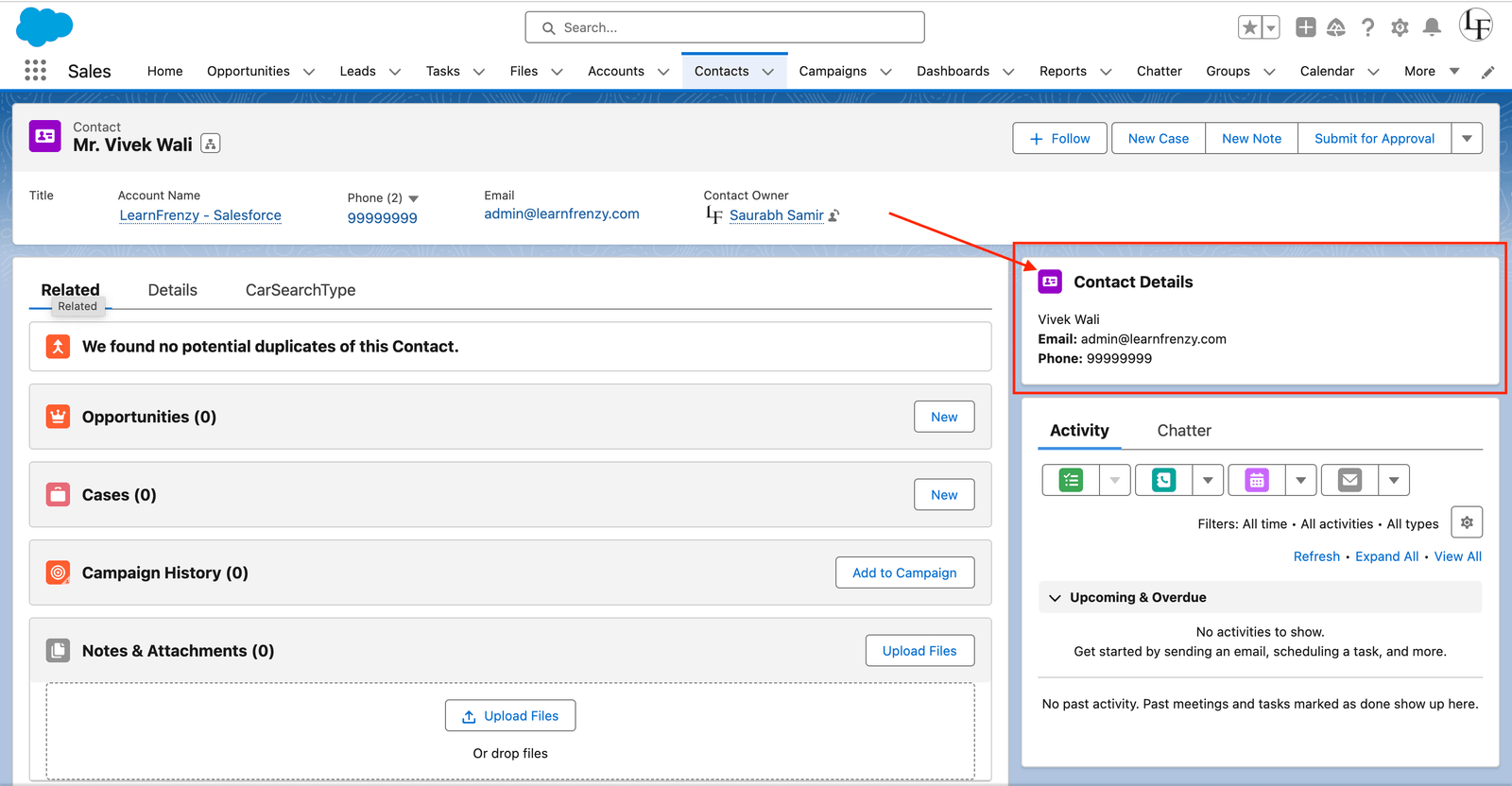
ContactDetails component is rendered with a valid recordId (Contact Id), it dynamically fetches and displays the details of the specified Contact, including Name, Email, and Phone.This scenario illustrates the usage of uiRecordApi in Lightning Web Components to efficiently retrieve and display Salesforce record details.
2. lightning/uiListsApi
Scenario: Displaying Opportunities in a Custom List
Objective: Retrieve and display a custom list of Opportunities usinguiListsApi.
The lightning/uiListsApi module in Salesforce Lightning Web Components (LWC) is used to retrieve and display lists of records, including standard and custom lists. The following scenario demonstrates how to use uiListsApi to display a custom list of Opportunities in an LWC.
Implementation
Create a new Lightning Web Component named OpportunityList.
<template>
  <lightning-card title="Opportunity List">
    <div class="slds-m-around_medium">

      <template if:true={opportunities.data}>
        <lightning-layout>
          <lightning-layout-item size="6" padding="around-medium">
            <lightning-datatable key-field="Id"
                                 data={opportunities.data}
                                 columns={columns}
                                 hide-checkbox-column>
            </lightning-datatable>
          </lightning-layout-item>
        </lightning-layout>
      </template>

      <template if:true={opportunities.loading}>
        <lightning-spinner alternative-text="Loading" size="large">
        </lightning-spinner>
      </template>

      <template if:true={opportunities.error}>
        <div class="slds-text-color_error">{opportunities.error.body.message}</div>
      </template>
    </div>
  </lightning-card>
</template>
2. JavaScript File
Implement the logic to retrieve Opportunities using uiListsApi in the JavaScript file.
// OpportunityList.js
import { LightningElement, wire } from 'lwc';
import { getListUi } from 'lightning/uiListsApi';

const COLUMNS = [
    { label: 'Opportunity Name', fieldName: 'Name', type: 'text' },
    { label: 'Stage', fieldName: 'StageName', type: 'text' },
    { label: 'Amount', fieldName: 'Amount', type: 'currency', typeAttributes: { currencyCode: 'USD' } },
    // Add more columns as needed
];

export default class OpportunityList extends LightningElement {
    columns = COLUMNS;

    @wire(getListUi, { objectApiName: 'Opportunity', listViewApiName: 'Your_Custom_List_API_Name' })
    opportunities;

    // You need to replace 'Your_Custom_List_API_Name' with the API name of your custom list view.
}
Explanation
getListUi from lightning/uiListsApi to fetch the custom list of Opportunities.COLUMNS defines the columns to be displayed in the datatable.@wire decorator calls the getListUi function, providing the object API name (Opportunity) and the API name of the custom list view (Your_Custom_List_API_Name).Output
COLUMNS array.Ensure that you replace 'Your_Custom_List_API_Name' with the actual API name of your custom list view. Additionally, customize the columns in the COLUMNS array based on the fields you want to display.
3. lightning/uiAppApi
Scenario: Dynamic App Navigation
Objective: Dynamically navigate to a custom app page usinguiAppApi.
The lightning/uiAppApi module in Salesforce Lightning Web Components (LWC) provides the ability to dynamically navigate to a custom app page. This scenario demonstrates how to use uiAppApi for dynamic app navigation.
Implementation
Create a new Lightning Web Component named DynamicAppNavigation.
<template>
  <lightning-card title="Dynamic App Navigation">
    <div class="slds-m-around_medium">
      <lightning-button label="Navigate to Custom Page"
                        onclick={navigateToCustomPage}>
      </lightning-button>
    </div>
  </lightning-card>
</template>
2. JavaScript File
uiAppApi in the JavaScript file.Here in the below example :
// DynamicAppNavigation.js
import { LightningElement, api } from 'lwc';
import { NavigationMixin } from 'lightning/navigation';
import { encodeDefaultFieldValues } from 'lightning/pageReferenceUtils';

export default class DynamicAppNavigation extends NavigationMixin(LightningElement) {
    @api customObjectValue = 'SampleValue';

    navigateToCustomPage() {
        // Construct a page reference with custom app page details
        const pageReference = {
            type: 'standard__app',
            attributes: {
                //appTarget: 'Custom_App_Name__c' // Replace with your custom app's API name
                appTarget: 'LWC_SCENARIO' // Replace with your custom app's API name
            },
            state: {
                c__customObjectValue: this.customObjectValue
            }
        };

        // Navigate to the custom app page
        this[NavigationMixin.Navigate](pageReference);
    }
}
Explanation
NavigationMixin from lightning/navigation and encodeDefaultFieldValues from lightning/pageReferenceUtils.DynamicAppNavigation component extends NavigationMixin(LightningElement) to enable navigation.navigateToCustomPage method constructs a page reference for the custom app page. It specifies the app target and includes any necessary state parameters (in this case, c__customObjectValue).this[NavigationMixin.Navigate](pageReference) line performs the actual navigation.Output
Click on 'Navigate to Custom Page' button.
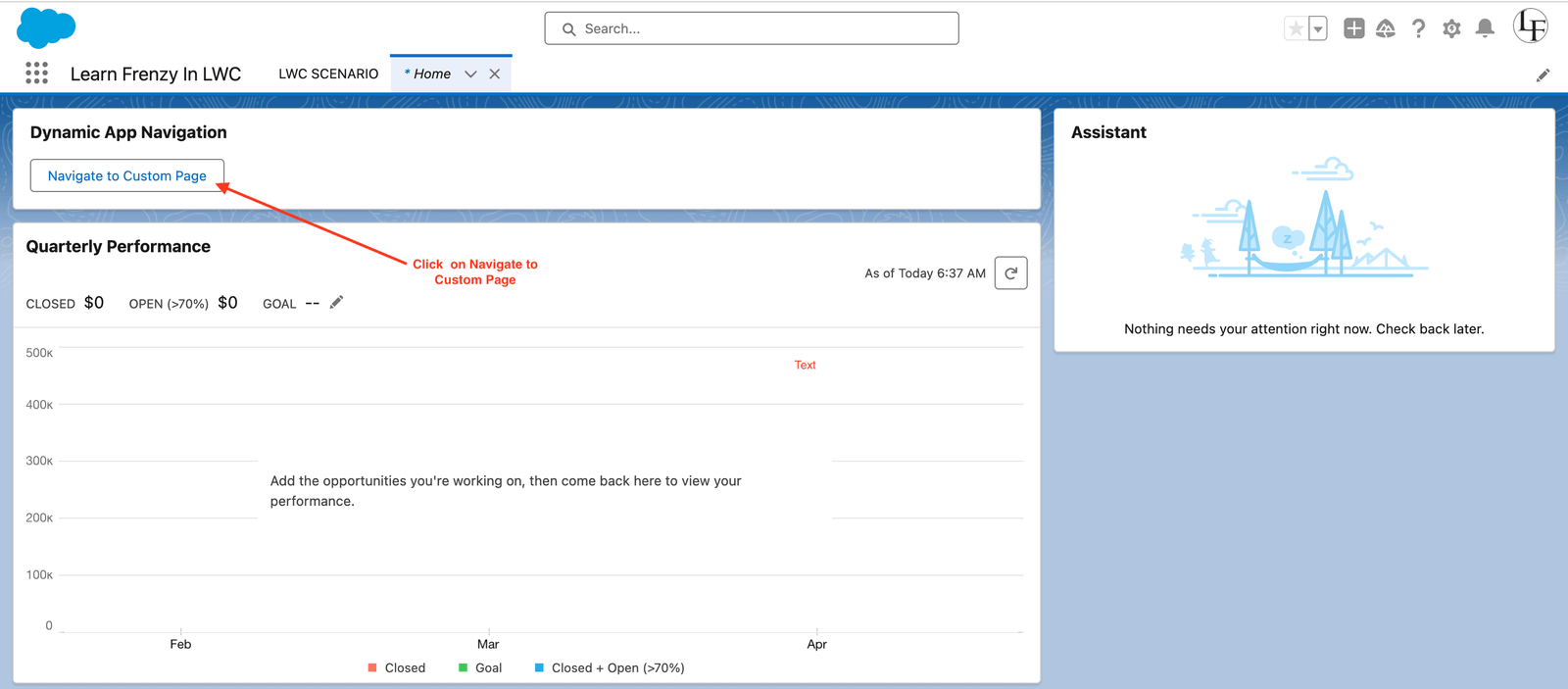
After Click on 'Navigate to Custom Page' button. it dynamically navigates to the specified custom app page 'LWC SCENARIO'.
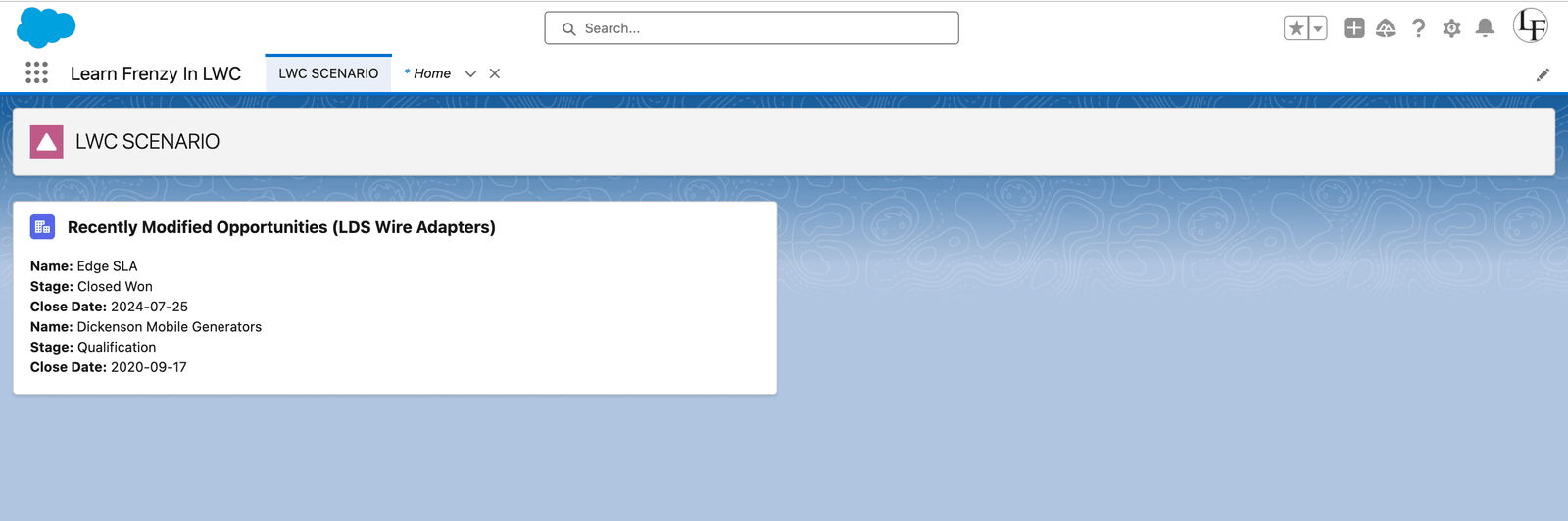
DynamicAppNavigation Lightning Web Component to a Lightning page and click the "Navigate to Custom Page" button, it dynamically navigates to the specified custom app page (Custom_App_Name__c) with the provided state parameter (c__customObjectValue).This scenario demonstrates how to use uiAppApi for dynamic app navigation in a Lightning Web Component.
“Stay tuned for more exciting LWC topics, and keep exploring the world of Lightning Web Components to become a Salesforce development pro.”
Happy coding with LWC!

One short email when we publish something new — interview questions, Salesforce guides and career tips. No spam, unsubscribe in one click.
Understand LWC decorators (@api, @track, @wire) and lifecycle hooks with clear examples — what each does and when to use it in your components.
JavaScript fundamentals for Lightning Web Components — scope, this, closures, promises, events and modules — explained with LWC-focused examples.

The JavaScript concepts to know before starting Lightning Web Components — variables, functions, objects, arrays, classes, modules and promises.
Questions, corrections or your own experience — they all help the next reader.