
Understanding Decorators and Lifecycle Hooks in Salesforce LWC
Understand LWC decorators (@api, @track, @wire) and lifecycle hooks with clear examples — what each does and when to use it in your components.
How to call Apex from Lightning Web Components — @AuraEnabled methods, wire and imperative calls, parameters and error handling — with examples.

Lightning Web Components (LWC) is a powerful framework provided by Salesforce for building modern and efficient user interfaces. One of the key features that enhance the functionality of LWC is the ability to work with Apex methods. Apex methods allow you to perform server-side operations and retrieve data from Salesforce databases, providing a seamless integration between your frontend LWC components and backend Salesforce logic. In this blog post, we'll explore the process of working with Apex methods in LWC, accompanied by practical examples.
In this topic, we will get to know about how apex method are being called in LWC component.
Discussion About
In Salesforce development with Lightning Web Components (LWC), there are two main aspects to consider: importing Apex methods into your Lightning Web Components and exposing Apex methods for consumption by other components.
1. Import Statement
To use an Apex method in a Lightning Web Component, you need to import it into the component. This is done using an import statement in the JavaScript file of the component. The import statement includes the Apex method's namespace and name.
import apexMethodName from '@salesforce/apex/namespace.classname.apexMethodReference';apexMethodName - A symbol that identifies the Apex method.apexMethodReference - The name of the Apex method to import.classname - The name of the Apex class.namespace - If the class is in the same namespace as the component, don’t specify a namespace. If the class is in a managed package, specify the namespace of the managed package.Example
import getAccountDetails from '@salesforce/apex/MyApexController.getAccountDetails';In this example, MyApexController is the Apex class, and getAccountDetails is the specific method being imported.
2. Calling the Apex Method
Once imported, you can call the Apex method in your component's JavaScript file. This can be done using the @wire decorator for reactive data fetching or through imperative Apex for more control.
// Using @wire decorator
@wire(getAccountDetails, { accountId: '$recordId' })
wiredAccount;

// Using imperative Apex
connectedCallback() {
    getAccountDetails({ accountId: this.recordId })
        .then(result => {
            // Handle result
        })
        .catch(error => {
            // Handle error
        });
}
In the examples above, getAccountDetails is the imported Apex method. The first example uses the @wire decorator to fetch data reactively, while the second example demonstrates an imperative call in the connectedCallback lifecycle hook.
1. Annotation in Apex Class
To make an Apex method accessible to Lightning Web Components, it needs to be annotated with @AuraEnabled or @AuraEnabled(cacheable=true).
Mind it!
To expose Apex method, method must be static and either global or public with annotated @AuraEnabled.
If an Apex method is marked with @AuraEnabled(cacheable=true) A client-side Lightning Data Service cache is checked before issuing the network call to invoke the Apex method on the server.
public with sharing class MyApexController {
    @AuraEnabled(cacheable=true)
    public static String getAccountDetails(String accountId) {
        // Apex logic to fetch account details
        return 'Account details for ' + accountId;
    }
}
In this example, getAccountDetails is annotated with @AuraEnabled(cacheable=true).
After the Apex method is annotated, it can be imported and used in Lightning Web Components as described in the previous section.
import getAccountDetails from '@salesforce/apex/MyApexController.getAccountDetails';

// ...

@wire(getAccountDetails, { accountId: '$recordId' })
wiredAccount;
Now, getAccountDetails can be used in the Lightning Web Component to fetch data from the server.
By following these steps, you can seamlessly import Apex methods into your Lightning Web Components for data retrieval and expose Apex methods from your Apex classes to be consumed by Lightning Web Components. This allows for efficient communication between the frontend and backend in Salesforce development.
Let's go through each of the scenarios step by step with example code:
To get Salesforce Data, you need to use @wire adapter in JS file, You can @wire a property or a function to receive the data. To operate on the returned data, @wire a function.
Syntax
import apexMethodName from '@salesforce/apex/namespace.classname.apexMethodReference';
@wire(apexMethodName, { apexMethodParams })
propertyOrFunction;// Apex method in Apex class (MyApexController)
public with sharing class MyApexController {
@AuraEnabled (cacheable=true)
public static list<Account> getAccountDetails(){
return [SELECT Id, Name, Rating, Type FROM Account LIMIT 10];
}
}<template>
<lightning-card title="LDS with Apex controller">
<div class="slds-p-horizontal_small">
<template for:each="{accData}" for:item="data">
<div key="{data.Id}">
<p>Name: - {data.Name}</p>
</div>
</template>
</div>
</lightning-card>
</template>// ldsWithApex.js
import { LightningElement, wire } from 'lwc';
import getAccountDetails from '@salesforce/apex/MyApexController.getAccountDetails';
export default class LdsWithApex extends LightningElement {
accData = [];
@wire(getAccountDetails)
accDetails({ data, error }) {
if (data) {
console.log(JSON.stringify(data));
this.accData = data
if (error)
console.log(error);
}
}
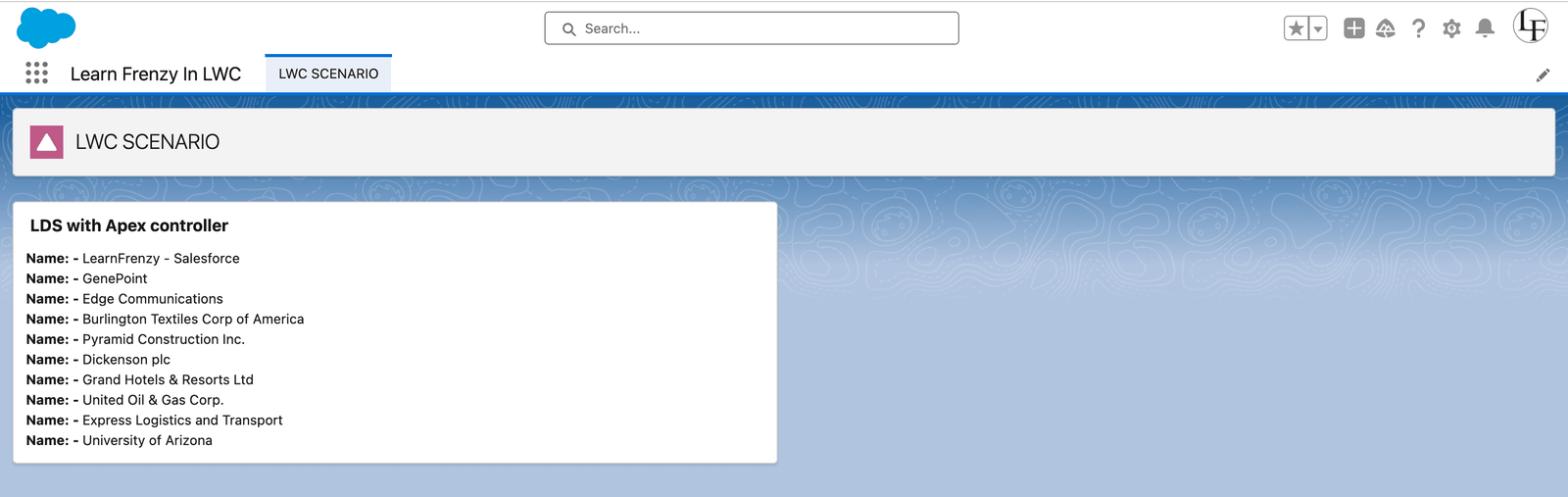
}In this example, the getAccountDetails method is called using the @wire decorator. The result is stored in the accData property, and the formatted names are displayed in the template.
// Apex method in Apex class (ApexClassController)
public with sharing class ApexClassController {

    @AuraEnabled (cacheable=true)
    public static list<Account> getAccountDetailsByRating(String accRating){
        return [SELECT Id, Name, Rating, Type
                FROM Account
                WHERE Rating =: accRating
                WITH SECURITY_ENFORCED LIMIT 10];
    }
}
<template>
<lightning-card title="LDS with parameter in Apex controller">
<div class="slds-p-horizontal_small">
<lightning-combobox name="rating" label="Rating" value="{accRating}" placeholder="Select Rating" options="{options}" onchange="{handleChange}">
</lightning-combobox>
<template for:each="{accDataByRating}" for:item="accData">
<div key="{accData.Id}">
<p>Name: - {accData.Name} </p>
</div>
</template>
</div>
</lightning-card>
</template>// ldsWithApex.js
import { LightningElement, wire } from 'lwc';
import filterAccountDetails from '@salesforce/apex/ApexClassController.getAccountDetailsByRating';
export default class LdsWithApex extends LightningElement {
accDataByRating = [];
accRating = '';
@wire(filterAccountDetails, { accRating: '$accRating' })
accDetailsByType({ data, error }) {
if (data) {
console.log(JSON.stringify(data));
this.accDataByRating = data;
if (error)
console.log(error);
}
}
get options() {
return [
{ label: 'Hot', value: 'Hot' },
{ label: 'Warm', value: 'Warm' },
{ label: 'Cold', value: 'Cold' }
]
}
handleChange(event) {
this.accRating = event.target.value;
console.log('Search Rating:- ' + this.accRating);
}
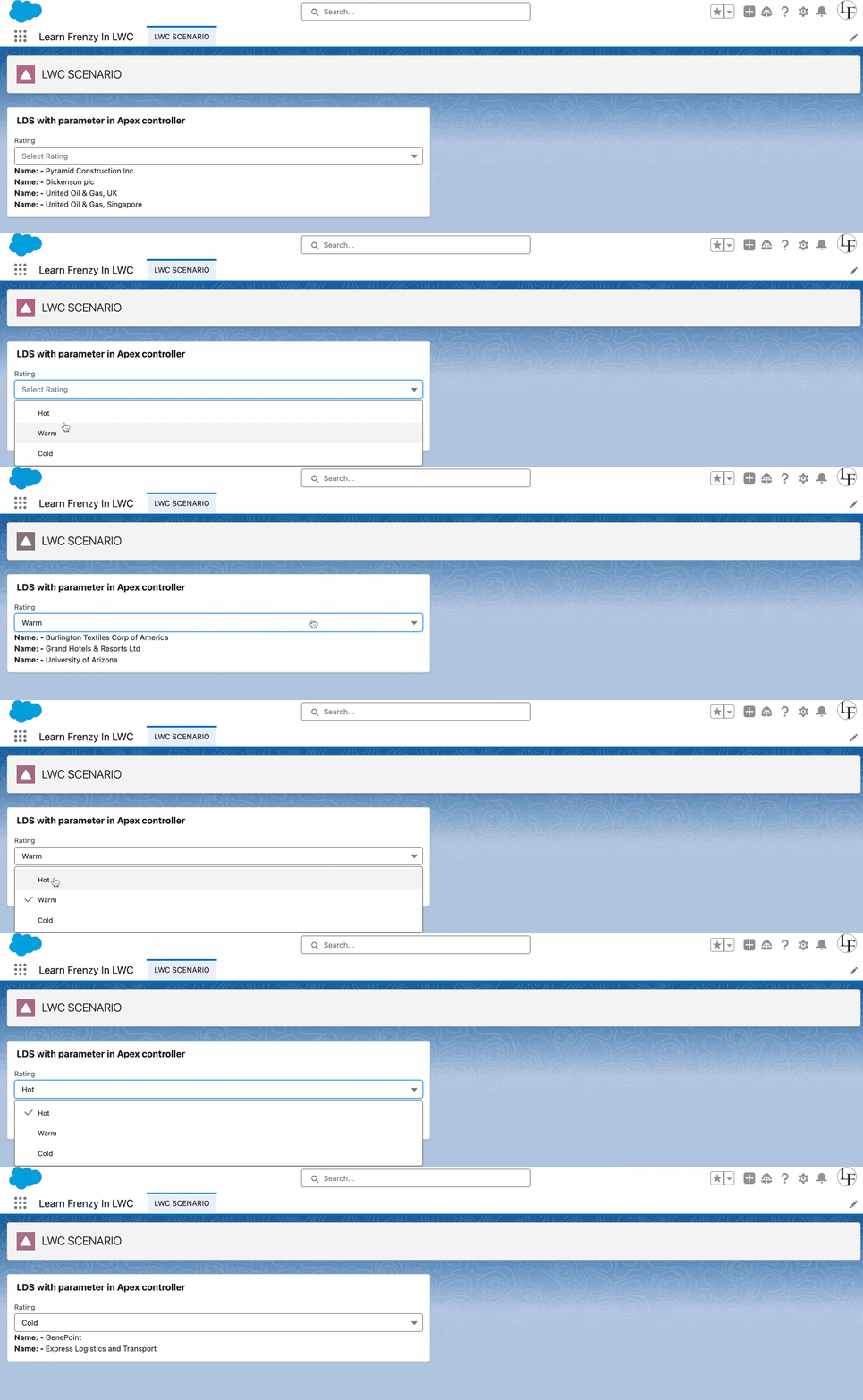
}
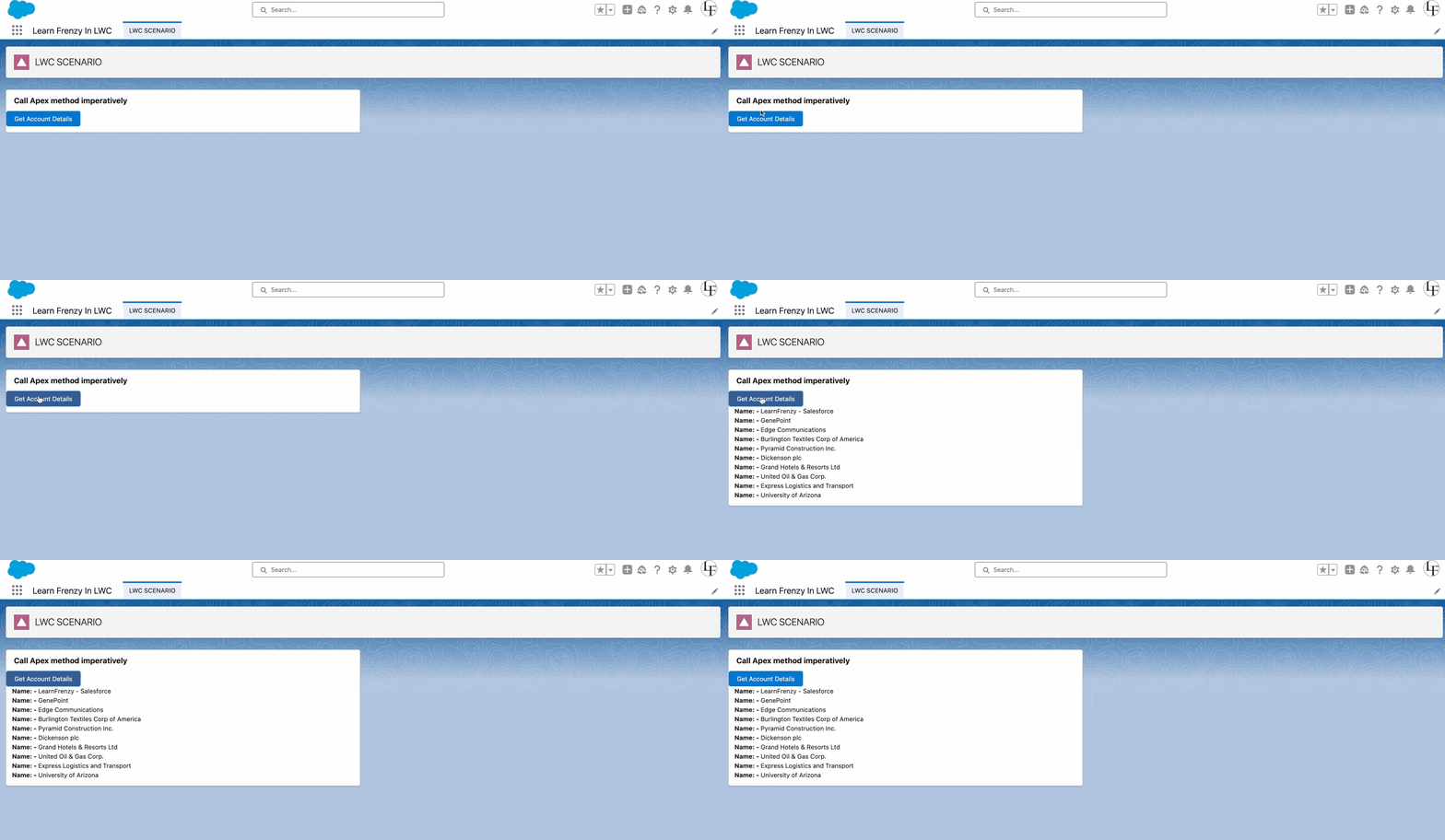
Calling Apex methods imperatively in Lightning Web Components (LWC) involves making a direct call to an Apex method from your JavaScript code, providing more control over when and how the call is executed. Unlike using the @wire decorator, imperative Apex calls are initiated programmatically, typically in response to user interactions, lifecycle events, or other dynamic conditions.
Mind it!
To control when method should be invoked, use imperative approach.
for example, you want to get data by clicking of button, then you can use imperative approach.
cacheable=true, which includes any method that inserts, updates, or deletes data.LightningElement.// Apex method in Apex class (ApexClassController)
public with sharing class ApexClassController {
@AuraEnabled
public static list<Account> getAccountDetailsImperatively(){
return [SELECT Id, Name, Rating, Type
FROM Account
WITH SECURITY_ENFORCED LIMIT 10];
}
}<template>
<lightning-card title="Call Apex method imperatively">
<div class="sIds-p-horizontal_small">
<lightning-button variant="Brand" label="Get Account Details" title="acc details" onclick="{handleClick}">
</lightning-button>
</div>
<div class="slds-p-horizontal_small">
<template lwc:if="{accDetailsImperatively}">
<template for:each="{accDetailsImperatively}" for:item="item">
<div key="{item.Id}">
<p>Name: - {item.Name}</p>
</div>
</template>
</template>
</div>
</lightning-card>
</template>// ldsWithApex.js
import { LightningElement, wire } from 'lwc';
import getAccountDetailsImperatively from '@salesforce/apex/ApexClassController.getAccountDetailsImperatively';
export default class LdsWithApex extends LightningElement {
accDetailsImperatively = [];
error = '';
//Call Apex method imperatively
handleClick() {
getAccountDetailsImperatively()
.then((result) => {
console.log(result);
this.accDetailsImperatively = result
this.error = undefined
})
.catch((error) => {
console.log(error);
this.accDetailsImperatively = undefined
this.error = error
})
}
}Explanation
import { LightningElement, wire } from 'lwc'; : This imports the necessary Lightning Web Component modules, including LightningElement and wire.import getAccountDetailsImperatively from '@salesforce/apex/ApexClassController.getAccountDetailsImperatively'; : export default class LdsWithApex extends LightningElement { :accDetailsImperatively = []; : This property is an array (accDetailsImperatively) that will store the results returned by the Apex method.error = ''; : This property will store any errors encountered during the Apex method call.handleClick() {: This method (handleClick) is triggered when an action, such as a button click, occurs in the component.getAccountDetailsImperatively(): This is an imperative Apex method call. It fetches account details using the imported Apex method..then((result) => { ... }) : This part handles the success scenario. If the Apex method call is successful, the result is logged to the console, and the accDetailsImperatively property is updated with the result..catch((error) => { ... }) : This part handles errors. If an error occurs during the Apex method call, the error is logged to the console, and the error property is updated with the error message.Usage
The component exposes a method (handleClick) that can be associated with a button or another user interface element. When the user interacts with that element, the imperative Apex method (getAccountDetailsImperatively) is called, and the results or errors are processed accordingly.
This code demonstrates how to use imperative Apex in a Lightning Web Component, fetching data and handling both success and error scenarios. The fetched data is stored in a property for potential display or further processing in the component.
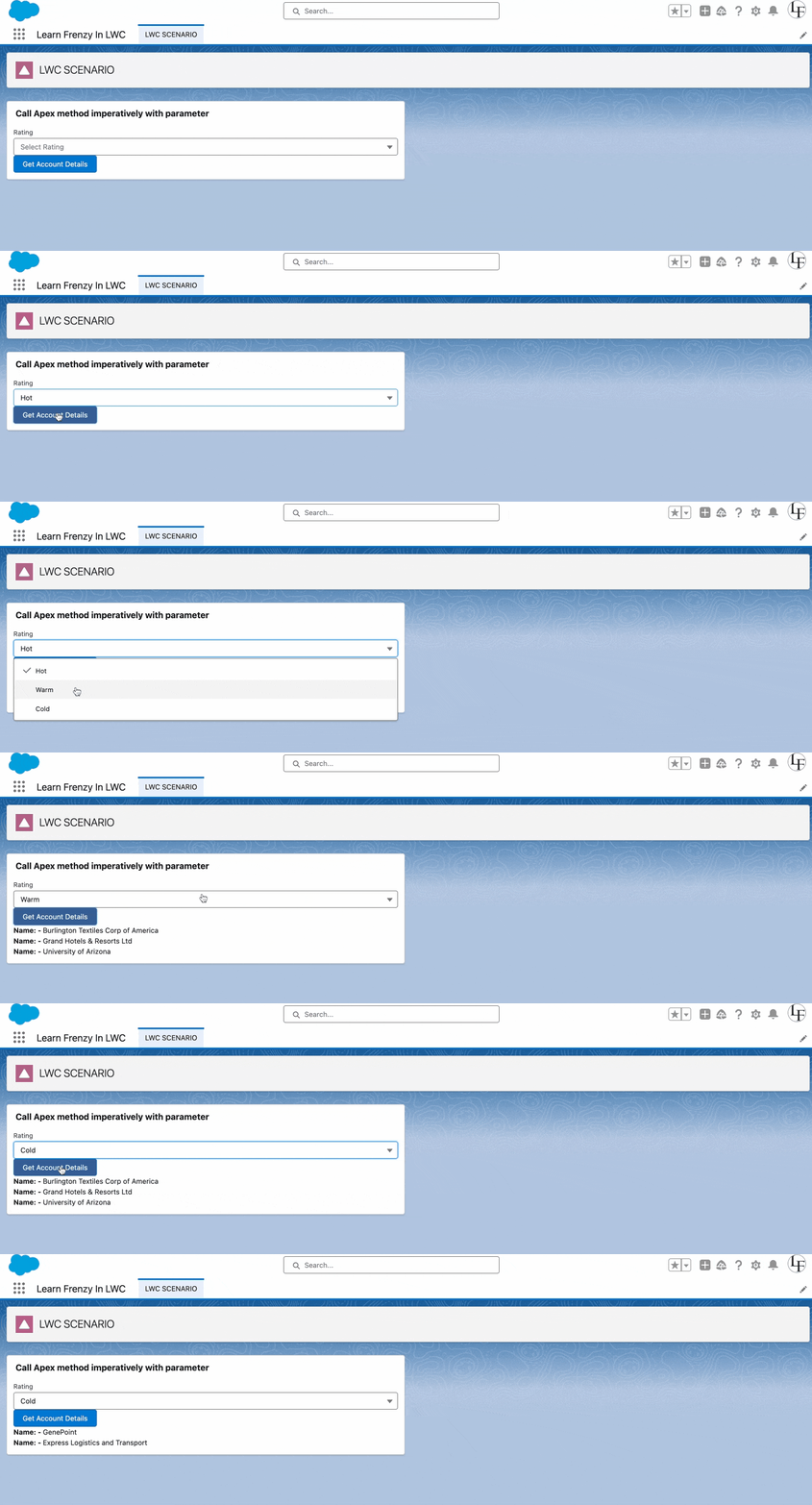
Pass parameters values to an Apex method in an object whose properties match the parameters of the Apex method.
For example, if the Apex method takes a string parameter, don’t pass a string directly. Instead, pass an object that contains a property whose value is a string.
// Apex method in Apex class (ApexClassController)
public with sharing class ApexClassController {

    @AuraEnabled
    public static list<Account> getAccountDetailsImperatively(String rating){
        return [SELECT Id, Name, Rating, Type
                FROM Account
                WHERE Rating =: rating
                WITH SECURITY_ENFORCED LIMIT 10];
    }
}
<template>
<lightning-card title="Call Apex method imperatively with parameter">
<div class="slds-p-horizontal_small">
<lightning-combobox name="rating" label="Rating" value="{rating}" placeholder="Select Rating" options="{options}" onchange="{handleRatingChange}">
</lightning-combobox>
<lightning-button variant="Brand" label="Get Account Details" title="acc details" onclick="{buttonHandler}">
</lightning-button>
</div>
<div class="slds-p-horizontal_small">
<template lwc:if="{accDetailsByRatingImperatively}">
<template for:each="{accDetailsByRatingImperatively}" for:item="item">
<div key="{item.Id}">
<p>Name: - {item.Name}</p>
</div>
</template>
</template>
</div>
</lightning-card>
</template>// ldsWithApex.js
import { LightningElement } from 'lwc';
import getAccountDetailsByRatingImperatively from '@salesforce/apex/ApexClassController.getAccountDetailsByRatingImperatively';
export default class LdsWithApex extends LightningElement {
rating = '';
error = '';
accDetailsByRatingImperatively = [];
get options() {
return [
{ label: 'Hot', value: 'Hot' },
{ label: 'Warm', value: 'Warm' },
{ label: 'Cold', value: 'Cold' }
]
}
handleRatingChange(event) {
this.rating = event.target.value;
}
buttonHandler() {
getAccountDetailsByRatingImperatively({ rating: this.rating })
.then((result) => {
this.accDetailsByRatingImperatively = result
this.error = undefined
})
.catch((error) => {
this.error = error
this.accDetailsByRatingImperatively = undefined
})
}
}
Calling an Apex method using async and await in Lightning Web Components (LWC) involves making an asynchronous call to an Apex method, allowing you to write more concise and readable code. The async/await pattern simplifies the handling of promises and improves the readability of asynchronous code by making it look more synchronous.
Mind it!
To call apex method asynchronously, use async and await keyword in JS.
Here's an explanation with an example:
Example Scenario
Let's consider a scenario where you want to fetch the details of a specific account based on its ID using an Apex method.
Apex Method
// Apex method in Apex class (MyApexController)
public with sharing class MyApexController {
    @AuraEnabled(cacheable=true)
    public static Account getAccountDetails(String accountId) {
        return [SELECT Id, Name, Industry, AnnualRevenue
                FROM Account
                WHERE Id = :accountId LIMIT 1];
    }
}<template>
<lightning-card title="Account Details" icon-name="standard:account">
<div class="slds-m-around_medium">
<template if:true="{accountDetails}">
<p>Name: {accountDetails.Name}</p>
<p>Industry: {accountDetails.Industry}</p>
<p>Annual Revenue: ${accountDetails.AnnualRevenue}</p>
</template>
<template if:false="{accountDetails}">
No account details available.
</template>
</div>
</lightning-card>
</template>// LWC component using async/await (MyLWCComponent)
import { LightningElement, api } from 'lwc';
import getAccountDetails from '@salesforce/apex/MyApexController.getAccountDetails';
export default class MyLWCComponent extends LightningElement {
@api recordId; // Account Id passed from the parent component or record page
accountDetails;
connectedCallback() {
this.loadAccountDetails();
}
async loadAccountDetails() {
try {
this.accountDetails = await getAccountDetails({ accountId: this.recordId });
console.log('Account Details:', this.accountDetails);
} catch (error) {
console.error('Error fetching account details:', error);
}
}
}Explanation
getAccountDetails) into the LWC JavaScript file. Ensure that the method is annotated with @AuraEnabled or @AuraEnabled(cacheable=true).@api recordId property is used to pass the Account Id from the parent component or the record page to this LWC. This is a common practice when working with record pages or parent-child component relationships.connectedCallback lifecycle hook is used to initiate the asynchronous call when the component is connected to the DOM.loadAccountDetails method, the getAccountDetails Apex method is called using the await keyword. This makes the asynchronous call appear synchronous, enhancing code readability.accountDetails property directly, simplifying the code structure.catch block, providing a clean and straightforward way to handle exceptions.Usage
In this example, the async/await approach is used to call the Apex method imperatively, fetching account details based on the provided recordId. This approach simplifies the syntax, making the code more readable and maintaining a clean and structured error handling mechanism.
Note: Ensure that you handle errors gracefully and consider implementing loading indicators or feedback to enhance the user experience during the asynchronous Apex call.

In conclusion, the choice of method depends on the specific requirements of your Lightning Web Component. The wire adapter is excellent for declarative data fetching and reactivity, the imperative approach offers fine-grained control, and the async/await pattern provides a readable and synchronous-like coding style. Understanding these approaches empowers developers to choose the most suitable method based on the specific needs of their Salesforce development projects.
Let's consider a real-time scenario where we want to retrieve a list of recently modified accounts from Salesforce using an Apex method. We'll implement this scenario using the three approaches mentioned:
Scenario
Display the names of the five most recently modified accounts on the Lightning Web Component.
// Apex method in Apex class (MyApexController)
public with sharing class MyApexController {
    @AuraEnabled(cacheable=true)
    public static List<String> getRecentlyModifiedAccountNames() {
        List<Account> accounts = [SELECT Name FROM Account ORDER BY LastModifiedDate DESC LIMIT 5];
        List<string> accountNames = new List<string>();
        for (Account acc : accounts) {
            accountNames.add(acc.Name);
        }
        return accountNames;
    }
}
<template>
<lightning-card title="Recently Modified Accounts" icon-name="standard:account">
<div class="slds-m-around_medium">
<template if:true="{accountNames.data}">
<p>Account Names: {formattedAccountNames}</p>
</template>
<template if:false="{accountNames.data}">
<p>No recently modified accounts found.</p>
</template>
</div>
</lightning-card>
</template>// LWC component using wire adapter (MyLWCComponent)
import { LightningElement, wire } from 'lwc';
import getRecentlyModifiedAccountNames from '@salesforce/apex/MyApexController.getRecentlyModifiedAccountNames';
export default class MyLWCComponent extends LightningElement {
@wire(getRecentlyModifiedAccountNames) accountNames;
get formattedAccountNames() {
return this.accountNames.data ? this.accountNames.data.join(', ') : 'Loading...';
}
}Explanation
The getRecentlyModifiedAccountNames method in the Apex class retrieves the names of the five most recently modified accounts. The LWC component uses the @wire decorator to call this method, and the retrieved account names are displayed in the template.

If there are accounts in Salesforce, the LWC component will display the names of the five most recently modified accounts separated by commas. Otherwise, it will show 'Loading...'.
Scenario
Log the names of the three accounts modified in the last seven days to the console using imperative Apex.
In this scenario, the objective is to log the names of the three accounts that were modified in the last seven days using the imperative Apex approach. This involves making a direct call to an Apex method from a Lightning Web Component (LWC) and logging the results to the console.
// Apex class (MyApexController)
public with sharing class MyApexController {

    @AuraEnabled(cacheable=true)
    public static List<string> getRecentlyModifiedAccountNames() {
        Date sevenDaysAgo = Date.today().addDays(-7);

        List<Account> modifiedAccounts = [SELECT Name FROM Account WHERE LastModifiedDate >= :sevenDaysAgo LIMIT 3];

        List<String> accountNames = new List<String>();
        for (Account acc : modifiedAccounts) {
            accountNames.add(acc.Name);
        }

        return accountNames;
    }
}
In this Apex class:
getRecentlyModifiedAccountNames method is annotated with @AuraEnabled(cacheable=true). It queries the three most recently modified accounts in the last seven days and returns their names.<template>
<lightning-card title="Recently Modified Accounts (Imperative Apex)" icon-name="standard:account">
<div class="slds-m-around_medium">
</div>
</lightning-card>
</template>// LWC component using imperative Apex (MyLWCComponent)
import { LightningElement } from 'lwc';
import getRecentlyModifiedAccountNames from '@salesforce/apex/MyApexController.getRecentlyModifiedAccountNames';
export default class MyLWCComponent extends LightningElement {
connectedCallback() {
getRecentlyModifiedAccountNames()
.then(result => {
console.log('Imperative Apex Result:', result);
})
.catch(error => {
console.error('Imperative Apex Error:', error);
});
}
}Explanation
In this scenario, the connectedCallback lifecycle hook is used to call the getRecentlyModifiedAccountNames method imperatively. The result, which is an array of account names, is logged to the console.
Output
Assuming there are three accounts modified in the last seven days, the output in the browser console would be something like:
Recently Modified Account Names: ["Account1", "Account2", "Account3"]
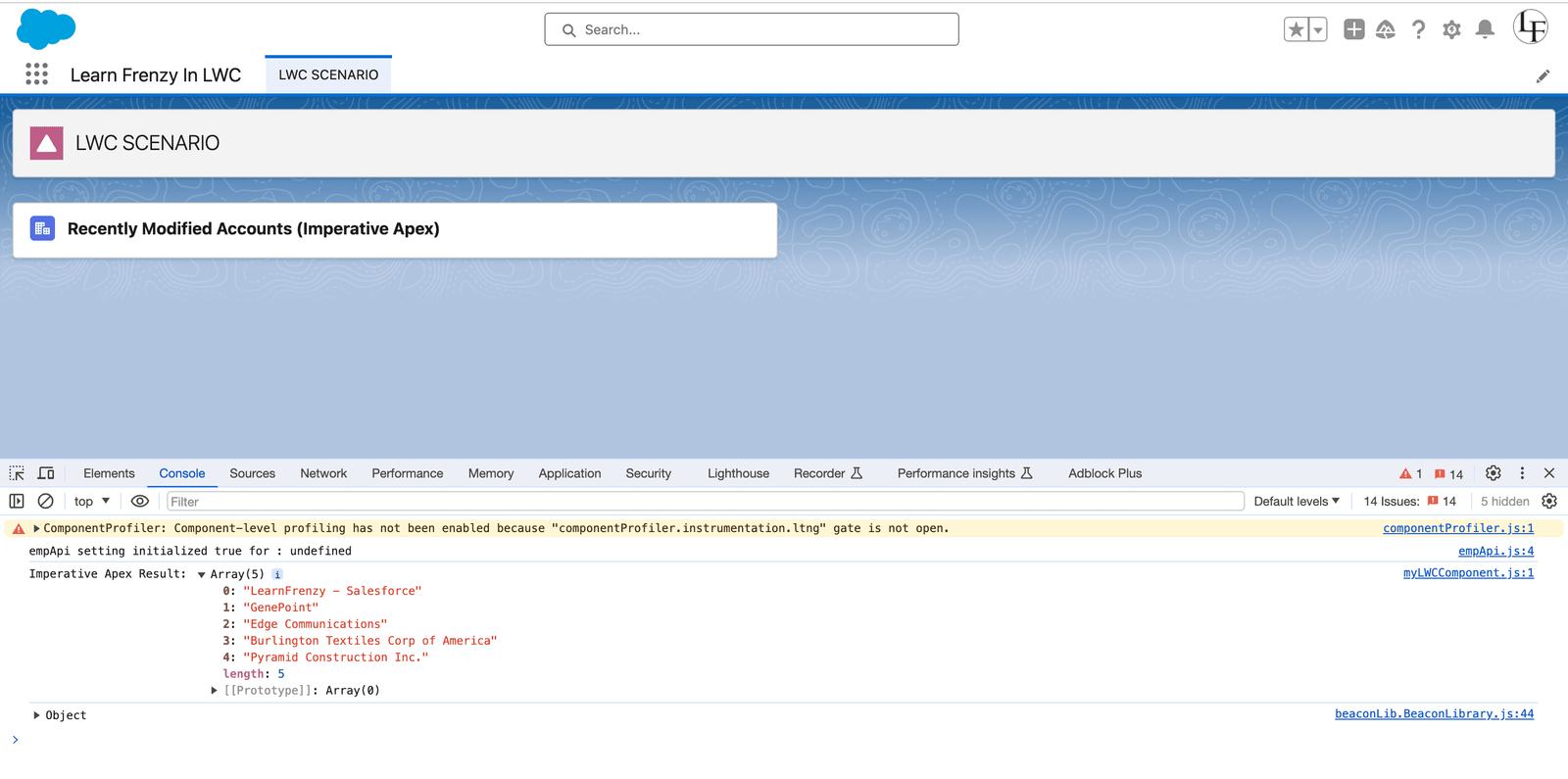
The console will display the names of the three most recently modified accounts if there are accounts modified in the last seven days. If there are no such accounts, the console will log an empty array.
Mind it!
Here's an alternative way:
// LWC component (MyLWCComponent.js)
import { LightningElement, wire } from 'lwc';
import getRecentlyModifiedAccountNames from '@salesforce/apex/MyApexController.getRecentlyModifiedAccountNames';

export default class MyLWCComponent extends LightningElement {

    connectedCallback() {
        this.fetchAndLogAccountNames();
    }

    async fetchAndLogAccountNames() {
        try {
            const accountNames = await getRecentlyModifiedAccountNames();
            console.log('Recently Modified Account Names:', accountNames);
        } catch (error) {
            console.error('Error fetching recently modified account names:', error);
        }
    }
}
In this LWC:
fetchAndLogAccountNames method is an asynchronous function using async and await. It makes an imperative call to the getRecentlyModifiedAccountNames Apex method.try block logs the names of the recently modified accounts to the console.catch block logs any errors encountered during the Apex call to the console.
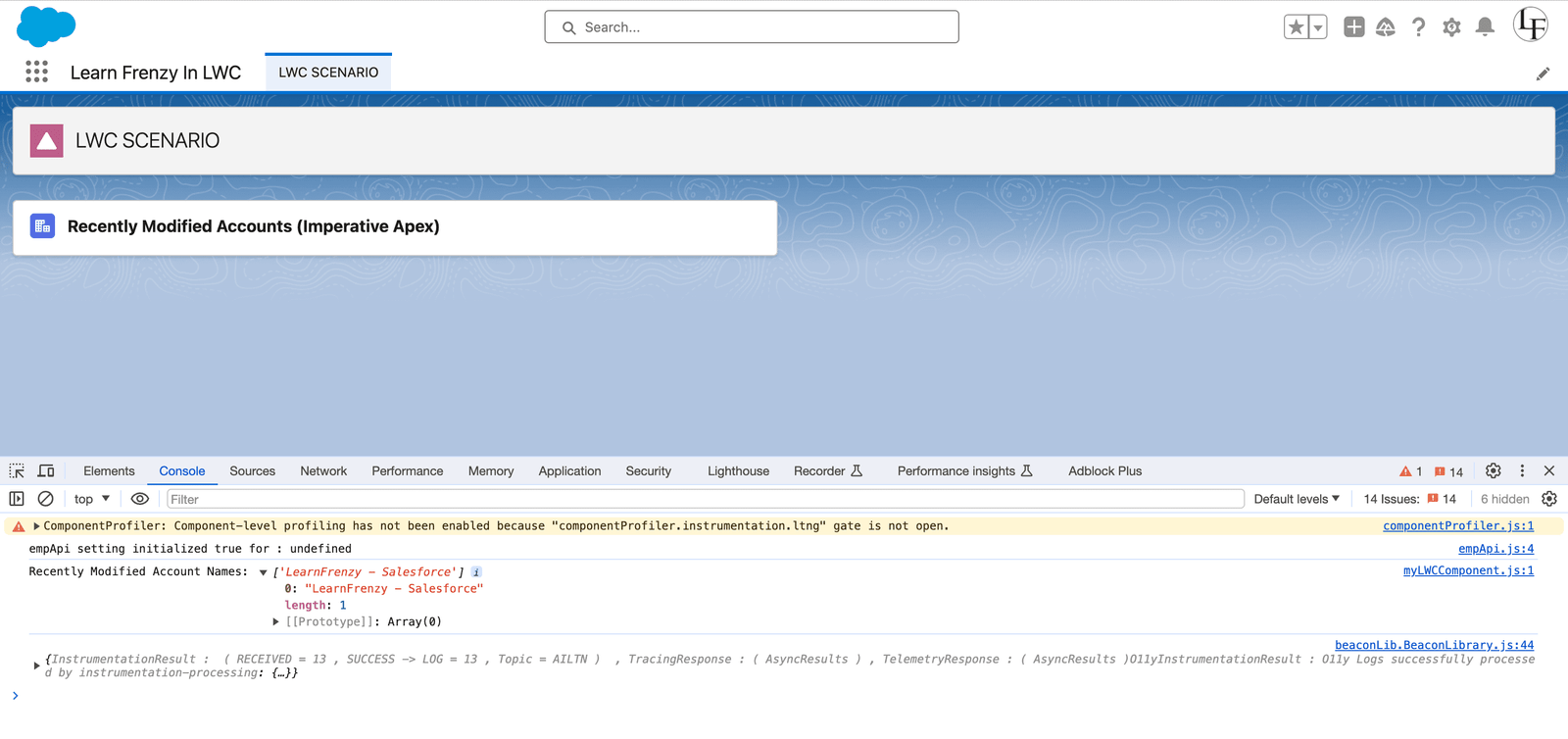
This example demonstrates how to use imperative Apex to fetch and log the names of recently modified accounts in a Lightning Web Component. The actual names would vary based on the data in your Salesforce organization.
Scenario
Display a message on the Lightning Web Component if there is at least one account modified in the last 30 days; otherwise, display a different message.
To achieve the scenario using the async and await approach in a Lightning Web Component (LWC), we'll create an asynchronous JavaScript function to call the Apex method and handle the logic.
// Apex class (MyApexController)
public with sharing class MyApexController {

    @AuraEnabled(cacheable=true)
    public static Boolean hasRecentlyModifiedAccounts() {
        // Logic to determine if there is at least one account modified in the last 30 days
        Date thirtyDaysAgo = Date.today().addDays(-30);

        Integer modifiedAccountsCount = [SELECT COUNT() FROM Account WHERE LastModifiedDate >= :thirtyDaysAgo];

        return modifiedAccountsCount > 0;
    }
}
In this Apex class:
hasRecentlyModifiedAccounts is an Apex method annotated with @AuraEnabled(cacheable=true). This method checks for the presence of at least one account modified in the last 30 days by performing a SOQL query on the Account object.<template>
<lightning-card title="Recently Modified Accounts" icon-name="standard:account">
<div class="slds-m-around_medium">
<p>{messageToDisplay}</p>
</div>
</lightning-card>
</template>In this HTML template:
<lightning-card> component to create a card with a title and icon.{messageToDisplay} dynamic expression displays the message based on the result of the hasRecentlyModifiedAccounts Apex method.// LWC component using async/await (MyLWCComponent.js)
import { LightningElement, api } from 'lwc';
import hasRecentlyModifiedAccounts from '@salesforce/apex/MyApexController.hasRecentlyModifiedAccounts';
export default class MyLWCComponent extends LightningElement {
@api recordId; // Account Id passed from the parent component or record page
hasModifiedAccounts;
connectedCallback() {
this.checkRecentlyModifiedAccounts();
}
async checkRecentlyModifiedAccounts() {
try {
this.hasModifiedAccounts = await hasRecentlyModifiedAccounts();
} catch (error) {
console.error('Error checking recently modified accounts:', error);
}
}
get messageToDisplay() {
return this.hasModifiedAccounts
? "At least one account has been modified in the last 30 days."
: "No accounts modified in the last 30 days.";
}
}Explanation
In this scenario,
checkRecentlyModifiedAccounts method is an asynchronous function that uses await to call the hasRecentlyModifiedAccounts Apex method.messageToDisplay getter dynamically determines the message based on the result of the asynchronous Apex call.connectedCallback lifecycle hook is used to initiate the asynchronous call when the component is connected to the DOM.This async/await approach simplifies the code structure, making it more readable and maintaining a clean error handling mechanism.
Output
If at least one account has been modified in the last 30 days, the output will be:
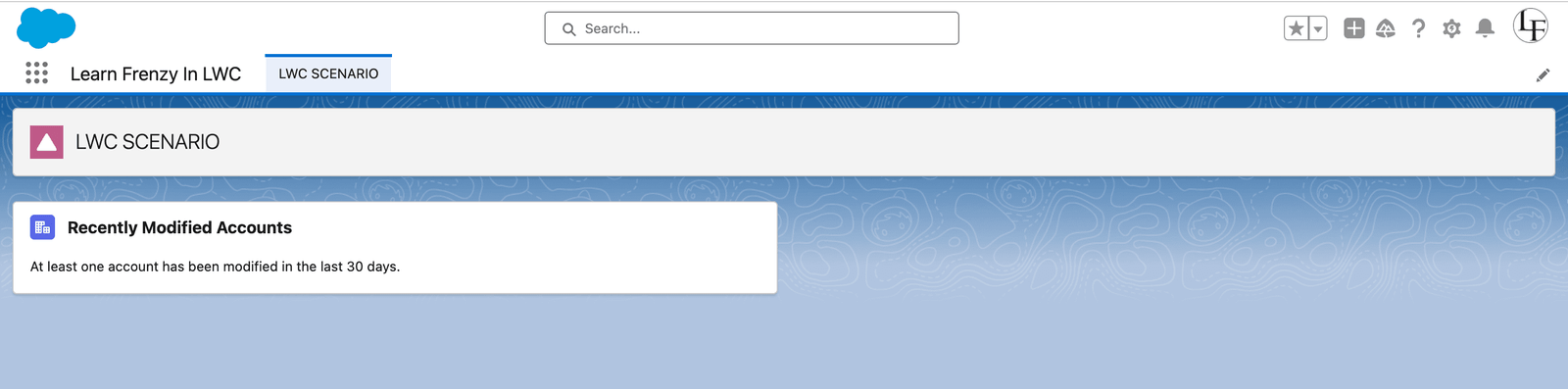
If no accounts have been modified in the last 30 days, the output will be:
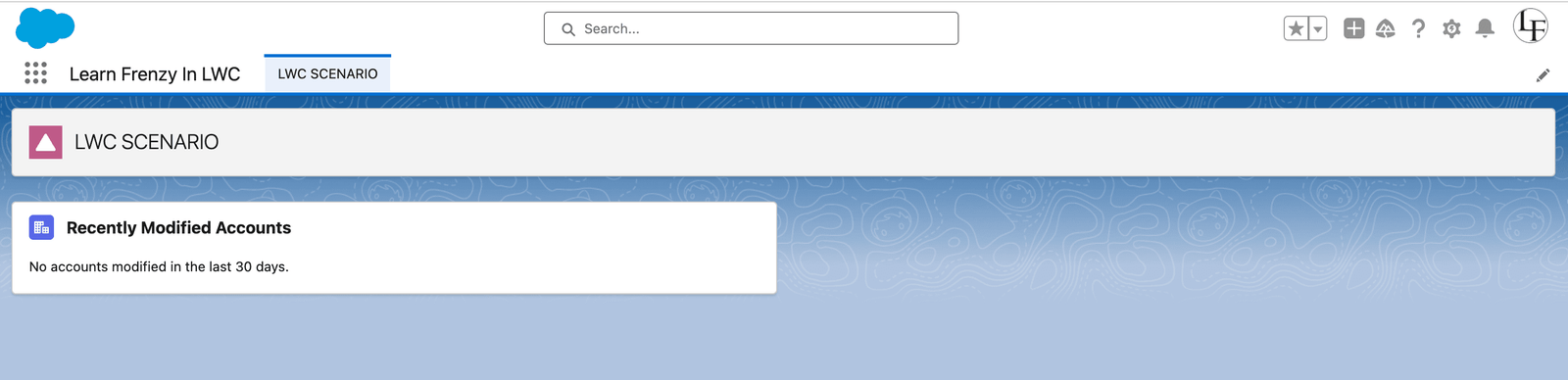
Mind it!
Hello friends, here we can explore Scenario 3 with an imperative call to the Apex method.
// LWC component using wire adapter (MyLWCComponent)
import { LightningElement, wire } from 'lwc';
import hasRecentlyModifiedAccounts from '@salesforce/apex/MyApexController.hasRecentlyModifiedAccounts';

export default class MyLWCComponent extends LightningElement {
  @wire(hasRecentlyModifiedAccounts) hasModifiedAccounts;

  get messageToDisplay() {
    return this.hasModifiedAccounts.data
      ? "At least one account has been modified in the last 30 days."
      : "No accounts modified in the last 30 days.";
  }
}@wire decorator is used to call the hasRecentlyModifiedAccounts Apex method imperatively.messageToDisplay getter dynamically determines the message based on whether there are recently modified accounts.These examples illustrate practical scenarios where each approach (wire adapter, imperative, async/await) can be applied to interact with Apex methods in Lightning Web Components. Choose the approach that aligns with your use case and coding preferences.
“Stay tuned for more exciting LWC topics, and keep exploring the world of Lightning Web Components to become a Salesforce development pro.”
Happy coding with LWC!

One short email when we publish something new — interview questions, Salesforce guides and career tips. No spam, unsubscribe in one click.
Understand LWC decorators (@api, @track, @wire) and lifecycle hooks with clear examples — what each does and when to use it in your components.
JavaScript fundamentals for Lightning Web Components — scope, this, closures, promises, events and modules — explained with LWC-focused examples.

The JavaScript concepts to know before starting Lightning Web Components — variables, functions, objects, arrays, classes, modules and promises.
Questions, corrections or your own experience — they all help the next reader.