
Top 30 Salesforce CPQ Interview Questions & Answers
Thirty Salesforce CPQ interview questions with answers — quote-to-cash, products, bundles, price rules, product rules, approvals and contracts.
Batch Apex interview questions answered as a real interview — Database.Batchable, start, execute and finish, governor limits, chaining and testing.

Hello everyone, Welcome in SFDC Worlds...!!
Asking simple straightforward questions of Batch Apex in Salesforce is history. Few years back Salesforce certified people were very less. Hence criteria was just to check whether that person know about Salesforce or not.
So questions used to be:
What are types of Asynchronous apex?
What is Batch Apex?
What are the methods used in batch apex?
etc.
If you notice above questions are crisp to the point. But now since in market there are many Salesforce certified people above style of interview doesn't work. One could easily memories these.
Now the style of asking questions is different for the interviewer. There is more focus on asking real time scenario questions rather than how etc.
In this blog series, I am starting the "Interview Series on Salesforce". I am covering real time scenario questions and concepts. I have tried to cover all scenario based questions which are often asked by Salesforce Apex Developer in an interview.
Please go through them in depth.
Batch class in salesforce :
When we want to deal with large number of records we go for batch apex. The code inside batch class runs asynchronously i.e. in future context. The governor limit are also more as compared to synchronous code.
Understanding Batch Apex Terminology
There is a governor limit on the total number of records retrieved by a SOQL query. We can only retrieve 50,000 records. But what if we want to retrieve more than 50,000 records. Here Batch Apex comes in as a savior. Using Batch Apex class we can process records in batches asynchronously. Each execution of a batch Apex job is considered a discrete transaction.
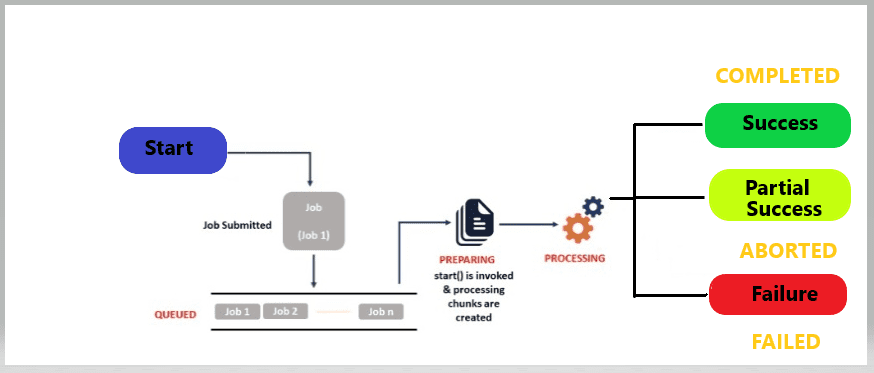
When we use batch apex we implements Database.batchable() interface
The Database.batchable() contains three methods that we need to defined inside batch class and they are,
Database.QueryLocator object or an Iterable that contains the records or objects passed to the job.Execute method is called after the start method, it receives the list of record which can be processed as required.
The default batch size is 200 records. Batches of records are not guaranteed to execute in the order they are received from the start method.
Syntax
global class batch implements Database.Batchable <sObject> {
    global (Database.QueryLocator or  Iterable<sobject>)
        start(Database.BatchableContext bc) {
            //query on object;
            //return Database.getQueryLocator(query);
        }
    global void execute(Database.batchableContext bc, List <SObject> scope) {
        //some processing.
    }
    global void finish(Database.BatchableContext bc) {
        //job such as sending email or calling another batch class
    }
}
Points To Remember
Database.getQueryLocator when you are using simple query to create scope for object in batch job.Limits in Batch Apex
Database.QueryLocator object.QueryLocator, the optional scope parameter of Database.executeBatch can have a maximum value of 2,000. If set to a higher value, Salesforce chunks the records returned by the QueryLocator into smaller batches of up to 2,000 records. Interview Series
Hey guys, from this post i am starting interview series on Asynchronous Apex (i.e. Batch Apex, Apex Scheduler, Future Methods and Queueable Apex) which are very helpful in interviews.
Mind it!
| Need | Batch Apex | Scheduled Apex | Future Methods | Queueable Apex |
|---|---|---|---|---|
| Process large data volumes | Yes | |||
| Execute logic at specific time intervals | Yes | |||
| Perform Web Service Calls | Yes | Yes | Yes | |
| Sequential Processing (Chaining) | Yes | |||
| Support for Non-Primitive (sObject, custom Apex types) | Yes | Yes | Yes |
In this blog series, I have tried to cover Batch Apex based questions that are often asked from a Salesforce developer in an interview.
Let start the first interview series on Batch Apex (Between Interviewer & Interviewee).
Interviewer
Why do we use Batches?
Interviewee
We use Batch Apex in Salesforce mainly to handle large volumes of data or long-running jobs that can’t be processed in a single transaction because of governor limits.
Mind it!
Here’s a clear breakdown of why batches are used:
1. Process Large Data Sets
2. Avoid Governor Limits
Example: if you update 1 million Accounts, each batch of 200 records runs separately with fresh limits.
3. Asynchronous Processing
4. Callouts with Large Data
Database.AllowsCallouts.5. Error Handling
In short
We use batches when we need to process or update very large sets of records, avoid hitting limits, run asynchronously, or handle external integrations at scale.
Interviewer
Why to use Batch class as we already having data loader to process the bulk data.
Interviewee
Agree with this point if and only if the data needs to be updated is static or predefined or which can be done through excel.
We will choose batch class if we have to perform some custom calculations at run time or if you want to run some complex logic which can't be driven by excel sheets in those cases we have to go with batch classes.
For Examples:
Interviewer
What interface will you use for batch apex?
Interviewee
It is Database.Batchable interface.
Mind it!
For Batch Apex, the core interface you use is: Database.Batchable<T>
<T> is the type of object the batch will process, usually sObject.start – defines the scope of records.execute – processes each batch of records.finish – post-processing after all batches are done.If your batch needs to make callouts, you also add: Database.AllowsCallouts (a marker interface).
Example
global class MyBatchClass implements Database.Batchable<sobject>, Database.AllowsCallouts {
    global Database.QueryLocator start(Database.BatchableContext bc) {
        return Database.getQueryLocator('SELECT Id, Name FROM Account');
    }

    global void execute(Database.BatchableContext bc, List<account> scope) {
        // Your logic here (DML, callouts, etc.)
    }

    global void finish(Database.BatchableContext bc) {
        // Send email, log results, etc.
    }
}
So the main interface is Database.Batchable<T>, and you add Database.AllowsCallouts if external API calls are required.
Interviewer
What did you mean by “a new set of governor limits per transaction”?

Interviewee
Batch Jobs can be operated on any size of records, with a maximum of 200 records per batch. Each batch is a transaction. The Apex governor limits are reset for each transaction.
Interviewer
Can you write a batch class blueprint?
Interviewee
Yes — The Batch class executes every transaction, by breaking down large sets of data into small chunks and providing us with the additional benefit of a governor limit.
It provides us with a higher SOQL query limit. It implements a Database.Batchable interface.
Database.Batchable Interface has three methods that we have to implement:
global class batch implements Database.Batchable <sObject> {
    global (Database.QueryLocator or  Iterable<sobject>)
        start(Database.BatchableContext bc) {
            //query on object;
            //return Database.getQueryLocator(query);
        }
    global void execute(Database.batchableContext bc, List <SObject> scope) {
        //some processing.
    }
    global void finish(Database.BatchableContext bc) {
        //job such as sending email or calling another batch class
    }
}
Mind it!
A batch Apex class must implement the ‘Database.Batchable
’ interface & Should include the following methods: Start(), Execute(), Finish() Start() method : Returns either of the two types of objects ‘Database.QueryLocator’ or ‘Iterable’.
Executes only once. Returns batch scope / records to be processed on.Execute() method : Executes multiple times. Can call Queueable Apex. Each execution will set new governor limits.
Finish() method : Executes only once. Can call another Batch Apex.
Interviewer
What is the difference between Database.QueryLocator & Iterable<sobject> used in batch apex?
Interviewee
Both Database.QueryLocator and Iterable<sObject> can be used in the start method of a Batch Apex class, but they behave differently.
1. Database.QueryLocator
Example
global Database.QueryLocator start(Database.BatchableContext bc) {
    return Database.getQueryLocator('SELECT Id, Name FROM Account WHERE Active__c = true');
}
2. Iterable<sObject>
Iterable and Iterator interfaces to control how records are returned.Example
global Iterable<Account> start(Database.BatchableContext bc) {
    List<account> accList = [SELECT Id, Name FROM Account WHERE Active__c = true];
    return accList; // acts as an Iterable
}
Key Differences at a Glance
| Feature | Database.QueryLocator | Iterable<sObject> |
|---|---|---|
| Data Source | SOQL query only | Any custom collection / logic |
| Record Limit | Up to 50 million | Up to 50,000 (normal governor limit) |
| Ease of Use | Simple, less code | More code (must implement Iterable/Iterator) |
| When to Use | For large data sets via SOQL | For complex sources or combined data |
Simple rule of thumb
QueryLocator.Iterable.Interviewer
Can you explain more about interable interface. What you mean by custom scope?
Interviewee
Exactly - let's look at this, as Iterable in Batch Apex is often confusing.
What is Iterable in Batch Apex?
When you implement Database.Batchable, the start method must return either:
Database.QueryLocator (from SOQL), orIterable<T> (a collection you control).The Iterable approach gives you custom scope — meaning you decide what records (or objects) the batch should process, and in what order, instead of Salesforce doing it for you through a simple SOQL query.
What do we mean by Custom Scope?
"Custom scope" means you can create your own list of records, objects, or even data not directly fetched from SOQL. Examples:
Basically, you’re not tied to a single SOQL query — you define your own data set.
When you use Iterable, you must implement two things:
Iterator<T>.Let’s say you want to process only top 10 Accounts by revenue, but SOQL doesn’t allow complex logic to easily chunk them. You can do:
global class CustomIterableBatch implements Database.Batchable<sObject> {

    global Iterable<sObject> start(Database.BatchableContext bc) {
        List<Account> accList = [SELECT Id, Name, AnnualRevenue FROM Account ORDER BY AnnualRevenue DESC LIMIT 10];
        return new AccountIterable(accList);
    }

    global void execute(Database.BatchableContext bc, List<sObject> scope) {
        for (Account acc : (List<Account>)scope) {
            acc.Description = 'Processed in custom Iterable batch';
        }
        update scope;
    }

    global void finish(Database.BatchableContext bc) {
        System.debug('Batch completed.');
    }
}

global class AccountIterable implements Iterable<sObject> {
    private List<Account> records;

    global AccountIterable(List<Account> accs) {
        this.records = accs;
    }

    global Iterator<sObject> iterator() {
        return new AccountIterator(records);
    }
}

global class AccountIterator implements Iterator<sObject> {
    private List<Account> records;
    private Integer index = 0;

    global AccountIterator(List<Account> accs) {
        this.records = accs;
    }

    global boolean hasNext() {
        return index < records.size();
    }

    global Account next() {
        return records[index++];
    }
}
Mind it!
So, "custom scope" = you, not Salesforce, define exactly which records or data items the batch processes, using an Iterable instead of just a SOQL query.
Interviewer
If We use Itereable<sObject>, will We be able to process Batches in a specific order?
Interviewee
Yes — that’s actually one of the main advantages of using Iterable<sObject> instead of Database.QueryLocator.
Why?
Database.QueryLocator, Salesforce controls the order. You can add ORDER BY in SOQL, but once the records are chunked into batches, you don’t have fine-grained control.Iterable, you create and pass your own list/collection. That means you decide the exact order of elements in that list. The batch framework will respect that order while chunking into scope lists.Example
Suppose you want to process Accounts ordered by Annual Revenue descending (highest-paying customers first):
global class RevenueBatch implements Database.Batchable<sObject> {

    global Iterable<sObject> start(Database.BatchableContext bc) {
        // Get accounts ordered by revenue
        List<Account> accList = [
            SELECT Id, Name, AnnualRevenue
            FROM Account
            WHERE Active__c = true
            ORDER BY AnnualRevenue DESC
        ];
        return accList; // preserves order
    }

    global void execute(Database.BatchableContext bc, List<sObject> scope) {
        for (Account acc : (List<Account>)scope) {
            System.debug('Processing: ' + acc.Name + ' Revenue: ' + acc.AnnualRevenue);
        }
    }

    global void finish(Database.BatchableContext bc) {
        System.debug('Batch finished.');
    }
}
Here, each chunk of 200 records (default batch size) will be processed in the same order you defined in your list.
Mind it!
Iterable batches preserve the order of the list/collection you pass in.
This is why Iterable is handy when:
Interviewer
In a batch context, can I process Data in a specific order?
Interviewee
Not always. It depends on which start method you use.
If you use Database.QueryLocator
ORDER BY in the SOQL.global Database.QueryLocator start(Database.BatchableContext bc) {
return Database.getQueryLocator(
'SELECT Id, Name FROM Account ORDER BY AnnualRevenue DESC'
);
}If you use Iterable<sObject>
Mind it!
So the correct answer is
You can process data in a specific order within each batch scope, but you cannot strictly enforce a sequential order across all scopes.
Interviewer
Can I query related records using Database.QueryLocator ?
Interviewee
Yes, you can query related records with Database.QueryLocator, because it supports all standard SOQL relationship queries (both parent-to-child and child-to-parent). The only limitation is that the batch scope is based on the main object in your query.
Database.QueryLocator accepts any valid SOQL query.global Database.QueryLocator start(Database.BatchableContext bc) {
return Database.getQueryLocator(
'SELECT Id, Name, Account.Name, Account.Industry FROM Contact'
);
}Here you’re pulling related Account fields while batching through Contacts.
global Database.QueryLocator start(Database.BatchableContext bc) {
    return Database.getQueryLocator(
        'SELECT Id, Name, (SELECT Id, Subject FROM Tasks) FROM Account'
    );
}
Each Account record in the scope will also include its child Tasks.
execute will always be a list of the main object from your query (List<Contact> in example 1, List<Account> in example 2).for (Account acc : scope) {
for (Task t : acc.Tasks) {
System.debug('Task: ' + t.Subject);
}
}Interviewer
Can I Use FOR UPDATE in SOQL using Database.QueryLocator?
Interviewee
No. You cannot use FOR UPDATE with Database.QueryLocator.
Why?
Database.QueryLocator is designed for large-volume, read-only streaming of records (up to 50 million).FOR UPDATE would try to lock all those rows in a single transaction, which isn’t supported."
FOR UPDATEis not allowed withDatabase.getQueryLocator()."
What if you need row locking in Batch Apex?
Iterable<sObject> start method instead of QueryLocator.FOR UPDATE using standard SOQL.List and return it as an Iterable.global class LockingBatch implements Database.Batchable<sObject> {
global Iterable<sObject> start(Database.BatchableContext bc) {
List<Account> accs = [
SELECT Id, Name FROM Account WHERE Active__c = true FOR UPDATE
];
return accs;
}
global void execute(Database.BatchableContext bc, List<sObject> scope) {
// Process with records locked
}
global void finish(Database.BatchableContext bc) {}
}execute().That way you only lock the records being processed in the current scope.
Mind it!
QueryLocator —> supports huge volumes, but no FOR UPDATE.Iterable —> smaller volumes (?50k), but you can use FOR UPDATE for record locking.Interviewer
What is the state of batch apex?
Interviewee
Batch Apex is typically stateless. Each execution of a batch Apex job is considered a discrete transaction.
For example, a batch Apex job that contains 1,000 records and uses the default batch size is considered five transactions of 200 records each.
Interviewer
Let’s say Record A has to be processed before Record B, but Record B came in the first Batch and Record A came in the second batch. The batch picks records which are unprocessed every time it runs. How will you control the processing Order?
Interviewee
The Processing order can’t be controlled, but we can bypass the Record B processing before Record A. We can implement Database.STATEFUL and use one class variable to track whether Record A has processed or not. If not processed and Record B has come, don’t process Record B. After all the execution completes, Record A has already been processed so Run the batch again, to process Record B.
Interviewer
What is Database.Stateful?
Interviewee
Database.Stateful is a Marker interface helps in maintaining state across transactions. When using Database.Stateful, only instance member variables retain their values between transactions.
Static member variables don’t retain their values and are reset between transactions.
Maintaining state is useful for counting or summarizing records as they’re processed.
For example, we’ll be updating contact records in our batch job and want to keep track of the total records affected so we can include it in the notification email.
Database.Stateful : Used to keep track of data in every batch execution. (If a execute/finish method required data from previous execute method)
Interviewer
Is there any other interface that can be implemented by a Batch apex?
Interviewee
Database.AllowsCallouts is another Marker Interface, which is implemented to make HTTP callouts through Batch.
Interviewer
How to monitor Batch job?
Interviewee
To monitor the status of the jobs
1. From Setup, enter Jobs in Quick Find box
2. Select Apex Jobs
–> Go to Setup --->Apex Job page
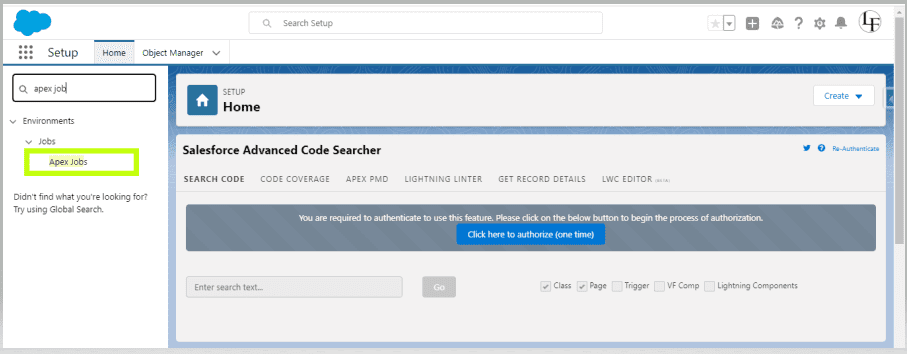
We can monitor progress going to -> Setup -> Apex Jobs (will get job id)
To get details using Job ID : (Perform query on AsyncApexJob object)
AsyncApexJob jobInfo = [SELECT Status,NumberOfErrors FROM AsyncApexJob WHERE Id=:jobID];
Interviewer
What is the Limit of Size of scope in a batch?
Interviewee
If the start method of the batch class returns a QueryLocator, the optional scope parameter of Database.executeBatch can have a maximum value of 2,000. If set to a higher value, Salesforce chunks the records returned by the QueryLocator into smaller batches of up to 2,000 records. If the start method of the batch class returns an iterable, the scope parameter value has no upper limit.
Interviewer
If a batch is having 200 records and 1 record fails what will happen?
Interviewee
If any record fails all 200 record will fail but next batch will get executed.
Interviewer
How to calculate the batch size if we are making any call out from the batch class execute method?
Interviewee
Basically in salesforce we have limitation of 100 call outs for a transaction. When it comes to batch class each execute method call will be considered as one transaction. So, in this case your batch size must be calculated in such way
Batch size = (No of callouts allowed for single transaction /total number of call outs for each record) - 1;
Batch size = (100 /total number of call outs for each record) - 1;
Interviewer
How many times the execute method will be executed to process the 1236 records.
Interviewee
It depends on your batch size what you have configured at the time of calling the batch class from schedule class.
Execution method count = Total No Of Records/Batch Size (Any decimal ceil it to upper value)
If you haven't set any batch size then :
1236 = 6.18 = 7 times execute method will be called 200
Interviewer
Can we call the batch into another batch apex?
Interviewee
Yes, we can call from the finish method.
Interviewer
Can we call batch apex into another batch in execute method?
Interviewee
Only in batch class finish method, We can call another batch class. If you will call another batch class from batch class execute and start method, then Salesforce will throw below runtime error.
System.AsyncException: Database.executeBatch cannot be called from a batch start, batch execute, or future method.
Interviewer
Why to call only from the finish method why not from execute?
Interviewee
Because the execute method will gets invoked multiple times based on the volume of the records and batch size. So, if your calling it from execute method then the chaining class will get called multiple times which is not an suggested way of doing.
We can also use the Queueable Apex for chaining of the jobs.
Interviewer
Let’s say, we have run an apex batch to process 1000 records, and It is running with batch size 200. Now, while doing DML on 398th record, an error occurred, What will happen in that case?
Interviewee
In batches, If the first transaction succeeds but the second fails, the database updates made in the first transaction are not rolled back.
Since the batch size is 200, so the first batch will be processed completely and all data will be committed to DB. In seconds batch, if we are committing records using normal DML statements like insert, update than the whole batch will be rollbacked. So records 201 to 400 will not be processed.
If we use the Database DML operations like Database.insert with AllOrNone as false, then partial commit can happen and only 398th record will not be processed in that batch and total 199 records will be processed. Also, the other batch execution will not gonna be hampered.
Interviewer
Can I call any method from Batch Apex?
Interviewee
Methods declared as future can’t be called from a batch Apex class.
Interviewer
Is there is any way through which we can call future method from batch apex?
Interviewee
As we know that a webservice can be called from batch class and webservice can call @future method. So in your batch class call web service and which can call your @future method. Also, you can call future methods from the finish method in the batch class.
Interviewer
How many can concurrent batch jobs be added to the queue?
Interviewee
At most, there can be 5 batch jobs queued at a time.
Interviewer
Can we call the batch apex from triggers in salesforce?
Interviewee
Yes, it is possible. We can call a batch apex from trigger but we should always keep in mind that we should not call batch apex from trigger each time as this will exceeds the governor limit this is because of the reason that we can only have 5 apex jobs queued or executing at a time.
Interviewer
Can we call webservice callout from batch apex?
Interviewee
To make a Webservice callout in batch Apex, we have to implement Database.AllowsCallouts interface.
Interviewer
How many times start, execute, finish methods will execute in batch apex?
Interviewee
Start method, finish method one time, execute method it depends on requirement. Based on the batch size and data retrieved in Start method.
Interviewer
What is the Batch executions limit per day?
Interviewee
The maximum number of batch executions is 250,000 per 24 hours.
Interviewer
How can we track the status of the current running batch job?
Interviewee
The job Id returned by the batchable context variable helps us in finding the status of a batch through AsyncApexJob object. For example,
global void finish(Database.BatchableContext info){

    // Get the ID of the AsyncApexJob representing this batch job
    // from Database.BatchableContext.
    // Query the AsyncApexJob object to retrieve the current job's information.

    AsyncApexJob a = [SELECT Id, Status, NumberOfErrors, JobItemsProcessed,
                      TotalJobItems, CreatedBy.Email FROM AsyncApexJob WHERE Id = :info.getJobId()];

    // Send an email to the Apex job's submitter notifying of job completion.

    Messaging.SingleEmailMessage mail = new Messaging.SingleEmailMessage();

    String[] toAddresses = new String[] {a.CreatedBy.Email};
    mail.setToAddresses(toAddresses);
    mail.setSubject('Account and contact update' + a.Status);
    mail.setPlainTextBody

        ('The batch Apex job processed ' + a.TotalJobItems +
         ' batches with '+ a.NumberOfErrors + ' failures.'+successRecord+'successRecordids: '+ 'failRecordids: '+ failRecord);
    Messaging.sendEmail(new Messaging.SingleEmailMessage[] { mail });
}
Interviewer
How can you stop a Batch job?
Interviewee
The Database.executeBatch and System.scheduleBatch method returns an ID that can be used in System.abortJob method.
Interviewer
How to stop all the running batches related to a particular batch classes before scheduling the same batch class from the schedule class.
Interviewee
global class CaseCreationonSchedular implements Schedulable
{
    global void execute(SchedulableContext SC)
    {

        for(AsyncApexJob ap: [SELECT Id, ApexClass.Name,createddate, JobType, Status, JobItemsProcessed, MethodName, ParentJobId
                                     FROM AsyncApexJob
                                     Where ParentJobId!=Null
                                     AND JobType IN('BatchApex','BatchApexWorker')
                                     And ApexClass.Name='YourBatchClassName'
                                     And Status NOT IN('Completed','Aborted')])
        {
            System.abortJob(ap.ParentJobId);

        }
        YourBatchClassName cls = new YourBatchClassName();
        DataBase.executeBatch(cls);
    }
}
Interviewer
What is Apex Flex Queue?
Interviewee
At a time salesforce allows 5 batches to be running or to be in queued state. So, if you have consumed all these 5 limits and if system has received one or more batch execution request all these waiting batch will be stored in this Apex Flex Queue.
The maximum number of batch classes allowed in Apex Flex Queue for execution is 100.
Interviewer
Let’s say, I have 150 Batch jobs to execute, Will I be able to queue them in one go?
Interviewee
Once you run Database.executeBatch, the Batch jobs will be placed in the Apex flex queue and its status becomes Holding. The Apex flex queue has the maximum number of 100 jobs, Database.executeBatch throws a LimitException and doesn’t add the job to the queue. So atmost 100 jobs can be added in one go.
Also, if Apex flex queue is not enabled, the Job status becomes Queued, Since the concurrent limit of the queued or active batch is 5, so atmost 5 batch jobs can be added in one go.
Interviewer
Can I change the order of already queued Batch Jobs?
Interviewee
Only jobs having status as Holding can be moved. It can be done through UI of Apex Flex queue or we can use Apex Flex Queue Methods.
Boolean isSuccess = System.FlexQueue.moveBeforeJob(jobToMoveId, jobInQueueId);Interviewer
How Can I schedule a Batch Apex?
Interviewee
Through System.scheduleBatch Method, we can schedule batch for once at a future time. This method returns the scheduled job ID also called CronTrigger ID.
String cronID = System.scheduleBatch(reassign, 'job example', 1);

CronTrigger ct = [SELECT Id, TimesTriggered, NextFireTime
                  FROM CronTrigger WHERE Id = :cronID];
Interviewer
Is it possible to do Synchronous Web service callouts from scheduled apex?
Interviewee
No — you cannot make synchronous web service callouts directly from a scheduled Apex class. Salesforce enforces this limitation because scheduled jobs run in a system context where synchronous callouts are not allowed.
Why It's Not Allowed: The Governor Limit
The primary reason is a strict governor limit enforced by the Salesforce platform:
@future methods) has a limit of 10 synchronous HTTP callouts per transaction.Scheduled Apex runs asynchronously. Therefore, the context it runs in does not permit any synchronous operations that would wait for an external response. The platform enforces this to prevent an async process from blocking a shared resource while waiting for a potentially slow external service to respond.
What Happens If You Try?
If you write code in a Schedulable class that performs a synchronous callout (e.g., using HttpRequest and HttpResponse without a continuation), you will receive a fatal, un-catchable exception at runtime:
System.AsyncException: Synchronous operation not allowed from async context: Schedule
Your scheduled job will fail, and you will see this error in the Apex Jobs log (Setup -> Monitoring -> Apex Jobs).
Interviewer
Can we call the scheduler from the future method?
Interviewee
Yes..!! We can call the scheduler from the future method.
Interviewer
Can we modify the scheduler class or classes referenced by this scheduler class if any scheduled job is pending?
Interviewee
No, If there are one or more active scheduled jobs for an Apex class, you cannot update the class or any classes referenced by this class through the Salesforce user interface.
Interviewer
Can I call Queueable from a batch?
Interviewee
Yes, But you’re limited to just one System.enqueueJob call per execute in the Database.Batchable class. Salesforce has imposed this limitation to prevent explosive execution.
Interviewer
How Can I Test a Batch Apex?
Interviewee
We can test it by calling the Batch job between Test.startTest() and Test.stopTest(). Using the Test methods startTest and stopTest around the executeBatch method to ensure that it finishes before continuing your test. All asynchronous calls made after the startTest method are collected by the system. When stopTest is executed, all asynchronous processes are run synchronously.
Also we can test only one execution of the execute method. So we need to set the scope as per the governor limits.
Interviewer
How many records we can insert while testing Batch Apex?
Interviewee
We have to make sure that the number of records inserted is less than or equal to the batch size of 200 because test methods can execute only one batch. We must also ensure that the Iterable returned by the start method matches the batch size.
Batch Apex Scenario 1
Write a Batch apex class to automatically deactivate users when the user's Last Login Date is greater than 30 days.
Batch Apex Code: batchDeactivateUsers.apxc
global class batchDeactivateUsers implements Database.Batchable<sobject> {
    global Database.QueryLocator start(Database.BatchableContext bc){
        string query = 'SELECT Name, isActive, LastLoginDate FROM User WHERE LastLoginDate < LAST_N_DAYS:30';
        return database.getQueryLocator(query);
    }
    global void execute(Database.BatchableContext bc, List<user> users){
        List<user> userlist = new List<user>();
        for(User u : users){
            u.IsActive = false;
            userlist.add(u);
        }
        update userlist;
    }
    global void finish(Database.BatchableContext bc){
    }
}
Batch Apex Scenario 2
Update account description, number of employees, contact last name using batch apex. Get the failure record ids in the email. Also, schedule the job for every Monday.
Batch Apex Code: batchUpdateAccountsContacts.apxc
global class batchUpdateAccountsContacts implements Database.Batchable <sObject>,Database.Stateful,Schedulable {
    global batchUpdateAccountsContacts(){
    }
    Set<id> successRecord = new Set<id>();
    Set<id> failRecord = new Set<id>();

    global Database.QueryLocator start(Database.BatchableContext info){
        String SOQL='Select id, name, NumberOfEmployees, description,(select id, name from contacts) from Account';
        return Database.getQueryLocator(SOQL);
    }
    global void execute(Database.BatchableContext info, List<account> scope){
        List<account> accsToUpdate = new List<account>();
        List<contact> contUpdate = new List<contact>();
        for(Account a : scope)
        {
            a.description ='Welcome to Learnfrenzy - Best Place to Learn';
            a.NumberOfEmployees = 70;
            accsToUpdate.add(a);
            for (Contact c:a.contacts){
                c.lastname = 'test+a';
                contUpdate.add(c);
            }
        }
        Database.SaveResult[] srList = Database.update(accsToUpdate, false);
        Database.SaveResult[] srList1 = Database.update(contUpdate, false);


        for (Database.SaveResult sr : srList) {
            if (sr.isSuccess()) {
                // Operation was successful, so get the ID of the record that was processed
                successRecord.add(sr.getId());
            }

            else {
                for(Database.Error err : sr.getErrors()) {
                }
                failRecord.add(sr.getId());
            }
        }

        for (Database.SaveResult sr : srList1) {
            if (sr.isSuccess()) {
                successRecord.add(sr.getId());
            }
            else {
                for(Database.Error err : sr.getErrors()) {
                }
                failRecord.add(sr.getId());
            }
        }


    }
    global void finish(Database.BatchableContext info){

        // Get the ID of the AsyncApexJob representing this batch job
        // from Database.BatchableContext.
        // Query the AsyncApexJob object to retrieve the current job's information.
        AsyncApexJob a = [SELECT Id, Status, NumberOfErrors, JobItemsProcessed,
                          TotalJobItems, CreatedBy.Email FROM AsyncApexJob WHERE Id = :info.getJobId()];

        // Send an email to the Apex job's submitter notifying of job completion.
        Messaging.SingleEmailMessage mail = new Messaging.SingleEmailMessage();

        String[] toAddresses = new String[] {a.CreatedBy.Email};
            mail.setToAddresses(toAddresses);
        mail.setSubject('Account and contact update' + a.Status);
        mail.setPlainTextBody

            ('The batch Apex job processed ' + a.TotalJobItems +
             ' batches with '+ a.NumberOfErrors + ' failures.'+successRecord+'successRecordids: '+ 'failRecordids: '+ failRecord);
        Messaging.sendEmail(new Messaging.SingleEmailMessage[] { mail });
    }


    global void execute(SchedulableContext SC){
        database.executeBatch(new batchUpdateAccountsContacts(),100);
        //for cron expression
        // String cronexpression = ‘0 0 0 ? * * *’
        // System.schedule(‘Testing’, cronexpression, testobj);
    }

}1. Go to developer console
2. Open execute anonymous window.
3. Run the below code
database.executeBatch(new batchUpdateAccountsContacts(),100);
To monitor the status of the jobs
1. From Setup, enter Jobs in Quick Find box
2. Select Apex Jobs

Output
Now in the below image we can see updated description and LastName as a requirement in above batch class.


Batch Apex Scenario 3
Write a Batch Class to Update the Status of the Campaign to Completed if it is not Completed.
Batch Apex Code: batchUpdateCampaignStatus.apxc
global class batchUpdateCampaignStatus implements Database.Batchable<sObject> {

    global Database.QueryLocator start(Database.BatchableContext bc) {
        string query = 'SELECT Id,Name,Enddate,Status FROM Campaign WHERE Enddate < TODAY';
        return database.getQueryLocator(query);
    }

    global void execute(Database.BatchableContext bc, List<Campaign> campaigns) {

        List<Campaign> camplist = new List<Campaign>();

        for(Campaign c :campaigns){
            // Check if the Status is not Completed
            if(c.status != 'Completed'){
                // Change the Status to Completed
                c.status = 'Completed';
                camplist.add(c);
            }
        }

        update camplist;
    }

    global void finish(Database.BatchableContext bc) {

    }
}
Batch Apex Scenario 4
Write a Batch apex class to automatically delete the Leads whose Lead Status is "Closed- Not Converted".
Batch Apex Code: batchDeleteLeadsNotConverted.apxc
global class batchDeleteLeadsNotConverted implements Database.Batchable<sObject> {

    global Database.QueryLocator start(Database.BatchableContext bc){
        string query = 'SELECT Id,Name,Status FROM Lead where Status = \'Closed - Not Converted\'';
        return database.getQueryLocator(query);
    }

    global void execute(Database.BatchableContext bc, List<Lead> leads){
        // Delete the Leads which are not converted.
        Delete Leads;
        // Removes the Leads from the Recycle Bin.
        database.emptyRecycleBin(leads);
    }


    global void finish(Database.BatchableContext bc) {

    }

}
Hopefully, this interview series on Batch Apex will help to understand Batch Apex clearly and crack the interview.
All the Best...!!

One short email when we publish something new — interview questions, Salesforce guides and career tips. No spam, unsubscribe in one click.
Thirty Salesforce CPQ interview questions with answers — quote-to-cash, products, bundles, price rules, product rules, approvals and contracts.
The 30 Salesforce Apex interview questions asked most — collections, SOQL, DML, governor limits, triggers, async Apex and testing — with answers.
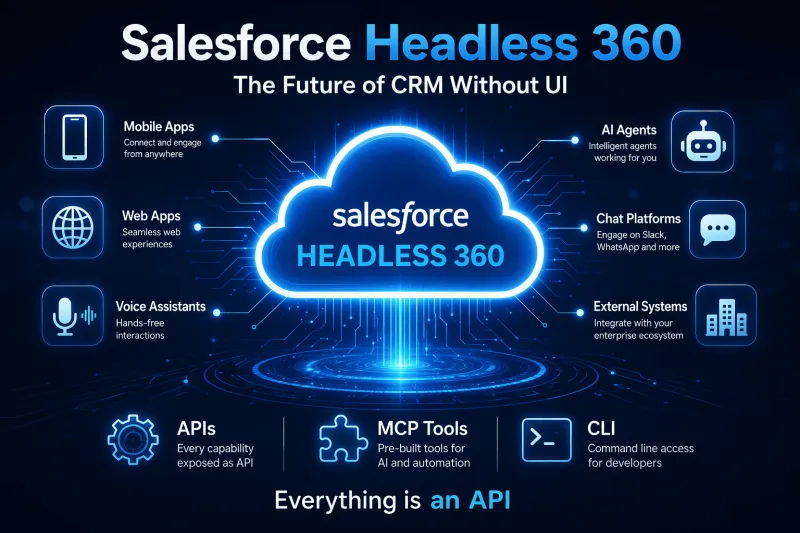
Salesforce Headless 360 explained — what headless CRM means, how APIs and data cloud power it, and what it changes for developers and businesses.
Questions, corrections or your own experience — they all help the next reader.
Anisha
prasanth
Vishal Pawar
Hemendra
Kartik
Gunjan
Athira P U
rohit rawat
Amit
siddhu
Chandan Sagar S
Chandan Sagar S
Gaurav Saini
Manohar