Top 30 Salesforce CPQ Interview Questions & Answers
Thirty Salesforce CPQ interview questions with answers — quote-to-cash, products, bundles, price rules, product rules, approvals and contracts.
Scheduled Apex interview questions with answers — Schedulable interface, CRON expressions, scheduling batch jobs, limits and testing.

Hello everyone, Welcome to SFDC Worlds...!!
Last month I started the "Interview Series on Salesforce". My first Interview Series was on Batch Apex.
In this blog series, I am starting next interview series on Apex Scheduler. I am covering real time scenario questions and concepts. I have tried to cover all scenario based questions which are often asked by Salesforce Apex Developer in an interview.
Scheduled apex is all about to run a piece of apex code at some particular time within a period of time. Schedule apex in Salesforce is a class that runs at a regular interval of time. To schedule an apex class, we need to implement an interface Schedulable.

If you want to schedule apex class to run at regular intervals then you need to write an Apex class that implement Schedulable interface.
Syntax
global class SampleSchedulerClass implements Schedulable {
 global void execute(SchedulableContext SC) {
    //Some code that would be called
 }
}
Apex Scheduler Limits
1. You can only have 100 scheduled Apex jobs at one time.
2. The maximum number of scheduled Apex executions per a 24-hour period is 250,000 or the number of user licenses in your organization multiplied by 200, whichever is greater.
3. Synchronous Web service callouts are not supported from Scheduled Apex.
In this way, you can schedule apex classes to execute at particular intervals of time by implementing the schedulable class. Sometimes, execution may be delayed based on service availability.
 Interview Series
Hey guys, I have tried to cover Apex Scheduler based questions that are often asked from a Salesforce developer in an interview.
Let start the second interview series on Apex Scheduler (Between Interviewer & Interviewee).
Interviewer
What is an Apex Scheduler?
Interviewee
Apex Scheduler is an ability to invoke an Apex class to run at specific times.
To schedule an apex class, we need to implement an interface Schedulable.
Interviewer
What could be the use cases for Apex Scheduler?
Interviewee
1. Sending Periodic notifications to users.
2. Tasks related to real-time updates.
3. Newsletter's on the 15th of every month.
Interviewer
Ok. So, what are the prerequisites for the apex scheduler?
Interviewee
The apex class needs to implement the Salesforce-provided interface Schedulable and override it’s execute() method.
Interviewer
What is the parameter of the execute method ?
Interviewee
The parameter of this method is a SchedulableContext object.
Interviewer
Can you write the basic Apex structure of a class that can be scheduled?
Interviewee
global class SampleSchedulerClass implements Schedulable {
 global void execute(SchedulableContext SC)
  {
    /* Logic goes here */
  }
}
Interviewer
What is SchedulableContext?
Interviewee
Represents the parameter type of a method in a class that implements the Schedulable interface and contains the scheduled job ID using the getTriggerID() method. This interface is implemented internally by Apex.
Interviewer
And what would be the use of that Job ID?
Interviewee
With that ID, we can track the Progress of a Scheduled Job through a query on CronTrigger. The ID is of type CronTrigger.
Moreover, we can go to Setup ---> Scheduled Jobs too, for monitoring.
Interviewer
What happens after the class is scheduled?
Interviewee
After a class has been scheduled, a CronTrigger object is created that represents the scheduled job. It provides a getTriggerId method that returns the ID of a CronTrigger API object.
Interviewer
So, How can I schedule the apex class?
Interviewee
Once you are done with the implementation. You can schedule it either through theDeveloper console using system.schedule method.
SampleSchedulerClass obj = new SampleSchedulerClass();
String CRON_EXP = '20 30 8 10 2 ?';
String jobID = system.schedule(‘Sample Scheduler Job’, CRON_EXP, obj);
Here:
20 represents seconds
30 represents minutes
8 represents hour of the day
10 represents 10th day of month
2 represents month of the year
? represents day of the month
OR
From system UI
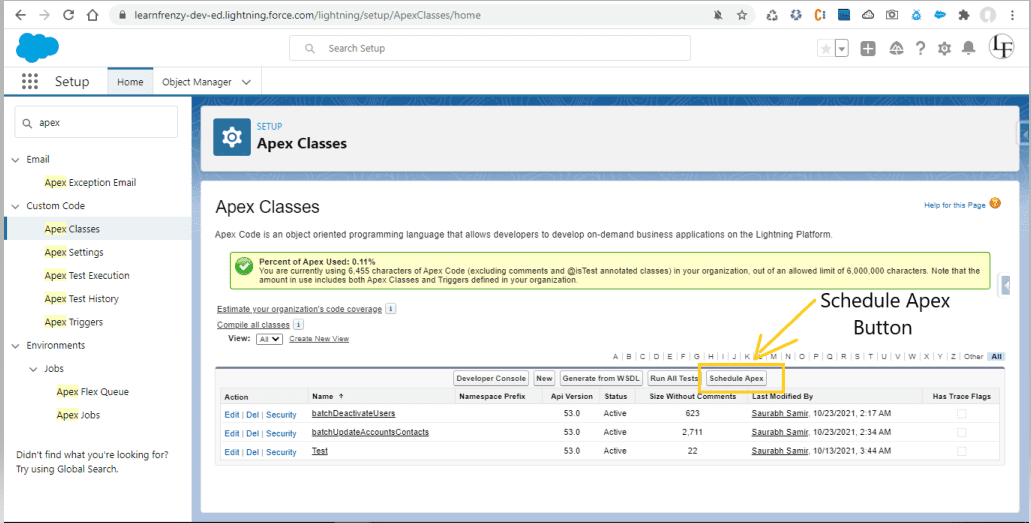
1. From Setup, enter Apex in Quick Find box
2. Select Apex Classes
–> Go to Setup --->Apex Classes page
You will see a “Schedule Apex” button. You can set up the timing from there.
Mind it!
The difference between the two ways is that in the system.schedule method we can also specify the minutes and seconds as well but using the UI we can just mention the hour of the day.
Interviewer
What are the arguments of the System.Schedule method?
Interviewee
Once you are implemented schedulable interface use system.schedulable method to execute the class.
system.schedule() method takes 3 parameters :
1. Name of the job.
2. An expression that is used to represent the time and date of the operation.
3. The object of the class which you want to execute.
Interviewer
What is return type of system.schedule?
Interviewee
System.schedule method returns the job ID in string format.
String jobID = system.schedule(‘Sample Scheduler Job’, CRON_EXP, obj);Interviewer
As you mentioned that the jobID can be used to query the progress, how can we track it?
Interviewee
We can simply fire a query to get information about current job.
CronTrigger ct = [SELECT CronExpression, CronJobDetailId, PreviousFireTime,
TimesTriggered, NextFireTime, State, StartTime, EndTime
FROM CronTrigger WHERE Id =: jobID];
Interviewer
What is this CronJobDetailId?
Interviewee
CronJobDetail is the parent CronTrigger that saves a job’s information like Name, JobType, etc.
JobType value is always 7 for Scheduled Apex.
we can get these details too using the same CronTrigger query.
CronTrigger job = [SELECT Id, CronJobDetail.Id, CronJobDetail.Name, CronJobDetail.JobType
FROM CronTrigger where Id =: jobId];
OR
Can query on CronJobDetail with CronJobDetailId.
CronJobDetail ctd = [SELECT Id, Name, JobType
 FROM CronJobDetail WHERE Id = :CronJobDetailId];
Interviewer
what is CRON_EXP?
Interviewee
It is called CRON EXPRESSION which is used to define the scheduling time. it has 6 to 7 inputs.
An expression is written in the form of 'Seconds, Minutes, Hours, Day_of_month, Month, Day_of_week, optional_year'.
it uses some special characters too
? — No Value
* — All Values
? — Specifies no specific value
/-Specifies increments. The number before the slash specifies when the intervals will begin, and the number after the slash is the interval amount.
#-Specifies the nth day of the month, in the format weekday#day_of_month
L-Specifies the end of a range (last)
W-Specifies the nearest weekday(Monday-Friday) of the given day
Values of Expressions in Salesforce Apex
| Name | Values | Special Characters |
|---|---|---|
| Seconds | 0–59 | None |
| Minutes | 0–59 | None |
| Hours | 0–23 | None |
| Day_of_month | 1–31 | , - * ? / L W |
| Month | 1–12 or the following: Jan, Feb, Mar, Apr, May, Jun, Jul, Aug, Sep, Oct, Nov, Dec | , - * / |
| Day_of_week | 1–7 or the following: Sun, Mon, Tue, Wed, Thu, Fri, Sat | , - * ? / L # |
| optional_year | null or 1970–2099 | , - * / |
Interviewer
Why is the purpose of special characters?
Interviewee
The purpose of special characters is to define a range or interval. They are like wildcard characters in database queries.
For example, If I want to run a job at 12 midnight on the 1st of every month in 2022.
My CRON_EXP would be : “0 0 0 1 * 2022”
Where * = all values possible for a month i.e. 1–12
Interviewer
Ok... So write CRON_EXP for scheduling a job at
1. Run every day at 1 PM.
2. Run the last Friday of every month at 10 PM.
3. At 12:00 AM every day
4. Run Monday through Friday at 10 AM.
5. Run every day at 8 PM during the year 2024.
6. At 12:00 PM every day
7. At 10.00 AM every day
8. At 3:00 PM every day
9. Every 30 minutes
10. Runs the last Friday of every month at 7:00 PM.
11. At 5:25 AM on the 15th day of every month
12. At 5:15 PM on the third Friday of every month
13. Every minute starting at 3:00 PM and ending at 3:05 PM, every day
14. At 5:15 PM every Monday, Tuesday, Wednesday, Thursday and Friday
15. Runs every day at 11:00 PM during the year 2022.
Interviewee
| S.No | Scheduling a Job | CORN_EXP |
|---|---|---|
| 1. | Run every day at 1 PM. | 0 0 13 * * ? |
| 2. | Run the last Friday of every month at 10 PM. | 0 0 22 ? * 6L |
| 3. | At 12:00 AM every day | 0 0 0 ? * * * |
| 4. | Run Monday through Friday at 10 AM. | 0 0 10 ? * MON-FRI |
| 5. | Run every day at 8 PM during the year 2024. | 0 0 20 * * ? 2024 |
| 6. | At 12:00 PM every day | 0 0 12 * * ? |
| 7. | At 10.00 AM every day | 0 0 10 ? * * 0 0 10 * * ? 0 0 10 * * ? * |
| 8. | At 3:00 PM every day | 0 0 15 ? * * * |
| 9. | Every 30 minutes | 0 30 * * * ? |
| 10. | Runs the last Friday of every month at 7:00 PM. | 0 0 19 ? * 6L |
| 11. | At 5:25 AM on the 15th day of every month | 0 25 5 15 * ? |
| 12. | At 5:15 PM on the third Friday of every month | 0 15 17 ? * 6#3 |
| 13. | Every minute starting at 3:00 PM and ending at 3:05 PM, every day | 0 0-5 15 * * ? |
| 14. | At 5:15 PM every Monday, Tuesday, Wednesday, Thursday and Friday | 0 15 17 ? * MON-FRI |
| 15. | Runs every day at 11:00 PM during the year 2022. | 0 0 23 * * ? 2022 |
Interviewer
So let's say, I have scheduled an apex class to run at 7 pm today, and at 7 pm, some batches are already running. How will your apex class code run at 7 pm?
Interviewee
It will get scheduled on time because Salesforce schedules the class for execution at the specified time, But the Actual execution may be delayed based on service availability. So, it will run once everything is done.
Interviewer
Cool, let’s say, I have scheduled an apex class to run at 3 pm today, and at 3:15 pm, downtime occurred. What will happen now?
Interviewee
There could be 2 cases:
1. Before starting the job, downtime occurred, in this case, Apex jobs will be scheduled to run after the service comes back up, when system resources become available.
2. If a scheduled Apex job was running when downtime occurred, the job is rolled back and scheduled again after the service comes back up.
Interviewer
What async processes, I can schedule?
Interviewee
We can schedule:
1. Batch Apex (can call a batch from Scheduled Apex)
2. Future Method (can call future from Scheduled Apex)
3. Queueable Apex (can call queueable form Scheduled Apex)
Interviewer
Which of the above can cause an issue?
Interviewee
Calling the Future methods from scheduled apex can cause some issue:
1. The future won’t guarantee it’s execution on time, so tracking is not possible. Also, we lose transaction control because the scheduled apex gets over as soon as it fires the future method call.
2. There is a limit to the number of future calls based on your number of licenses.
Interviewer
Want to schedule batch job at one time only and not again. How to do it?
Interviewee
System.scheduleBatch() is used to run a schedule a batch job only once for a future time. This method has got 3 parameters.
param 1 : Instance of a class that implements Database.Batchable interface.
param 2 : Job name.
param 3 : Time interval after which the job should start executing.
param 4 : It’s an optional parameter which will define the no. of that processed at a time.
The system.scheduleBatch() returns the scheduled job Id.
We can use the job Id to abort the job.
This method returns the scheduled job ID also called CronTrigger ID.
String cronID = System.scheduleBatch(reassign, 'job example', 1);

CronTrigger ct = [SELECT Id, TimesTriggered, NextFireTime
                   FROM CronTrigger WHERE Id = :cronID];
This method is available only for batch classes and doesn’t require the implementation of the Schedulable interface. This makes it easy to schedule a batch job for one execution.
Interviewer
How to get count of Apex Scheduled Job programmatically?
Interviewee
You can programmatically query the CronTrigger and CronJobDetail objects to get the count of Apex scheduled jobs.
Interviewer
If there are one or more active scheduled jobs for an Apex class, can you update the class or any classes referenced in Salesforce UI?
Interviewee
If there are one or more active scheduled jobs for an Apex class, you cannot update the class or any classes referenced by this class through the Salesforce user interface. However, you can enable deployments to update the class with active scheduled jobs by using the Metadata API
Interviewer
Maximum, How many jobs can be scheduled at any point in time?
Interviewee
You can only have 100 scheduled Apex jobs at one time. Either we can verify the count by viewing the Scheduled Jobs page.
OR
we can simply query with CronJobDetail.JobType as 7 (scheduled Apex) on CronTrigger>
SELECT COUNT() FROM CronTrigger WHERE CronJobDetail.JobType = ‘7’Interviewer
How to Call batch apex from schedulable class?
Interviewee
Create instance of batchClass and then pass the instance in database.executebatch.
batchable b = new batchable();
 database.executebatch(b);
An easier way to schedule a batch job is to call the System.scheduleBatch method without having to implement the Schedulable interface.
Interviewer
How to get Job name and job type for Scheduled jobs?
Interviewee
You can get job’s name and the job’s type from the CronJobDetail record associated with the CronTrigger record.
Interviewer
Callout is not supported in Scheduled Apex so what is the alternative?
Interviewee
Synchronous Web service callouts are not supported from scheduled Apex. To be able to make callouts, make an asynchronous callout by placing the callout in a method annotated with @future(callout=true) and call this method from scheduled Apex. However, if your scheduled Apex executes a batch job, callouts are supported from the batch class.
Interviewer
How can you stop the execution of a job that has already been scheduled?
Interviewee
To stop the execution of a job that has been scheduled, use the System.abortJob method with the ID returned by the getTriggerID method.
Interviewer
Can we write a Unit test case for a scheduled Apex?
Interviewee
Yes we can.
Use the Test methods startTest and stopTest around the System.schedule method to ensure it finishes before continuing your test.
All asynchronous calls made after the startTest method are collected by the system.
When stopTest is executed, all asynchronous processes are run synchronously.
If you don’t include the System.schedule method within the startTest and stopTest methods, the scheduled job executes at the end of your test method
Apex Class
global class ScheduledApexTestExample implements Schedulable {
    // This test runs a scheduled job at midnight Sept. 19th. 2022
    public static String CRON_EXP = '0 0 0 19 9 ? 2022';
    global void execute(SchedulableContext ctx) {
    }
}
Test Class
@istest
class TestClass {
    static testmethod void test() {
        Test.startTest();
        String jobId = System.schedule('testBasicScheduledApex',
                                       ScheduledApexTestExample.CRON_EXP,
                                       new ScheduledApexTestExample());
        // Get the information from the CronTrigger API object
        CronTrigger ct = [SELECT Id, CronExpression, TimesTriggered,
                          NextFireTime FROM CronTrigger WHERE id = :jobId];
        // Verify the expressions are the same
        System.assertEquals(ScheduledApexTestExample.CRON_EXP, ct.CronExpression);
        Test.stopTest();
    }
}
Interviewer
Can you tell Best Practices to be followed while using Scheduled Apex?
Interviewee
1. Synchronous Web service callouts are not supported from scheduled Apex. To be able to make callouts, make an asynchronous callout.
2. While scheduling a job from the trigger, we must be able to guarantee that the trigger won’t add more scheduled classes than the limit.
Scheduled Apex Scenario 1
In a set list of emails are stored in execute method. In the finish method that set is not having any emails. What is the reason?
Answer
By default batch class is stateless. Emails which are added to set can be remembered only in execute method. If we try to access the set in finish method you won't see those emails. In finish method if you want to access those emails of that set we should inherit the interface called Database.Stateful.
Scheduled Apex Scenario 2
How to schedule batch apex in minutes/hours?
Answer
To schedule the batch class in minutes/hours, in the finish method we should use System.schedule method which will take 3 parameters Job Name, Chrone Expression and schedulable class instance name respectively.
 /*** Scheduling in minutes or hours ***/
//Create object for schedulable class
SchedulableUsage su = new SchedulableUsage();
//Preparing chron_exp
Datetime sysTime = System.now();
sysTime = sysTime.addminutes(6);
String chron_exp = '' + sysTime.second() + ' ' + sysTime.minute() + ' ' +
sysTime.hour() + ' ' + sysTime.day() + ' ' + sysTime.month() + ' ? ' + sysTime.year();
System.schedule('Dep Update'+sysTime.getTime(),chron_exp, su);
Hopefully, this interview series on Scheduled Apex will help to understand Scheduled Apex clearly and crack the interview.
All the Best...!!

One short email when we publish something new — interview questions, Salesforce guides and career tips. No spam, unsubscribe in one click.
Thirty Salesforce CPQ interview questions with answers — quote-to-cash, products, bundles, price rules, product rules, approvals and contracts.

The 30 Salesforce Apex interview questions asked most — collections, SOQL, DML, governor limits, triggers, async Apex and testing — with answers.

Salesforce Headless 360 explained — what headless CRM means, how APIs and data cloud power it, and what it changes for developers and businesses.
Questions, corrections or your own experience — they all help the next reader.
Nldhi
anonymous
Anonymous