Top 30 Salesforce CPQ Interview Questions & Answers
Thirty Salesforce CPQ interview questions with answers — quote-to-cash, products, bundles, price rules, product rules, approvals and contracts.
Scenario-based Salesforce trigger questions with solutions — real business requirements turned into Apex triggers, with code and explanations.
Asking simple straightforward questions in Salesforce is history. Few years back Salesforce certified people were very less. Hence criteria was just to check whether that person know about Salesforce or not.
So questions used to be:
What is Salesforce Trigger?
What is account and contact?
What is relationship between account contact?
What is workflow?
What is approval process?
etc.
If you notice above questions are crisp to the point. But now since in market there are many Salesforce certified people above style of interview doesn't work. One could easily memories these.
I too take interviews in my company and now style is different. Focus is more to ask scenario questions rather then what how etc.
In this blog series, I have tried to cover trigger scenario based questions that are often asked from a Salesforce developer in an interview.
Trigger Scenario 1
When ever a case is created with origin as email then set status as new and Priority as Medium.
Object : Case
Trigger: Before Insert
Trigger Code: CaseOrigin.apxt
trigger CaseOrigin on Case (before insert) {
    for(case c : trigger.new){
        if(c.origin == 'Email'){
            c.status = 'New';
            c.priority = 'Medium';
        }
    }
}
Output
Status : Working
Priority : High
Case Origin : Email
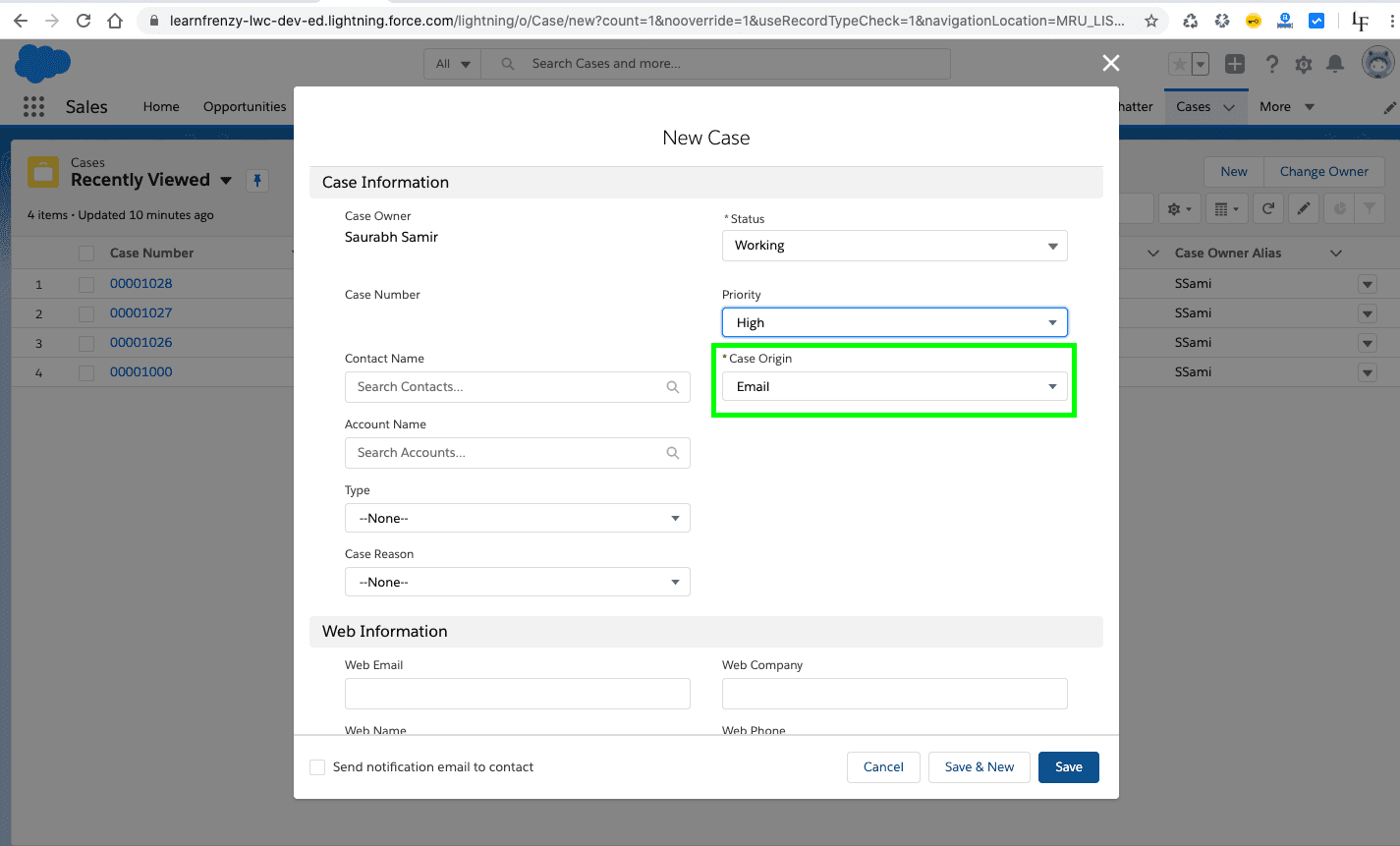
–> Before Insert
As per the requirement, we are performing an operation on the trigger when the user save the new case that means we need to use as before insert trigger.
Status : New
Priority : Medium
Case Origin : Email

Trigger Scenario 2
When ever Lead is created with LeadSource as Web then give rating as cold otherwise hot.
Object : Lead
Trigger: Before Insert
Trigger Code: LeadScenario.apxt
trigger LeadScenario on Lead (before insert) {
    for(lead ld : trigger.new){
        if(ld.leadsource == 'Web'){
            ld.Rating = 'Cold';
        }
        else{
            ld.Rating = 'Hot';
        }
    }
}
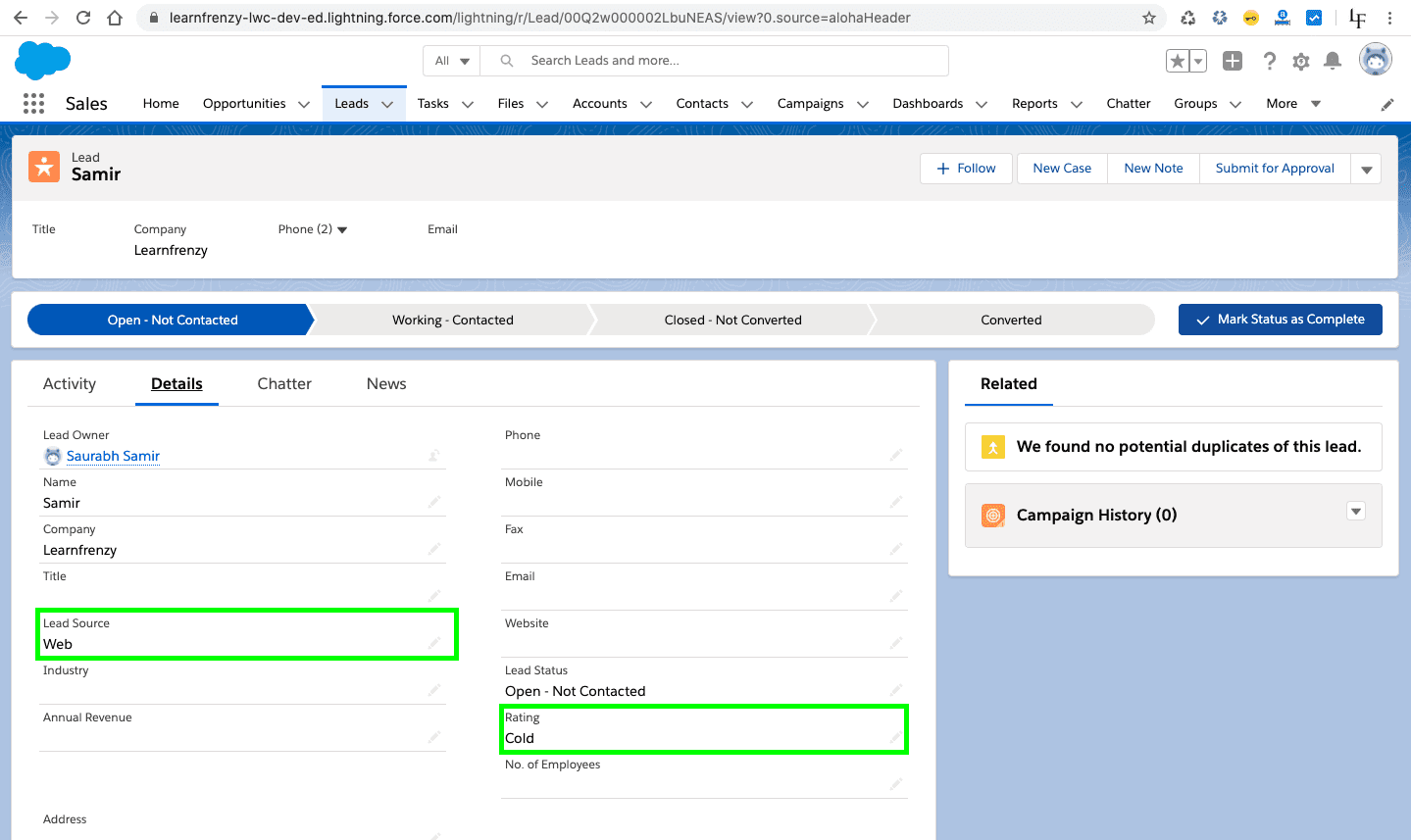
Output

–> Before Insert
As per the requirement, we are performing an operation on the trigger when the user save the new lead that means we need to use as before insert trigger.
Here the user has selected the lead source as 'web', so the rating will be 'cold'
Trigger Scenario 3
Whenever New Account Record is created then needs to create associated Contact Record automatically.
Object : Account
Trigger: After Insert
Description : When ever new Account record is successfully created, then create the corresponding contact record for the account with:
Trigger Code: AccountAfter.apxt
trigger AccountAfter on Account (after insert) {
    List<contact> cons=new List<contact>();
    for(Account acc: Trigger.New){
        Contact c=new Contact();
        c.accountid=acc.id;
        c.lastname=acc.name;
        c.phone=acc.phone;
        cons.add(c);
    }
    insert cons;

}
Test Class
@isTest
private class AccountAfterHandler {
    @isTest
    static void testme(){
        Integer count=[select count() from Account];
        Integer size=[select count() from Contact];
        Account acc=new Account(Name='LearnFrenzy',phone='022-845454');

        try{
            insert acc;
        }catch(Exception e){
            System.debug(e);
        }

        Integer newCount=[select count() from Account];
        Integer newsize=[select count() from Contact];
        Contact c=[select lastname,phone from Contact where accountid=:acc.id];
        System.assertEquals(c.lastname,acc.name);
        System.assertEquals(c.phone,acc.phone);
    }
}
Trigger Scenario 4
When ever the Account is created with Industry as Banking then create a contact for account, Contact Lastname as Account name and contact phone as account phone.
Object : Account
Trigger: After Insert
Trigger Code: CreateAccountContact.apxt
trigger CreateAccountContact on Account (after insert) {
    list<contact> contacts = new list<contact>();
    for(account acc : trigger.new){
        if(acc.Industry == 'Banking'){
            contact con = new contact();
            con.LastName = acc.name;
            con.Phone = acc.Phone;
            con.AccountId = acc.Id;
            contacts.add(con);
        }
    }
    insert contacts;
}
Output
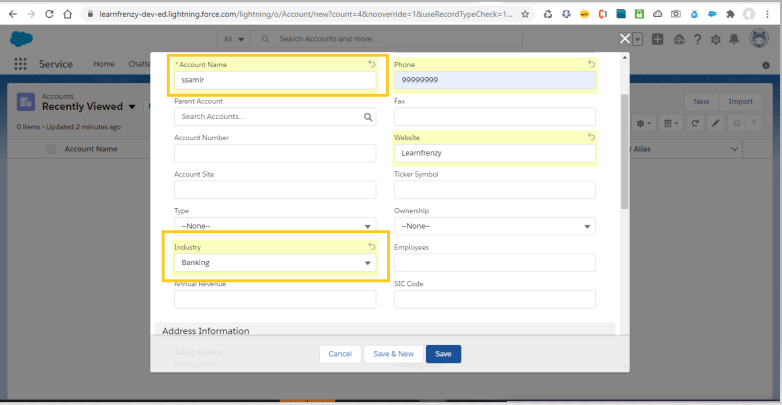
–> After Insert
As per the requirement, we are performing an operation on the trigger when the user save the new account that means we need to use as after insert trigger.
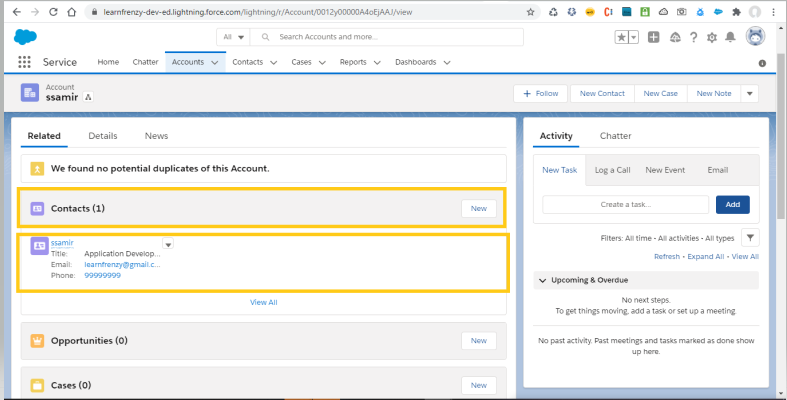
AFTER triggers are usually used when information needs to be updated in a separate table/object due to a change. They run after changes have been made to the database (not necessarily committed).
Trigger Scenario 5
Creates the number of contacts which are equal to the number which we will enter in the Number of Locations field on the Account Object.
To create a number of Contact records equal to the value entered in the Number of Locations field on the Account object, we can write an after insert and after update trigger on the Account object.
The logic will check the value of the Number of Locations field on the Account, and create the same number of Contact records associated with that Account.
Assumptions
Account for the number of locations is called Number_of_Locations__c (you can replace this with the actual API name of the field).Contact records (you can customize this further).Object : Account
Trigger: After Insert, After Update
Trigger Code: CreateContactsBasedOnLocations.apxt
trigger CreateContactsBasedOnLocations on Account (after insert, after update) {
    // List to hold contacts to be created
    List<Contact> contactsToCreate = new List<Contact>();

    // Iterate over Accounts after insert or update
    for (Account acc : Trigger.new) {
        // Safely cast the Number_of_Locations__c (Decimal) to Integer
        Integer numLocations = Integer.valueOf(acc.Number_of_Locations__c);

        // Fetch existing contacts related to the account
        Integer existingContactsCount = [SELECT COUNT() FROM Contact WHERE AccountId = :acc.Id];

        // Check if we need to create more contacts
        if (existingContactsCount < numLocations) {
            Integer contactsToCreateCount = numLocations - existingContactsCount;

            // Create the required number of Contacts
            for (Integer i = 0; i < contactsToCreateCount; i++) {
                Contact newContact = new Contact(
                    FirstName = 'Location ' + (existingContactsCount + i + 1), // Assign unique name
                    LastName = 'Contact',
                    AccountId = acc.Id
                );
                contactsToCreate.add(newContact);
            }
        }
    }

    // Insert new Contacts if there are any
    if (!contactsToCreate.isEmpty()) {
        insert contactsToCreate;
    }
}
Explanation
after insert and after update to ensure it acts on both new and updated Accounts.Trigger.new), handling one account at a time.Number_of_Locations__c field, it calculates how many more contacts need to be created.AccountId to link them to the Account and assigns a placeholder FirstName like "Location 1", "Location 2", etc., with the last name set to "Contact".insert operation for efficiency.Output
–> Enter in the Number of Locations field on the Account Object. :
Here the user has created a new account 'LearnFrenzy' and the Number of Locations is 4.
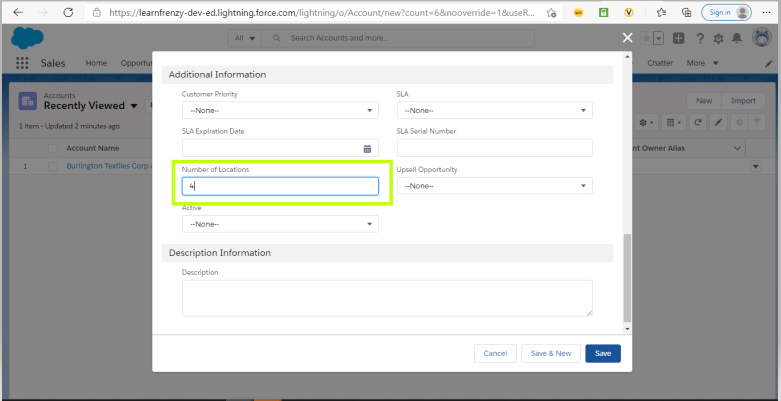
As per the requirement, we are performing an operation on the trigger when the user creates the number of contacts which are equal to the number which we will enter in the Number of Locations field on the Account Object. That means we need to use as after insert trigger.

Trigger Scenario 6
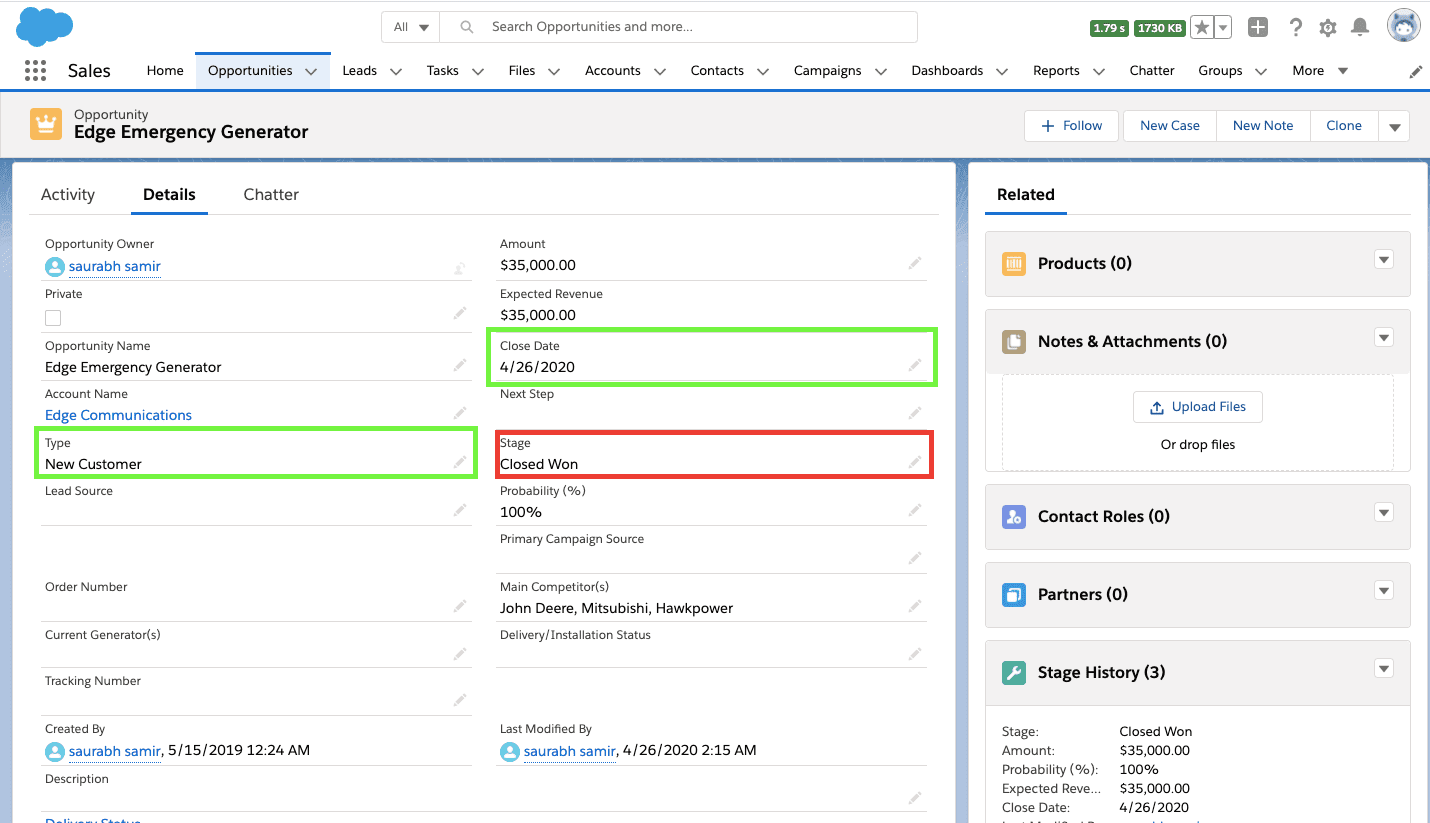
When ever Opportunity "Stage" is modified to "Closed Won" then set "Close Date" as "Today Date" and "Type" as "New Customer".
Object : Opportunity
Trigger: Before Update
Trigger Code: OpportunityUpdate.apxt
trigger OpporUpdate on Opportunity (before update) {
    Map<Id,Opportunity> oppOld = Trigger.oldMap;
    Map<Id,Opportunity> oppNew = Trigger.newMap;
    Set<Id> keys =oppOld.keySet();
    for(Id rid :keys){
        Opportunity oldOpportunity = oppOld.get(rid);
        Opportunity newOpportunity = oppNew.get(rid);
        if(oldOpportunity.stagename!='Closed Won' && newOpportunity.stagename=='Closed Won'){
            newOpportunity.closeDate=System.today();
            newOpportunity.type='New Customer';
        }
    }
}
Output
For Below Example:
Stage -> Closed Won
Closed Date -> 5/17/2019
Type -> Existing Customer - Replacement

–> Before Update
As per the requirement, we are performing an operation on the trigger when the user modified the stage name that means we need to use as before update trigger.
Here the user has modified the "Stage" name as 'Closed Won', so before update the "Type" will be 'New Customer' and "Closed Date" will be "Today Date".
Trigger Scenario 7
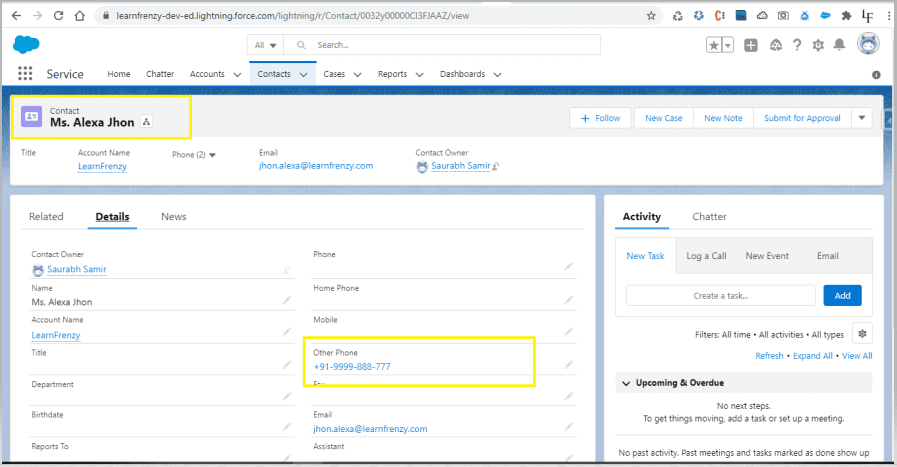
when a new contact is created for a existing account then set contact otherphone as account phone.
To set the OtherPhone field of a Contact to the Phone number of its associated Account when a new Contact is created, you can write a before insert trigger on the Contact object.
Object : Contact
Trigger: Before Insert
Trigger Code: SetContactOtherPhone.apxt
trigger SetContactOtherPhone on Contact (before insert) {
    // Step 1: Collect Account IDs from the new Contacts
    Set<Id> accountIds = new Set<Id>();

    for (Contact con : Trigger.new) {
        if (con.AccountId != null) {
            accountIds.add(con.AccountId);
        }
    }

    // Step 2: Query the Accounts for these Account IDs
    Map<Id, Account> accountMap = new Map<Id, Account>(
        [SELECT Id, Phone FROM Account WHERE Id IN :accountIds]
    );

    // Step 3: Set the Contact OtherPhone field to the Account's Phone
    for (Contact con : Trigger.new) {
        if (con.AccountId != null && accountMap.containsKey(con.AccountId)) {
            con.OtherPhone = accountMap.get(con.AccountId).Phone;
        }
    }
}
Explanation
Contact records being inserted (Trigger.new) and collects their AccountIds (if they have one) into a set called accountIds.Account object to retrieve the Phone numbers of the accounts that are linked to these Contacts. The results are stored in a map (accountMap) where the key is the AccountId and the value is the Account record.Contact in Trigger.new, if the AccountId is not null and an associated account exists in accountMap, the OtherPhone field of the Contact is set to the Phone field of the associated Account.Output
–> Existing Account
Account Name* : Learnfrenzy
Phone: +91-9999-888-777

–> Before Insert
As per the requirement, we are performing an operation on the trigger when the user create new contact is created for a existing account then set contact otherphone as account phone that means we need to use as before insert trigger.

–> New Contact
Account Name* : Learnfrenzy
Contact : Ms. Alexa Jhon
Other Phone : +91-9999-888-777
Trigger Scenario 8
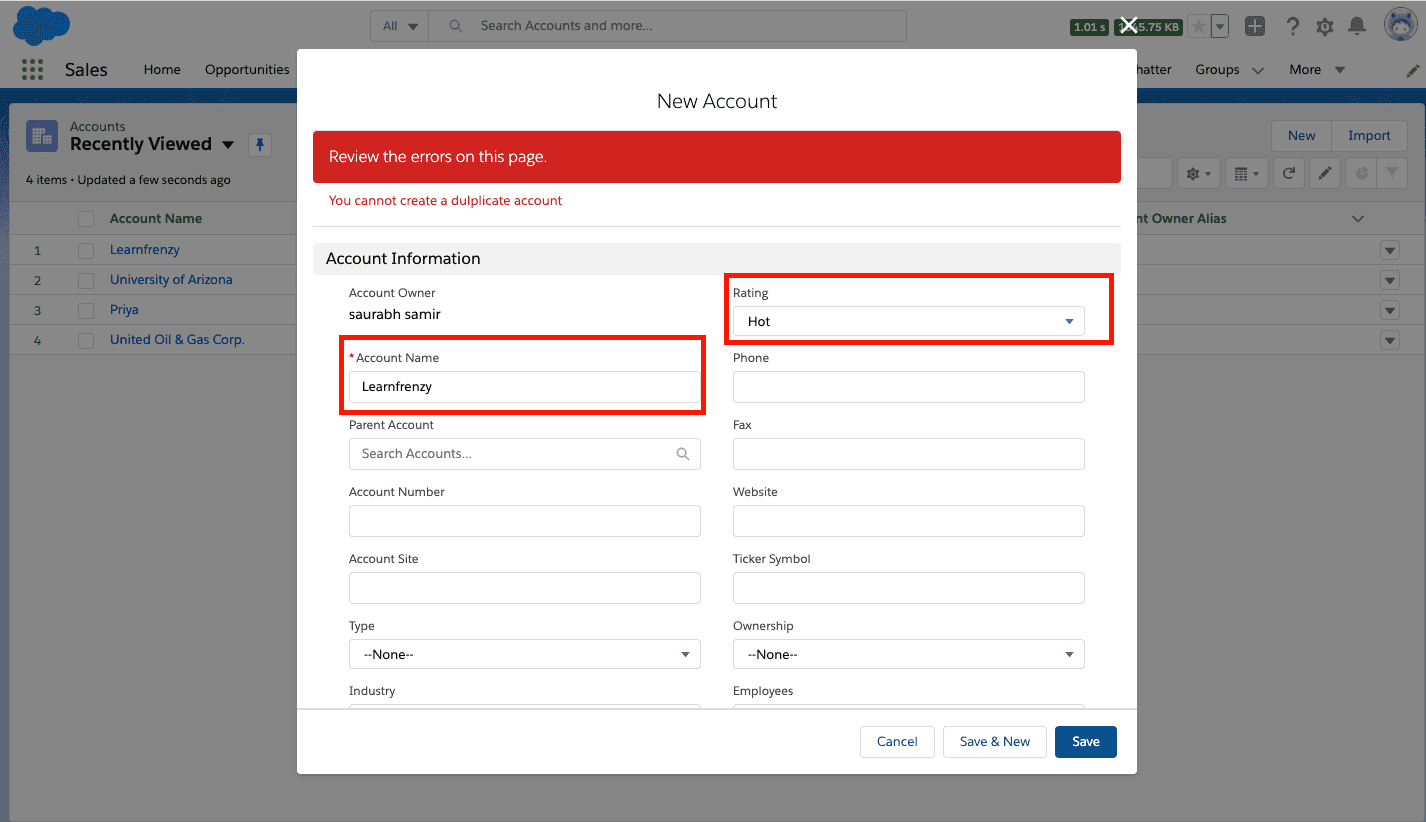
The following Trigger will fires when we try to create the account with same name i.e. Preventing the users to create Duplicate Accounts
Object : Account
Trigger: Before Insert, Before Update
Mind it!
Here (Way-1), I have used SOQL inside for loop which will affect governor limit and it is not best practice.
The most important being that it is not bulkified. We should always avoid SOQL inside loop. So please see second way-2 below for best practices.
Trigger Code: AccountDuplicateTrigger.apxt
trigger AccountDuplicateTrigger on Account (before insert, before update) {
    for(Account a:Trigger.new)
    {
        List<Account> acc=[select ID from account where Name=:a.Name and Rating=:a.rating];
        if(acc.size()>0)
        {
            a.adderror('You cannot create a duplicate account');
        }
    }
}
Test Class: AccountDuplicateTriggerTest
@istest
public class AccountDuplicateTriggerTest{
  static testmethod void myTest(){
      Boolean result =false;
      Account a = new Account();
      a.Name= 'Learnfrenzy';
      a.Rating='Warm';
      insert a;

      try{
      Account a1=new account();
      a1.Name= 'Learnfrenzy';
      a1.Rating='Warm';
      insert a1;
      }
      catch(DMLException ex)
      {
      result=true;
      system.assert(result);
      }
  }
 }
Output
–> Existing Account
Account Name* : Learnfrenzy
Rating: Hot

–> when we try to create the account with same name i.e. Preventing the users to create Duplicate Accounts (before insert, before update):
WAY-2 :Here, avoid SOQL Queries or DML statements inside FOR Loops
trigger AccountDuplicateTrigger on Account (before insert, before update) {

    list<string> acc = new list<string>();
    for(Account a:Trigger.new)
    {
        acc.add(a.name);
    }
    list<Account> listOfDuplicateAccounts = [select id, Name from Account where Name in :acc];
    for(Account account:trigger.new)
    {
        if(trigger.isInsert){
            if(listOfDuplicateAccounts.size()!=0)
            {
                account.addError('Account already exists with this name');
            }
        }
        if(trigger.isUpdate)
        {
            for(Account oldaccount :trigger.old)
            {
                if(account.Name!=oldAccount.Name && listOfDuplicateAccounts.size()!=0)
                {
                    account.addError('Account already exists with this name');
                }
            }
        }
    }
}
Output
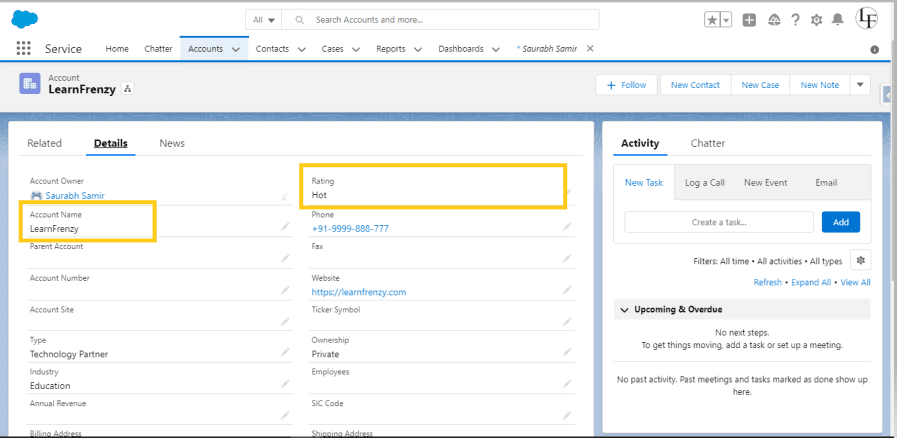
–> Existing Account
Account Name* : Learnfrenzy
Rating: Hot
–> when we try to create the account with same name i.e. Preventing the users to create Duplicate Accounts (before insert, before update):
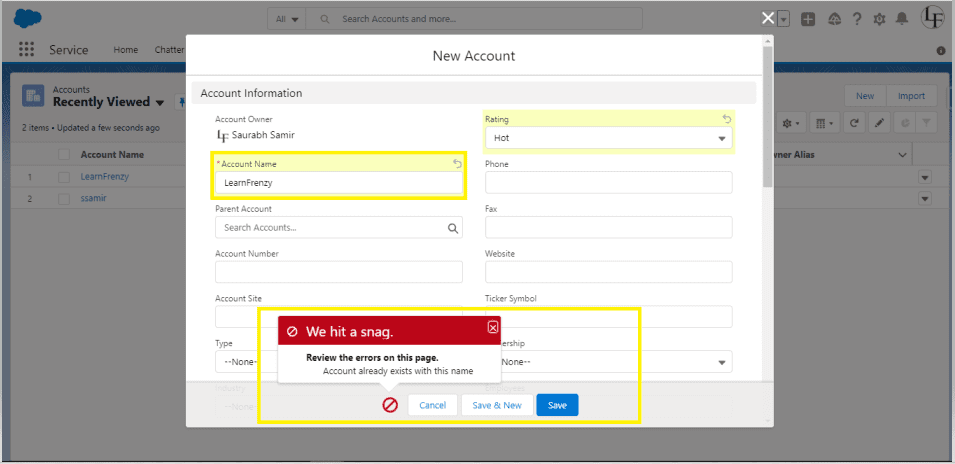
As like as this code you can write Trigger to prevent from creating Duplicate Records in your object.
Trigger Scenario 9
Write a trigger in which if an account that has related contacts and the user tries to delete that account it throws you an error "Account cannot be deleted".
Mind it!
To prevent the deletion of an Account record if it has related Contact records, you can write a before delete trigger on the Account object. This trigger will check if any contacts are associated with the account, and if they are, it will throw an error.
Object : Account
Trigger: Before Delete
Trigger Code: PreventAccountFromDeletion.apxt
trigger PreventAccountFromDeletion on Account (before delete) {
    Set<Id> accIdSet = new Set<Id>();

    // Collect account IDs being deleted
    for (Account acc : Trigger.old) {
        accIdSet.add(acc.Id);
    }

    // Query Accounts with related Contacts
    Map<Id, Account> accts = new Map<Id, Account>(
        [SELECT Id, (SELECT Id FROM Contacts)
         FROM Account
         WHERE Id IN :accIdSet]
    );

    // Prevent deletion if related contacts exist
    for (Account acc : Trigger.old) {
        if (accts.get(acc.Id).Contacts.size() > 0) {
            acc.addError('Account cannot be deleted because it has related contacts.');
        }
    }
}
Explanation
This trigger prevents the deletion of an Account if it has related Contact records:
Trigger.old."Account cannot be deleted because it has related contacts."), which prevents the deletion.

Here's an alternative way:
trigger AccountTrigger on Account (before delete) {
    // Get the list of account IDs that are being deleted
    Set<id> accountIds = new Set<id>();

    for (Account acc : Trigger.old) {
        accountIds.add(acc.Id);
    }

    // Query to check if any contacts exist for the accounts being deleted
    List<contact> relatedContacts = [SELECT Id, AccountId FROM Contact WHERE AccountId IN :accountIds];

    if (relatedContacts.size() > 0) {
        // Throw an error if any contacts are found
        for (Account acc : Trigger.old) {
            acc.addError('Account cannot be deleted because it has related contacts.');
        }
    }
}
Explanation
before delete context because we want to prevent the account deletion if there are related contacts.Trigger.old and adding the IDs to a set.Contact object to check if there are any contacts related to the accounts being deleted. The query checks for any Contact records whose AccountId matches any of the IDs in the accountIds set.relatedContacts.size() > 0), it means there are contacts associated with the account, and in this case, we prevent the account from being deleted by calling addError() on each account in Trigger.old.Output/Error
If the user attempts to delete an account that has related contacts, they will see the following error message on the user interface:

This error will prevent the deletion of the account until all related contacts are removed or reassigned.
Trigger Scenario 10
Write a trigger on lead to prevent duplicate records based on lead email, if a record already created with the same Email, Or record is Updated. The trigger should throw an error.
To prevent the creation or updating of duplicate Lead records based on the Email field, you can write a before insert and before update trigger. The trigger will check if a Lead record with the same Email already exists in the database. If a duplicate is found, it will throw an error.
Standard Object : Lead
Trigger: Before Insert, Before Update
Trigger Code: PreventDuplicateLead.apxt (Apex Class Trigger)
trigger PreventDuplicateLead on Lead (before insert, before update) {
    // Step 1: Collect Emails from new or updated Leads
    Set<String> leadEmails = new Set<String>();

    for (Lead l : Trigger.new) {
        if (l.Email != null) {
            leadEmails.add(l.Email.toLowerCase());  // Use lower case to avoid case-sensitive duplicates
        }
    }

    // Step 2: Query existing Leads with the same Email
    Map<String, Lead> existingLeadMap = new Map<String, Lead>(
        [SELECT Id, Email FROM Lead WHERE Email IN :leadEmails]
    );

    // Step 3: Prevent duplicate Lead creation or update
    for (Lead l : Trigger.new) {
        if (l.Email != null) {
            Lead existingLead = existingLeadMap.get(l.Email.toLowerCase());

            // Check if the lead is new or is being updated
            if (existingLead != null && existingLead.Id != l.Id) {
                l.addError('A Lead with this Email already exists. Duplicate leads are not allowed.');
            }
        }
    }
}
Explanation
leadEmails is created to collect the emails from the new or updated Lead records in Trigger.new.l.Email.toLowerCase()) to ensure the check is case-insensitive (e.g., test@example.com and Test@example.com are treated the same).Lead records that already have the same Email values as those being inserted or updated.existingLeadMap, where the key is the email (in lowercase) and the value is the Lead record.Lead in Trigger.new, the trigger checks if there is an existing Lead with the same Email (using existingLeadMap).Id is different from the current lead being inserted or updated (existingLead.Id != l.Id), an error is thrown using addError().Output
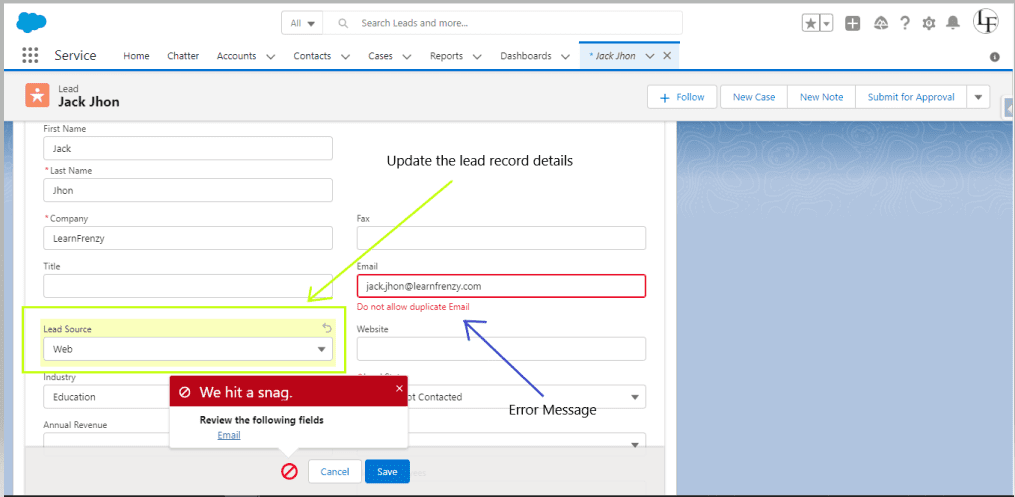
When a user tries to create or update a Lead with an email that already exists in another Lead record, they will receive an error, and the operation will be blocked:
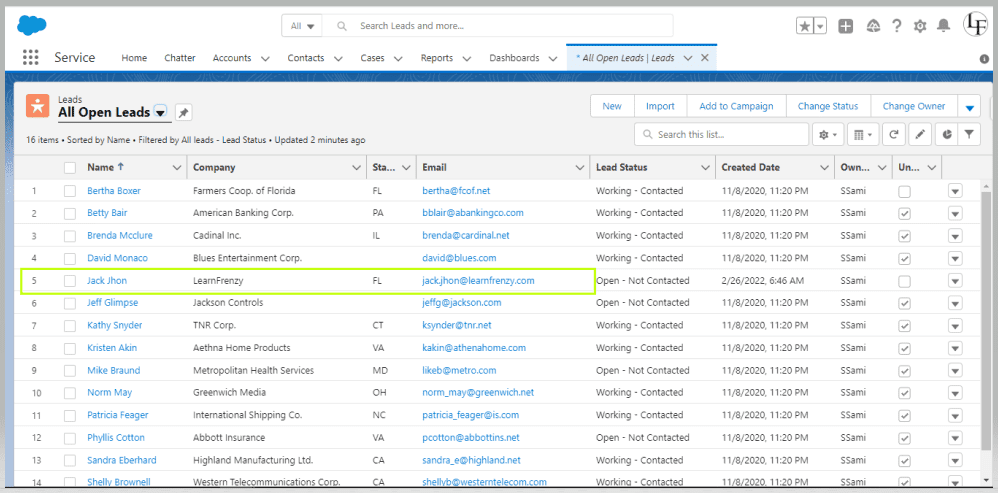
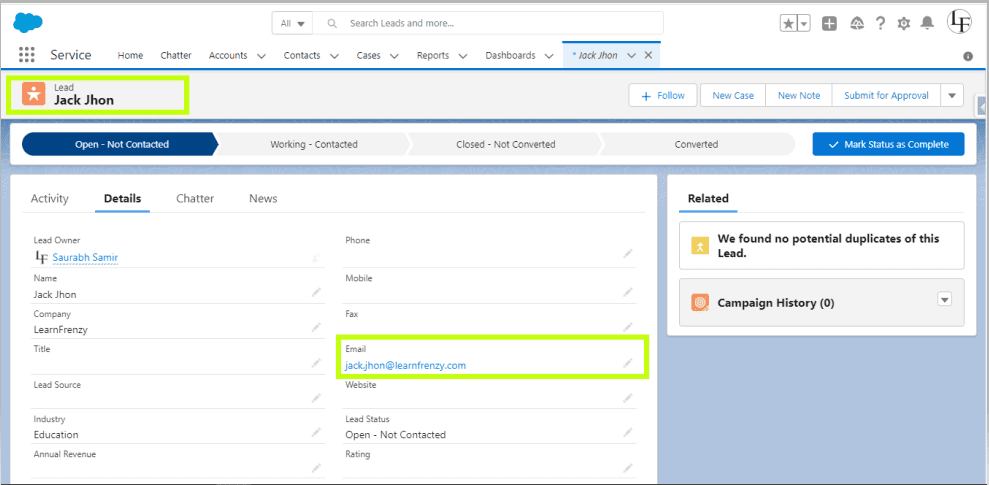
–> Lead Record Page
Name : Jack Jhon
Email : jack.jhon@learnfrenzy.com
The below example is based on trigger on lead to prevent duplicate records based on lead email, if a record already created with the same Email, Or record is Updated. The trigger should throw an error.
--> When updating a lead source in an existing record, where the email already exists.
Trigger Scenario 11
Write a trigger that updates the Last_Contact_Date__c field on an Account when a new Contact is created for that account. How would you implement this?
Mind it!
Why this is asked: This question tests handling parent-child relationships, bulk processing, and proper DML operations.
The trigger ContactTrigger runs after insert of a Contact record. Its main purpose is to update the custom field Last_Contact_Date__c on the associated Account when a new Contact is created.
Object : Contact
Trigger: After Insert
Trigger Code: ContactTrigger.apxt
trigger ContactTrigger on Contact (after insert) {
    // Set to hold unique account IDs associated with newly created contacts
    Set<Id> accountIds = new Set<Id>();

    // Collect account IDs from new contacts if AccountId is not null
    for (Contact con : Trigger.new) {
        if (con.AccountId != null) {
            accountIds.add(con.AccountId);
        }
    }

    // Proceed only if there are account IDs to update
    if (!accountIds.isEmpty()) {
        // Query the accounts that need their Last_Contact_Date__c updated
        List<account> accountsToUpdate = [SELECT Id FROM Account WHERE Id IN :accountIds];

        // Update the Last_Contact_Date__c field for each queried account
        for (Account acc : accountsToUpdate) {
            acc.Last_Contact_Date__c = Date.today(); // Set to the current date
        }

        // Perform the update in bulk to avoid multiple DML statements
        update accountsToUpdate;
    }
}
Explanation
AccountId from each Contact. This ensures that the same account isn't processed multiple times if multiple contacts are created for the same account.for loop iterates over the newly created Contact records (from Trigger.new), and if a contact has an associated account (AccountId is not null), it adds the AccountId to the set.Account records that correspond to the collected AccountId values. Only the Id field is queried since we only need to update the Last_Contact_Date__c field.Account in the list, the Last_Contact_Date__c field is updated to the current date (Date.today()), which reflects the date a new contact was added.update DML statement is called to update all the Account records that had new contacts associated with them.Expected Output: When a Contact is inserted, the Last_Contact_Date__c field on the associated Account is updated to the current date.
Mind it!
Facing interview is very stressful situation for everyone who want to get the job. For every problem there is a solution. Practice the best solution to crack the interview. Pick the best source and practice your technical and HR interview with experienced persons which helpful to boost confidence in real interview.
Related Posts

One short email when we publish something new — interview questions, Salesforce guides and career tips. No spam, unsubscribe in one click.
Thirty Salesforce CPQ interview questions with answers — quote-to-cash, products, bundles, price rules, product rules, approvals and contracts.

The 30 Salesforce Apex interview questions asked most — collections, SOQL, DML, governor limits, triggers, async Apex and testing — with answers.

Salesforce Headless 360 explained — what headless CRM means, how APIs and data cloud power it, and what it changes for developers and businesses.
Questions, corrections or your own experience — they all help the next reader.
Rakesh Gupta
Akbar Mulani
Akbar Mulani
Vaishnavi
Sunil
Rajni Rajak
LearnFrenzy Team
Yash Shukla
Varun Shrivastava
LearnFrenzy Team
Shahrukh Anwar
Ankur Singh
LearnFrenzy Team
SFDev Fresher
Rajshekhar
Mallesh
prajakta
Siddhu
megha
Supriya
naveen
Sharadha Mulugu
Salesforce specialist
Sonikaa Possimsetty
Akash Karhale