Understanding Decorators and Lifecycle Hooks in Salesforce LWC
Understand LWC decorators (@api, @track, @wire) and lifecycle hooks with clear examples — what each does and when to use it in your components.
Lightning Web Component lifecycle hooks explained — constructor, connectedCallback, renderedCallback, disconnectedCallback and errorCallback — with code.
Lifecycle hooks are a fundamental aspect of any Lightning Web Component (LWC) development journey. They provide developers with the ability to control and respond to the various stages in a component's lifecycle, allowing for a more efficient and fine-tuned approach to building web components in the Salesforce ecosystem.
In this blog, we delve into the world of LWC lifecycle hooks. We will explore what these hooks are, why they are essential, and how to use them effectively to create dynamic and responsive components. Whether you're just starting your journey with LWC or looking to sharpen your skills, understanding these hooks is crucial for crafting powerful and efficient Lightning Web Components.
Throughout this blog, we'll break down the different lifecycle hooks available in LWC, discuss their specific use cases, and provide practical examples to help you grasp their real-world applications. By the end of this journey, you'll be equipped with the knowledge to harness the full potential of LWC by mastering the art of managing component lifecycles.
Lightning Web Components (LWC) are the building blocks of dynamic and interactive user interfaces within the Salesforce platform. To truly harness their potential, developers need to understand the intricate stages that these components go through during their lifecycle. Enter the world of "Lifecycle Hooks."
Lifecycle hooks in LWC are predefined methods that allow developers to intervene at different stages of a component's journey. These hooks provide you with the power to control, optimize, and respond to specific events and transitions in your component's lifecycle. Understanding and using them effectively is key to creating robust and responsive components.
Lifecycle hooks :
its a callback method triggered at specific phase of component lifecycle.
Here's a brief overview of some essential lifecycle hooks:
First it called parent constructor then parent connectedCallBack and then if there is any child component then it moves to child constructor --> connectedCall Back --> renderedCallBack then it moves to parent renderedCallback
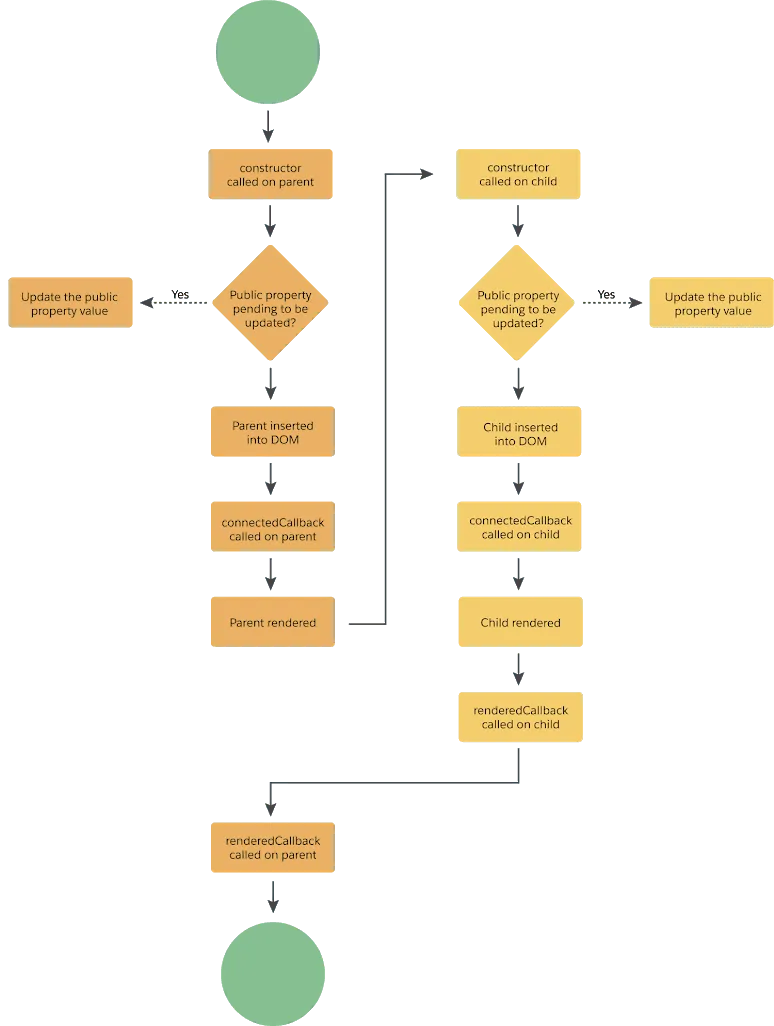
The flow of lifecycle hooks in Lightning Web Components (LWC) can be summarized as follows:
1. Creation
constructor(): This is the first hook to run when an instance of the component is created. It's where you initialize variables and set default values.Mind it!
import { LightningElement } from 'lwc';

export default class LifeCycleHookParent extends LightningElement {
  constructor() {
    super(); // call LightningElement class constructor console.log('Parent Constructor Called');
    let con = this.template //access host element
    console.log(con);
  }
}
2. Initialization
connectedCallback(): After the component is initialized, this hook is called. It's an ideal place for DOM manipulations and data retrieval.Mind it!
connectedCallback(){
  console.log('Parent Connected Call Back called');
  let cb = this.template
  console.log('is connected=> ' + cb.isConnected);
}
3. Rendering
renderedCallback(): This hook is triggered after the component's initial render. It's suitable for actions that require knowledge of the rendered DOM, like interacting with elements.Mind it!
import { LightningElement } from 'lwc';
export default class LifeCycleHookParent extends LightningElement {
  isRendered = true // to check component is rendered
  renderedCallback() {
    if (this.isRendered) {
      console.log('Parent Rendered call Back called');
      this.isRendered = false
    }
  ?
 }
4. Reactivity
renderedCallback again.5. Destruction
disconnectedCallback(): When the component is removed from the DOM, this hook is called. It's an excellent place for cleanup operations and releasing resources like event listeners.Mind it!
6. Error Handling
errorCallback(): If an error occurs during rendering, this hook is invoked. It provides an opportunity to gracefully handle errors and display appropriate messages.Mind it!
Implement it to create an error boundary component that captures errors in all the descendent components in its tree.
It captures errors that occur in the descendant’s lifecycle hooks or during an event handler declared in an HTML template.
//Child Component
connectedCallback(){
  console.log('Child Connected Call Back called');
  throw new Error('problem in child component connectedCallback')
  }
//Parent component
errorCallback(error, stack){
console.log(error message);
console.log('Stack: - ' + stack);
}Understanding this flow and the use of each hook is crucial for effectively managing and optimizing the lifecycle of your LWCs. It enables you to create responsive, efficient, and interactive web components in the Salesforce ecosystem.
Understanding @wire in LWC Lifecycle
@wire is a reactive wire service in LWC used to fetch data asynchronously from Salesforce.
When is @wire Invoked?
@wire service executes after connectedCallback().How Many Times is @wire Invoked?
@wire method again.Lifecycle hooks offer several advantages:
Let's consider a simple example to illustrate the importance of lifecycle hooks. Imagine you're building a countdown timer component. Here's how you might use lifecycle hooks:
export default class CountdownTimer extends LightningElement {
    seconds = 10;

    connectedCallback() {
        this.timer = setInterval(() => {
            if (this.seconds > 0) {
                this.seconds--;
            }
        }, 1000);
    }

    renderedCallback() {
        if (this.seconds === 0) {
            clearInterval(this.timer);
        }
    }

    disconnectedCallback() {
        clearInterval(this.timer);
    }
}
In this example, the connectedCallback sets up a timer, the renderedCallback updates the UI when the timer reaches 0, and the disconnectedCallback ensures that the timer is stopped when the component is removed.
Lifecycle hooks in LWC are your secret weapons for creating efficient, interactive, and well-structured Lightning Web Components. They empower you to manage the journey of your components, making them responsive and optimized for performance. Whether you're building a simple timer or a complex Salesforce app, mastering lifecycle hooks is essential for success.

One short email when we publish something new — interview questions, Salesforce guides and career tips. No spam, unsubscribe in one click.
Understand LWC decorators (@api, @track, @wire) and lifecycle hooks with clear examples — what each does and when to use it in your components.
JavaScript fundamentals for Lightning Web Components — scope, this, closures, promises, events and modules — explained with LWC-focused examples.
The JavaScript concepts to know before starting Lightning Web Components — variables, functions, objects, arrays, classes, modules and promises.
Questions, corrections or your own experience — they all help the next reader.