Top 30 Salesforce CPQ Interview Questions & Answers
Thirty Salesforce CPQ interview questions with answers — quote-to-cash, products, bundles, price rules, product rules, approvals and contracts.
Design patterns for Salesforce development — singleton, factory, strategy, trigger handler and selector — with Apex examples and when to use them.
Writing code that works is one thing. Writing code that scales, doesn't break in production, and doesn't make your future self question your life choices? That's where design patterns come in.
When I first started as a Salesforce developer, my mantra was simple: "Just make it work." And it did?-?until suddenly, I was:
That's when I discovered design patterns?-?not as theoretical concepts, but as lifesaving tools for real-world Salesforce development.
Here are a few that made the biggest difference in how I write Salesforce code today. No fluff, just patterns I've actually used and leaned on in real projects.
Let's be honest: putting all your logic directly in a trigger might seem easier at first?-?until it becomes a tangled mess.
I've been there. Early in my career, I built triggers that:
The fix? A trigger handler.
The Problem
You write a “simple” trigger. Then someone adds “just one more” field update. Soon, your trigger is 300 lines of nested if statements that somehow breaks every time a workflow rule fires.
The Solution
Separate trigger logic into a dedicated handler class.
// BEFORE: Logic buried in trigger (danger zone!)
trigger AccountTrigger on Account (before insert, before update) {
    for (Account acc : Trigger.new) {
        // Validation
        if (acc.Name == null) {
            acc.Name.addError('Name required');
        }
        // Field default
        if (Trigger.isInsert && acc.Industry == null) {
            acc.Industry = 'Other';
        }
        // Related record update?? Why is this here??
        if (acc.Rating == 'Hot') {
            // 50 more lines of chaos...
        }
    }
}// Trigger
trigger AccountTrigger on Account (before insert, before update) {
AccountTriggerHandler.handleBeforeEvents(Trigger.new, Trigger.oldMap);
}// Handler class (all logic lives here)
public class AccountTriggerHandler {
public static void handleBeforeEvents(List<account> newAccounts, Map<id, account=""> oldMap) {
validateNames(newAccounts);
applyDefaultValues(newAccounts, oldMap);
}
private static void validateNames(List<account> accounts) {
for (Account acc : accounts) {
if (String.isBlank(acc.Name)) {
acc.Name.addError('Account name cannot be blank');
}
}
}
private static void applyDefaultValues(List<account> accounts, Map<id, account=""> oldMap) {
// Logic for defaults
}
}
</id,></account></account></id,></account>Why This Rocks
This one clicked for me when I found myself needing the same logic in multiple places — in a trigger, a batch job, and a screen flow.
Instead of copying the code 3 times, I created a service class.
The Problem
You need to qualify Opportunities in:
So you copy-paste the same 20 lines of code… and now you have three places to update when the sales team changes their rules.
The Solution
Centralize business logic in a service class.
// Service class (single source of truth)
public class OpportunityService {
    public static void qualifyOpportunity(Opportunity opp) {
        if (opp.Amount > 100000 && opp.CloseDate >= Date.today()) {
            opp.StageName = 'Qualified';
            opp.Priority__c = 'High';
        }
    }
}
Usage in a Trigger
// In OpportunityTriggerHandler
for (Opportunity opp : Trigger.new) {
    OpportunityService.qualifyOpportunity(opp); // Same logic everywhere
}
Why This Rocks
We’ve all been there — scrolling through a project and seeing the same helper functions copy-pasted everywhere:
Not only does this create maintenance nightmares, but it’s also a ticking time bomb for inconsistencies.
The Problem
You need to format a date in:
So you rewrite (or copy) the same logic three times. Then someone requests a date format change, and now you’re updating it in a dozen places.
The Solution
A central utility class for common functions.
// Utils/DateHelper.cls
public with sharing class DateHelper {
    // Standardize date formatting org-wide
    public static String formatForUI(Date d) {
        if (d == null) return '';
        return d.format('MMMM d, yyyy'); // "June 15, 2025"
    }

    // Business logic for fiscal year calculation
    public static Boolean isInCurrentFiscalYear(Date d) {
        Date fiscalYearStart = Date.newInstance(Date.today().year(), 7, 1); // July 1 start
        return d >= fiscalYearStart && d < fiscalYearStart.addYears(1);
    }
}
Usage in LWC (JavaScript)
import { LightningElement } from 'lwc';
import getFormattedDate from '@salesforce/apex/DateHelper.formatForUI';

export default class InvoiceComponent extends LightningElement {
    formattedDate;

    connectedCallback() {
        getFormattedDate({ d: new Date() })
            .then(result => this.formattedDate = result); // "June 15, 2025"
    }
}
Usage in Apex Trigger
// In OpportunityTriggerHandler
for (Opportunity opp : Trigger.new) {
    String closeDateFormatted = DateHelper.formatForUI(opp.CloseDate);
    System.debug('Closing: ' + closeDateFormatted);
}
Why This Is a Game-Changer
Group utilities by theme
DateHelper.cls (Dates)UserInfoHelper.cls (User context)RecordTypeHelper.cls (Record type IDs)When to Use This Pattern
I used this one when I had different types of notifications — email, SMS, push — and needed to send them all without cluttering my code with a bunch of if statements.
The Problem
You need to:
But if/else chains are making your code unreadable.
The Solution
A factory pattern to decouple creation from logic.
public interface INotifier {
    void send(String message);
}

public class EmailNotifier implements INotifier {
    public void send(String message) {
        // Email logic
    }
}

public class SMSNotifier implements INotifier {
    public void send(String message) {
        // SMS logic
    }
}

public class NotificationFactory {
    public static INotifier getNotifier(String type) {
        switch on type {
            when 'Email' { return new EmailNotifier(); }
            when 'SMS' { return new SMSNotifier(); }
            when else { throw new IllegalArgumentException('Invalid type'); }
        }
    }
}
Usage
INotifier notifier = NotificationFactory.getNotifier('SMS');
notifier.send('Your case #1234 was updated');
Why This Rocks
The Problem
WHERE clause that breaks half your batch jobsThe Solution
A selector layer to centralize all queries.
public inherited sharing class AccountSelector {
    public static List<account> getActiveAccountsByRegion(String region) {
        return [
            SELECT Id, Name, AnnualRevenue
            FROM Account
            WHERE Region__c = :region
            AND IsActive__c = true
            WITH SECURITY_ENFORCED
        ];
    }
}
</account>
Usage
// In any class
List<account> accounts = AccountSelector.getActiveAccountsByRegion('EMEA');
</account>
Why This Rocks
The Problem
Your trigger handler has grown into a 500-line monster with:
The Solution
A domain class to encapsulate object-specific behavior.
public class Accounts extends fflib_SObjectDomain {
    public Accounts(List<account> records) {
        super(records);
    }

    public override void onApplyDefaults() {
        for (Account acc : (List<account>) Records) {
            if (acc.Industry == 'Technology') {
                acc.Rating = 'Hot';
            }
        }
    }

    public override void onValidate() {
        for (Account acc : (List<account>) Records) {
            if (acc.AnnualRevenue < 0) {
                acc.addError('Revenue cannot be negative');
            }
        }
    }
}
</account></account></account>
Why This Rocks
Not full-blown patterns, but real-life things that made a difference:
Design patterns sound fancy, but they’re just good habits. I didn’t learn them all at once. I picked them up slowly, after running into problems and wanting a better way to do things.
If you’re early in your Salesforce dev journey — or even a few years in — I highly recommend learning these patterns and trying them out. Your codebase, your team, and your future self will thank you.
And if you’ve got a favorite pattern (or horror story from not using one), I’d love to hear it!

One short email when we publish something new — interview questions, Salesforce guides and career tips. No spam, unsubscribe in one click.
Thirty Salesforce CPQ interview questions with answers — quote-to-cash, products, bundles, price rules, product rules, approvals and contracts.
The 30 Salesforce Apex interview questions asked most — collections, SOQL, DML, governor limits, triggers, async Apex and testing — with answers.
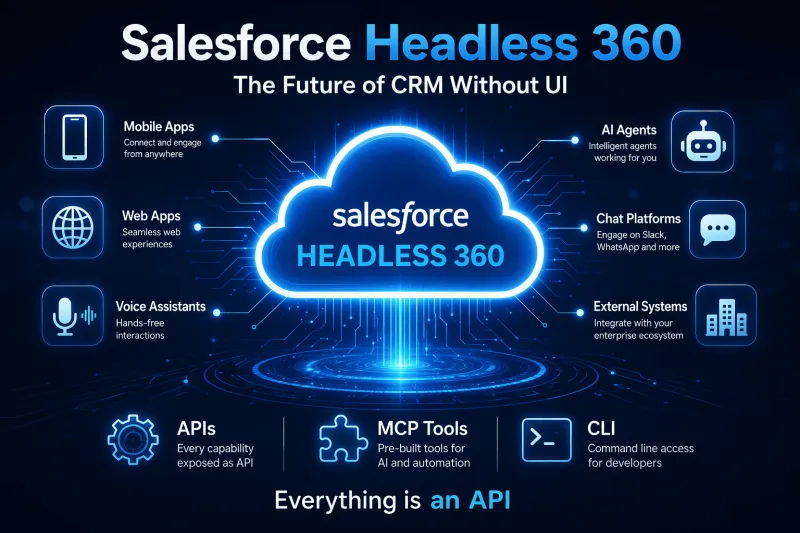
Salesforce Headless 360 explained — what headless CRM means, how APIs and data cloud power it, and what it changes for developers and businesses.
Questions, corrections or your own experience — they all help the next reader.