Top 30 Salesforce CPQ Interview Questions & Answers
Thirty Salesforce CPQ interview questions with answers — quote-to-cash, products, bundles, price rules, product rules, approvals and contracts.
Salesforce Apex interview questions with answers and scenarios — collections, SOQL, DML, triggers, asynchronous Apex and test classes.

Straightforward questions like 'What is Apex in Salesforce?' or 'What are the methods used in Batch Apex?' are now a thing of the past when it comes to Salesforce Developer interviews. A few years ago, when Salesforce certifications were rare, the interview process was simpler. The focus was mainly on checking if the candidate had basic knowledge of Salesforce.
Common questions back then included:
etc.
These questions were crisp, direct, and to the point. However, times have changed. Today, the market is flooded with Salesforce-certified professionals, and memorizing definitions or simple answers won’t set you apart. The old style of questioning no longer works because it doesn’t evaluate real-world problem-solving skills.
Now, interviewers are shifting their focus toward real-time scenario-based questions. These questions are designed to test how well you can apply your knowledge in practical situations, handle complex workflows, and solve challenges encountered in actual Salesforce implementations.
In this blog, we’ll dive into these modern, scenario-driven Salesforce Apex interview questions. Whether you’re just starting or have years of experience, this guide will prepare you for interviews that demand more than just textbook answers.
For interviewees, these questions are designed to sharpen your problem-solving abilities and give you the confidence to handle tricky scenarios during your interview. Whether you're a developer with a few years of experience or looking to transition into Salesforce development, this guide will help you understand what to expect and how to answer effectively.
Let’s jump into the world of Salesforce development and explore questions that really make a difference!
What is Apex in Salesforce?
Apex is a strongly-typed, object-oriented programming language provided by Salesforce. It is specifically designed for developing custom business logic and automating complex processes within the Salesforce platform.
Apex is similar to Java in syntax and allows developers to execute flows and transactions on the Salesforce server in association with the platform's database.
For example, we use Apex to write triggers, create custom controllers or extensions for Visualforce pages, and implement asynchronous processing like batch jobs or scheduled tasks.
Additionally, Apex supports SOQL (Salesforce Object Query Language) and DML (Data Manipulation Language) operations to interact with Salesforce data. It also includes built-in exception handling to manage runtime errors effectively.
Key features of Apex include
- Tightly Integrated with Salesforce: Apex runs on Salesforce servers and is optimized to work seamlessly with the platform’s data model and UI.
- Cloud-Based Execution: Apex code executes entirely on Salesforce's multi-tenant architecture.
- Built-In Governor Limits: Apex enforces resource limits to ensure fair usage in shared environments.
- Asynchronous Processing: Apex supports features like Batch Apex, Queueable, and Future methods for handling large-scale operations.
To effectively work with Apex, it's essential to understand some foundational terms:
| Term | Description |
|---|---|
| Trigger | A piece of Apex code that executes automatically in response to database events like insert or update. |
| Governor Limits | Salesforce-enforced limits to ensure efficient code execution in a multi-tenant environment. |
| SOQL and SOSL | Salesforce-specific query languages for fetching and searching data from objects. |
| Asynchronous Apex | Methods for handling large-scale or time-consuming operations (Batch Apex, Future methods, etc.). |
| Apex Class | A blueprint containing methods and variables for reusable and modular coding. |
| Custom Object | User-defined database tables for storing specific business data in Salesforce. |
 Interview Series
This blog series covers a wide range of Salesforce Apex interview questions commonly asked to Salesforce Developers, LWC Developers, Salesforce Technical Architects, and Backend Salesforce Engineers.
Let's start the interview series on Salesforce Apex Interviews Questions (Between Interviewer & Candidate).
Interviewer
What strategies would you use to ensure that a trigger or Apex class doesn’t exceed SOQL query limits, especially in a bulk data processing scenario?
Concepts Tested
Why This is Asked:
Efficient SOQL usage is critical in Salesforce development to avoid runtime exceptions, especially in bulk operations.
Interviewee
To avoid SOQL in loops:
For Example:
I would use maps to hold query results and prevent repeated queries in a loop. For instance, in an Opportunity trigger, I would query related Account records in bulk at the start and store them in a map keyed by AccountId for efficient lookup.
Interviewer
What factors influence your choice between Batch Apex and Queueable Apex for asynchronous operations?
Concepts Tested
Why This is Asked:
This question examines the candidate’s ability to choose the right asynchronous approach for specific scenarios.
Interviewee
I would use Batch Apex for large data volumes (up to 50 million records) requiring chunk-based processing. Queueable Apex is better for lightweight jobs requiring chaining or complex data structures.
For Example:
If I need to process over 50,000 records with retry logic, I would choose Batch Apex due to its scalability. For simpler tasks, like updating related records in a single transaction, Queueable Apex would be more appropriate.
Interviewer
What is the difference between before and after triggers, and when would you choose one over the other?
Concepts Tested
Why This is Asked:
Understanding the differences is essential for writing efficient triggers that align with Salesforce’s best practices.
Interviewee
Before triggers are used for updating or validating data before it is saved to the database, as the records are still in memory.
After triggers are used when data needs to be committed to the database, such as creating related records or performing actions dependent on saved data.
For Example:
I would use a before trigger for updating a record’s field value, such as setting a default status. For example, Trigger.new allows in-memory updates without an explicit DML statement. For tasks like inserting child records based on a saved parent, I would choose an after trigger.
Interviewer
What would you do if your code exceeds the DML statement governor limit during bulk processing?
Concepts Tested
Why This is Asked:
This question assesses the candidate’s ability to optimize bulk operations and respect governor limits.
Interviewee
To handle DML limit issues:
For Example:
I would review the code to ensure all DML operations are grouped into a single operation. For instance, instead of updating records individually, I would add them to a list and perform a bulk update at the end of the transaction.
Interviewer
Imagine a scenario where a Batch Apex class processes millions of records, but an issue occurs mid-execution, causing the batch to fail. How would you design the batch to ensure it restarts from the failure point?
Concepts Tested
Why This is Asked:
Batch Apex is vital for handling large data volumes. A good candidate must understand the use of the Database.Stateful interface and robust error recovery strategies, as handling failures is common in real-world projects.
Interviewee
To handle a scenario where a Batch Apex class processes millions of records and fails mid-execution, I would design the batch to ensure it can restart from the failure point by leveraging stateful batch processing and proper error handling mechanisms. Here’s my approach:
Database.Stateful interface, I can maintain state across batch chunks. This allows me to track successfully processed records and resume from where the failure occurred.try-catch blocks within the execute method to handle individual record errors without failing the entire batch.Set<Id> or List<Id>) to store successfully processed record IDs.public class MyBatchClass implements Database.Batchable<SObject>, Database.Stateful {
private Set<Id> processedRecordIds = new Set<Id>();
// Start method
public Database.QueryLocator start(Database.BatchableContext bc) {
// Query records not already processed
return Database.getQueryLocator([
SELECT Id, Name FROM MyObject__c WHERE Id NOT IN :processedRecordIds
]);
}
// Execute method
public void execute(Database.BatchableContext bc, List<SObject> scope) {
try {
for (SObject record : scope) {
// Process record
MyObject__c obj = (MyObject__c) record;
// Simulate processing logic
obj.Status__c = 'Processed';
update obj;
// Mark record as processed
processedRecordIds.add(obj.Id);
}
} catch (Exception ex) {
// Log error
System.debug('Error processing batch: ' + ex.getMessage());
}
}
// Finish method
public void finish(Database.BatchableContext bc) {
// Notify admin of completion or failure details
Messaging.SingleEmailMessage email = new Messaging.SingleEmailMessage();
email.setSubject('Batch Process Complete');
email.setPlainTextBody('The batch process completed successfully.');
email.setToAddresses(new String[] {'admin@example.com'});
Messaging.sendEmail(new Messaging.SingleEmailMessage[] {email});
}
}execute method, I would store their IDs in a custom object or a static resource.This design ensures the batch can restart from the failure point using Database.Stateful, tracks processed records, handles individual errors gracefully, and retries failed records in subsequent executions. It aligns with Salesforce best practices for scalability and resilience.
Mind it!
Ideal Answer
To ensure the batch restarts from the failure point, I would implement the Database.Stateful interface to maintain state between batch executions. By maintaining a record of successfully processed IDs in an instance variable, I can exclude them in subsequent queries. Additionally, I would include a try-catch block in the execute() method to log errors and track where the failure occurred. Using tools like the Database.saveResult object allows me to capture partial success in bulk DML operations.
Example Response from Interviewee
Batch Apex with millions of records demands both efficiency and error resilience. Implementing Database.Stateful ensures that variables like processed IDs persist across transactions. If a failure occurs, I use error logging to identify failed records, ensuring I can restart the batch without duplicating work. Governor limits would also guide how I design the logic, especially to avoid memory limits.
Interviewer
How would you use Queueable Apex to pass complex objects like lists or maps between chained jobs? Can you highlight any limitations?
Concepts Tested
Why This is Asked:
Queueable Apex provides flexibility in chaining jobs and handling non-primitive data. Understanding its serialization and governor limit implications is crucial for candidates handling real-world workflows.
Interviewee
Queueable Apex allows chaining by calling System.enqueueJob() within the execute() method. To pass complex objects like maps or lists, these must be serializable. If a candidate passes an unserializable object, such as a transient variable, it leads to runtime issues. Additionally, Salesforce limits chaining to 50 jobs per transaction, which must be respected to avoid job rejection.
For Example: I would ensure that any data passed between chained Queueable jobs is serializable, such as using lists or JSON strings for more complex structures. If chaining more than 50 jobs is required, I would redesign the process to group records in batches. Proper exception handling is also necessary to ensure no data loss during chaining.
Interviewer
Why would a Future method be necessary when working with User and Custom Object records in the same transaction? How would you structure it?
Concepts Tested
Why This is Asked:
Future methods are essential in overcoming mixed DML restrictions. A good candidate must identify these scenarios and suggest proper implementation while being mindful of asynchronous limitations like order of execution.
Interviewee
Mixed DML errors occur when DML operations on setup and non-setup objects are performed in the same transaction. Future methods allow these operations to run in separate transactions. However, as Future methods do not guarantee execution order, alternative solutions like Queueable Apex are preferred in scenarios requiring dependency.
For Example: I would structure a Future method to handle DML operations on User records separately from custom object DMLs, thus preventing mixed DML issues. Since Future methods don’t guarantee order, if dependency exists, I would opt for Queueable Apex or Platform Events to orchestrate the sequence.
Curious?
A Future method is necessary when working with User and Custom Object records in the same transaction because updates to the User object (and certain other setup objects) are considered non-transactional. This means they can't be directly updated within the same transaction that involves standard DML operations on custom objects. Salesforce enforces this restriction to maintain database integrity for setup objects.
When to Use a Future Method
How to Structure It
@future annotation to make the method asynchronous.Id, String) as parameters to the method.Code Example
public class UserUpdateService {

    // Future method for asynchronous User updates
    @future
    public static void updateUserDetails(Set<Id> userIds) {
        try {
            // Fetch and update User records
            List<User> usersToUpdate = [SELECT Id, IsActive FROM User WHERE Id IN :userIds];
            for (User usr : usersToUpdate) {
                usr.IsActive = false; // Example update
            }
            update usersToUpdate;
        } catch (Exception e) {
            System.debug('Error updating User records: ' + e.getMessage());
        }
    }

    // Main method to handle Custom Object and User updates
    public static void processRecords(Id customObjectId, Id userId) {
        // Custom Object DML
        CustomObject__c customObj = [SELECT Id, Name FROM CustomObject__c WHERE Id = :customObjectId];
        customObj.Status__c = 'Processed';
        update customObj;

        // Asynchronous User Update
        Set<Id> userIds = new Set<Id>{userId};
        updateUserDetails(userIds);
    }
}
Explanation
processRecords method handles the synchronous operation (Custom Object update) and invokes the Future method for the asynchronous User update.@future method (updateUserDetails) ensures that User record updates occur in a separate transaction.A Future method is essential for handling operations on both User and Custom Object records within the same logical process due to Salesforce's DML restrictions. Structuring the transaction as shown ensures compliance with these restrictions while maintaining functionality.
Interviewer
Write an Apex class to prevent duplicate Contact records from being inserted. Duplicates are determined by matching Email fields. Ensure the solution works for bulk operations.
Concepts Tested
Why This is Asked:
To assess a candidate's ability to handle real-world data quality issues while adhering to governor limits.
Interviewee
To prevent duplicate Contact records based on the Email field during insertion, we need to consider both single-record and bulk operations. The solution should be efficient, bulk-safe, and compliant with Salesforce governor limits.
Here’s how I would implement this:
Apex Trigger
The trigger will invoke a helper class to handle the duplicate check.
trigger ContactTrigger on Contact (before insert) {
    if (Trigger.isBefore && Trigger.isInsert) {
        ContactDuplicateHandler.preventDuplicateContacts(Trigger.new);
    }
}
Apex Class for Duplicate Prevention
public class ContactDuplicateHandler {
    public static void preventDuplicateContacts(List<Contact> newContacts) {
        // Step 1: Collect all Emails from the incoming records
        Set<String> emailSet = new Set<String>();
        for (Contact con : newContacts) {
            if (con.Email != null) {
                emailSet.add(con.Email.toLowerCase()); // Normalize to handle case sensitivity
            }
        }

        // Step 2: Query existing Contacts with matching Emails
        Map<String, Id> existingContacts = new Map<String, Id>();
        if (!emailSet.isEmpty()) {
            for (Contact existingCon : [
                SELECT Id, Email FROM Contact WHERE Email IN :emailSet
            ]) {
                existingContacts.put(existingCon.Email.toLowerCase(), existingCon.Id);
            }
        }

        // Step 3: Check for duplicates and add errors
        for (Contact con : newContacts) {
            if (con.Email != null && existingContacts.containsKey(con.Email.toLowerCase())) {
                con.addError('Duplicate Contact detected. A Contact with this Email already exists.');
            }
        }
    }
}
Explanation
Set, Map).addError() method to block duplicate records and display an appropriate message to the user.before insert context to avoid unnecessary DML operations.Bulk Operation Example
Suppose a user tries to insert the following contacts:
john.doe@example.comjane.doe@example.comjohn.doe@example.com
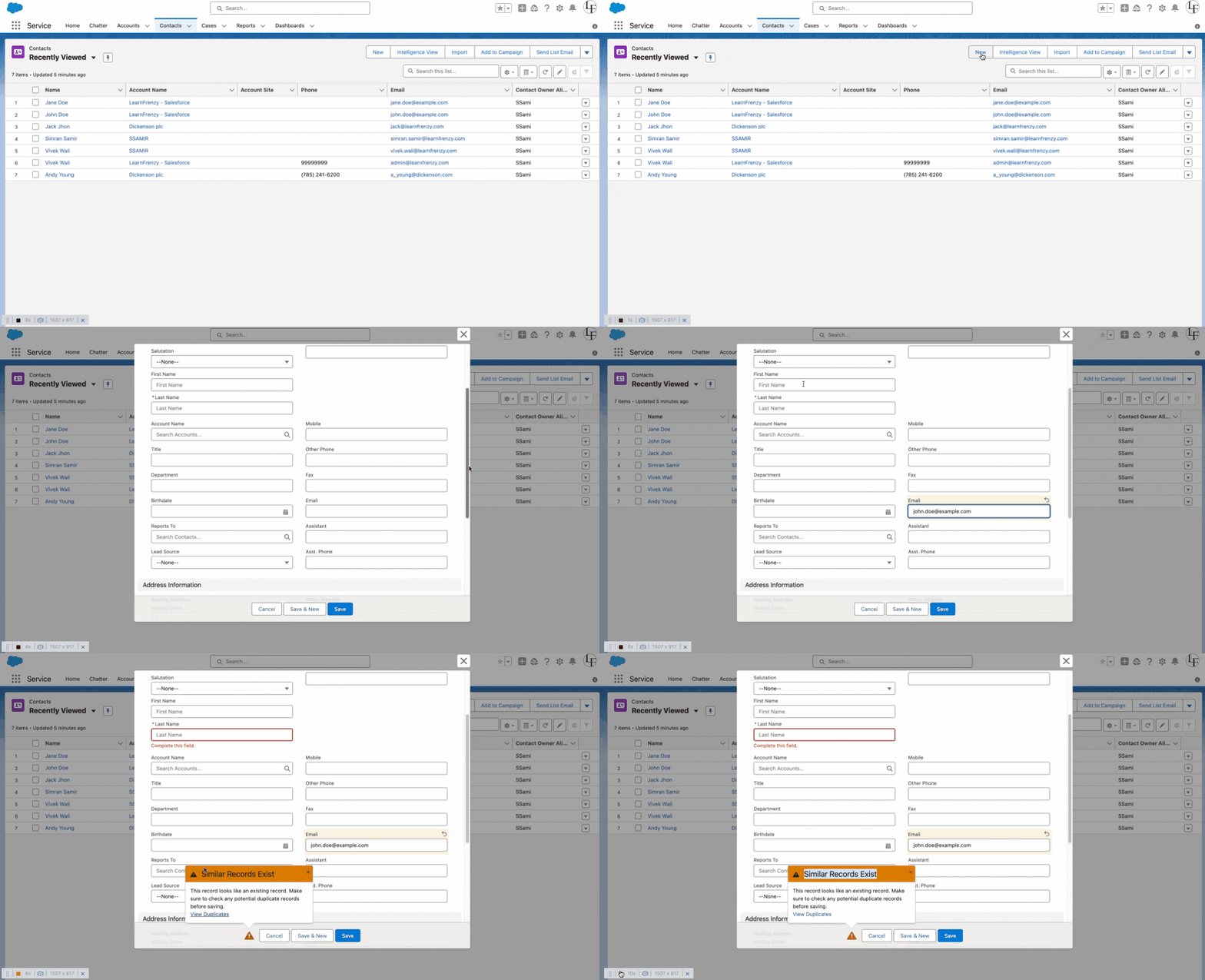
The class will detect that Duplicate John conflicts with an existing record and prevent its insertion while allowing the others.
This design ensures the prevention of duplicate Contact records in a scalable and bulk-safe manner, adhering to Salesforce best practices.
Interviewer
Write an Apex class to dynamically fetch and return all Contact records associated with Accounts in a specific industry.
Concepts Tested
Why This is Asked:
To evaluate the candidate’s understanding of dynamic queries and filters.
Interviewee
To fetch and return all Contact records associated with Accounts in a specific Industry, the solution must handle dynamic querying and ensure it is bulk-safe and governor-limit compliant.
Here’s how I would design the class:
Apex Class
public class ContactFetcherByIndustry {
    /**
     * Fetches and returns all Contact records associated with Accounts in a specific Industry.
     * @param industryName The name of the Industry to filter Accounts by.
     * @return List<Contact> A list of Contacts associated with the specified Industry's Accounts.
     */
    public static List<Contact> fetchContactsByIndustry(String industryName) {
        if (String.isBlank(industryName)) {
            throw new IllegalArgumentException('Industry name cannot be null or empty.');
        }

        // Query to fetch Contacts dynamically
        List<Contact> contacts = [
            SELECT Id, FirstName, LastName, Email, Account.Name, Account.Industry
            FROM Contact
            WHERE Account.Industry = :industryName
        ];

        return contacts;
    }
}
Explanation
industryName parameter to ensure it is not null or empty.FirstName, LastName, Email) and relevant Account fields (Name, Industry) for better visibility and debugging.List<Contact> containing all matching records.Usage Example
To use this class in an Apex method or Lightning component:
List<Contact> healthcareContacts = ContactFetcherByIndustry.fetchContactsByIndustry('Healthcare');
System.debug('Fetched Contacts: ' + healthcareContacts);
This retrieves all Contacts associated with Accounts in the Healthcare industry.
This class is simple, efficient, and scalable, providing a dynamic solution to fetch Contacts based on Account industries while ensuring compliance with Salesforce best practices.
Curious?
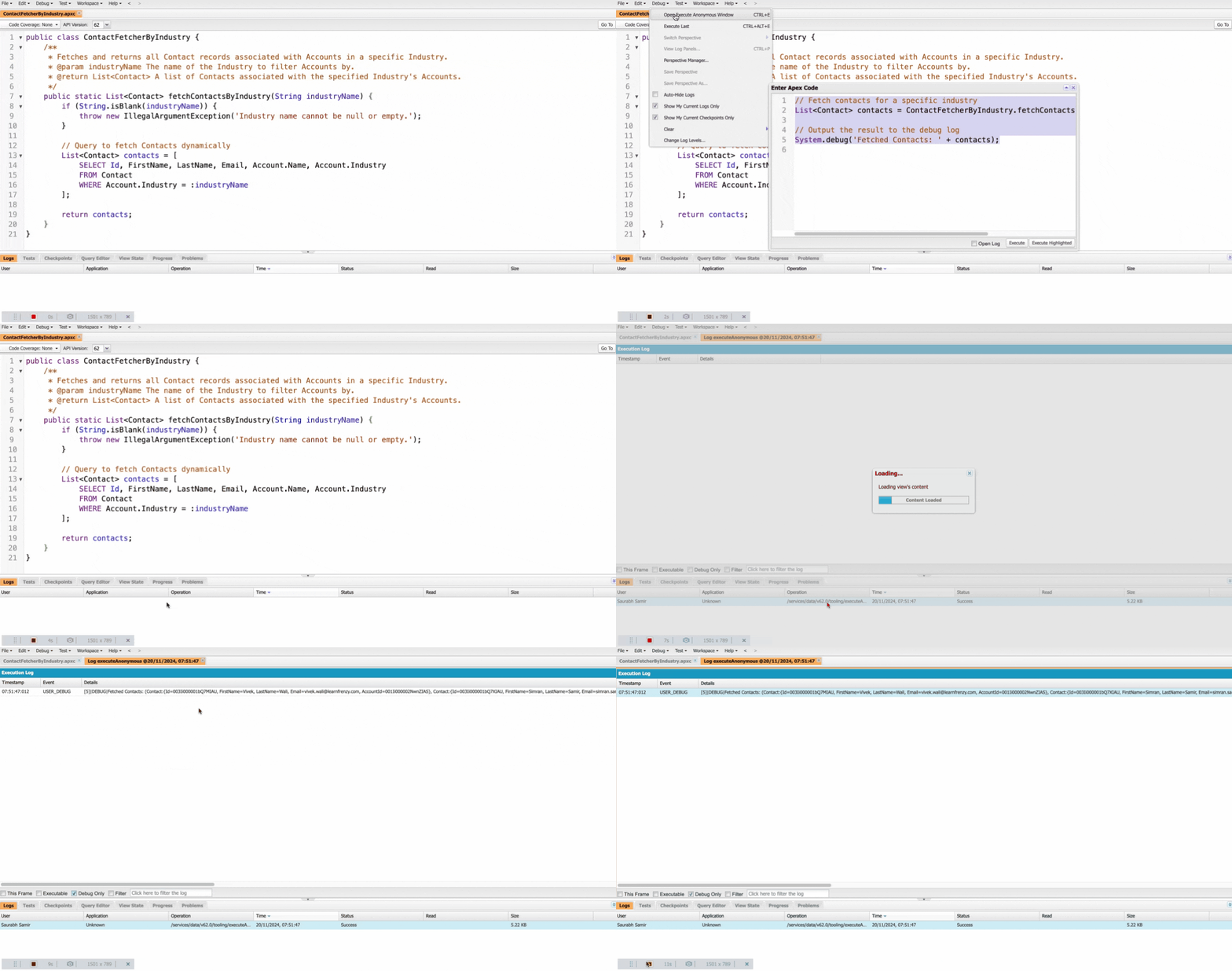
To check the output of the ContactFetcherByIndustry class, you can follow these steps:
Use Anonymous Apex
Execute the class in Anonymous Apex through the Developer Console.
Steps
// Fetch contacts for a specific industry
List<Contact> contacts = ContactFetcherByIndustry.fetchContactsByIndustry('Healthcare');

// Output the result to the debug log
System.debug('Fetched Contacts: ' + contacts);
Check Output
Fetched Contacts debug statement to see the list of contacts.
Interviewer
Write an Apex utility class to log exceptions into a custom object named Error_Log__c with fields Error_Message__c, Class_Name__c, and Method_Name__c.
Concepts Tested
Why This is Asked:
To evaluate the candidate’s ability to create reusable components for centralized error handling.
Interviewee
To log exceptions into a custom object named Error_Log__c, we can create a utility class that captures error details and inserts them into the custom object. The fields to be logged include:
Apex Utility Class
public class ErrorLogger {
    /**
     * Logs an exception to the Error_Log__c custom object.
     *
     * @param exception The exception to log.
     * @param className The name of the class where the error occurred.
     * @param methodName The name of the method where the error occurred.
     */
    public static void logError(Exception exception, String className, String methodName) {
        try {
            // Create an instance of the custom error log object
            Error_Log__c errorLog = new Error_Log__c();
            errorLog.Error_Message__c = exception.getMessage();
            errorLog.Class_Name__c = className;
            errorLog.Method_Name__c = methodName;

            // Insert the error log record
            insert errorLog;
        } catch (Exception loggingException) {
            // Prevent logging failure from affecting the main process
            System.debug('Error while logging exception: ' + loggingException.getMessage());
        }
    }
}
How to Use the Utility Class
In any Apex class or trigger, you can use this utility class to log exceptions. Here's an example:
public class SampleClass {
    public static void performOperation() {
        try {
            // Simulated code that may throw an exception
            Integer result = 5 / 0;  // This will cause a division by zero exception
        } catch (Exception e) {
            // Log the exception using the ErrorLogger utility
            ErrorLogger.logError(e, 'SampleClass', 'performOperation');
        }
    }
}
Explanation
exception: The caught exception to log.className and methodName: Passed explicitly to identify where the error occurred.try-catch inside the logging process ensures that even if logging fails, it won’t affect the main process.Output
An Error_Log__c record is created with details of the exception, including the error message, class name, and method name.
Benefits of This Approach
Interviewer
Write an Apex class to update all Lead records whose Status is "Open - Not Contacted" by changing their Status to "Working." Schedule this class to run daily at midnight.
Concepts Tested
Why This is Asked:
To assess a candidate's ability to use Batch Apex for processing large data volumes and Scheduler Apex for automation.
Interviewee
To update all Lead records with the status "Open - Not Contacted" to "Working", we need to create two Apex classes:
"Open - Not Contacted", changing it to "Working".1. Batch Apex Class
public class UpdateLeadStatusBatch implements Database.Batchable<sObject> {

    // Query to fetch Lead records with Status 'Open - Not Contacted'
    public Database.QueryLocator start(Database.BatchableContext context) {
        return Database.getQueryLocator([SELECT Id, Status FROM Lead WHERE Status = 'Open - Not Contacted']);
    }

    // Process each batch of records
    public void execute(Database.BatchableContext context, List<Lead> leadList) {
        for (Lead lead : leadList) {
            lead.Status = 'Working';  // Update Status
        }
        update leadList;  // Perform bulk update
    }

    // Called once after all batches are processed
    public void finish(Database.BatchableContext context) {
        System.debug('Batch job to update Lead statuses completed.');
    }
}
2. Scheduled Apex Class
This class schedules the UpdateLeadStatusBatch to run daily at midnight.
public class UpdateLeadStatusScheduler implements Schedulable {
    public void execute(SchedulableContext context) {
        // Run the batch job with 200 records per batch
        UpdateLeadStatusBatch batchJob = new UpdateLeadStatusBatch();
        Database.executeBatch(batchJob, 200);
    }
}
3. Schedule the Job
To schedule the job to run daily at midnight, use the Developer Console or Anonymous Apex Execution:
// Schedule to run daily at midnight (0 AM)
String cronExp = '0 0 0 * * ?';  // Cron expression for midnight
UpdateLeadStatusScheduler schedulerJob = new UpdateLeadStatusScheduler();
System.schedule('Daily Lead Status Update', cronExp, schedulerJob);
Explanation
"Working".'0 0 0 * * ?' schedules the job at midnight.Expected Output:
When the batch job and scheduled class run successfully, the following outcomes can be observed:
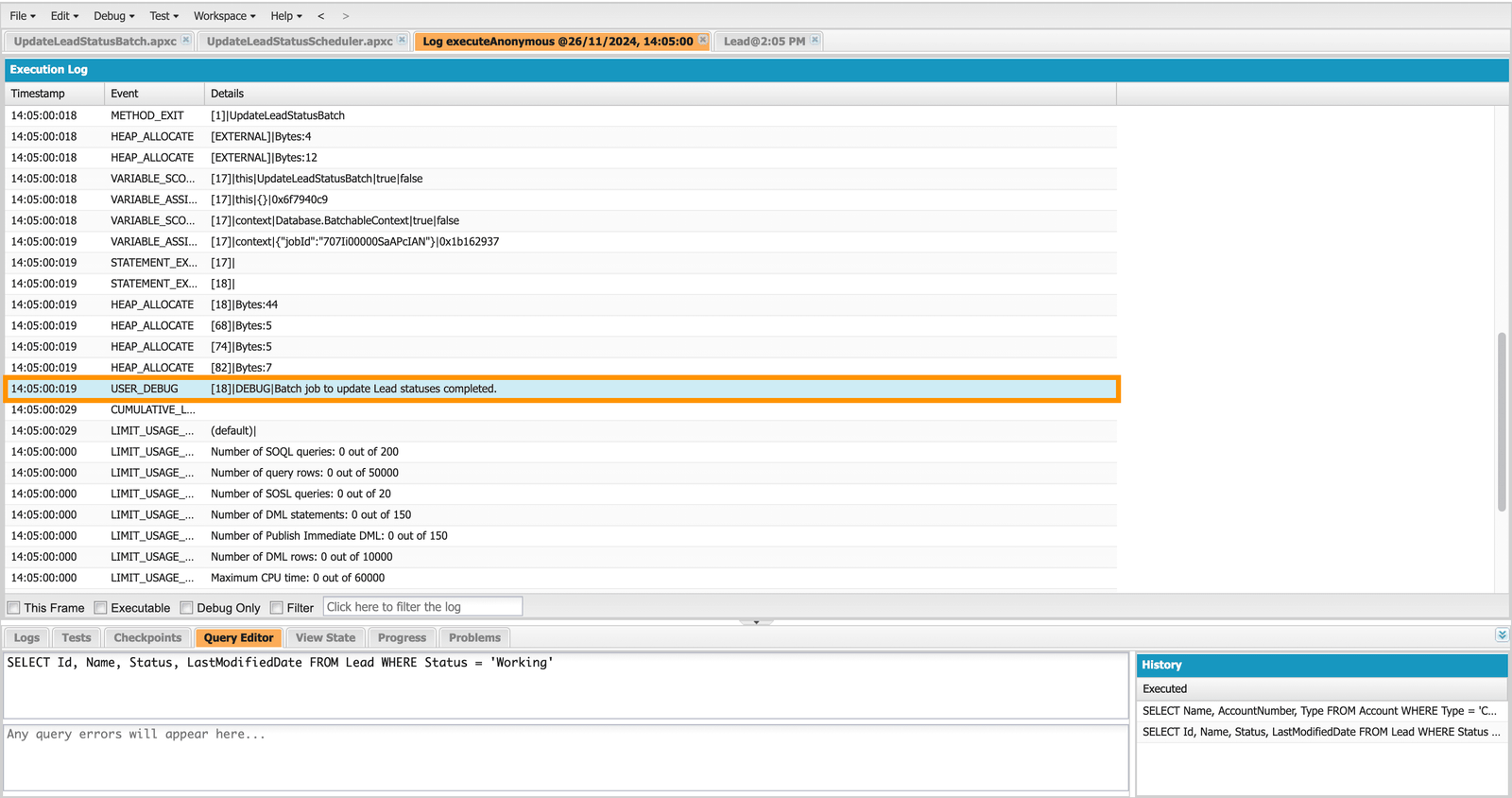
Lead records with Status = "Open - Not Contacted" will have their Status updated to "Working" daily at midnight.Batch job to update Lead statuses completed.Mind it!
Facing interview is very stressful situation for everyone who want to get the job. For every problem there is a solution. Practice the best solution to crack the interview. Pick the best source and practice your technical and HR interview with experienced persons which helpful to boost confidence in real interview.
Related Posts

One short email when we publish something new — interview questions, Salesforce guides and career tips. No spam, unsubscribe in one click.
Thirty Salesforce CPQ interview questions with answers — quote-to-cash, products, bundles, price rules, product rules, approvals and contracts.
The 30 Salesforce Apex interview questions asked most — collections, SOQL, DML, governor limits, triggers, async Apex and testing — with answers.
Salesforce Headless 360 explained — what headless CRM means, how APIs and data cloud power it, and what it changes for developers and businesses.
Questions, corrections or your own experience — they all help the next reader.
Priya