
Hello everyone,
If you are preparing for Salesforce Lightning Web Components (LWC) interviews, one thing is very clear today. Interviews are no longer about memorizing definitions. Interviewers want to know how you think, how you build, and how you handle real project scenarios.
Earlier, questions were very direct like “What is LWC?” or “Difference between Aura and LWC?”. Today, those questions are just warm-ups. Real interviews focus on scenario-based discussions where the interviewer tries to understand:
- Have you actually worked on LWC in real projects?
- Do you know when to use which approach?
- Can you explain complex behavior in a simple, confident way?
In this guide, I’ll walk you through commonly asked scenario-based LWC interview questions with clear, practical explanations, exactly the way you should explain them in an interview. Think of this as a conversation between a senior developer and an interviewer, not textbook documentation.
Let’s get started.
1. What are lifecycle hooks in Lightning Web Components, and how do they execute when parent and child components are involved?
Lifecycle hooks in LWC are predefined methods that run automatically at different stages of a component’s life, like when it is created, inserted into the DOM, rendered, or removed.
They help us control when to execute logic, such as:
- Initializing data
- Calling Apex
- Working with DOM
- Cleaning up resources
The most important hooks are:
constructor()connectedCallback()renderedCallback()disconnectedCallback()errorCallback()
Parent and Child Execution Order (Very Important)
When a parent and child component are involved, the execution order matters:
- Parent
constructor - Parent
connectedCallback - Child
constructor - Child
connectedCallback - Child
renderedCallback - Parent
renderedCallback
How to explain to interviewer
“I always remember this rule: parent initializes first, but child finishes rendering first. This is important when I depend on child DOM elements or public methods.”
Example Code
Parent Component
</> JavaScript
import { LightningElement } from 'lwc';

export default class ParentCmp extends LightningElement {

    constructor() {
        super();
        console.log('Parent constructor');
    }

    connectedCallback() {
        console.log('Parent connectedCallback');
    }

    renderedCallback() {
        console.log('Parent renderedCallback');
    }
}
</> HTML
<template>
    <c-child-cmp></c-child-cmp>
</template>
Child Component
</>  JavaScript
import { LightningElement } from 'lwc';

export default class ChildCmp extends LightningElement {

    constructor() {
        super();
        console.log('Child constructor');
    }

    connectedCallback() {
        console.log('Child connectedCallback');
    }

    renderedCallback() {
        console.log('Child renderedCallback');
    }
}
2. Why do we use the constructor in an LWC, and what are its limitations compared to other lifecycle hooks?
The constructor is used to initialize default values and set up basic state for the component.
Constructor example
constructor() {
    super();
    this.message = 'Initial value';
}
What constructor is good for
- Initializing variables
- Calling
super() - Setting default values
Limitations
- You cannot access DOM elements
- You cannot call Apex
- You should not use
@wirelogic here
Interview-friendly explanation
“I treat the constructor like a setup phase. If I need to fetch data, access DOM, or react to page context, I always use
connectedCallbackorrenderedCallbackinstead.”
3. Can connectedCallback() run multiple times?
What they asked me:
“Is connectedCallback executed only once or can it run multiple times?”
Yes, connectedCallback() can run multiple times in LWC.
It is executed every time the component is inserted into the DOM, not just once during its lifecycle.
In simple terms:
“Whenever the component is added to the DOM again, connectedCallback runs again.”
 MIND IT !
When does it run multiple times?
1. Conditional Rendering (if:true / if:false)
</> HTML
<template if:true={showChild}>
    <c-child-cmp></c-child-cmp>
</template>
</> JavaScript
toggle() {
    this.showChild = !this.showChild;
}
Each time showChild becomes true → component is recreated → connectedCallback() runs again
2. Navigation Between Pages
- Navigating away and coming back
- Component gets destroyed and recreated
3. Dynamic Component Creation
- Using dynamic rendering or loops
Example
</> JavaScript
connectedCallback() {
    console.log('Connected Callback called');
}
This log may appear multiple times, not just once.
Real Project Scenario
In one project, I had a component inside a conditional block.
Every time the condition changed, the component was destroyed and recreated, causing connectedCallback() to run again and triggering multiple API calls.
I fixed it by:
- Adding a flag to control execution
- Moving logic to a controlled flow
One-Line Strong Answer
“Yes, connectedCallback can run multiple times because it executes whenever the component is inserted into the DOM, so I always write logic to handle repeated executions safely.”
4. What is a callback function in JavaScript, and how is it commonly used inside LWC components?
A callback function is a function that is passed as an argument to another function and executed later, usually after some operation completes.
In LWC, callbacks are commonly used for:
- Handling user actions (like button clicks)
- Processing asynchronous operations (like Apex calls)
- Working with timers or events
In simple terms:
“Callback means → run this function after something happens.”
Example 1: Button Click (Basic Callback)
</> HTML
<lightning-button label="Click Me" onclick={handleClick}></lightning-button>
</> JavaScript
handleClick() {
    console.log('Button clicked');
}
Explanation
Here, handleClick is a callback function that runs when the button is clicked.
Example 2: Callback with Apex (Promise-based)
</> JavaScript
import getAccounts from '@salesforce/apex/AccountController.getAccounts';

handleLoad() {
    getAccounts()
        .then(result => {
            this.accounts = result; // callback execution
        })
        .catch(error => {
            console.error(error);
        });
}
Explanation
.then()→ success callback.catch()→ error callback
Example 3: Callback with setTimeout
</> JavaScript
handleDelay() {
    setTimeout(() => {
        console.log('Executed after 2 seconds');
    }, 2000);
}
Explanation
Function runs after delay → classic callback usage.
MIND IT !
Real Project Scenario
In one project, I used a button click to trigger an Apex call. After the data was returned, I updated the UI inside the .then() callback.
Initially, I tried accessing data outside the callback, but it didn’t work because the Apex call was asynchronous.
That’s when I understood:
“Callbacks are necessary to handle async behavior correctly.”
5. What is Lightning Data Service (LDS) in the context of LWC, and when would you prefer it over calling Apex?
Lightning Data Service (LDS) is a Salesforce-provided mechanism that allows LWC to read, create, update, and delete records without writing Apex code.
It works through the lightning/uiRecordApi module and uses built-in caching, security (FLS & sharing), and optimized performance.
In simple terms:
“LDS lets me interact with Salesforce data directly from LWC without backend code.”
Key Benefits
- No Apex required
- Built-in FLS and sharing rules enforcement
- Automatic caching and performance optimization
- Less code, easier maintenance
- Follows Salesforce best practices
Example 1: Fetch Record using LDS (@wire)
</> JavaScript
import { LightningElement, api, wire } from 'lwc';
import { getRecord } from 'lightning/uiRecordApi';

const FIELDS = ['Account.Name'];

export default class AccountView extends LightningElement {
    @api recordId;

    @wire(getRecord, { recordId: '$recordId', fields: FIELDS })
    account;
}
What this shows
- No Apex class needed
- Data is automatically fetched and reactive
Example 2: Create Record using LDS
</> JavaScript
import { createRecord } from 'lightning/uiRecordApi';
import ACCOUNT_OBJECT from '@salesforce/schema/Account';
import NAME_FIELD from '@salesforce/schema/Account.Name';

handleCreate() {
    const fields = {};
    fields[NAME_FIELD.fieldApiName] = 'Test Account';

    const recordInput = {
        apiName: ACCOUNT_OBJECT.objectApiName,
        fields
    };

    createRecord(recordInput)
        .then(() => {
            console.log('Record created');
        })
        .catch(error => {
            console.error(error);
        });
}
When I Prefer LDS over Apex
I use LDS when:
- Working with standard CRUD operations
- No complex business logic is required
- Need better performance and caching
- Want to avoid unnecessary Apex code
When I Prefer Apex instead
I use Apex when:
- Complex business logic is required
- Data from multiple objects needs to be combined
- Custom validation or processing is needed
- Bulk operations or integrations are involved
MIND IT !
Real Project Scenario
In one project, we needed to create and update Contact records from LWC.
Initially, we wrote Apex methods, but later replaced them with LDS (createRecord and updateRecord).
This reduced code, improved performance, and ensured security automatically.
6. How many decorators are available in LWC, and what is the purpose of each one?
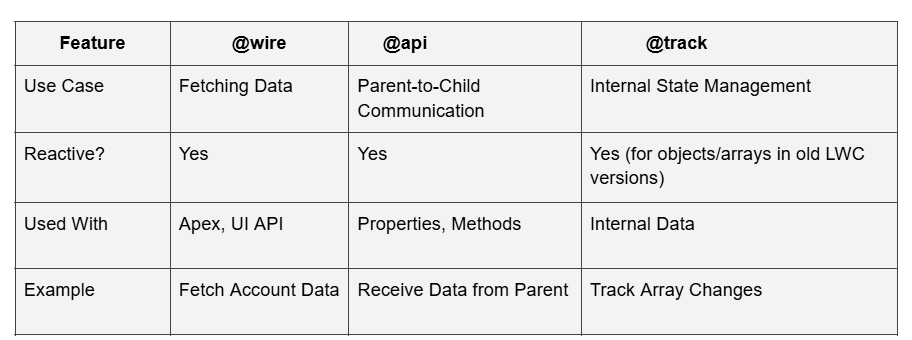
In LWC, there are three main decorators:
@api@wire@track(less used now)
Each decorator has a specific purpose related to data flow, reactivity, and communication.
In simple terms:
“@api is for communication, @wire is for data, and @track is for reactivity.”
1. @api (Public Properties & Methods)
Purpose
Used to expose properties or methods to parent components.
Example (Property)
</> JavaScript
import { LightningElement, api } from 'lwc';

export default class ChildCmp extends LightningElement {
    @api message;
}
</> HTML
<c-child-cmp message="Hello from Parent"></c-child-cmp>
Example (Method)
</> JavaScript
@api showAlert() {
    alert('Called from parent');
}
</> JavaScript
this.template.querySelector('c-child-cmp').showAlert();
When I use it
- Parent → Child communication
- Exposing public methods
2. @wire (Reactive Data Fetching)
Purpose
Used to connect LWC to Salesforce data (Apex or LDS) in a reactive way.
Example
</> JavaScript
import { wire } from 'lwc';
import getAccounts from '@salesforce/apex/AccountController.getAccounts';

@wire(getAccounts)
accounts;
Reactive Example
</> JavaScript
@wire(getAccounts, { type: '$accountType' })
accounts;
When accountType changes → wire runs again automatically.
When I use it
- Fetching data
- Auto-refresh based on parameters
3. @track (Reactivity for Objects/Arrays)
Purpose
Used to make object or array changes reactive (mainly older behavior).
Example
</> JavaScript
import { track } from 'lwc';

@track user = { name: 'Samir' };
Update Example
</> JavaScript
this.user.name = 'Sam'; // tracked change
Important Note
In modern LWC:
- Many cases are auto-tracked
- @track is rarely needed
How Decorators Work
MIND IT !
Real Project Scenario
In one project:
- I used
@apito pass configuration from parent to child - Used
@wireto fetch account data - Avoided
@trackby updating object references properly
This made the component cleaner and more maintainable.
7. Do we still need @track in LWC?
No, in most cases @track is not required anymore because LWC automatically tracks changes for properties.
However, it may still be needed for deep mutations inside objects or arrays.
Example
</> JavaScript
user = { name: 'Samir' };

// This may NOT trigger UI update
this.user.name = 'Sam';
Fix
</> JavaScript
this.user = { ...this.user, name: 'Sam' };
Tip
“Instead of using @track, I prefer updating object references.”
8. Can we modify an @api property inside a child component?
What they asked me:
“Can child modify @api variable?”
Technically possible, but not recommended.
Because @api is meant to be controlled by the parent, modifying it in the child breaks one-way data flow.
Tip
“@api should be treated as read-only inside child.”
9. What is the difference between wired property and wired function?
Property
</> JavaScript
@wire(getAccounts)
accounts;
Function
</> JavaScript
@wire(getAccounts)
wiredAccounts({ data, error }) {
    if (data) {
        this.accounts = data;
    }
}
Key Difference
- Property → simple usage
- Function → more control (error handling, transformation)
10. In how many different ways can an Apex method be invoked from an LWC?
What they asked me:
“What are the different ways to call Apex from LWC, and when do you use each?”
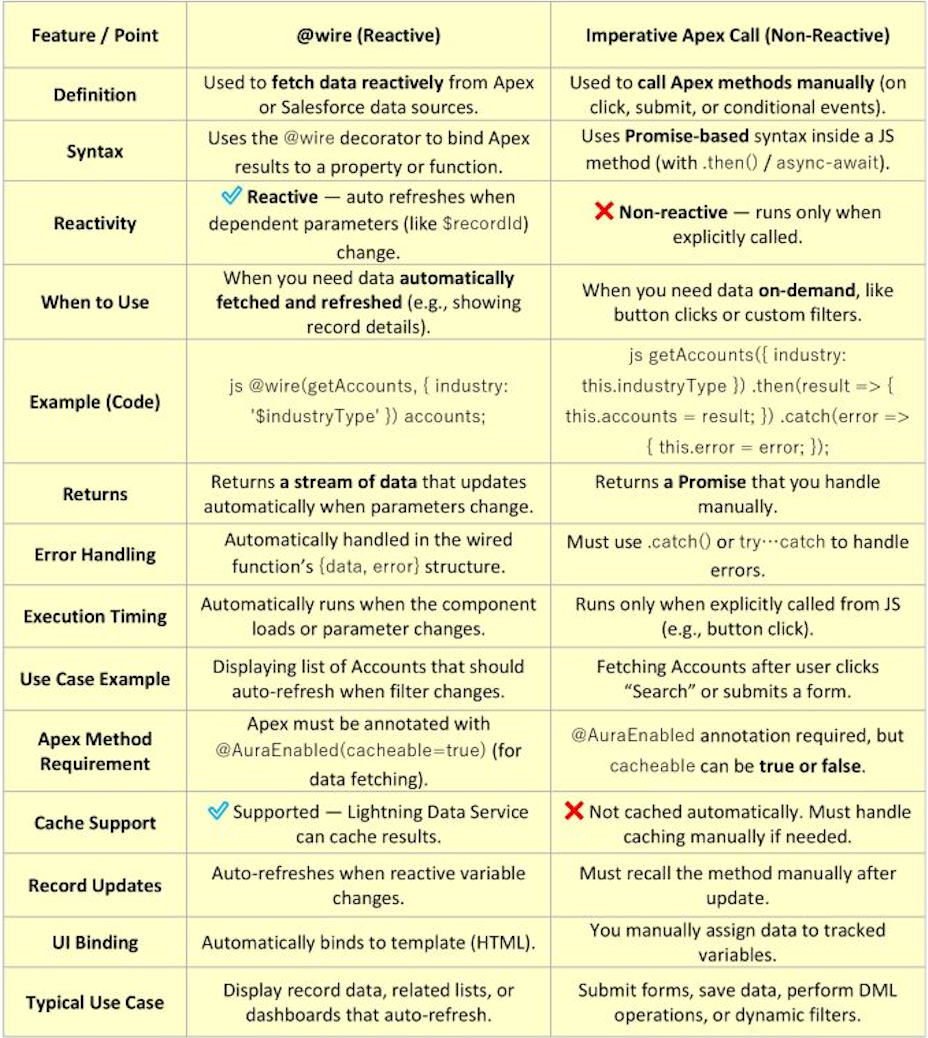
In LWC, we can invoke an Apex method in two main ways:
- Using
@wire(Reactive Approach) - Using Imperative Apex (Manual Approach)
Both are important, and I choose between them based on the use case and control required.
1. Using @wire (Reactive Approach)
What it does
- Automatically calls Apex
- Reacts to parameter changes
- Managed by framework
Example
</> JavaScript
import { LightningElement, wire } from 'lwc';
import getAccounts from '@salesforce/apex/AccountController.getAccounts';

export default class WireExample extends LightningElement {
    @wire(getAccounts)
    accounts;
}
Reactive Example
</> JavaScript
@wire(getAccounts, { type: '$accountType' })
accounts;
If accountType changes → Apex is called again automatically.
When I use @wire
- Data should load automatically
- Data should refresh when parameters change
- Read-only operations
2. Imperative Apex Call (Manual Approach)
What it does
- Called explicitly from JavaScript
- Full control over execution
- Best for user-driven actions
Example
</> JavaScript
import getAccounts from '@salesforce/apex/AccountController.getAccounts';

handleClick() {
    getAccounts()
        .then(result => {
            this.accounts = result;
        })
        .catch(error => {
            console.error(error);
        });
}
When I use Imperative
- Button click or user action
- Create, update, delete operations
- Complex logic or validation
One-Line Strong Answer
“An Apex method can be invoked in two ways in LWC — using @wire for reactive, automatic data fetching, and using imperative calls for controlled, user-driven operations.”
Diagram (Wire vs Imperative Flow)
MIND IT !
Real Project Scenario
In one project:
- I used
@wireto load Account data on page load - Used imperative Apex when user clicked “Search” button
This gave both automatic data loading and controlled execution.
11. How can you fetch data from an Apex class using @wire without calling the method imperatively?
What they asked me:
“How does @wire fetch data from Apex without explicitly calling the method?”
In LWC, we can fetch data from an Apex class using the @wire decorator by simply importing the Apex method and binding it to a property or function.
We don’t call the method manually. Instead, the LWC framework automatically invokes it and keeps it in sync with reactive parameters.
In simple terms:
“With @wire, I don’t control when the method runs — the framework does.”
Basic Example (Wired Property)
Apex Class
</> Apex
public with sharing class AccountController {
    @AuraEnabled(cacheable=true)
    public static List getAccounts() {
        return [SELECT Id, Name FROM Account LIMIT 10];
    }
}
LWC JavaScript
</> JavaScript
import { LightningElement, wire } from 'lwc';
import getAccounts from '@salesforce/apex/AccountController.getAccounts';

export default class AccountList extends LightningElement {
    @wire(getAccounts)
    accounts;
}
What’s happening here
- No manual call
- Apex runs automatically
- Data is available in
accounts.data
Example with Reactive Parameters
</> JavaScript
import { LightningElement, wire } from 'lwc';
import getAccounts from '@salesforce/apex/AccountController.getAccounts';

export default class AccountList extends LightningElement {
    accountType = 'Customer';

    @wire(getAccounts, { type: '$accountType' })
    accounts;
}
Key Point
If accountType changes → Apex method runs again automatically.
Wired Function (Advanced Control)
</> JavaScript
@wire(getAccounts)
wiredAccounts({ data, error }) {
    if (data) {
        this.accounts = data;
    } else if (error) {
        console.error(error);
    }
}
Why use function instead of property?
- Handle errors
- Transform data
- Store response manually
One-Line Strong Answer
“We fetch data from Apex using @wire by decorating a property or function, and the framework automatically invokes the method and refreshes it when reactive parameters change, without any imperative call.”
MIND IT !
Real Project Scenario
In one project, I used @wire to load account data based on selected account type.
Whenever the user changed the dropdown, the accountType variable updated, and @wire automatically fetched new data without any manual call.
This reduced code and improved performance.
Common Mistake (Very Important)
Mistake ✗
Trying to call wire method manually
</> JavaScript
this.getAccounts(); // ✗ not allowed
Correct Understanding
“@wire is declarative, not imperative.”
Tips to Impress the Interviewer ✓
- Say:
- Mention:
@AuraEnabled(cacheable=true)is required- Use phrase:
“@wire automatically invokes Apex based on reactive parameters”
“Framework-controlled execution”
12. When using a wired function, how many times can it be invoked and what factors trigger its re-execution?
What they asked me:
“How many times does a wired function execute, and what triggers it?”
A wired function in LWC can be invoked multiple times, not just once.
It is reactive, which means it automatically re-executes whenever certain conditions change.
In simple terms:
“@wire is not a one-time call. It runs whenever its dependencies change.”
Key Triggers for Re-execution
- Change in reactive parameters
- Component re-render
- Explicit refreshApex
- Page refresh
1. Reactive Parameter Change
If any reactive parameter changes, the wire method runs again.
</> JavaScript
@wire(getAccounts, { type: '$accountType' })
wiredAccounts({ data }) {
    this.accounts = data;
}
</> JavaScript
this.accountType = 'Customer'; // triggers re-execution
2. Component Re-render
If the component re-renders due to state change, wire may re-evaluate.
3. refreshApex() Call
Manual trigger to refresh data.
</> JavaScript
import { refreshApex } from '@salesforce/apex';

refreshApex(this.wiredResult);
4. Page Refresh / Navigation
Reloading the page or navigating back can invoke wire again.
Example (Complete Scenario)
</> JavaScript
import { LightningElement, wire } from 'lwc';
import getAccounts from '@salesforce/apex/AccountController.getAccounts';

export default class Example extends LightningElement {
    accountType = 'Customer';

    @wire(getAccounts, { type: '$accountType' })
    wiredAccounts({ data, error }) {
        if (data) {
            this.accounts = data;
        }
    }

    handleChange() {
        this.accountType = 'Partner'; // triggers wire again
    }
}
One-Line Strong Answer
“A wired function can execute multiple times because it is reactive, and it re-executes whenever reactive parameters change, refreshApex is called, or the component lifecycle triggers re-evaluation.”
MIND IT !
Real Project Scenario
In one project, I had a dropdown for Account Type.
Whenever the user changed the value, the wire method automatically fetched updated data without any manual call.
Later, after updating records, I used refreshApex() to reload the latest data.
13. Why is my @wire not getting called?
What they asked me:
“Your wire method is not executing. What could be the reason?”
The most common reason is that the reactive parameter is undefined or null, so the framework doesn’t invoke the Apex method.
Problem ✗
</> JavaScript
@wire(getAccounts, { type: '$accountType' })
accounts;
If accountType is undefined → wire won’t run.
Fix ✓
</> JavaScript
accountType = 'Customer';
Real Insight
“Wire only executes when all reactive parameters have valid values.”
14. Why is @wire running multiple times?
What they asked me:
“Why is your Apex method getting called multiple times?”
Because @wire is reactive. It runs again whenever:
- Reactive parameters change
- Component re-renders
refreshApexis called
Example
</> JavaScript
@wire(getAccounts, { type: '$accountType' })
accounts;
Every change in accountType → triggers call.
Tip
“Wire is not a one-time call, it’s reactive.”
15. Why am I getting undefined in @wire data?
What they asked me:
“Why is data undefined sometimes?”
Because wire executes asynchronously. Initially, data is undefined until the response arrives.
Safe Handling ✓
</> JavaScript
get accountList() {
    return this.accounts?.data || [];
}
Tip
“Always handle undefined state in wire.”
16. Why is @wire not suitable for button click?
Because @wire runs automatically. It cannot be triggered manually on demand.
Use imperative Apex for user-driven actions.
17. What happens if multiple @wire are used?
No, they run independently and asynchronously. Execution order is not guaranteed.
Tip
“Don’t depend on order of wire execution.”
18. Suppose you need to create a Contact record from LWC without using Apex. Which approach would you follow?
What they asked me:
“How will you create a Contact record in LWC without writing any Apex code?”
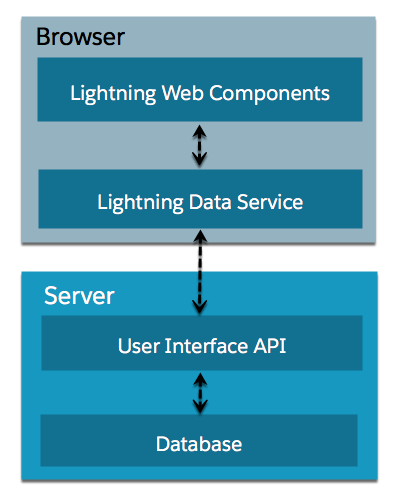
I would use Lightning Data Service (LDS), specifically the createRecord method from lightning/uiRecordApi.
This allows me to create records directly from LWC without Apex, while automatically handling:
- Field-level security (FLS)
- Sharing rules
- Validation rules
In simple terms:
“If it’s a simple record creation, I prefer LDS instead of Apex.”
Example (Create Contact using LDS)
JavaScript
</> JavaScript
import { LightningElement } from 'lwc';
import { createRecord } from 'lightning/uiRecordApi';
import CONTACT_OBJECT from '@salesforce/schema/Contact';
import LASTNAME_FIELD from '@salesforce/schema/Contact.LastName';
import EMAIL_FIELD from '@salesforce/schema/Contact.Email';

export default class CreateContact extends LightningElement {
    lastName = '';
    email = '';

    handleChange(event) {
        const field = event.target.name;
        if (field === 'lastName') {
            this.lastName = event.target.value;
        } else if (field === 'email') {
            this.email = event.target.value;
        }
    }

    handleSave() {
        const fields = {};
        fields[LASTNAME_FIELD.fieldApiName] = this.lastName;
        fields[EMAIL_FIELD.fieldApiName] = this.email;

        const recordInput = {
            apiName: CONTACT_OBJECT.objectApiName,
            fields
        };

        createRecord(recordInput)
            .then(result => {
                console.log('Contact created with Id:', result.id);
            })
            .catch(error => {
                console.error(error);
            });
    }
}
HTML
</> HTML
<template>
    <lightning-input
        label="Last Name"
        name="lastName"
        onchange={handleChange}>
    </lightning-input>

    <lightning-input
        label="Email"
        name="email"
        onchange={handleChange}>
    </lightning-input>

    <lightning-button
        label="Create Contact"
        onclick={handleSave}>
    </lightning-button>
</template>
Alternative Approach (Also Valid)
Use lightning-record-edit-form
</> HTML
<lightning-record-edit-form object-api-name="Contact">
    <lightning-input-field field-name="LastName"></lightning-input-field>
    <lightning-input-field field-name="Email"></lightning-input-field>

    <lightning-button type="submit" label="Save"></lightning-button>
</lightning-record-edit-form>
When I Choose Each Approach
createRecord
- Custom UI
- Full control over fields
- Custom validations
lightning-record-edit-form
- Quick form
- Minimal code
- Standard UI
One-Line Strong Answer
“To create a Contact record without Apex, I use Lightning Data Service with createRecord, which allows secure and efficient record creation directly from LWC.”
Diagram (LDS Record Creation Flow)
MIND IT !
Real Project Scenario
In one project, we needed a custom UI for creating Contacts with conditional fields.
Instead of writing Apex, I used createRecord, which reduced backend code and ensured security automatically.
Common Mistake (Very Important)
Mistake ✗
Using Apex for simple record creation
Better Approach ✓
Use LDS (createRecord)
Tips to Impress the Interviewer ✓
- Say:
- Mention:
- FLS
- Sharing
- Validation rules
- Use phrase:
“I prefer LDS first, Apex only when needed”
“No backend code required”
19. Describe in detail how parent-to-child and child-to-parent communication works in LWC.
In LWC, communication between components follows a one-way data flow:
- Parent → Child using
@api(properties or methods) - Child → Parent using Custom Events
In simple terms:
“Data flows down using @api, and events flow up using CustomEvent.”
1. Parent → Child Communication
How it works
The parent passes data to the child using public properties (@api) or calls public methods.
Mechanism:
- The child component exposes a property using the
@apidecorator. - The parent component binds to that property in its HTML template using standard attribute syntax.
- The binding is reactive – if the parent updates the value, the child automatically re-renders with the new value.
Example (Passing Data via @api Property)
Child Component (childCmp.js)
</> JavaScript
import { LightningElement, api } from 'lwc';

export default class ChildCmp extends LightningElement {
    @api messageFromParent; // public property
}
Child HTML
</> HTML
<template>
  <lightning-card variant="Narrow" title="Child Component" icon-name="custom:custom14">
    <div class="slds-m-around_medium">
      <div>Message :{messageFromParent}</div>
    </div>

</template>
Parent Component
parentCmp.js
</> JavaScript
import { LightningElement } from 'lwc';

export default class ParentComp extends LightningElement {
  message = '';

  handleMessageFromParent(event) {
    this.message = event.detail.value;
  }
}
parentCmp.html
</> HTML
<template>
  <lightning-card variant="narrow" title="Parent Component" icon-name="custom:custom14">
    <div class="slds-m-around_medium">
      <lightning-input type="text" label="Enter a message" onchange="{handleMessageFromParent}" value="{message}">
      </lightning-input>
      <!-- Passing data to child -->
      <c-child-comp message-from-parent="{message}"></c-child-comp>
    </div>
  </lightning-card>
</template>
Output (What You See on UI)
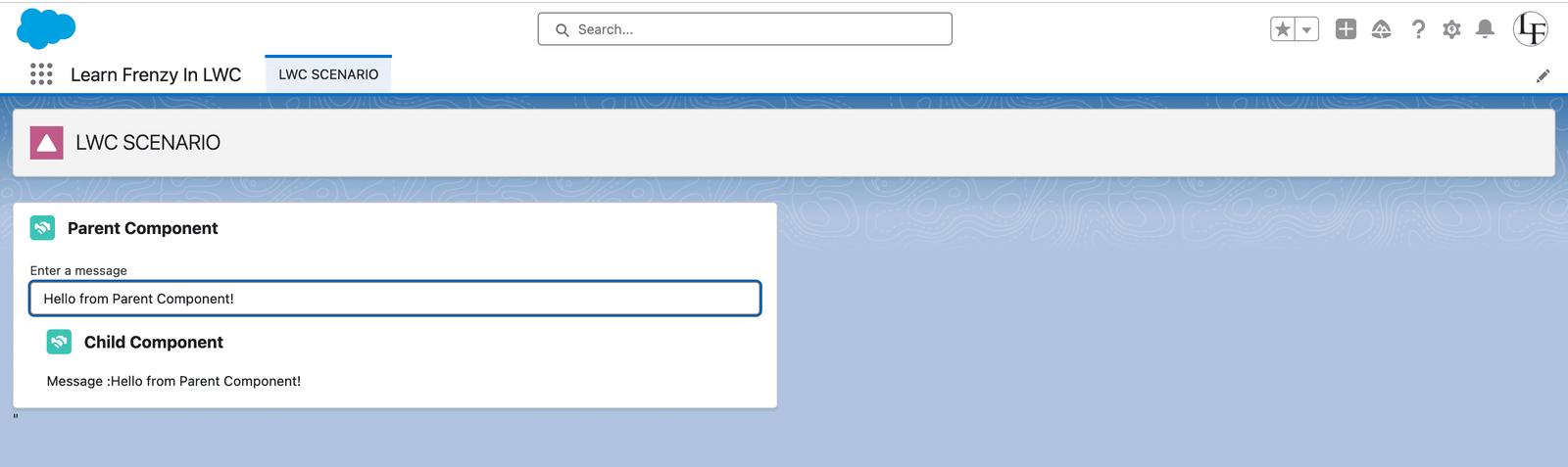
Key Points for Parent-to-Child:
@apimakes property/method public- Parent controls the child
- Property names in HTML use kebab-case (e.g.,
message-from-parentmaps tomessageFromParentin JS). - Data flows one-way from parent to child.
- Child components should never modify
@apiproperties directly (they are read-only from the child’s perspective).
Parent Calling Child Methods
Sometimes a parent needs to invoke a method in the child component. This is done by:
- Exposing a method in the child using
@api. - Accessing the child component in the parent using
this.template.querySelector()or a public getter.
Example (Calling Child Method)
Child Component:
</> JavaScript
@api validate() {
    // Validation logic
    return this.isValid;
}
Parent Component:
</> JavaScript
handleSubmit() {
    const child = this.template.querySelector('c-child-component');
    const isValid = child.validate();
    if (isValid) {
        // Proceed with submission
    }
}
2. Child → Parent Communication
How it works
Child-to-parent communication is achieved using custom events. The child component dispatches a DOM event, and the parent listens to that event and handles it.
Mechanism:
- The child creates and dispatches a
CustomEventusingthis.dispatchEvent(). - The event can carry data via the
detailproperty. - The parent component listens to the event in the template using
on{eventname}syntax. - A handler method in the parent processes the event.
Example:
Child Component (childComponent.js)
</> JavaScript
import { LightningElement, api } from 'lwc';

export default class ChildComponent extends LightningElement {
    @api productId;

    handleAddToCart() {
        // Create and dispatch custom event with data
        const event = new CustomEvent('addtocart', {
            detail: {
                productId: this.productId,
                timestamp: new Date().toISOString()
            },
            bubbles: true,      // Allows event to bubble up through DOM
            composed: true      // Allows event to cross shadow DOM boundary
        });
        this.dispatchEvent(event);
    }

    handleRemove() {
        const event = new CustomEvent('remove', {
            detail: { productId: this.productId }
        });
        this.dispatchEvent(event);
    }
}
Child Component Template (childComponent.html)
</> HTML
<template>
    <div>
        <button onclick={handleAddToCart}>Add to Cart</button>
        <button onclick={handleRemove}>Remove</button>
    </div>
</template>
Parent Component Template (parentComponent.html)
</> HTML
<template>
    <c-child-component
        product-id={product.id}
        onaddtocart={handleAddToCart}
        onremove={handleRemove}>
    </c-child-component>
</template>
Parent Component (parentComponent.js)
</> JavaScript
import { LightningElement, track } from 'lwc';

export default class ParentComponent extends LightningElement {
    @track cartItems = [];
    @track product = { id: 'P001', name: 'Wireless Mouse' };

    handleAddToCart(event) {
        const { productId, timestamp } = event.detail;
        console.log(`Product ${productId} added at ${timestamp}`);

        // Add to cart logic
        this.cartItems = [...this.cartItems, {
            id: productId,
            addedAt: timestamp
        }];
    }

    handleRemove(event) {
        const { productId } = event.detail;
        console.log(`Removing product ${productId}`);

        // Remove from cart logic
        this.cartItems = this.cartItems.filter(item => item.id !== productId);
    }
}
Key Points for Child-to-Parent:
- Event names in HTML use lowercase and are prefixed with
on(e.g.,onaddtocartmaps to event nameaddtocart). - Always set
bubbles: trueandcomposed: trueto ensure events cross shadow DOM boundaries. - Use
event.detailto pass data from child to parent. - Events follow standard DOM event propagation (bubbling/capturing).
Output (What You See on UI)
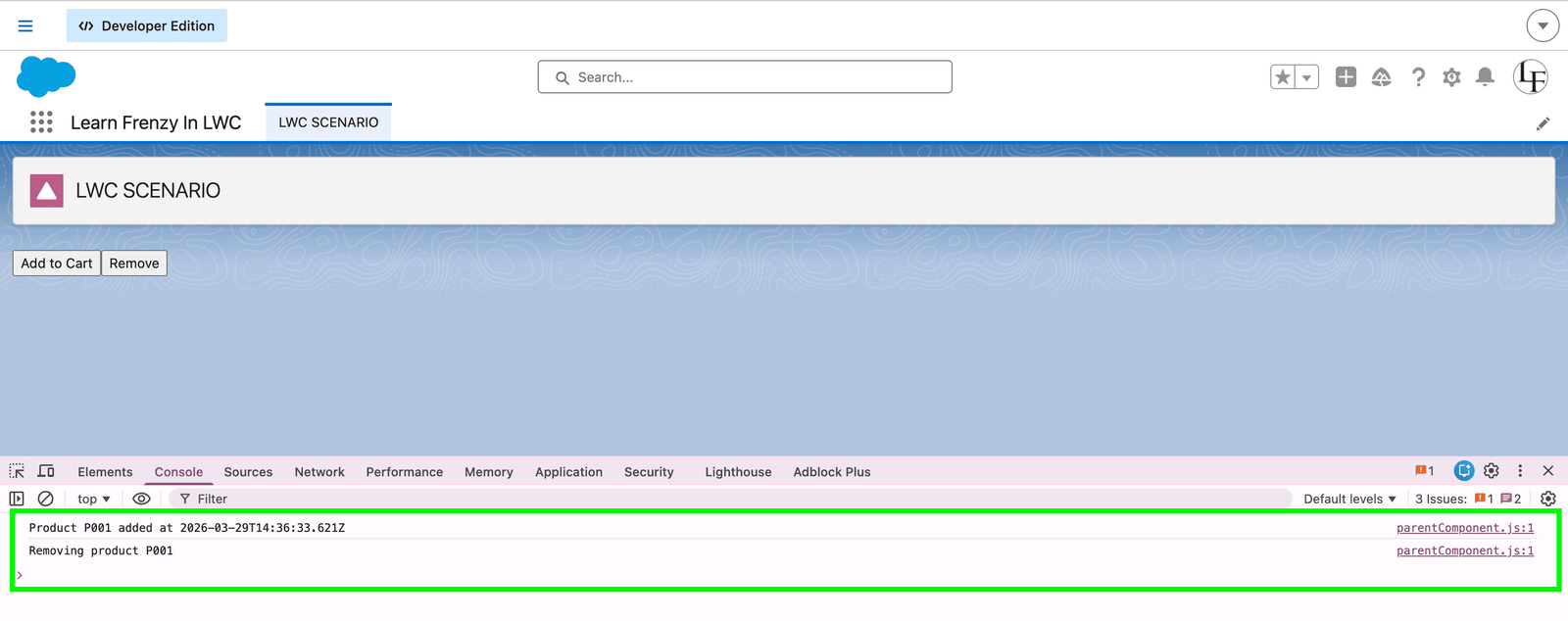
Visual Representation of Complete Flow
Child Component                    Parent Component
     |                                    |
     | 1. User clicks "Add to Cart"       |
     |----------------------------------->|
     |    dispatchEvent('addtocart',      |
     |    { productId: 'P001' })          |
     |                                    |
     |                                    | 2. handleAddToCart executes
     |                                    |    Console: "Product P001 added..."
     |                                    |    Update cartItems array
     |                                    |
     | 3. User clicks "Remove"            |
     |<-----------------------------------|
     |    (Optional: Parent can trigger   |
     |     child methods)                 |
     |                                    |
     | 4. Child dispatches 'remove'       |
     |----------------------------------->|
     |                                    | 5. handleRemove executes
     |                                    |    Console: "Removing product P001"
     |                                    |    Filter cartItems array
MIND IT !
One-Line Strong Answer
“In LWC, parent-to-child communication happens via @api properties and methods, while child-to-parent communication is handled using Custom Events, ensuring a clean one-way data flow.”
20. What is the syntax to invoke a child component’s public method or property from the parent?
To invoke a child component’s public method or access its property, we use:
</> JavaScript
this.template.querySelector('c-child-component').methodName();
This works only if the child method or property is exposed using the @api decorator.
In simple terms:
“First make it public using @api, then access it using querySelector from the parent.”
Example
Use Case
Parent has a button → when clicked → calls a method in child → child shows an alert message.
Step 1: Child Component
childCmp.js
</> JavaScript
import { LightningElement, api } from 'lwc';

export default class ChildCmp extends LightningElement {

    @api showMessage() {
        alert('Hello from Child Component!');
    }
}
childCmp.html
</> HTML
<template>
    <p>Child Component Ready</p>
</template>
Step 2: Parent Component
parentCmp.js
</> JavaScript
import { LightningElement } from 'lwc';

export default class ParentCmp extends LightningElement {

    handleClick() {
        const child = this.template.querySelector('c-child-cmp');

        if (child) {
            child.showMessage();
        }
    }
}
parentCmp.html
</> HTML
<template>
    <h2>Parent Component</h2>

    <lightning-button
        label="Call Child Method"
        onclick={handleClick}>
    </lightning-button>

    <c-child-cmp></c-child-cmp>
</template>
Output (UI Behavior)
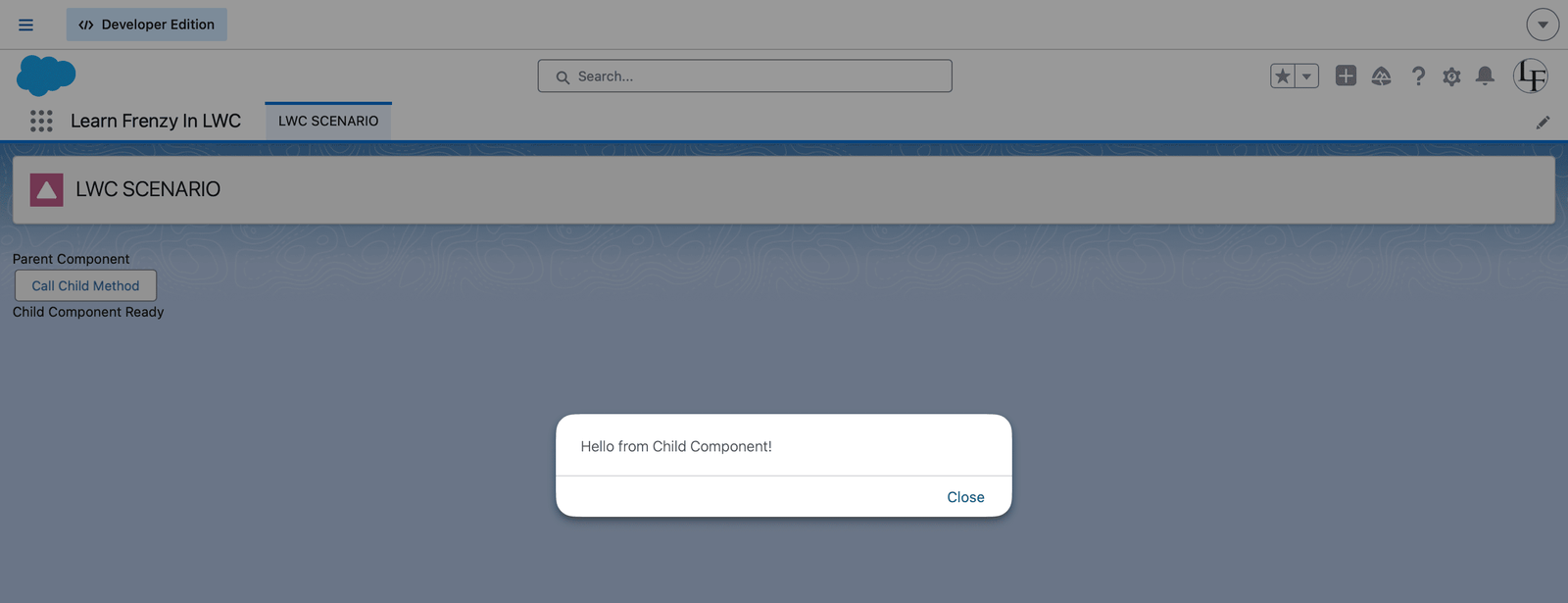
What happens:
- User clicks “Call Child Method” button
- Parent calls child method
- Child shows alert:
“Hello from Child Component!”
MIND IT !
Syntax Breakdown (Important for Interview)
</> JavaScript
this.template.querySelector('c-child-cmp').showMessage();
Explanation:
this.template→ current component DOMquerySelector()→ finds child component'c-child-cmp'→ child selectorshowMessage()→ public method
One-Line Strong Answer
“To invoke a child component’s public method, I expose it using @api in the child and then use template.querySelector in the parent to call that method after the component is rendered.”
21. How can you make a message, label, or property value dynamic in LWC based on the page?
What they asked me:
“How do you make your LWC reusable so values change based on where it is used?”
In LWC, we can make messages, labels, or properties dynamic using a few approaches:
@apiproperties (most common)- Lightning App Builder configuration
- Custom Labels
- Current Page Reference (context-based values)
In simple terms:
“I avoid hardcoding values and use @api or configuration so the component behaves differently on each page.”
1. Using @api Property (Most Common Approach)
Use Case
Same component used on multiple pages, but each page shows a different message.
Child Component
</> JavaScript
import { LightningElement, api } from 'lwc';

export default class DynamicMessage extends LightningElement {
    @api message; // dynamic input
}
</> HTML
<template>
    <h3>{message}</h3>
</template>
Parent Usage (Different Pages)
</> HTML
<c-dynamic-message message="Welcome to Account Page"></c-dynamic-message>
</> HTML
<c-dynamic-message message="Welcome to Contact Page"></c-dynamic-message>
Output
Same component → different messages
2. Using Lightning App Builder (Page Configuration)
What it does
Allows admins to set values without changing code
Step
</> JavaScript
@api heading;
Then in App Builder:
- Drag component
- Set
heading = "Dashboard View"
Interview Line
“This makes the component reusable and configurable without deployment.”
3. Using Custom Labels
When to use
- Static but configurable text
- Multi-language support
Example
</> JavaScript
import LABEL from '@salesforce/label/c.My_Label';

export default class Example extends LightningElement {
    label = LABEL;
}
Custom labels are best for reusable text and translations.
4. Using Page Context (CurrentPageReference)
When to use
- Dynamic behavior based on page type or record
Example
</> JavaScript
import { CurrentPageReference } from 'lightning/navigation';
import { wire } from 'lwc';

@wire(CurrentPageReference)
pageRef;

get recordId() {
    return this.pageRef?.state?.recordId;
}
Use Case
- Show different data based on recordId
- Change UI based on page type
MIND IT !
Real Project Scenario
In one project, I created a reusable LWC used on:
- Account page
- Contact page
- Dashboard
Instead of hardcoding labels, I used @api and App Builder configuration so each page showed different content without changing code.
One-Line Strong Answer
“To make values dynamic in LWC, I use @api properties for configurable inputs, App Builder for page-level customization, custom labels for reusable text, and page reference for context-based behavior.”
22. Is it possible to place two unrelated LWCs on the same Lightning page and still make them talk to each other?
What they asked me:
“If two components don’t have a parent-child relationship, how will they communicate?”
Yes, it is absolutely possible using Lightning Message Service (LMS).
LMS allows communication between unrelated components on the same page, even if they are not connected in the component hierarchy.
In simple terms:
“When components are not related, I use LMS for communication.”
How LMS Works
- One component → publishes message
- Another component → subscribes and receives message
- Communication happens via a Message Channel
Example
Use Case
- Component A → sends message
- Component B → receives and displays it
Step 1: Create Message Channel
messageChannel.messageChannel-meta.xml
</> XML

<lightningmessagechannel xmlns="http://soap.sforce.com/2006/04/metadata">
    <masterlabel>MessageChannel</masterlabel>
    <isexposed>true</isexposed>
    <description>Sample LMS Channel</description>
</lightningmessagechannel>
Step 2: Publisher Component (Sender)
publisher.js
</> JvavaScript
import { LightningElement, wire } from 'lwc';
import { publish, MessageContext } from 'lightning/messageService';
import CHANNEL from '@salesforce/messageChannel/MessageChannel__c';

export default class Publisher extends LightningElement {

    @wire(MessageContext)
    messageContext;

    handleSend() {
        const payload = {
            message: 'Hello from Publisher!'
        };

        publish(this.messageContext, CHANNEL, payload);
    }
}
publisher.html
</> HTML
<template>
    <lightning-button
        label="Send Message"
        onclick={handleSend}>
    </lightning-button>
</template>
Step 3: Subscriber Component (Receiver)
subscriber.js
</> JavaScript
import { LightningElement, wire } from 'lwc';
import { subscribe, MessageContext } from 'lightning/messageService';
import CHANNEL from '@salesforce/messageChannel/MessageChannel__c';

export default class Subscriber extends LightningElement {

    message = '';

    @wire(MessageContext)
    messageContext;

    connectedCallback() {
        subscribe(this.messageContext, CHANNEL, (message) => {
            this.message = message.message;
        });
    }
}
subscriber.html
</> HTML
<template>
    <p><strong>Received:</strong> {message}</p>
</template>
Output:
- Click “Send Message” in Component A
- Component B instantly displays:
“Hello from Publisher!”
One-Line Strong Answer
“Yes, unrelated LWCs can communicate using Lightning Message Service, where one component publishes a message and another subscribes to it through a message channel.”
23. You have a button in LWC that should fetch data from Apex only when clicked. How would you implement this using wire method?
What they asked me:
“Wire is reactive, so how will you control it to run only on button click?”
By default, @wire runs automatically, so we can’t directly call it on button click like imperative Apex.
But we can control it using a reactive parameter. The idea is:
- Initially keep parameter empty
- On button click → update parameter
- This triggers the wire method
In simple terms:
“I don’t call @wire directly. I trigger it by changing a reactive variable.”
Approach: Controlled Execution using Reactive Parameter
Example Code
Apex
</> apex
public with sharing class AccountController {

    @AuraEnabled(cacheable=true)
    public static List<Account> getAccounts(String keyword) {
        return [
            SELECT Id, Name
            FROM Account
            WHERE Name LIKE :('%' + keyword + '%')
            LIMIT 50
        ];
    }
}
LWC JS
</>
import { LightningElement, wire } from 'lwc';
import getAccounts from '@salesforce/apex/AccountController.getAccounts';

export default class SearchWithWire extends LightningElement {
    searchKey = '';     // user input
    triggerKey = null;  // controls wire execution

    accounts;

    @wire(getAccounts, { keyword: '$triggerKey' })
    wiredAccounts({ data, error }) {
        if (data) {
            this.accounts = data;
        } else if (error) {
            console.error(error);
        }
    }

    handleInput(event) {
        this.searchKey = event.target.value;
    }

    handleSearch() {
        this.triggerKey = this.searchKey; // triggers wire
    }
}
LWC HTML
</> HTML
<template>
    <lightning-input
        label="Search Account"
        onchange={handleInput}>
    </lightning-input>

    <lightning-button
        label="Search"
        onclick={handleSearch}>
    </lightning-button>

    <template if:true={accounts}>
        <template for:each={accounts} for:item="acc">
            <p key={acc.Id}>{acc.Name}</p>
        </template>
    </template>
</template>
Output
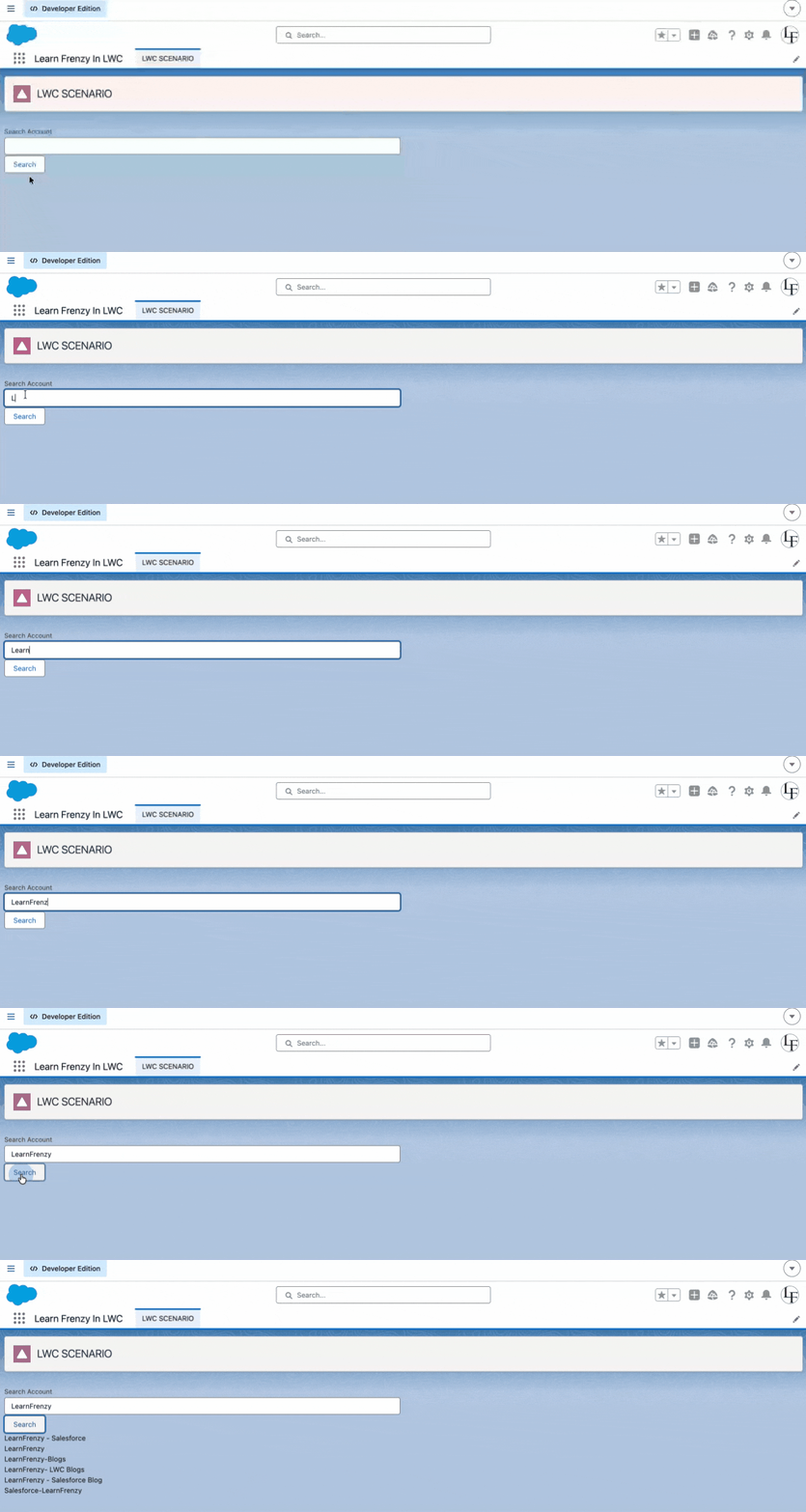
How It Works
- Initially →
triggerKey = null→ wire does not run - User clicks button
triggerKeygets updated- Wire re-executes automatically
- Data is fetched and displayed
24. How do you handle bulk data safely between LWC and Apex?
What they asked me:
“If LWC sends multiple records to Apex, how do you ensure it handles bulk operations safely?”
When LWC sends multiple records to Apex, I always design the Apex method to be bulk-safe and governor-limit compliant.
First, I ensure the method accepts a collection (List or Map) instead of a single record. Then in Apex, I process all records in bulk rather than using loops with DML or SOQL inside them.
I follow these key practices:
- Perform SOQL queries outside loops
- Use single bulk DML operations like insert/update on lists
- Use maps and sets for efficient data handling
- Avoid per-record processing patterns
On the LWC side, I send the data as a JSON array and deserialize it into a list of sObjects or wrapper classes in Apex.
If the data volume is very large, I consider using Batch Apex or Queueable Apex instead of synchronous processing.
This ensures scalability, avoids governor limits, and keeps the system performant.
Example
Apex Controller (Bulk-Safe)
</> apex
public with sharing class ContactController {

    @AuraEnabled
    public static void saveContacts(List<Contact> contacts) {

        if (contacts == null || contacts.isEmpty()) {
            return;
        }

        // Example validation
        for (Contact c : contacts) {
            if (String.isBlank(c.LastName)) {
                throw new AuraHandledException('Last Name is required');
            }
        }

        // Single DML (bulk-safe)
        insert contacts;
    }
}
LWC JavaScript
</> JavaScript
import { LightningElement } from 'lwc';
import saveContacts from '@salesforce/apex/ContactController.saveContacts';

export default class BulkSaveExample extends LightningElement {

    handleSave() {
        const contacts = [
            { LastName: 'Samir' },
            { LastName: 'Sam' },
            { LastName: 'Alex' }
        ];

        saveContacts({ contacts })
            .then(() => {
                console.log('All contacts saved successfully');
            })
            .catch(error => {
                console.error(error.body.message);
            });
    }
}
MIND IT !
If They Ask for Example (Add This)
You can quickly extend:
Suppose LWC sends 200 records:
- I accept
List<myobject__c>in Apex - Query related data using a Set of IDs
- Process using Maps
- Perform a single
update recordsList;
This avoids hitting limits like:
- 100 SOQL queries
- 150 DML statements
One-Line Strong Answer
“To handle bulk data safely, I design Apex methods to accept collections, avoid SOQL and DML inside loops, and perform operations in bulk, ensuring scalability and compliance with governor limits.”
25. How do you handle exceptions from Apex in LWC?
What they asked me:
“How do you handle errors coming from Apex and show meaningful messages in LWC?”
When handling exceptions from Apex in LWC, I follow a structured approach.
In Apex, I use try-catch blocks and throw AuraHandledException for controlled, user-friendly errors. This prevents exposing internal system details.
In LWC, I handle errors using .catch() for imperative calls or the error property in @wire. Then I extract meaningful messages from error.body.message or error.body and display them using toast notifications.
This ensures proper error handling, better user experience, and secure communication between Apex and LWC.
Real Example
Apex (Throw Controlled Exception)
</> apex
public with sharing class AccountService {

    @AuraEnabled
    public static void createAccount(Account acc) {
        try {
            if (acc.Name == null) {
                // Controlled error
                throw new AuraHandledException('Account Name is required');
            }

            insert acc;

        } catch (Exception e) {
            // Wrap system error
            throw new AuraHandledException('Error creating account: ' + e.getMessage());
        }
    }
}
LWC JS (Catch + Handle Error)
</> JavaScript
import { LightningElement } from 'lwc';
import createAccount from '@salesforce/apex/AccountService.createAccount';
import { ShowToastEvent } from 'lightning/platformShowToastEvent';

export default class CreateAccount extends LightningElement {

    handleCreate() {
        const acc = { Name: null }; // simulate error

        createAccount({ acc })
            .then(() => {
                this.showToast('Success', 'Account created', 'success');
            })
            .catch(error => {
                let message = 'Unknown error';

                // Extract meaningful message
                if (error.body && error.body.message) {
                    message = error.body.message;
                }

                this.showToast('Error', message, 'error');
            });
    }

    showToast(title, message, variant) {
        this.dispatchEvent(
            new ShowToastEvent({ title, message, variant })
        );
    }
}
Key Points to Say in Interview
Apex Side
- Use try-catch
- Throw AuraHandledException
- Avoid exposing internal stack traces
LWC Side
- Use
.catch(error) - Extract:
error.body.messageerror.body.pageErrors- Show user-friendly message (Toast)
One-Line Strong Answer
I handle exceptions by throwing AuraHandledException in Apex and catching them in LWC to display clean, user-friendly messages.
26. Why can't we use @wire for DML operations?
What they asked me:
“Why is @wire not suitable for insert, update, or delete operations?”
We cannot use @wire for DML operations because @wire only supports read-only, cacheable Apex methods.
For a method to be used with @wire, it must be annotated with:
</> apex
@AuraEnabled(cacheable=true)
And cacheable methods are not allowed to perform DML operations like insert, update, or delete.
In simple terms:
“@wire is designed for fetching data, not modifying data.”
MIND IT !
Why This Restriction Exists
1. Caching Requirement
@wireuses client-side caching- DML changes data → cache becomes invalid
2. Side Effects Are Not Allowed
@wiremust be idempotent (no side effects)- DML operations modify data → not allowed
3. Framework-Controlled Execution
@wireruns automatically- DML needs controlled execution (like button click)
Example (Wrong Usage ✗)
</> apex
@AuraEnabled(cacheable=true)
public static void createAccount() {
    insert new Account(Name = 'Test'); // ✗ Not allowed
}
This will throw error or behave incorrectly
Correct Approach ✓ (Use Imperative Apex)
Apex
</>
@AuraEnabled
public static void createAccount(String name) {
    insert new Account(Name = name);
}
LWC
</>
import createAccount from '@salesforce/apex/AccountController.createAccount';

handleSave() {
    createAccount({ name: 'Test' })
        .then(() => {
            console.log('Record created');
        });
}
Alternative (Better for CRUD)
Use Lightning Data Service (LDS)
</> JavaScript
import { createRecord } from 'lightning/uiRecordApi';
One-Line Strong Answer
“We cannot use @wire for DML operations because it only supports cacheable, read-only methods, while DML requires controlled execution and modifies data, which is not compatible with the wire service.”
27. What is the uiRecordApi module?
What they asked me:
“What is uiRecordApi in LWC and why do we use it?”
The uiRecordApi module is a Lightning Web Components (LWC) module that provides standard APIs to interact with Salesforce records without writing Apex.
It is part of Lightning Data Service (LDS) and allows you to:
- Fetch records
- Create records
- Update records
- Delete records
All while automatically handling:
- Caching
- Sharing rules
- FLS (Field-Level Security)
- CRUD permissions
MIND IT !
Why We Use uiRecordApi
- No Apex required
- Built-in security (FLS & sharing)
- Better performance (caching)
- Less code
Common Methods in uiRecordApi
getRecord→ Fetch record datagetFieldValue→ Extract field valuescreateRecord→ Create new recordupdateRecord→ Update recorddeleteRecord→ Delete record
Example
</> JavaScript
import { LightningElement, wire } from 'lwc';
import { getRecord } from 'lightning/uiRecordApi';
import NAME_FIELD from '@salesforce/schema/Account.Name';

export default class Example extends LightningElement {
    recordId = '001XXXXXXXXXXXX';

    @wire(getRecord, { recordId: '$recordId', fields: [NAME_FIELD] })
    account;
}
Key Points to Say in Interview
- No Apex required
- Built on Lightning Data Service
- Handles security automatically
- Supports reactive data (via @wire)
- Improves performance via client-side caching
One-Line Strong Answer
“uiRecordApi is a Lightning Data Service module in LWC that allows us to perform CRUD operations on Salesforce records without Apex, while automatically handling security, caching, and data consistency.”

When to Use vs Apex
Use uiRecordApi when:
- Simple CRUD operations
- Single object
- No complex logic
Use Apex when:
- Complex business logic
- Multiple objects
- Custom validations
28. What is the Promise function in LWC?
A Promise in LWC is a JavaScript object used to handle asynchronous operations, such as calling Apex, fetching data, or working with APIs.
It represents a value that will be available:
- Resolved (success)
- Rejected (error)
In simple terms:
“A Promise helps me handle async operations without blocking the UI.”
Promise States
- Pending → operation is in progress
- Fulfilled → success (
then) - Rejected → error (
catch)
Example (Apex Call using Promise)
</> JavaScript
import { LightningElement } from 'lwc';
import getAccounts from '@salesforce/apex/AccountController.getAccounts';

export default class Example extends LightningElement {

    handleClick() {
        getAccounts()
            .then(result => {
                console.log('Data:', result); // ✓ resolved
            })
            .catch(error => {
                console.error('Error:', error); // ✗ rejected
            });
    }
}
.then()→ handles success (resolved state).catch()→ handles errors (rejected state).finally()→ runs always (optional)
MIND IT !
Why Promises Are Important in LWC
- Apex calls are asynchronous
- UI should not freeze
- Better error handling
- Cleaner code flow
One-Line Strong Answer
“A Promise in LWC is used to handle asynchronous operations like Apex calls, allowing us to manage success and failure using
.then()and.catch().”
29. What is the difference between async and await in JavaScript?
What they asked me:
“Explain async and await. How are they different and how do they work together?”
async and await are used together to handle asynchronous operations in a cleaner way compared to Promises.
async→ makes a function return a Promiseawait→ pauses execution until the Promise resolves
In simple terms:
“async defines an asynchronous function, and await waits for the result.”
1. async Function
What it does
- Converts a function into a Promise
- Always returns a Promise
Example
</> JavaScript
async function getData() {
    return 'Hello';
}
This actually returns:
</> JavaScript
Promise.resolve('Hello');
2. await Keyword
What it does
- Waits for a Promise to resolve
- Can only be used inside an
asyncfunction
Example
</> JavaScript
async function fetchData() {
    const result = await getData();
    console.log(result);
}
Before vs After (Important for Interview)
✗ Using Promises
</> JavaScript
getAccounts()
    .then(result => {
        this.accounts = result;
    })
    .catch(error => {
        console.error(error);
    });
✓ Using async/await
</> JavaScript
async handleLoad() {
    try {
        const result = await getAccounts();
        this.accounts = result;
    } catch (error) {
        console.error(error);
    }
}
MIND IT !
Real Project Scenario
In one project, I had multiple Apex calls chained together.
Using .then() made the code messy, so I switched to async/await, which made it cleaner and easier to debug.
Key Differences
Async vs Await
| Feature | async | await |
|---|---|---|
| Purpose | Defines async function | Waits for Promise |
| Returns | Always a Promise | Returns resolved value |
| Usage | Function level | Inside async function |
| Readability | Enables cleaner code | Simplifies flow |
One-Line Strong Answer
“Async defines a function that returns a Promise, and await is used inside that function to pause execution until the Promise resolves, making asynchronous code easier to read and manage.”
30. Explain event bubbling and capturing in LWC. How do events travel?
Event bubbling and capturing are two phases of DOM event propagation. Bubbling moves bottom-up (child → parent), while capturing moves top-down (parent → child). In LWC, only bubbling is supported for handling events.
Event Bubbling (Most Important in LWC)
How it works
When an event is fired in a child component, it travels upward through the DOM hierarchy.
Example (Child → Parent)
Child JS
</> JavaScript
this.dispatchEvent(
    new CustomEvent('notify', {
        detail: 'Hello Parent',
        bubbles: true,
        composed: true
    })
);
Parent HTML
</> HTML
<c-child onnotify={handleNotify}></c-child>
Parent JS
</> JavaScript
handleNotify(event) {
    console.log(event.detail);
}
Important Properties
bubbles: true→ allows event to move upcomposed: true→ allows crossing shadow DOM boundary
MIND IT !
Simple Flow
Bubbling (Supported)
Child → Parent → Grandparent
Capturing (Not supported in LWC)
Grandparent → Parent → Child
Real Project Scenario
In one project, I needed to send selected row data from child table to parent.
I used event bubbling with CustomEvent, which allowed the parent to receive data without tight coupling.
One-Line Strong Answer
“Event bubbling in LWC allows events to travel from child to parent using CustomEvent with bubbles and composed properties, while event capturing is part of the DOM model but not commonly used in LWC.”
Follow-up Questions They Might Ask
Q: Can I stop event bubbling?
A: Yes, using event.stopPropagation() in any ancestor handler.
Q: What's the difference between target and currentTarget?
A: event.target is the component that dispatched the event.
event.currentTarget is the component whose handler is currently executing.
Q: How do unrelated components communicate?
A: Use Lightning Message Service or a shared service component. Bubbling only works for parent-child relationships.
31. Can we call Apex inside constructor()?
No, absolutely not. The constructor() runs before the component is connected to the DOM and before reactive properties are available.
</> JavaScript
// ✗ NEVER DO THIS
constructor() {
    super();
    // This will FAIL or cause unexpected behavior
    getRecord({ recordId: this.recordId }); // this.recordId is undefined
}

// ✓ DO THIS INSTEAD
connectedCallback() {
    // Apex calls belong here
    getRecord({ recordId: this.recordId })
        .then(result => { this.record = result; });
}
Why not?
@apiproperties are not yet set- Component not connected to DOM
- No reactive context available
- Will cause runtime errors
“I always keep constructor lightweight and use connectedCallback for data calls.”
32. Why is renderedCallback() considered risky?
renderedCallback() is risky because it runs after every render, not just once. This can cause:
- Infinite loops – If you modify a reactive property inside it that triggers another render
- Performance issues – Running expensive operations multiple times unnecessarily
- Unpredictable behavior – Can execute many times (initial render + every subsequent re-render)
</> JavaScript
// ✗  DANGEROUS - Causes infinite loop
renderedCallback() {
    this.data = [1, 2, 3];  // Modifying reactive property triggers re-render
    // This causes renderedCallback() to run again → infinite loop
}

// ✓ SAFE - Use guard condition
renderedCallback() {
    if (!this.hasProcessed) {
        this.processData();  // Runs only once
        this.hasProcessed = true;
    }
}
33. When should you use renderedCallback() instead of connectedCallback()?
What they asked me:
“Why not do everything in connectedCallback?”
Use renderedCallback() when you need access to the DOM after it's been rendered or need to perform operations that require elements to be in the DOM.
- Use
connectedCallback()→ for data fetching - Use
renderedCallback()→ when DOM is required
connectedCallback() vs renderedCallback()
| Use Case | connectedCallback() | renderedCallback() |
|---|---|---|
| Access DOM elements | ✗ DOM not ready | ✓ DOM is ready |
| Measure element dimensions | ✗ Not available | ✓ Available |
| Third-party library initialization | ✗ No DOM yet | ✓ Perfect time |
| Set initial property values | ✓ Best place | ⚠ Risky (causes re-renders) |
| Subscribe to services | ✓ Best place | ✗ Runs multiple times |
Example
- Initializing charts
- Accessing elements using querySelector
</> JavaScript
// ✓ Use renderedCallback() for DOM-dependent operations
renderedCallback() {
    if (!this.initialized) {
        // Initialize third-party chart library
        const canvas = this.template.querySelector('canvas');
        this.chart = new Chart(canvas, { /* config */ });
        this.initialized = true;
    }
}

// ✓ Use connectedCallback() for non-DOM setup
connectedCallback() {
    this.recordId = this.recordId || 'default';
    this.loadData(); // Call Apex, set properties
}
If I need DOM, I wait for renderedCallback.
Comments (4)
What others are saying about this article
Vikram Singh
ReaderAnjali Mehta
ReaderAmit Kulkarni
ReaderSweta Reddy
ReaderLeave a Comment
Share your thoughts and join the discussion