
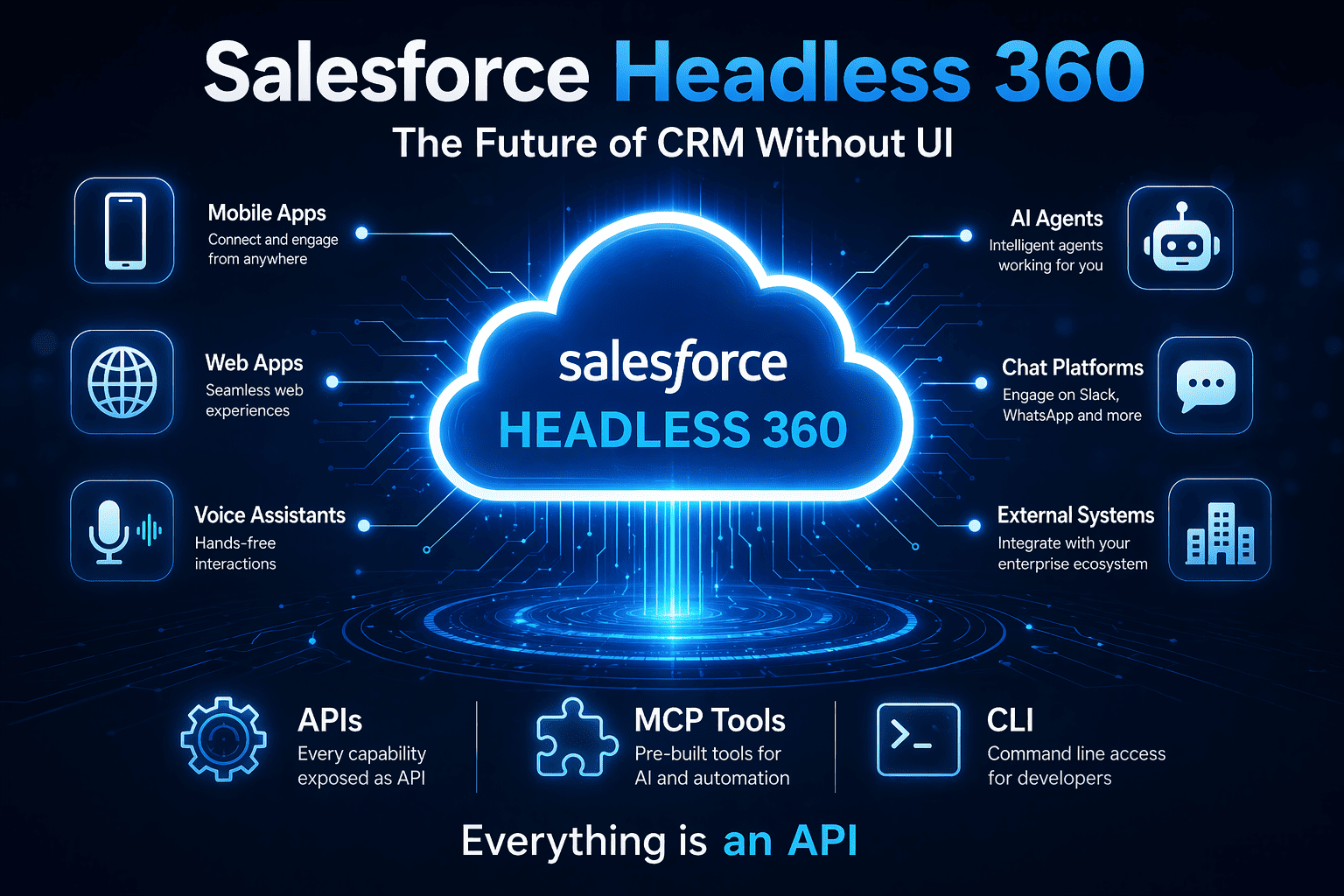
For years, CRM systems have followed a familiar pattern: users log in, navigate dashboards, and manually perform tasks. Platforms like Salesforce have been at the center of this model.
But things are changing.
With the rise of AI, automation, and real-time integrations, businesses no longer want to rely on human-driven workflows. They want systems that can think, decide, and act automatically.
This is where Salesforce Headless 360 Architecture comes in.
Headless 360 represents a shift from UI-driven CRM to API-driven CRM, where Salesforce operates as a backend engine powering intelligent workflows across multiple channels.
What is Salesforce Headless 360 Architecture?
Salesforce Headless 360 is an API-first architecture where Salesforce runs without depending on its traditional user interface.
How It Works
In a Headless setup, users are no longer dependent on screens or manual clicks. The entire system is accessed programmatically through:
- APIs (Application Programming Interfaces)
- MCP (Model Context Protocol) tools
- CLI (Command Line Interface) commands
- AI Agents and automation workflows
👉 API becomes the primary interface
What This Means in Practice
- No need to log into Salesforce UI
- Systems and AI agents handle operations automatically
- Processes run in the background without manual intervention
- Data flows seamlessly across systems using APIs
Why It Matters
Salesforce is evolving from a traditional CRM platform into a powerful backend engine. With Headless 360, it becomes the core system that powers AI-driven workflows, integrations, and automation across multiple applications.
In short: Salesforce is no longer just a UI-based tool — it’s becoming an API-first, AI-powered platform.
Why This Shift Happened (The Real Reason)
Traditional CRM assumes humans are always in the loop.
But today’s reality is different.
AI agents are increasingly capable of:
- Reading customer data
- Updating records
- Triggering workflows
- Making decisions based on logic
And here’s the key insight:
AI does not use UI. It uses APIs.
This is why Salesforce restructured the platform so that:
- Agents can access data and workflows directly
- Business logic can run without human clicks
- Systems can operate autonomously
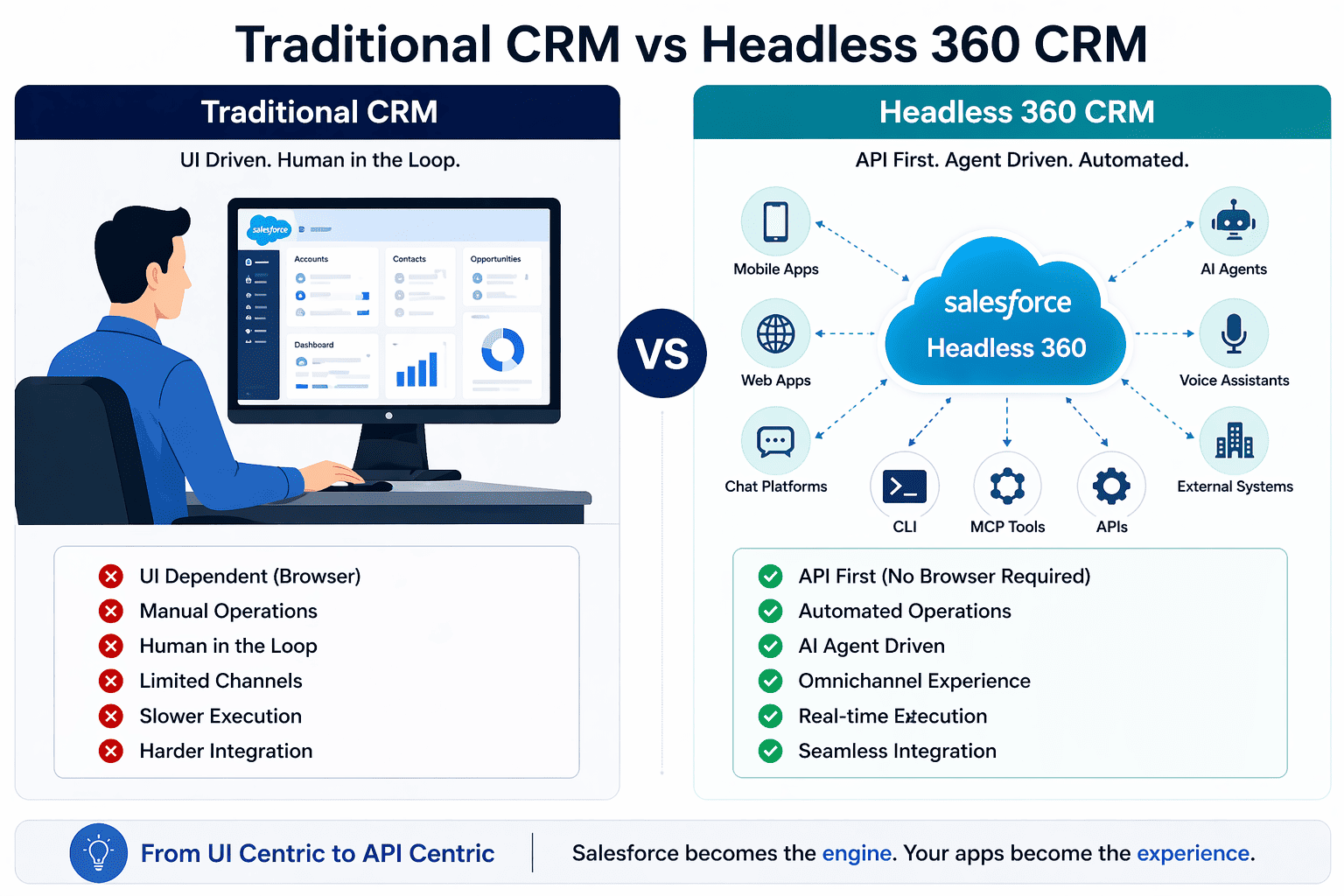
This marks the transition to what experts call agent-first architecture
The Three Core Innovations in Headless 360
Salesforce introduced three major capabilities:
1. MCP Tools + Coding Skills
Salesforce now provides 60+ MCP tools and prebuilt skills that allow AI agents to directly interact with:
- Data
- Workflows
- Business logic
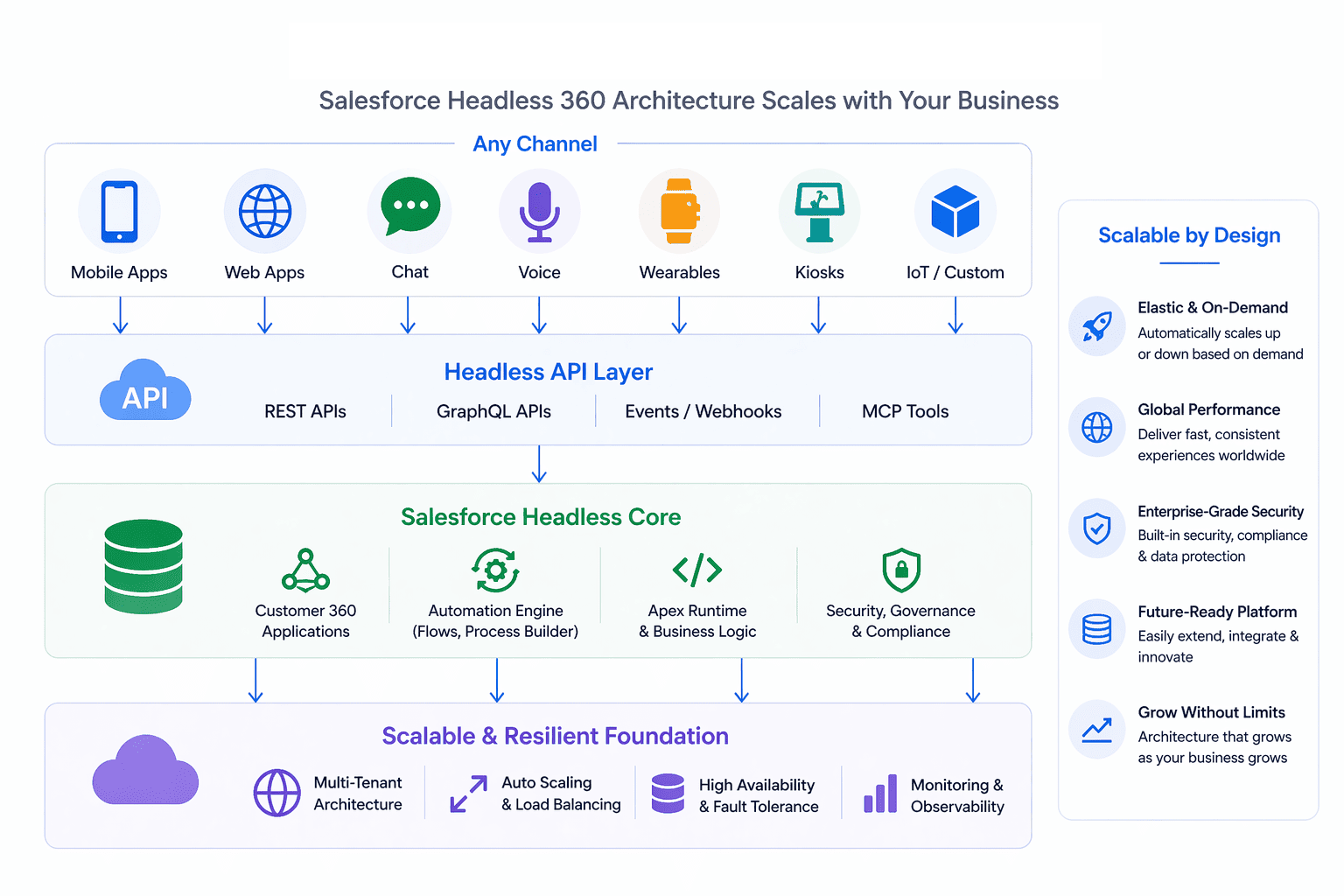
Agents can operate your entire org without custom integrations
2. Experience Layer (UI Becomes Optional)
Instead of one UI (Lightning), you can now interact through:
- Slack
- Voice interfaces
- Custom apps
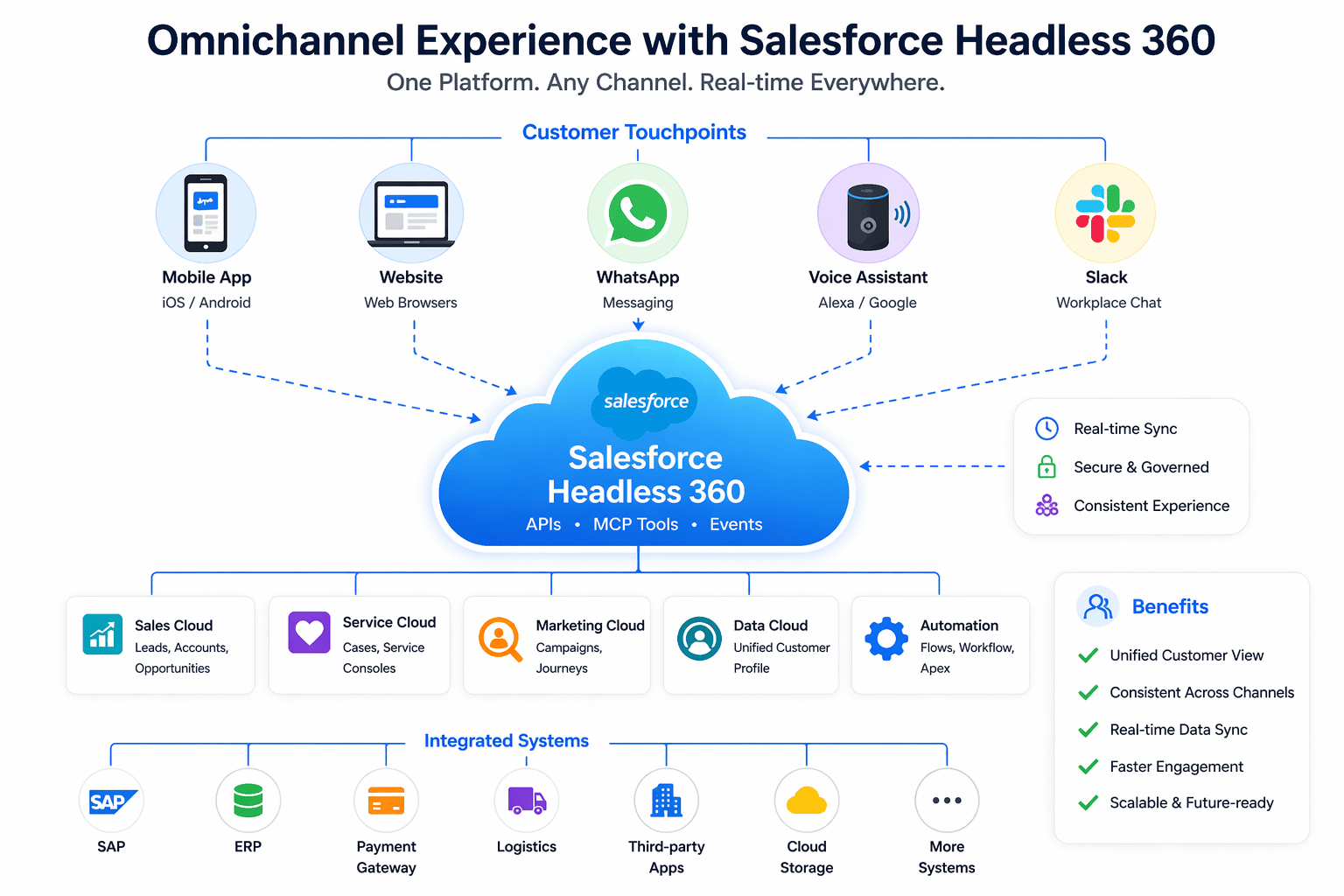
The interface is no longer fixed. It is flexible and context-driven
3. Agent Control & Governance
Salesforce adds control layers to:
- Test agent behavior
- Monitor execution
- Ensure compliance and trust
This is critical because now systems are acting independently.
The Biggest Mindset Shift
One important question raised by experts is:
If there is no UI, what becomes the primary interface?
This is still evolving.
Possible interfaces include:
- Slack bots
- Voice assistants
- AI chat interfaces
- Embedded enterprise apps
The key takeaway:
The interface is no longer Salesforce.
The interface is wherever the user already is.
This is a major conceptual shift in CRM thinking
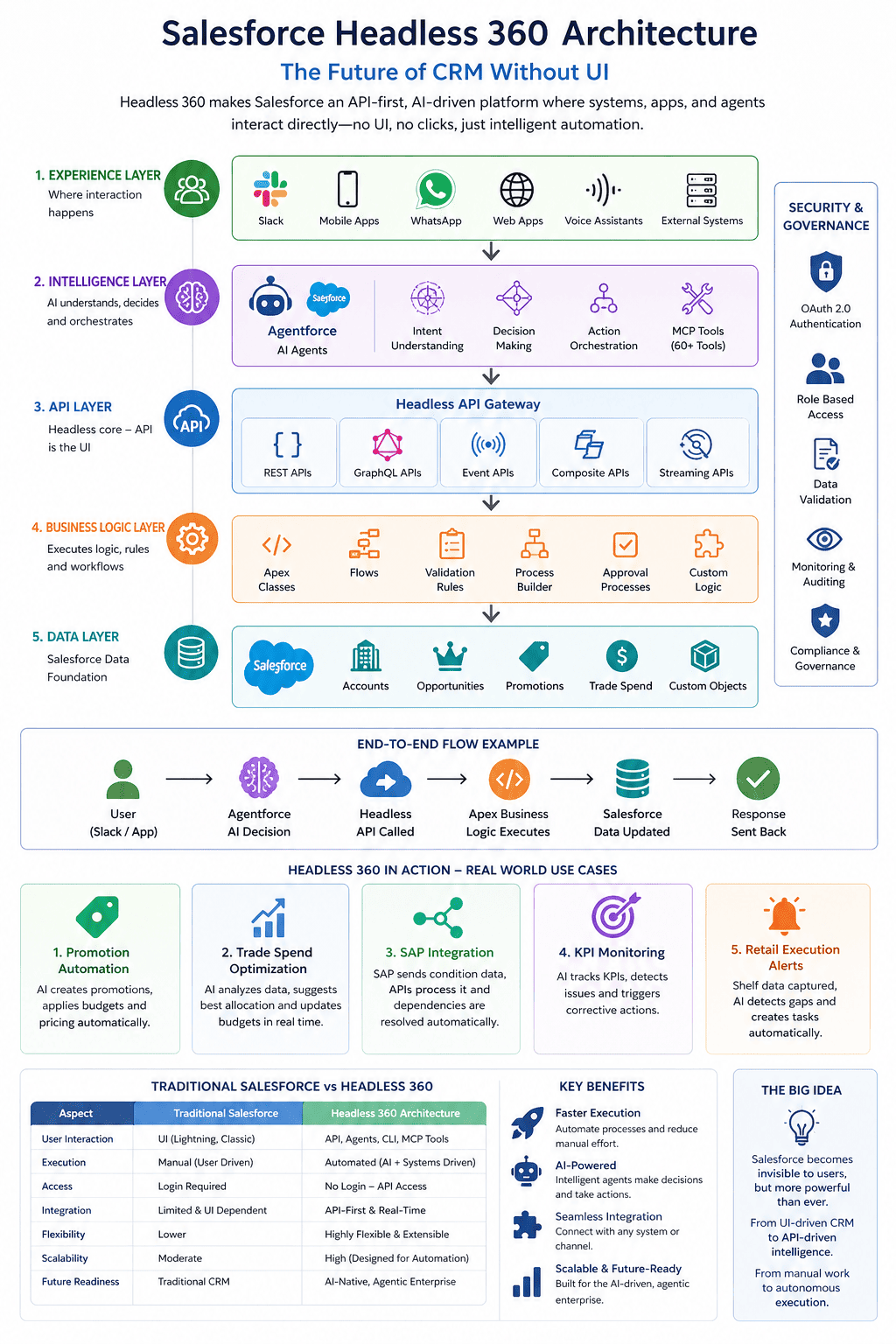
Headless 360 Architecture (Practical View)
Headless 360 is a modern, API-first approach where Salesforce operates without depending on its traditional UI. Instead of users clicking through pages, systems, applications, and AI agents interact directly with Salesforce using APIs, events, and services. In this setup, Salesforce acts as a powerful backend engine that manages data, enforces business logic, and executes workflows behind the scenes.
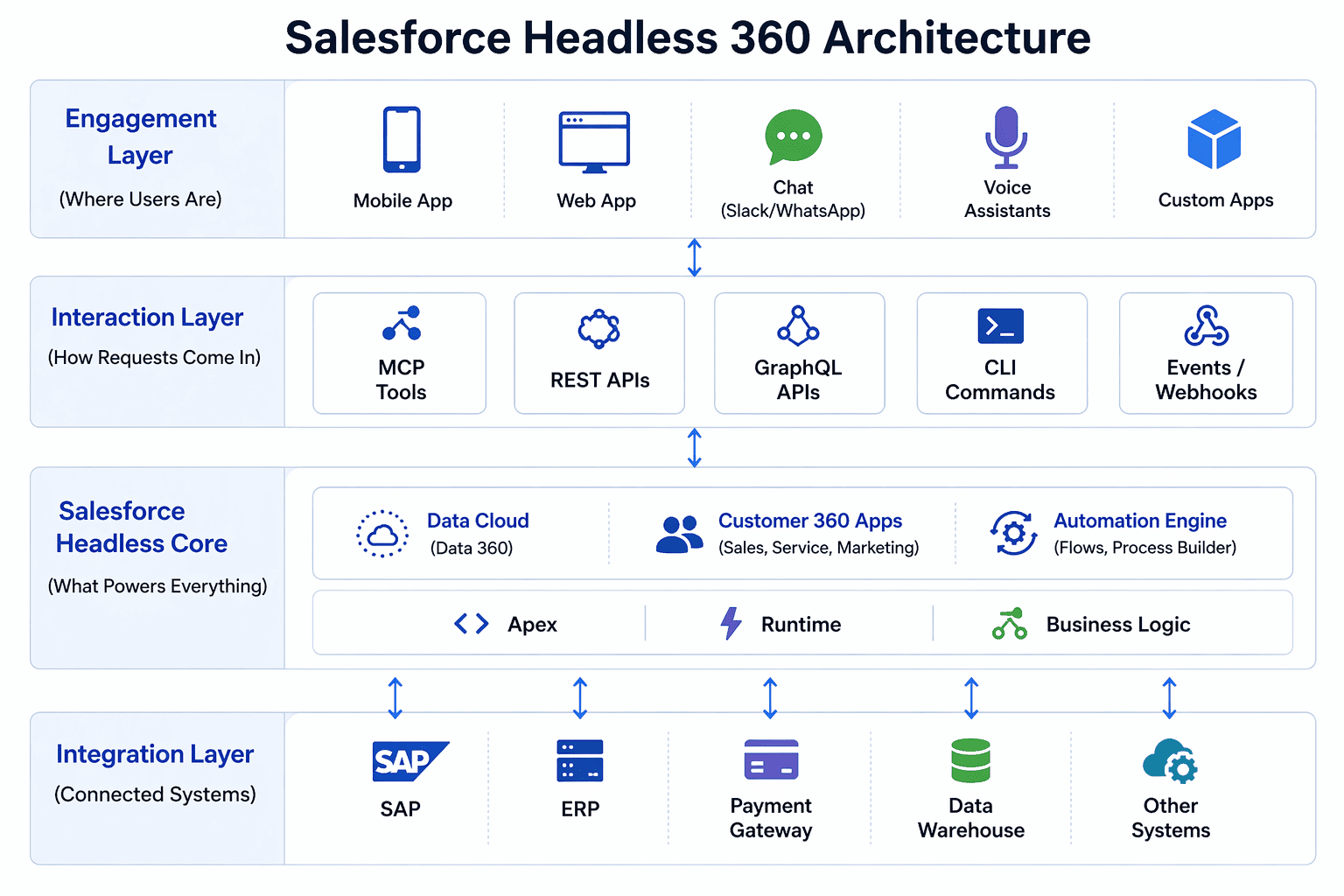
End-to-End Architecture
[ User / AI Interface Layer ]
  - Slack / Chat / Voice
  - Mobile App
  - Web App
  - AI Agent Interface

                ↓

[ Interaction Layer ]
  - MCP Tools (Agent Access)
  - REST / GraphQL APIs
  - CLI Commands

                ↓

[ Salesforce Headless Core ]
  - Customer 360 (Sales, Service, Marketing)
  - Data Cloud (Data 360)
  - Apex + Flows (Business Logic)
  - Automation Engine

                ↓

[ Agentforce Layer ]
  - AI Agents executing workflows
  - Decision engines
  - Autonomous operations

                ↓

[ External Systems ]
  - SAP / ERP
  - Payment Systems
  - Third-party tools
Key idea: Execution is API-driven. UI is optional.
How It Works (Step-by-Step Flow)
Let’s simplify how Headless 360 works in real life:
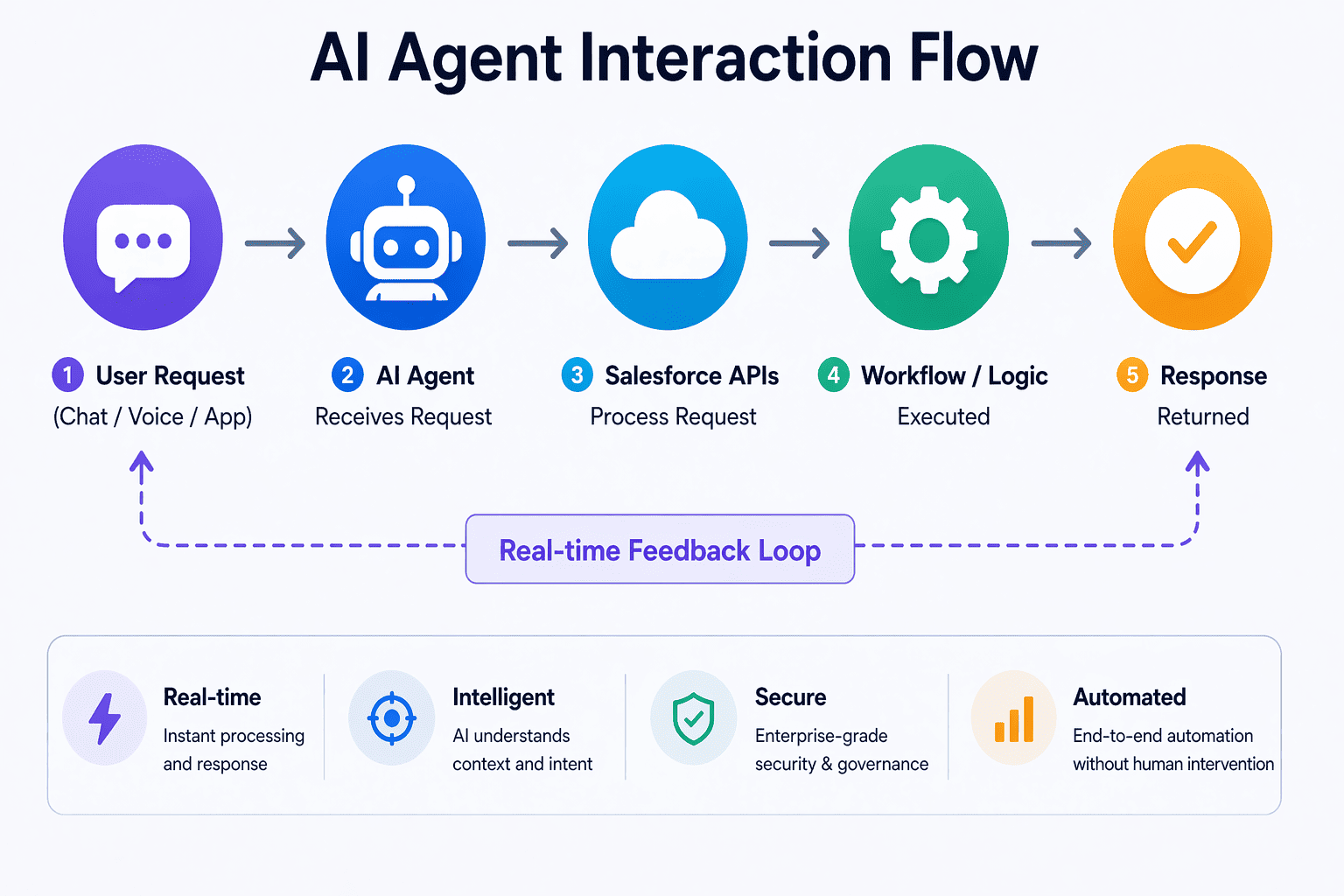
- User or AI sends request (chat, app, voice)
- Request hits API or MCP tool
- Salesforce processes logic (Apex / Flow)
- Agent decides next action
- Response is returned instantly
No login. No UI navigation. No manual work.
Everything runs in the background
Real Example: AI Customer Support (No UI)
Traditional Way
- Agent logs into Salesforce
- Reads case
- Updates status manually
Headless Way
- Customer sends message
- AI agent receives it
- Agent calls Salesforce API
- Case is created and resolved automatically
Salesforce runs in the background.
The user never sees it.
Developer Example (Real CLI + Agent Flow)
# Login without browser (JWT based)
sf org login jwt \
  --client-id CLIENT_ID \
  --jwt-key-file server.key \
  --username user@company.com

# Generate AI Agent
sf agent generate agent-spec \
  --type customer-support \
  --role "Handle billing queries"

# Deploy Agent
sf project deploy start
This is a true headless workflow.
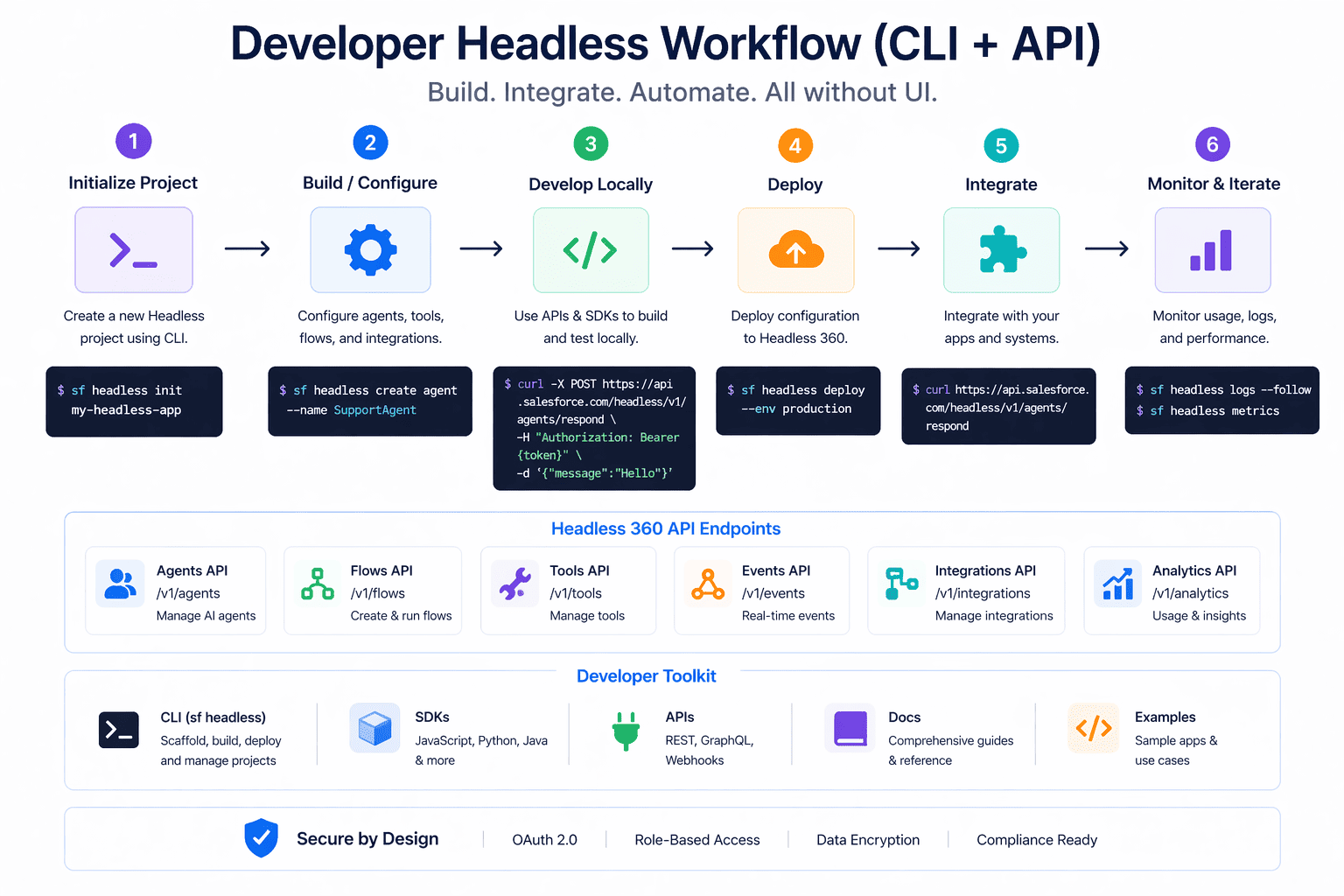
No UI involved at any stage.
What Changes for Different Roles
For Developers
- Move from UI-based dev → API + CLI-based dev
- Work with AI coding agents
- Build faster using automation
For Architects
- Design API-first systems
- Focus on integration + scalability
- Plan agent-driven workflows
For Business Users
- Less manual work
- More automation
- Interact via chat, voice, or apps
Benefits of Headless 360
- No dependency on UI
- Built for AI agents
- Faster execution of workflows
- Omnichannel experience
- Better scalability
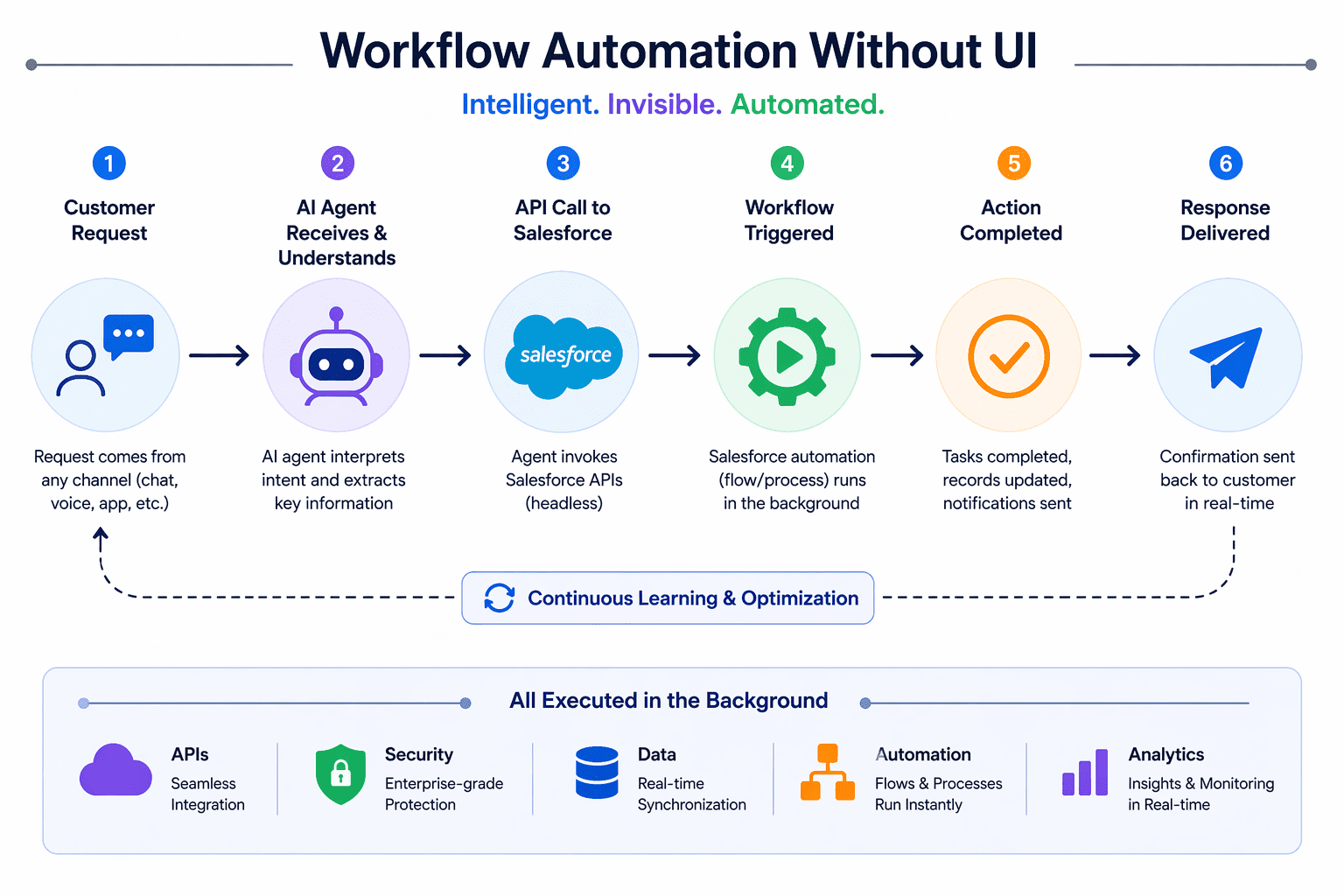
It enables systems to operate faster and more efficiently without human bottlenecks
Challenges and Open Questions (Important)
This is where most blogs stop. But let’s be real.
- How will pricing work for API + agent usage?
- What will be the primary user interface?
- How will governance scale with autonomous agents?
- Will businesses fully trust AI execution?
Even experts acknowledge that many answers are still evolving
This is not a finished product.
This is a new direction.
Headless 360 vs Traditional Salesforce
| Aspect | Traditional CRM | Headless 360 |
|---|---|---|
| Access | Browser UI | APIs / Agents |
| Execution | Manual | Automated |
| User | Human | AI + Human |
| Interface | Fixed | Flexible |
| Speed | Slower | Real-time |
The Bigger Picture: CRM Is Becoming Invisible
Earlier:
Human → UI → Salesforce
Now:
Agent → API → Salesforce
This is not just evolution.
This is a complete shift in how software is used.
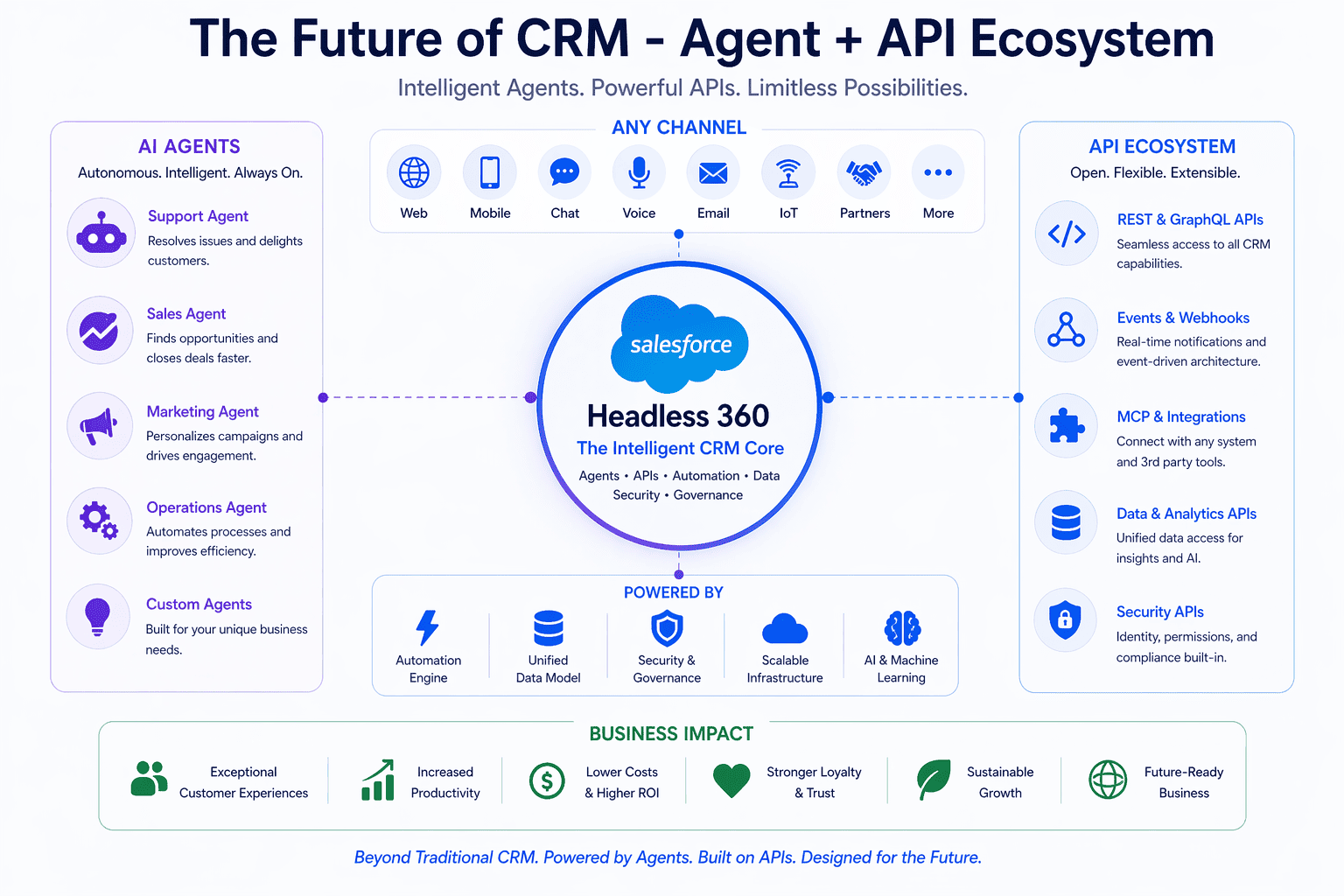
Salesforce is becoming:
- An execution engine
- An AI backend
- A programmable business layer
Final Thoughts
Salesforce Headless 360 is not about removing UI.
It is about removing dependency on UI.
It represents a future where:
- Systems run automatically
- AI agents handle workflows
- Humans focus on decisions, not operations
The most powerful CRM in the future will not be the one you log into.
It will be the one that works silently in the background.
Conclusion
If you are a Salesforce developer, architect, or business leader, this shift matters.
Start thinking beyond UI.
Start thinking APIs.
Start thinking agents.
Because the next version of Salesforce is not something you open.
It is something that runs.
 MIND IT !
Comments (0)
What others are saying about this article
No Comments Yet
Be the first to share your thoughts on this article.
Leave a Comment
Share your thoughts and join the discussion