

Hello Everyone,
If you’re preparing for Salesforce LWC + Apex interviews, especially for mid to senior-level roles, you’ve probably already realized something:
Interviews today are very different from what they used to be.
Earlier, most questions were straightforward:
- What is LWC?
- What is Apex?
- What is the difference between @wire and imperative calls?
You could prepare these answers by memorizing definitions.
But now, things have changed.
Today, interviewers don’t just check what you know — they want to understand how you think and how you solve problems.
You’ll face questions like:
- “Why is your wire method running multiple times?”
- “How would you handle race conditions in LWC?”
- “Design a scalable solution for dependent components.”
And suddenly, memorized answers are not enough.
💡 Why This Mock Interview Will Help You
This guide is designed to simulate a real interview experience.
Instead of theoretical answers, you’ll go through:
- Practical, scenario-based questions
- Real debugging situations
- Coding problems with explanations
- Follow-up questions (just like actual interviews)
The format is simple and conversational:
👨💼 Interviewer: Question... 👨💻 You: Answer...
How to Use This Guide
Don’t just read it passively. Try this approach:
- Read the question
- Pause and think about your answer
- Then compare with the explanation
This will help you build confidence, clarity, and real interview readiness.
What We’ll Cover
- LWC lifecycle and reactivity
- Apex integration and best practices
- @wire vs imperative vs LDS
- Component communication
- Performance optimization
- Real debugging scenarios
- Live coding questions
Let’s Begin
Now imagine this:
You’re sitting in front of the interviewer. The discussion starts…
👨💼 Interviewer: Let’s start simple...
What are lifecycle hooks in LWC, and how do they behave with parent and child components?
👨💼 Interviewer:
Let’s start simple.
Can you explain lifecycle hooks in LWC and how they behave with parent and child components?
👨💻 You (Ideal Answer):
Lifecycle hooks are methods that run at different stages of a component’s life, such as creation, rendering, and removal.
The key hooks are constructor, connectedCallback, renderedCallback, and disconnectedCallback.
In parent-child scenarios, the parent initializes first, but the child finishes rendering first. The execution order is:
Parent constructor
→ Parent connectedCallback
→ Child constructor
→ Child connectedCallback
→ Child renderedCallback
→ Parent renderedCallback
This is important because if I need to access a child component, I should use renderedCallback().
Have you faced any lifecycle-related issues in real projects?
👨💼 Interviewer:
Good.
Have you faced any lifecycle-related issues in real projects?
👨💻 You (Ideal Answer):
Yes, one common issue I faced was calling a child component’s method inside connectedCallback().
The problem was that the child component was not yet rendered at that stage, so the reference was null, and the method call failed.
I fixed this by moving the logic to renderedCallback(), where the DOM is fully available.
To avoid repeated execution (since renderedCallback() runs multiple times), I added a guard condition:
isRendered = false;

renderedCallback() {
    if (this.isRendered) return;

    this.isRendered = true;

    const child = this.template.querySelector('c-child-component');
    if (child) {
        child.someMethod();
    }
}
This ensured the logic runs only once and avoids unnecessary re-render issues.
What is the difference between @wire and imperative Apex?
👨💼 Interviewer:
Nice.
What is the difference between @wire and imperative Apex?
👨💻 You (Ideal Answer):
The main difference is how the Apex method is executed and controlled.
@wire is reactive and automatically executed by the framework whenever its parameters change. It is mainly used for read-only operations and works well with caching.
On the other hand, imperative Apex is manually invoked from JavaScript, giving full control over when and how the method is executed.
In real scenarios, I use @wire when data needs to load automatically or depends on reactive parameters.
I use imperative Apex when I need control over execution, such as handling button clicks, performing DML operations, or managing complex logic.
// @wire (automatic execution)
@wire(getAccounts) accounts;

// Imperative (manual execution)
getAccounts()
  .then(result => {
    this.accounts = result;
  });
So, in short, @wire is reactive and automatic, while imperative Apex is controlled and flexible.
If I want to call Apex only on button click, can I use @wire?
👨💼 Interviewer:
Good explanation.
If I want to call Apex only on button click, can I use @wire?
👨💻 You (Ideal Answer):
Not directly. Since @wire is reactive, it executes automatically when its parameters change, not on demand like a button click.
However, we can control its execution indirectly using a reactive parameter (trigger variable).
In this approach, I use one variable for input and another variable as a trigger. When the button is clicked, I update the trigger variable, which causes the @wire method to execute.
// Reactive trigger variable
triggerKey = null;

// Wire method
@wire(getAccounts, { key: '$triggerKey' })
wiredAccounts({ data, error }) {
    if (data) {
        this.accounts = data;
    }
}

// Button click handler
handleClick() {
    this.triggerKey = Date.now(); // changing value triggers @wire
}
This way, I can control when @wire runs, but for full control and better readability, I usually prefer imperative Apex for button-driven actions.
Why is your @wire method getting called multiple times?
👨💼 Interviewer:
That’s a strong answer.
Why is your wire method getting called multiple times?
👨💻 You (Ideal Answer):
This happens because @wire is reactive and not a one-time execution.
It gets triggered whenever its reactive dependencies or component state changes.
Some common reasons are:
- Reactive parameters change (like
$recordIdor any tracked variable) - Component re-renders due to state updates
- refreshApex() is explicitly called
So even if it looks like it should run once, it can execute multiple times depending on how the component state is managed.
// Example: Reactive parameter
@wire(getAccounts, { industry: '$industry' })
wiredAccounts({ data, error }) {
    if (data) {
        this.accounts = data;
    }
}

// Changing this triggers wire again
handleChange(event) {
    this.industry = event.target.value;
}
To control unnecessary executions, I make sure reactive variables are stable and avoid updating them unnecessarily.
In some cases, if I need full control, I switch to imperative Apex.
You updated a record, but the UI is still showing old data. Why?
👨💼 Interviewer:
Okay.
You updated a record, but UI is still showing old data. Why?
👨💻 You (Ideal Answer):
This usually happens because @wire uses client-side caching.
When we perform a DML operation (like insert, update, or delete), the cached data is not automatically refreshed.
So even though the data is updated in the database, the UI continues to show the old cached data.
To fix this, we need to explicitly call refreshApex() to fetch the latest data from the server.
// Store wired result
@wire(getAccounts)
wiredAccounts(result) {
    this.wiredResult = result;

    if (result.data) {
        this.accounts = result.data;
    }
}

// After DML operation
handleUpdate() {
    updateAccount()
        .then(() => {
            return refreshApex(this.wiredResult);
        });
}
This ensures the UI is refreshed with the latest data after the update.
Alternatively, if using Lightning Data Service (LDS), the UI can update automatically without needing refreshApex().
How do you communicate between two unrelated LWCs?
👨💼 Interviewer:
Good.
How do you communicate between two unrelated LWCs?
👨💻 You (Ideal Answer):
For communication between unrelated components, I use Lightning Message Service (LMS).
LMS follows a publish-subscribe pattern, where one component publishes a message and another component subscribes to it using a message channel.
This allows components to communicate without any direct parent-child relationship, making the architecture more flexible and loosely coupled.
// Publisher
publish(messageContext, CHANNEL, { data: 'Hello' });

// Subscriber
subscribe(messageContext, CHANNEL, (message) => {
    console.log(message.data);
});
This approach is very useful in scenarios like dashboards, where multiple independent components need to stay in sync.
Can you explain a real debugging issue you faced with LWC?
👨💼 Interviewer:
Nice.
Can you explain a real debugging issue you faced with LWC?
👨💻 You (Ideal Answer):
Yes, one issue I faced was an infinite loop caused by renderedCallback().
The problem was that I was updating a reactive property inside renderedCallback(), which triggered a re-render.
Since renderedCallback() runs after every render, it kept executing repeatedly, causing an infinite loop.
I fixed this by adding a guard flag to ensure the logic runs only once.
isRendered = false;

renderedCallback() {
    if (this.isRendered) return;

    this.isRendered = true;

    // logic here
}
This prevented repeated execution and stabilized the component behavior.
It also helped me understand that lifecycle hooks should be used carefully, especially when dealing with reactive properties.
How do you handle errors from Apex in LWC?
👨💼 Interviewer:
Good.
How do you handle errors from Apex in LWC?
👨💻 You (Ideal Answer):
I handle errors in two steps: from Apex and in LWC.
In Apex, I throw an AuraHandledException with a meaningful message instead of exposing raw system errors.
In LWC, I catch the error using .catch() and display a user-friendly message instead of a generic error.
// Apex
@AuraEnabled
public static void createAccount(String name) {
    if (String.isBlank(name)) {
        throw new AuraHandledException('Account name is required');
    }
}

// LWC JS
createAccount({ name: '' })
    .then(() => {
        console.log('Success');
    })
    .catch(error => {
        const message = error.body?.message || 'Unknown error';
        console.error(message);
    });
For better user experience, I usually show the error using a toast message instead of just logging it.
// Toast Example
import { ShowToastEvent } from 'lightning/platformShowToastEvent';

this.dispatchEvent(
    new ShowToastEvent({
        title: 'Error',
        message: error.body.message,
        variant: 'error'
    })
);
This approach ensures controlled error handling and improves user experience.
How do you optimize performance when dealing with large data in LWC and Apex?
👨💼 Interviewer:
Great.
How do you optimize performance when dealing with large data?
👨💻 You (Ideal Answer):
When dealing with large datasets, I focus on reducing data load, optimizing UI rendering, and minimizing server calls.
Some key techniques I use are:
- Pagination or Lazy Loading to load data in chunks instead of all at once
- LIMIT in SOQL to restrict the number of records fetched
- Avoid unnecessary re-renders by controlling reactive variables
- Debounce for search inputs to reduce frequent Apex calls
// Apex (limit records) @AuraEnabled(cacheable=true) public static ListgetAccounts() { return [SELECT Id, Name FROM Account LIMIT 50]; } // LWC (debounce example) delayTimeout; handleSearch(event) { clearTimeout(this.delayTimeout); const value = event.target.value; this.delayTimeout = setTimeout(() => { this.searchAccounts(value); }, 300); }
These techniques help improve performance, reduce server load, and ensure a smooth user experience.
In real projects, I also combine these with caching strategies and efficient data handling to make the application scalable.
What is one mistake developers commonly make in LWC?
👨💼 Interviewer:
Last question.
What is one mistake developers commonly make in LWC?
👨💻 You (Ideal Answer):
One common mistake is misunderstanding how reactivity works in LWC.
Developers often update objects or arrays directly, expecting the UI to update, but since LWC tracks changes by reference, those updates are not detected.
// ❌ Incorrect (no UI update)
this.user.name = 'Samir';

// ✅ Correct (new reference triggers re-render)
this.user = { ...this.user, name: 'Samir' };
Another common issue is misusing renderedCallback(), such as updating reactive properties inside it, which can lead to infinite loops and performance problems.
// ❌ Can cause infinite loop
renderedCallback() {
    this.count++; // triggers re-render again
}
To avoid this, I always ensure proper state management and use lifecycle hooks carefully.
These mistakes can lead to subtle bugs and performance issues, so understanding reactivity and lifecycle behavior is very important in LWC.
Now we move to top-company / hard-level interviews.
This is the level where interviewers evaluate:
- Depth of understanding
- Handling of edge cases
- Design thinking
- Real-world debugging ability
I’ll simulate a pressure-style interview, where answers reflect what a strong senior candidate would typically say.
Explain LWC reactivity. Why does updating an object property sometimes not update the UI?
👨💼 Interviewer:
Let’s start deep.
Explain LWC reactivity. Why does updating an object property sometimes not update the UI?
👨💻 You (Ideal Answer):
LWC reactivity is based on reference tracking, not deep mutation.
This means that LWC detects changes only when the reference of a variable changes, not when a property inside an object is modified.
For example, if I update a property like this:
// ❌ No UI update (same reference)
this.user.name = 'Sam';
The object reference remains the same, so LWC does not detect any change and the UI will not re-render.
To fix this, I create a new object using the spread operator:
// ✅ Correct (new reference triggers re-render)
this.user = { ...this.user, name: 'Sam' };
This creates a new reference, which LWC detects, and then it updates the UI accordingly.
So, the key point is that in LWC, changing the reference is required to trigger reactivity.
What happens internally when a reactive property changes in LWC?
👨💼 Interviewer:
Good.
Now tell me — what happens internally when a reactive property changes?
👨💻 You (Ideal Answer):
When a reactive property changes in LWC, a series of internal steps are triggered to update the UI efficiently.
The flow works like this:
- LWC marks the component as dirty (it knows something has changed)
- A re-render is scheduled (not immediate, but optimized)
- Virtual DOM diffing happens (old vs new state comparison)
- Only the changed parts of the DOM are updated
This process ensures that LWC does not re-render the entire DOM, which makes it highly efficient and performant.
// Example: Reactive property change
this.count = this.count + 1;

// Internally triggers:
// 1. Mark component dirty
// 2. Schedule re-render
// 3. Diff old vs new DOM
// 4. Update only changed nodes
So overall, LWC uses a reactive engine + virtual DOM to ensure minimal and efficient UI updates.
Why is renderedCallback() dangerous? Can you share a real issue?
👨💼 Interviewer:
Nice.
Why is renderedCallback dangerous? Give a real issue.
👨💻 You (Ideal Answer):
renderedCallback() can be risky because it runs after every render cycle, not just once.
If we update a reactive property inside it, it triggers another render, which causes continuous re-rendering and can lead to an infinite loop.
I faced this in a project where I was updating a counter inside renderedCallback(), and it kept re-rendering the component continuously.
// ❌ Problematic code
renderedCallback() {
    this.count++; // triggers re-render again
}
To fix this, I used a guard flag to ensure the logic runs only once:
isRendered = false;

renderedCallback() {
    if (this.isRendered) return;

    this.isRendered = true;

    // safe logic here
}
This prevents repeated execution and stabilizes the component behavior.
So, any state update inside renderedCallback() should be handled carefully to avoid performance issues and infinite loops.
Explain @wire service caching. When does it fail or become stale?
👨💼 Interviewer:
Good debugging answer.
Let’s go deeper — explain wire service caching. When does it fail?
👨💻 You (Ideal Answer):
The @wire service uses Lightning Data Service (LDS) caching to improve performance and reduce unnecessary server calls.
When data is requested, it first checks if a cached version is available. If so, it returns the cached data instead of calling the server again.
However, this caching can become stale or fail in certain scenarios:
- Data is updated via DML operations (insert, update, delete)
- External changes happen outside the component (another user or process)
- Cache is not invalidated automatically
In these cases, the UI may show outdated data because it is still using the cached response.
To resolve this, I explicitly call refreshApex() to fetch fresh data from the server:
// Store wired result
@wire(getAccounts)
wiredAccounts(result) {
    this.wiredResult = result;

    if (result.data) {
        this.accounts = result.data;
    }
}

// Refresh after DML
handleUpdate() {
    updateAccount()
        .then(() => {
            return refreshApex(this.wiredResult);
        });
}
This ensures the UI stays in sync with the latest database state.
Why should we avoid using @wire for DML operations?
👨💼 Interviewer:
Okay.
Why should we avoid using @wire for DML operations?
👨💻 You (Ideal Answer):
We should avoid using @wire for DML operations because it requires the Apex method to be annotated with cacheable=true, which means the method must be read-only.
DML operations like insert, update, and delete modify data, so they are not allowed in cacheable methods.
If we try to perform DML inside a @wire method, it will either throw an error or lead to inconsistent behavior due to caching.
// ❌ Incorrect: DML inside cacheable method
@AuraEnabled(cacheable=true)
public static void createAccount() {
    insert new Account(Name = 'Test'); // Not allowed
}
Instead, DML operations should be handled using imperative Apex or Lightning Data Service (LDS), where execution is controlled.
// ✅ Correct: Imperative Apex for DML
createAccount({ name: 'Test' })
  .then(() => {
    console.log('Record created');
  });
So in summary, @wire is meant for read-only operations, while DML requires controlled execution using imperative calls.
How would you design a system where multiple LWCs share data efficiently without excessive Apex calls?
👨💼 Interviewer:
Good.
Design a system where multiple LWCs share data efficiently without excessive Apex calls.
👨💻 You (Ideal Answer):
I would design this using a combination of efficient data sharing, caching, and decoupled communication.
First, for communication between components, I would use Lightning Message Service (LMS), which allows unrelated components to exchange data without tight coupling.
For data fetching, I would avoid multiple Apex calls by using shared data sources:
- Use @wire with
cacheable=truefor shared read-only data - Ensure the same Apex method is reused across components
- Leverage LDS caching to reduce server calls
If components are related, I would introduce a parent container component to fetch data once and pass it down using @api.
Additionally, I follow these optimization strategies:
- Avoid duplicate server calls by centralizing data fetching
- Cache results in component state when possible
- Use refreshApex() only when data needs to be refreshed
// Example: Shared @wire data
@wire(getAccounts)
wiredAccounts({ data, error }) {
    if (data) {
        this.accounts = data;
    }
}

// LMS Publish
publish(messageContext, CHANNEL, { accounts: this.accounts });

// LMS Subscribe
subscribe(messageContext, CHANNEL, (message) => {
    this.accounts = message.accounts;
});
This approach ensures minimal server calls, efficient data sharing, and a scalable architecture for large applications.
Your component is calling Apex multiple times unexpectedly. What will you check?
👨💼 Interviewer:
Good architecture thinking.
Now debugging — your component is calling Apex 5 times unexpectedly. What will you check?
👨💻 You (Ideal Answer):
If an Apex method is being called multiple times unexpectedly, I would approach it as a debugging scenario and check for common causes related to reactivity and lifecycle.
Some key areas I would verify are:
-
Reactive parameters changing unintentionally —
even small changes in tracked variables can trigger
@wireagain -
Component re-render triggers — updating state inside lifecycle hooks
like
renderedCallback()can cause repeated execution - Multiple @wire declarations — the same Apex method might be wired more than once
- Parent component re-render — which can cause child components to re-execute
- Missing debounce logic — especially in search inputs, causing rapid repeated calls
// Example: Uncontrolled reactive variable
@wire(getAccounts, { searchKey: '$searchKey' })
wiredAccounts;

// If searchKey changes frequently, wire will re-trigger multiple times
handleChange(event) {
    this.searchKey = event.target.value; // can cause multiple calls
}
Based on the root cause, I would stabilize reactive variables, add debounce where needed, and ensure Apex calls are controlled properly.
If necessary, I may switch to imperative Apex for better control over execution timing.
What is the difference between Shadow DOM and Light DOM in LWC?
👨💼 Interviewer:
Strong.
Explain the difference between Shadow DOM and Light DOM in LWC.
👨💻 You (Ideal Answer):
In LWC, the key difference between Shadow DOM and Light DOM is how the DOM and styles are handled.
By default, LWC uses Shadow DOM, which provides encapsulation. This means the component’s DOM and styles are isolated from the rest of the page, preventing style conflicts and ensuring predictable behavior.
On the other hand, Light DOM allows the component to render in the standard DOM tree, making it easier to apply global styles and integrate with external libraries.
However, Light DOM does not provide strict encapsulation, so styles can leak in or out of the component.
// Shadow DOM (default behavior)
// Styles are scoped to the component

// Light DOM (opt-in)
import { LightningElement } from 'lwc';

export default class Example extends LightningElement {
    static renderMode = 'light';
}
In practice, I use Shadow DOM for most standard components to maintain isolation and stability.
I use Light DOM when I need better integration with third-party libraries or when global styling flexibility is required.
How do you handle race conditions in Apex calls from LWC?
👨💼 Interviewer:
Nice.
How do you handle race conditions in Apex calls from LWC?
👨💻 You (Ideal Answer):
Race conditions occur when multiple asynchronous Apex calls are made, and their responses return in a different order than they were sent.
This can lead to incorrect or outdated data being displayed in the UI.
To handle this, I use techniques like:
- Tracking the latest request
- Ignoring outdated responses
- Using flags or timestamps
A common approach is to assign a unique identifier to each request and only process the response if it matches the latest request.
// Track latest request
this.currentRequestId = Date.now();
const requestId = this.currentRequestId;

// Call Apex
getData()
  .then(result => {
    // Process only latest response
    if (requestId === this.currentRequestId) {
      this.data = result;
    }
  });
This ensures that outdated responses are ignored, and only the most recent data is reflected in the UI.
This approach is especially useful in scenarios like search inputs or rapid user interactions where multiple calls are triggered.
How do you optimize performance in a complex LWC screen?
👨💼 Interviewer:
Excellent.
How do you optimize performance in a complex LWC screen?
👨💻 You (Ideal Answer):
When working with a complex LWC screen, I focus on improving both UI performance and data handling efficiency.
My approach includes the following strategies:
- Minimizing unnecessary re-renders by controlling reactive variables
- Using pagination or lazy loading to load data in smaller chunks
- Avoiding heavy logic in the template and moving it to JavaScript
- Debouncing user inputs to reduce frequent Apex calls
- Using Lightning Data Service (LDS) caching to minimize server requests
// Example: Debounce input
delayTimeout;

handleSearch(event) {
    clearTimeout(this.delayTimeout);

    const value = event.target.value;

    this.delayTimeout = setTimeout(() => {
        this.searchAccounts(value);
    }, 300);
}
Additionally, I try to reuse data across components, avoid duplicate Apex calls, and ensure efficient state management.
The goal is to keep the UI responsive while reducing server load and unnecessary rendering cycles.
Tell me one real production issue you solved that made a big impact.
👨💼 Interviewer:
Last one.
Tell me one real production issue you solved that made a big impact.
👨💻 You (Ideal Answer):
Yes, in one project we faced a significant performance issue where multiple Apex calls were being triggered due to frequently changing reactive parameters.
This caused unnecessary server load and increased page load time, especially during user input scenarios like search.
To solve this, I implemented two key improvements:
- Debouncing user input to limit frequent Apex calls
- Separating trigger variables from input variables, so Apex calls only execute when explicitly needed
// Separate input vs trigger variable
searchInput = '';
triggerKey = null;

// Input change (no Apex call)
handleChange(event) {
    this.searchInput = event.target.value;
}

// Button click (controlled trigger)
handleSearch() {
    this.triggerKey = this.searchInput;
}

// Wire uses triggerKey
@wire(getAccounts, { keyword: '$triggerKey' })
wiredAccounts;
This approach significantly reduced redundant API calls and improved overall performance.
As a result, we saw faster page load times and better user experience, especially in high-traffic scenarios.
Now we move to the hands-on coding round, where your practical skills are tested in real time.
This is the stage where interviewers evaluate:
- Problem-solving approach under time pressure
- Code quality and structure
- Handling of edge cases and optimizations
- Understanding of LWC + Apex integration
In this section, you’ll face real coding scenarios where you are expected to think aloud, write clean code, and explain your decisions like you would in an actual interview.
Debounced Search with Apex
👨💼 Interviewer:
Build a search component that fetches Accounts from Apex.
Avoid unnecessary API calls while typing.
👨💻 You (Approach First):
I’ll break this problem into two parts:
- UI input handling
- Optimized Apex calling
For implementation, I’ll use:
- Imperative Apex → because search is user-driven and should not auto-execute
- Debounce technique → to avoid calling Apex on every keystroke
This approach ensures better performance, reduces server load, and improves user experience.
👨💼 Interviewer (interrupts):
Why not use @wire?
👨💻 You:
I would avoid using @wire here because it is reactive and automatically executes whenever its parameters change.
In a search use case, this would trigger multiple Apex calls on every keystroke, which can negatively impact performance.
In this scenario, I need controlled execution, where the Apex method is called only when required.
That’s why I prefer imperative Apex, as it gives me full control over when the call happens, especially when combined with debounce logic.
So, @wire is best for reactive data loading, while imperative Apex is better for user-driven actions.
Apex Code
public with sharing class AccountController {

    @AuraEnabled(cacheable=true)
    public static List<Account> searchAccounts(String keyword) {

        if (String.isBlank(keyword)) {
            return new List<Account>();
        }

        return [
            SELECT Id, Name
            FROM Account
            WHERE Name LIKE :('%' + keyword + '%')
            LIMIT 20
        ];
    }
}
LWC JS
import { LightningElement } from 'lwc';
import searchAccounts from '@salesforce/apex/AccountController.searchAccounts';

export default class SearchAccount extends LightningElement {

    searchKey = '';
    accounts = [];
    delayTimeout;

    handleChange(event) {
        this.searchKey = event.target.value;

        //  Debounce
        clearTimeout(this.delayTimeout);

        this.delayTimeout = setTimeout(() => {
            this.fetchAccounts();
        }, 300);
    }

    fetchAccounts() {
        if (!this.searchKey) {
            this.accounts = [];
            return;
        }

        searchAccounts({ keyword: this.searchKey })
            .then(result => {
                this.accounts = result;
            })
            .catch(error => {
                console.error(error);
            });
    }
}
LWC HTML
<template>
    <lightning-input
        label="Search Accounts"
        onchange={handleChange}>
    </lightning-input>

    <template if:true={accounts}>
        <template for:each={accounts} for:item="acc">
            <p key={acc.Id}>{acc.Name}</p>
        </template>
    </template>
</template>
Output:
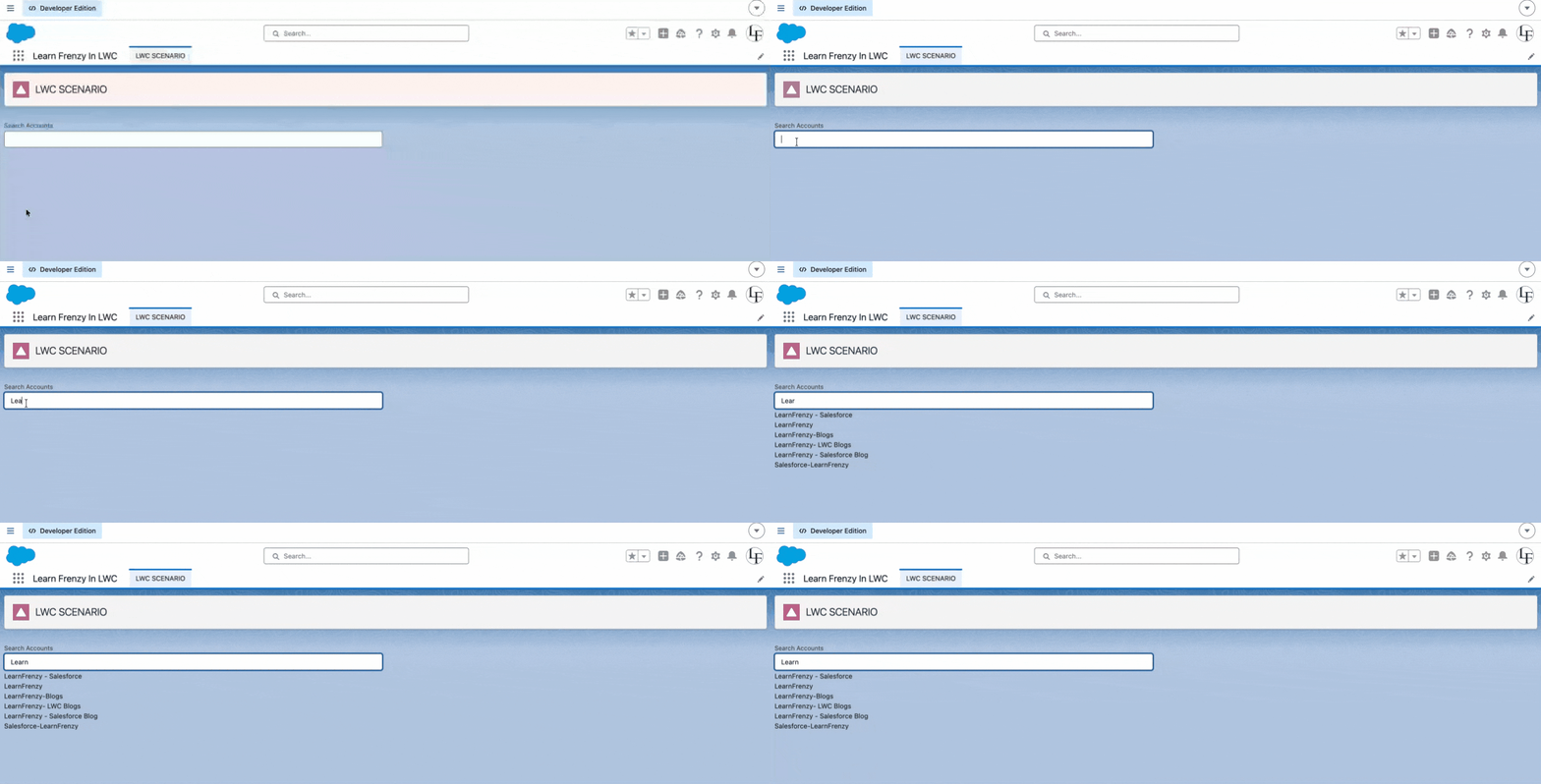
- Performance optimization — minimizing unnecessary API calls
- Proper method selection — choosing imperative Apex over @wire for control
- Clean async handling — managing promises and execution flow effectively
Bulk Insert with Validation and Error Handling
👨💼 Interviewer:
Insert multiple Contacts from LWC.
Handle validation and errors properly.
👨💻 You (Approach):
I’ll design this in a scalable and safe way by handling both frontend and backend logic.
My approach includes:
- Send an array of records from LWC
- Bulkify Apex to handle multiple records efficiently
- Add validation to ensure data integrity
- Handle errors using AuraHandledException for controlled messaging
👨💼 Interviewer:
What if some records fail?
👨💻 You:
In that case, I use Database.insert(records, false) to allow partial success.
This ensures that valid records are inserted successfully, while failed records return errors that I can handle and display to the user.
// Apex Example
Database.SaveResult[] results = Database.insert(contactList, false);

for (Database.SaveResult sr : results) {
    if (!sr.isSuccess()) {
        System.debug(sr.getErrors()[0].getMessage());
    }
}
This approach improves reliability and provides better user feedback instead of failing the entire operation.
Apex Code
public with sharing class ContactController {

    @AuraEnabled
    public static List<String> saveContacts(List<Contact> contacts) {

        List<String> results = new List<String>();

        if (contacts == null || contacts.isEmpty()) {
            return results;
        }

        Database.SaveResult[] srList = Database.insert(contacts, false);

        for (Database.SaveResult sr : srList) {
            if (sr.isSuccess()) {
                results.add('Success: ' + sr.getId());
            } else {
                results.add('Error: ' + sr.getErrors()[0].getMessage());
            }
        }

        return results;
    }
}
LWC JS
import { LightningElement } from 'lwc';
import saveContacts from '@salesforce/apex/ContactController.saveContacts';

export default class BulkInsert extends LightningElement {

    handleSave() {

        const contacts = [
            { LastName: 'Samir' },
            { LastName: '' } // invalid
        ];

        saveContacts({ contacts })
            .then(result => {
                console.log(result);
            })
            .catch(error => {
                console.error(error);
            });
    }
}
- Bulkification — handling multiple records efficiently
- Partial success handling — avoiding full transaction failure
- Real-world error handling — providing meaningful feedback to users
Multi-Select with Save and Duplicate Prevention
👨💼 Interviewer:
Allow users to select multiple Accounts and create Contacts.
Also ensure duplicate clicks are prevented.
👨💻 You (Approach):
I’ll design this to handle both user interaction and backend efficiency.
My approach includes:
- Using a Set to manage selected Account IDs efficiently
- Using an isLoading flag to prevent duplicate button clicks
- Performing bulk insert in Apex to handle multiple records
This ensures proper state management, prevents duplicate operations, and maintains performance.
// LWC (selection + duplicate prevention)
selectedIds = new Set();
isLoading = false;

handleSelect(event) {
    const id = event.target.dataset.id;

    if (this.selectedIds.has(id)) {
        this.selectedIds.delete(id);
    } else {
        this.selectedIds.add(id);
    }
}

handleSave() {
    if (this.isLoading || this.selectedIds.size === 0) return;

    this.isLoading = true;

    createContacts({ accountIds: Array.from(this.selectedIds) })
        .finally(() => {
            this.isLoading = false;
        });
}
This approach prevents duplicate submissions and ensures efficient processing of selected records.
Apex
@AuraEnabled
public static void createContacts(List<Id> accountIds) {

    List<Contact> contacts = new List<Contact>();

    for (Id accId : accountIds) {
        contacts.add(new Contact(
            LastName = 'Auto',
            AccountId = accId
        ));
    }

    insert contacts;
}
LWC JS
import { LightningElement } from 'lwc';
import createContacts from '@salesforce/apex/AccountController.createContacts';

export default class MultiSelect extends LightningElement {

    selectedIds = new Set();
    isLoading = false;

    handleSelect(event) {
        const id = event.target.dataset.id;

        if (this.selectedIds.has(id)) {
            this.selectedIds.delete(id);
        } else {
            this.selectedIds.add(id);
        }
    }

    handleSave() {

        if (this.isLoading || this.selectedIds.size === 0) return;

        this.isLoading = true;

        createContacts({ accountIds: Array.from(this.selectedIds) })
            .finally(() => {
                this.isLoading = false;
            });
    }
}
- State management — efficiently tracking user selections
- Duplicate prevention — avoiding multiple submissions
- Bulk DML handling — processing multiple records in a single transaction
Comments (0)
What others are saying about this article
No Comments Yet
Be the first to share your thoughts on this article.
Leave a Comment
Share your thoughts and join the discussion